
 Apple Music Profile
 YouTube Channel
 RSS Feed
 Dupin
Dupin Join Together
 M3Unify
 30 Most Recent RSS Feed
Apple
USB-IF Responds Against Palm
John Paczkowski reports the USB Implementers Forum has decided that Apple is not hampering competition by blocking the Pre from syncing with iTunes. The USB-IF additionally suggests that it is Palm that may be in violation of the rules. Ruh-roh.
iTunes 9.0.1 Released
Apple has released an iTunes update and describes pretty explicitly (for Apple) what the fixes are, like the issue with the zoom button, unexpected quits, and unresponsiveness, the latter two of which I experienced a couple few times.
Tell you one thing. It installed a lot faster on Leopard than it did on Snow Leopard.
Now, did they fix the discrepancy with displayed track sizes versus displayed Finder file sizes under Snow Leopard (my pet radar report)? No:
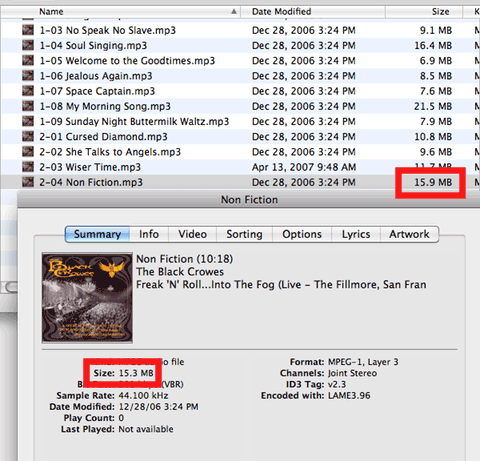
iTunes 9 Released
Apple released iTunes 9 today at its "It's only rock and roll" event. New features include "Genius Mixes"; improved syncing behaviors, like iPhone app organization; "Home sharing" to play, sync, copy tracks among up to 5 users on your local network; "iTunes LPs" in the iTunes Store featuring bonus material like lyrics, art, and video ("Cocktail"); new iTunes Store features.
Project Cocktail
The news about Apple working with the music labels to "stimulate digital sales of albums by bundling a new interactive booklet, sleeve notes and other interactive features with music downloads" is interesting, but these so-called "interactive" downloads are not new. As I recall, there have been several available from the iTunes Store, usually as part of larger "box" sets. They open in QuickTime and have virtual pages and hot links and they're pretty cool, depending on how they are designed.
Although I don't think it likely, wouldn't be surprised if DRM was part of the "talks".
iTunes 8.2.1 Released
Apple has released iTunes 8.2.1 via Software Update and the iTunes download site. More info later...
iTunes 8.2 Released
Apple put iTunes 8.2 up on the web and in Software Update, along with a QuickTime and GarageBand update. 8.2 sports accessibility and bug fixes, compatability with iPhone Software 3.0. I've been away all day and haven't given it a run through, so perhaps there will be more to report later.
iTunes 8.1.1 Released
Apple released iTunes 8.1.1 which enabled HD movie rentals and supplies some VoiceOver and syncing fixes.
The shortcut bug introduced in version 8.1--whereby scripts assigned keyboard shortcuts would run twice--appears fixed. Hooray!
iTunes AppleScript Keyboard Shortcuts Activate Twice
Correspondent Peter Kappesser noticed that under iTunes 8.1 AppleScripts to which he had assigned keyboard shortcuts (via the Keyboard Shortcuts tab in Keyboard & Mouse of System Preferences) would be activated twice when launched by the keyboard shortcut. Thus, they will perform their task twice in a row. I can verify it happens at my house, too. File a bug report.
8.1.1 Not Far Away?
Both TidBITS and iLounge surmise that reports of iTunes 8.1 video-Genius capabilities may have been premature on Apple's part, since the description of this feature has been removed from the iTunes What's New page, and quite obviously it is not working in iTunes 8.1. Should a v8.1.1 be expected soon?
