<?xml version="1.0" encoding="UTF-8"?>
<rss version="2.0"
	xmlns:content="http://purl.org/rss/1.0/modules/content/"
	xmlns:wfw="http://wellformedweb.org/CommentAPI/"
	xmlns:dc="http://purl.org/dc/elements/1.1/"
	xmlns:atom="http://www.w3.org/2005/Atom"
	xmlns:sy="http://purl.org/rss/1.0/modules/syndication/"
	xmlns:slash="http://purl.org/rss/1.0/modules/slash/"
	>

<channel>
	<title>Doug&#039;s AppleScripts for iTunes &#187; AppleScript Editor</title>
	<atom:link href="http://dougscripts.com/itunes/category/applescript-editor/feed/" rel="self" type="application/rss+xml" />
	<link>http://dougscripts.com</link>
	<description>AppleScripts for iTunes</description>
	<lastBuildDate>Sun, 13 May 2012 13:40:55 +0000</lastBuildDate>
	<generator>http://wordpress.org/?v=2.8.4</generator>
	<language>en</language>
	<sy:updatePeriod>hourly</sy:updatePeriod>
	<sy:updateFrequency>1</sy:updateFrequency>
	<cloud domain='dougscripts.com' port='80' path='/itunes/?rsscloud=notify' registerProcedure='' protocol='http-post' />
		<item>
		<title>Rosetta Redux</title>
		<link>http://dougscripts.com/itunes/2009/09/rosetta-redux/</link>
		<comments></comments>
		<pubDate>Wed, 23 Sep 2009 14:33:45 +0000</pubDate>
		<dc:creator>dougscripts</dc:creator>
				<category><![CDATA[AppleScript]]></category>
		<category><![CDATA[AppleScript Editor]]></category>
		<category><![CDATA[Rosetta]]></category>
		<category><![CDATA[Snow Leopard]]></category>
		<category><![CDATA[Tips and Info]]></category>

		<guid isPermaLink="false">http://dougscripts.com/itunes/?p=842</guid>
		<description><![CDATA[As you may know: to run AppleScripts that were compiled on a PowerPC machine on Intel machines (and therefore Snow Leopard) requires Rosetta&#8212;an optional install on your SL install disc. While Rosetta is a fairly small install, some people have expressed an interest in staying Rosetta-free. There are quite a few of these types of [...]]]></description>
			<content:encoded><![CDATA[<p>As you may know: to run AppleScripts that were compiled on a PowerPC machine on Intel machines (and therefore Snow Leopard) requires Rosetta&#8212;an optional install on your SL install disc. While Rosetta is a fairly small install, some people have expressed an interest in staying Rosetta-free. There are quite a few of these types of AppleScripts here on the site and I&#8217;m working on updating them to Universal Binary (although a good percentage of these in the <a href="http://dougscripts.com/itunes/scripts/scripts14.php">Retro Scripts</a> category probably won&#8217;t be updated by virtue of being obsolete). Long-time visitors may also have some of these scripts in their collections.</p>
<p>While you could wait for me to update these kinds of scripts to UB&#8212;disclosure: one of these days I will get around to admitting that I am a notorious procrastinator&#8212;you can update these scripts yourself by doing what I would do: open the script in AppleScript Editor, noting whether it is a compiled Script (.scpt) or an Application (.app), and re-save it. It will be re-compiled for your machine type, and if it is an Intel machine, will run without Rosetta. The &#8220;Run Only&#8221; and &#8220;Startup Screen&#8221; checkboxes can be left unchecked. Script Applications that use idle handlers need to be checked &#8220;Stay Open&#8221;.</p>
<p>During the Save, if AppleScript Editor informs you that the &#8220;Document Format is Read Only: This script application is in a format that is no longer supported&#8230;&#8221;, the case for non-bundled applications compiled pre-SL, just click the &#8220;Save As&#8221; button, and proceed with the save. In Snow Leopard, single-file-type apps are no longer supported. The defacto Application type <em>is</em> a bundle.</p>
<p>The <a href="http://developer.apple.com/mac/library/releasenotes/AppleScript/RN-AppleScript/RN-10_6/RN-10_6.html">AppleScript Release Note: 10.6 Changes</a> page at Apple has more on this.</p>
<hr/><small><a href="http://dougscripts.com/itunes/dougsupdated.rss" title="Take me to your reader">30 Most Recent RSS Feed</a> | <a href="http://dougscripts.com/itunes/scripts/scriptcount.php?sortBy=Name&op=y">Script Stats Page</a> by <a href="http://dougscripts.com/itunes/scripts/scriptcount.php?sortBy=Name&op=y">Name</a>, <a href="http://dougscripts.com/itunes/scripts/scriptcount.php?sortBy=Most Recent&op=y">Most Recent</a>, <a href="http://dougscripts.com/itunes/scripts/scriptcount.php?sortBy=Download Count&op=y">Download Count</a></small>]]></content:encoded>
			</item>
		<item>
		<title>Can They Fix This, Please?</title>
		<link>http://dougscripts.com/itunes/2009/09/can-they-fix-this-please/</link>
		<comments></comments>
		<pubDate>Thu, 17 Sep 2009 15:40:32 +0000</pubDate>
		<dc:creator>dougscripts</dc:creator>
				<category><![CDATA[AppleScript Editor]]></category>

		<guid isPermaLink="false">http://dougscripts.com/itunes/?p=814</guid>
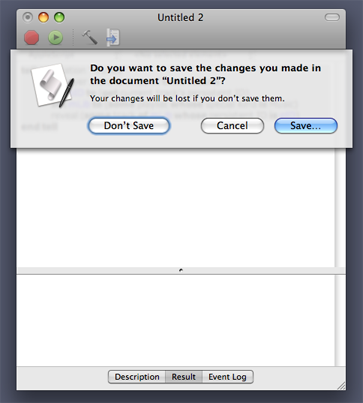
		<description><![CDATA[Why does this dialog in AppleScript Editor still prevent me from seeing the changes? I just know there&#8217;s something important behind there&#8230;

I see this about half a dozen times a day and it drives me crazy.
]]></description>
			<content:encoded><![CDATA[<p>Why does this dialog in AppleScript Editor still prevent me from <em>seeing</em> the changes? I <em>just know</em> there&#8217;s something important behind there&#8230;</p>
<p style="text-align:center;"><img src="http://dougscripts.com/itunes/pix/savechanges.png" alt="" title="Can't see nothin" /></p>
<p>I see this about half a dozen times a day and it drives me crazy.</p>
<hr/><small><a href="http://dougscripts.com/itunes/dougsupdated.rss" title="Take me to your reader">30 Most Recent RSS Feed</a> | <a href="http://dougscripts.com/itunes/scripts/scriptcount.php?sortBy=Name&op=y">Script Stats Page</a> by <a href="http://dougscripts.com/itunes/scripts/scriptcount.php?sortBy=Name&op=y">Name</a>, <a href="http://dougscripts.com/itunes/scripts/scriptcount.php?sortBy=Most Recent&op=y">Most Recent</a>, <a href="http://dougscripts.com/itunes/scripts/scriptcount.php?sortBy=Download Count&op=y">Download Count</a></small>]]></content:encoded>
			</item>
		<item>
		<title>(Apple)Script Editor in Snow Leopard</title>
		<link>http://dougscripts.com/itunes/2009/08/applescript-editor-in-snow-leopard/</link>
		<comments></comments>
		<pubDate>Thu, 27 Aug 2009 11:19:22 +0000</pubDate>
		<dc:creator>dougscripts</dc:creator>
				<category><![CDATA[AppleScript]]></category>
		<category><![CDATA[AppleScript Editor]]></category>
		<category><![CDATA[Rosetta]]></category>
		<category><![CDATA[Snow Leopard]]></category>

		<guid isPermaLink="false">http://dougscripts.com/itunes/wpfol/?p=15</guid>
		<description><![CDATA[I know I&#8217;m going to be repeating this a lot: as of Mac OS 10.6 the Script Editor application has been renamed AppleScript Editor and has been relocated from the /Applications/AppleScript/ to the /Applications/Utilities/ folder. Also, Rosetta, which allows PowerPC-compiled applications and AppleScripts to run on Intel Macs, is an optional install. Most AppleScripts on [...]]]></description>
			<content:encoded><![CDATA[<p>I know I&#8217;m going to be repeating this a lot: as of Mac OS 10.6 the <b>Script Editor</b> application has been renamed <b>AppleScript Editor</b> and has been relocated from the <em>/Applications/AppleScript/</em> to the <em>/Applications/Utilities/</em> folder. <br/><br/>Also, Rosetta, which allows PowerPC-compiled applications and AppleScripts to run on Intel Macs, is an <em>optional</em> install. Most AppleScripts on this site are either Intel-compiled or Universal Binary, but some older scripts may not run without Rosetta (especially if you had downloaded older versions of them or those that I never got around to updating as Universal Binary). So when performing your installation of Snow Leopard it&#8217;s probably a good idea to include Rosetta.</p>
<hr/><small><a href="http://dougscripts.com/itunes/dougsupdated.rss" title="Take me to your reader">30 Most Recent RSS Feed</a> | <a href="http://dougscripts.com/itunes/scripts/scriptcount.php?sortBy=Name&op=y">Script Stats Page</a> by <a href="http://dougscripts.com/itunes/scripts/scriptcount.php?sortBy=Name&op=y">Name</a>, <a href="http://dougscripts.com/itunes/scripts/scriptcount.php?sortBy=Most Recent&op=y">Most Recent</a>, <a href="http://dougscripts.com/itunes/scripts/scriptcount.php?sortBy=Download Count&op=y">Download Count</a></small>]]></content:encoded>
			</item>
		<item>
		<title>Delete Bug or Feature?</title>
		<link>http://dougscripts.com/itunes/2008/02/delete-bug-or-feature/</link>
		<comments></comments>
		<pubDate>Tue, 12 Feb 2008 02:57:48 +0000</pubDate>
		<dc:creator>dougscripts</dc:creator>
				<category><![CDATA[Apple]]></category>
		<category><![CDATA[AppleScript]]></category>
		<category><![CDATA[AppleScript Editor]]></category>
		<category><![CDATA[Bugs]]></category>
		<category><![CDATA[iTunes]]></category>

		<guid isPermaLink="false">http://dougscripts.com/itunes/?p=404</guid>
		<description><![CDATA[I just noticed this today using iTunes 7.6, but I do not know how long this &#8220;situation&#8221; has existed.
As far as I&#8217;ve always known, when you delete a track from a playlist using AppleScript, the track is removed from the playlist; when you delete a track from library playlist 1 (the Main library), the track [...]]]></description>
			<content:encoded><![CDATA[<p>I just noticed this today using iTunes 7.6, but I do not know how long this &#8220;situation&#8221; has existed.</p>
<p>As far as I&#8217;ve always known, when you <strong>delete</strong> a track from a playlist using AppleScript, the track is removed from the playlist; when you <strong>delete</strong> a track from library playlist 1 (the Main library), the track is removed entirely from iTunes. In both cases, the track&#8217;s <em>file</em> remained in its location in the Music folder. Today I noticed that when doing a <strong>delete</strong> from library playlist 1, the track was not only removed from iTunes <em>but its file was moved to the Trash!</em> I could not figure out a way to keep the file from doing so. I tried deleting it from its Master Library&#8211;in this case the &#8220;Music&#8221; playlist&#8211;but it still went to the Trash. Deleting from a simple playlist worked as expected: the track was removed from the playlist but remained in the Master Library.</p>
<p>Recently, some users of Make Bookmarkable wondered where their tracks went and it turns out they were moved to the Trash. Not so bad, since the bookmarkable copy was re-added (I believe). Still, this is not the behavior I expect when using <strong>delete</strong>. And until recently this wasn&#8217;t the behavior anyway. </p>
<p>If this is how <strong>delete</strong> works now, then there is no way to remove a track from iTunes via AppleScript and subsequently keep its file, which is an option when you manually delete a track using the Delete key.</p>
<p>So, what&#8217;s up with that?</p>
<hr/><small><a href="http://dougscripts.com/itunes/dougsupdated.rss" title="Take me to your reader">30 Most Recent RSS Feed</a> | <a href="http://dougscripts.com/itunes/scripts/scriptcount.php?sortBy=Name&op=y">Script Stats Page</a> by <a href="http://dougscripts.com/itunes/scripts/scriptcount.php?sortBy=Name&op=y">Name</a>, <a href="http://dougscripts.com/itunes/scripts/scriptcount.php?sortBy=Most Recent&op=y">Most Recent</a>, <a href="http://dougscripts.com/itunes/scripts/scriptcount.php?sortBy=Download Count&op=y">Download Count</a></small>]]></content:encoded>
			</item>
		<item>
		<title>How To Write Your First AppleScript</title>
		<link>http://dougscripts.com/itunes/2007/03/how-to-write-your-first-applescript/</link>
		<comments></comments>
		<pubDate>Wed, 07 Mar 2007 15:46:09 +0000</pubDate>
		<dc:creator>dougscripts</dc:creator>
				<category><![CDATA[Advice]]></category>
		<category><![CDATA[AppleScript]]></category>
		<category><![CDATA[AppleScript Editor]]></category>
		<category><![CDATA[AppleScript Syntax]]></category>
		<category><![CDATA[iTunes]]></category>

		<guid isPermaLink="false">http://dougscripts.com/itunes/?p=652</guid>
		<description><![CDATA[Perceval McElhearn has posted How To Write Your First AppleScript at Macinstruct. It&#8217;s a nice intro for those of you who want to get started. BTW: Perceval is the descendant of my good friend and Mac aficionado Kirk McElhearn. The nut don&#8217;t fall far from the tree.
]]></description>
			<content:encoded><![CDATA[<p>Perceval McElhearn has posted <a href="http://www.macinstruct.com/node/68">How To Write Your First AppleScript</a> at Macinstruct. It&#8217;s a nice intro for those of you who want to get started. BTW: Perceval is the descendant of my good friend and Mac aficionado <a href="http://www.mcelhearn.com/ ">Kirk McElhearn</a>. The nut don&#8217;t fall far from the tree.</p>
<hr/><small><a href="http://dougscripts.com/itunes/dougsupdated.rss" title="Take me to your reader">30 Most Recent RSS Feed</a> | <a href="http://dougscripts.com/itunes/scripts/scriptcount.php?sortBy=Name&op=y">Script Stats Page</a> by <a href="http://dougscripts.com/itunes/scripts/scriptcount.php?sortBy=Name&op=y">Name</a>, <a href="http://dougscripts.com/itunes/scripts/scriptcount.php?sortBy=Most Recent&op=y">Most Recent</a>, <a href="http://dougscripts.com/itunes/scripts/scriptcount.php?sortBy=Download Count&op=y">Download Count</a></small>]]></content:encoded>
			</item>
	</channel>
</rss>