<?xml version="1.0" encoding="UTF-8"?>
<rss version="2.0"
	xmlns:content="http://purl.org/rss/1.0/modules/content/"
	xmlns:wfw="http://wellformedweb.org/CommentAPI/"
	xmlns:dc="http://purl.org/dc/elements/1.1/"
	xmlns:atom="http://www.w3.org/2005/Atom"
	xmlns:sy="http://purl.org/rss/1.0/modules/syndication/"
	xmlns:slash="http://purl.org/rss/1.0/modules/slash/"
	>

<channel>
	<title>Doug&#039;s AppleScripts for iTunes &#187; AppleScript Syntax</title>
	<atom:link href="http://dougscripts.com/itunes/category/applescript-syntax/feed/" rel="self" type="application/rss+xml" />
	<link>http://dougscripts.com</link>
	<description>AppleScripts for iTunes</description>
	<lastBuildDate>Sun, 13 May 2012 13:40:55 +0000</lastBuildDate>
	<generator>http://wordpress.org/?v=2.8.4</generator>
	<language>en</language>
	<sy:updatePeriod>hourly</sy:updatePeriod>
	<sy:updateFrequency>1</sy:updateFrequency>
	<cloud domain='dougscripts.com' port='80' path='/itunes/?rsscloud=notify' registerProcedure='' protocol='http-post' />
		<item>
		<title>Create Shortcut Keys to Select Libraries</title>
		<link>http://dougscripts.com/itunes/2011/01/create-shortcut-keys-to-select-libraries/</link>
		<comments></comments>
		<pubDate>Thu, 27 Jan 2011 15:26:40 +0000</pubDate>
		<dc:creator>dougscripts</dc:creator>
				<category><![CDATA[AppleScript Syntax]]></category>
		<category><![CDATA[Snippets]]></category>
		<category><![CDATA[Tips and Info]]></category>

		<guid isPermaLink="false">http://dougscripts.com/itunes/?p=1208</guid>
		<description><![CDATA[There are no shortcut keys to select the Music, Podcast, TV Shows, and other libraries. But you can use AppleScript to create some. Here&#8217;s how:
What you&#8217;ll end up doing is creating a small script for each of the libraries you&#8217;ll want to access. Here&#8217;s the script for the Music library:

tell application "iTunes"
	try
		set view of front [...]]]></description>
			<content:encoded><![CDATA[<p>There are no shortcut keys to select the Music, Podcast, TV Shows, and other libraries. But you can use AppleScript to create some. Here&#8217;s how:</p>
<p><span id="more-1208"></span>What you&#8217;ll end up doing is creating a small script for each of the libraries you&#8217;ll want to access. Here&#8217;s the script for the Music library:</p>
<pre style="margin-bottom:1em;">
<b>tell</b> <span style="color:blue;">application</span> "iTunes"
	<b>try</b>
		<b>set</b> <span style="color:purple;">view</span> <b>of</b> <b>front</b> <span style="color:blue;">browser</span> <span style="color:blue;">window</span> <b>to</b> (<b>get</b> <b>some</b> <span style="color:blue;">playlist</span> <b>whose</b> <span style="color:purple;">special</span> <span style="color:purple;">kind</span> <b>is</b> Music)
	<b>end</b> <b>try</b>
<b>end</b> <b>tell</b>

<a href="applescript://com.apple.scripteditor?action=new&#038;script=tell application %22iTunes%22%0D%09try%0D%09%09set view of front browser window to %28get some playlist whose special kind is Music%29%0D%09end try%0Dend tell" title="Click to open in AppleScript Editor. Works via most modern Mac browsers."><img src="http://dougscripts.com/itunes/pix/clickscriptsmall.jpg" alt="" /></a>
</pre>
<p>Some might suggest using this syntax instead:</p>
<pre style="margin-bottom:1em;">
		<b>set</b> <span style="color:purple;">view</span> <b>of</b> <b>front</b> <span style="color:blue;">browser</span> <span style="color:blue;">window</span> <b>to</b> <span style="color:blue;">playlist</span> "Music"
</pre>
<p>That&#8217;s fine, too. I just prefer using <strong>special kind</strong> to avoid any ambiguity. Save that as &#8220;select_music.scpt&#8221; in your ~/Library/iTunes/Scripts/ folder so it will appear in the iTunes Script menu. Now, assign the script a &#8220;Command-1&#8243; <a href="http://dougscripts.com/itunes/itinfo/shortcutkeys.php">keyboard shortcut</a>. </p>
<p>I think you can see where this is going. You&#8217;ll create a &#8220;select-movies.scpt&#8221; and assign it &#8220;Command-2&#8243;, and so on. The <strong>special kind</strong> parameters for other libraries are <strong>Books</strong>, <strong>iTunes U</strong>, <strong>Movies</strong>, <strong>Podcasts</strong>, and <strong>TV Shows</strong>. For other libraries you may have to use the name parameter.</p>
<hr/><small><a href="http://dougscripts.com/itunes/dougsupdated.rss" title="Take me to your reader">30 Most Recent RSS Feed</a> | <a href="http://dougscripts.com/itunes/scripts/scriptcount.php?sortBy=Name&op=y">Script Stats Page</a> by <a href="http://dougscripts.com/itunes/scripts/scriptcount.php?sortBy=Name&op=y">Name</a>, <a href="http://dougscripts.com/itunes/scripts/scriptcount.php?sortBy=Most Recent&op=y">Most Recent</a>, <a href="http://dougscripts.com/itunes/scripts/scriptcount.php?sortBy=Download Count&op=y">Download Count</a></small>]]></content:encoded>
			</item>
		<item>
		<title>Change in Folder Actions</title>
		<link>http://dougscripts.com/itunes/2009/09/change-in-folder-actions/</link>
		<comments></comments>
		<pubDate>Wed, 09 Sep 2009 11:18:33 +0000</pubDate>
		<dc:creator>dougscripts</dc:creator>
				<category><![CDATA[AppleScript Syntax]]></category>
		<category><![CDATA[Snow Leopard]]></category>

		<guid isPermaLink="false">http://dougscripts.com/itunes/?p=774</guid>
		<description><![CDATA[The &#8220;on files added&#8221; Folder Actions handler in 10.6 now waits for a file to finish &#8220;arriving&#8221; before being called. Earlier versions would call the handler as soon as the a new file hit the folder. But if the file was very large the handler might fail because the file hadn&#8217;t completely arrived in the [...]]]></description>
			<content:encoded><![CDATA[<p>The &#8220;on files added&#8221; Folder Actions handler in 10.6 now waits for a file to finish &#8220;arriving&#8221; before being called. Earlier versions would call the handler as soon as the a new file hit the folder. But if the file was very large the handler might fail because the file hadn&#8217;t completely arrived in the folder. Now, under 10.6, if the file-being-added stays the same size for more than three seconds, it is deemed &#8220;done&#8221;, and the action is called.</p>
<p>The workaround suggested in this <a href="http://dougscripts.com/itunes/itinfo/folderaction01.php">Folder Actions and iTunes</a> tip is no longer necessary in Snow Leopard.</p>
<hr/><small><a href="http://dougscripts.com/itunes/dougsupdated.rss" title="Take me to your reader">30 Most Recent RSS Feed</a> | <a href="http://dougscripts.com/itunes/scripts/scriptcount.php?sortBy=Name&op=y">Script Stats Page</a> by <a href="http://dougscripts.com/itunes/scripts/scriptcount.php?sortBy=Name&op=y">Name</a>, <a href="http://dougscripts.com/itunes/scripts/scriptcount.php?sortBy=Most Recent&op=y">Most Recent</a>, <a href="http://dougscripts.com/itunes/scripts/scriptcount.php?sortBy=Download Count&op=y">Download Count</a></small>]]></content:encoded>
			</item>
		<item>
		<title>Target QuickTime Player by application id</title>
		<link>http://dougscripts.com/itunes/2009/09/target-quicktime-player-by-application-id/</link>
		<comments></comments>
		<pubDate>Mon, 07 Sep 2009 00:21:48 +0000</pubDate>
		<dc:creator>dougscripts</dc:creator>
				<category><![CDATA[AppleScript]]></category>
		<category><![CDATA[AppleScript Syntax]]></category>
		<category><![CDATA[Leopard]]></category>
		<category><![CDATA[QuickTime]]></category>
		<category><![CDATA[Snow Leopard]]></category>
		<category><![CDATA[Tips and Info]]></category>

		<guid isPermaLink="false">http://dougscripts.com/itunes/?p=287</guid>
		<description><![CDATA[If you&#8217;ve got a script that needs to target QuickTime Player in Snow Leopard you probably really want to target &#8220;QuickTime Player 7&#8243;. Otherwise, if you target &#8220;QuickTime Player&#8221; the QuickTime Player X app will run and it doesn&#8217;t have the AppleScript Goodness like QTP7. However, if the script also has to run in Leopard, [...]]]></description>
			<content:encoded><![CDATA[<p>If you&#8217;ve got a script that needs to target QuickTime Player in Snow Leopard you probably <i>really</i> want to target &#8220;QuickTime Player 7&#8243;. Otherwise, if you target &#8220;QuickTime Player&#8221; the QuickTime Player X app will run and it doesn&#8217;t have the AppleScript Goodness like QTP7. However, if the script also has to run in Leopard, you have to target &#8220;QuickTime Player&#8221;&#8211;without the &#8220;7&#8243;. But you don&#8217;t need to write two scripts.</p>
<p>In OS 10.5 and later you can target an app by its <i>application id</i>. I remember seeing that in the AppleScript Release Notes for 10.5 thinking &#8220;Hmm. Now how can I use that&#8221; and never really thought of anything. Until I needed to access QTP in both 10.5 and 10.6.</p>
<p>This <b>tell</b> block:</p>
<pre style="margin-bottom:1em;">
<b>tell</b> <span style="color:blue;">application</span> id "com.apple.quicktimeplayer"
	-- do something in QuickTime Player
<b>end</b> <b>tell</b>

<a href="applescript://com.apple.scripteditor?action=new&#038;script=tell application id %22com%2Eapple%2Equicktimeplayer%22%0D%09-- do something in QuickTime Player%0Dend tell" title="Open in AppleScript Editor. Works via most modern Mac browsers."><img src="http://dougscripts.com/itunes/pix/clickscriptsmall.jpg" alt="" /></a>
</pre>
<p>&#8230;will target &#8220;QuickTime Player&#8221; in OS 10.5 and &#8220;QuickTime Player 7&#8243; in OS 10.6. The application id is the same for each, so it makes no difference what their names are. And the AppleScript architecture is virtually the same in both operating systems. (Remember that &#8220;QuickTime Player 7&#8243; is an optional install either during installation or from the &#8220;Optional Installs&#8221; folder on your installation disc.)</p>
<p>&#8220;QuickTime Player X&#8221; is a drastically different version of the player app and scripts written for QTP7 will not play well with it. However, it is scriptable to a modest extent. Its application id  is &#8220;com.apple.QuickTimePlayerX&#8221; in case you need to target QTPX specifically.</p>
<hr/><small><a href="http://dougscripts.com/itunes/dougsupdated.rss" title="Take me to your reader">30 Most Recent RSS Feed</a> | <a href="http://dougscripts.com/itunes/scripts/scriptcount.php?sortBy=Name&op=y">Script Stats Page</a> by <a href="http://dougscripts.com/itunes/scripts/scriptcount.php?sortBy=Name&op=y">Name</a>, <a href="http://dougscripts.com/itunes/scripts/scriptcount.php?sortBy=Most Recent&op=y">Most Recent</a>, <a href="http://dougscripts.com/itunes/scripts/scriptcount.php?sortBy=Download Count&op=y">Download Count</a></small>]]></content:encoded>
			</item>
		<item>
		<title>New track Property</title>
		<link>http://dougscripts.com/itunes/2009/03/new-track-property/</link>
		<comments></comments>
		<pubDate>Thu, 12 Mar 2009 00:59:02 +0000</pubDate>
		<dc:creator>dougscripts</dc:creator>
				<category><![CDATA[Apple]]></category>
		<category><![CDATA[AppleScript Syntax]]></category>
		<category><![CDATA[Updates]]></category>
		<category><![CDATA[iTunes]]></category>

		<guid isPermaLink="false">http://dougscripts.com/itunes/wpfol/?p=93</guid>
		<description><![CDATA[New in iTunes 8.1, the track object has a new release date property.
]]></description>
			<content:encoded><![CDATA[<p>New in iTunes 8.1, the <b>track</b> object has a new <b>release date</b> property.</p>
<hr/><small><a href="http://dougscripts.com/itunes/dougsupdated.rss" title="Take me to your reader">30 Most Recent RSS Feed</a> | <a href="http://dougscripts.com/itunes/scripts/scriptcount.php?sortBy=Name&op=y">Script Stats Page</a> by <a href="http://dougscripts.com/itunes/scripts/scriptcount.php?sortBy=Name&op=y">Name</a>, <a href="http://dougscripts.com/itunes/scripts/scriptcount.php?sortBy=Most Recent&op=y">Most Recent</a>, <a href="http://dougscripts.com/itunes/scripts/scriptcount.php?sortBy=Download Count&op=y">Download Count</a></small>]]></content:encoded>
			</item>
		<item>
		<title>iTunes 8.1 Released</title>
		<link>http://dougscripts.com/itunes/2009/03/itunes-8-1-released/</link>
		<comments></comments>
		<pubDate>Thu, 12 Mar 2009 00:56:07 +0000</pubDate>
		<dc:creator>dougscripts</dc:creator>
				<category><![CDATA[Apple]]></category>
		<category><![CDATA[AppleScript Syntax]]></category>
		<category><![CDATA[Updates]]></category>
		<category><![CDATA[iTunes]]></category>

		<guid isPermaLink="false">http://dougscripts.com/itunes/wpfol/?p=95</guid>
		<description><![CDATA[Apple Released iTunes 8.1 today (v8.0.2 was the previous version). Among the new features are its ability to handle larger libraries more speedily, iTunes Plus (256kbps AAC) importing via CD, and Genius playlists that will scour for video media.

I know of at least one AppleScript enhancement. A track&#8217;s played date and skipped date properties can [...]]]></description>
			<content:encoded><![CDATA[<p>Apple Released <a href="http://www.apple.com/itunes/download/" target="_blank">iTunes 8.1</a> today (v8.0.2 was the previous version). Among the new features are its ability to handle larger libraries more speedily, iTunes Plus (256kbps AAC) importing via CD, and Genius playlists that will scour for video media.<br/><br />
<br/><br />
I know of at least one AppleScript enhancement. A track&#8217;s <strong>played date</strong> and <strong>skipped date</strong> properties can now be wiped by setting either to 0 (zero) or missing value. Before, you could never set these properties to anything but a <strong>date</strong>. While you could set <strong>played count</strong> and <strong>skipped count</strong> to 0, the only way to fudge the played or skipped date was to give it a date in the past, like <strong>date</strong> &#8220;January 1, 1970&#8243;. Now, you can do this:</p>
<pre style="margin-bottom:2em;">
<b>tell</b> application "iTunes"
	<b>set</b> <span style="color:blue;">sel</span> <b>to</b> selection
	<b>repeat</b> <b>with</b> <span style="color:blue;">aTrack</span> <b>in</b> <span style="color:blue;">sel</span>
		<b>tell</b> <span style="color:blue;">aTrack</span>
			<b>set</b> played date <b>to</b> missing value
			<b>set</b> played count <b>to</b> 0
			-- <span style="color:gray;">and/or</span>
			<b>set</b> skipped date <b>to</b> missing value
			<b>set</b> skipped count <b>to</b> 0
		<b>end</b> <b>tell</b>
	<b>end</b> <b>repeat</b>
<b>end</b> <b>tell</b>
<br/>
<a href="applescript://com.apple.scripteditor?action=new&#038;script=tell application %22iTunes%22%0D%09set sel to selection%0D%09repeat with aTrack in sel%0D%09%09tell aTrack%0D%09%09%09set played date to missing value%0D%09%09%09set played count to 0%0D%09%09%09-- and%2For%0D%09%09%09set skipped date to missing value%0D%09%09%09set skipped count to 0%0D%09%09end tell%0D%09end repeat%0Dend tell" title="Open in Script Editor. Works via most modern Mac browsers."><img src="pix/clickscriptsmall.jpg" alt="" /></a>
</pre>
<p>I&#8217;ll have a look for any other changes.</p>
<hr/><small><a href="http://dougscripts.com/itunes/dougsupdated.rss" title="Take me to your reader">30 Most Recent RSS Feed</a> | <a href="http://dougscripts.com/itunes/scripts/scriptcount.php?sortBy=Name&op=y">Script Stats Page</a> by <a href="http://dougscripts.com/itunes/scripts/scriptcount.php?sortBy=Name&op=y">Name</a>, <a href="http://dougscripts.com/itunes/scripts/scriptcount.php?sortBy=Most Recent&op=y">Most Recent</a>, <a href="http://dougscripts.com/itunes/scripts/scriptcount.php?sortBy=Download Count&op=y">Download Count</a></small>]]></content:encoded>
			</item>
		<item>
		<title>Library Follow-Up</title>
		<link>http://dougscripts.com/itunes/2009/01/library-follow-up/</link>
		<comments></comments>
		<pubDate>Fri, 02 Jan 2009 11:06:13 +0000</pubDate>
		<dc:creator>dougscripts</dc:creator>
				<category><![CDATA[AppleScript]]></category>
		<category><![CDATA[AppleScript Syntax]]></category>
		<category><![CDATA[Controlling iTunes]]></category>
		<category><![CDATA[iTunes]]></category>
		<category><![CDATA[unix]]></category>

		<guid isPermaLink="false">http://dougscripts.com/itunes/wpfol/?p=121</guid>
		<description><![CDATA[After playing around with the &#8220;show-library-playlist&#8221; setting, it looks like you do have to set &#8220;hide-library-playlist&#8221; also. So, to show the &#8220;Library&#8221;, run these two commands in Terminal one after the other (that is, press Return after entering each):
defaults write com.apple.iTunes show-library-playlist -bool TRUE
defaults write com.apple.iTunes hide-library-playlist -bool FALSE
To hide the Library again, run the [...]]]></description>
			<content:encoded><![CDATA[<p>After playing around with the &#8220;show-library-playlist&#8221; setting, it looks like you do have to set &#8220;hide-library-playlist&#8221; also. So, to show the &#8220;Library&#8221;, run these two commands in Terminal one after the other (that is, press Return after entering each):</p>
<pre>defaults write com.apple.iTunes show-library-playlist -bool TRUE
defaults write com.apple.iTunes hide-library-playlist -bool FALSE</pre>
<p>To hide the Library again, run the same commands, but reverse the TRUE/FALSE values.</p>
<hr/><small><a href="http://dougscripts.com/itunes/dougsupdated.rss" title="Take me to your reader">30 Most Recent RSS Feed</a> | <a href="http://dougscripts.com/itunes/scripts/scriptcount.php?sortBy=Name&op=y">Script Stats Page</a> by <a href="http://dougscripts.com/itunes/scripts/scriptcount.php?sortBy=Name&op=y">Name</a>, <a href="http://dougscripts.com/itunes/scripts/scriptcount.php?sortBy=Most Recent&op=y">Most Recent</a>, <a href="http://dougscripts.com/itunes/scripts/scriptcount.php?sortBy=Download Count&op=y">Download Count</a></small>]]></content:encoded>
			</item>
		<item>
		<title>Show the iTunes Library Old School</title>
		<link>http://dougscripts.com/itunes/2009/01/show-the-itunes-library-old-school/</link>
		<comments></comments>
		<pubDate>Thu, 01 Jan 2009 17:59:15 +0000</pubDate>
		<dc:creator>dougscripts</dc:creator>
				<category><![CDATA[AppleScript]]></category>
		<category><![CDATA[AppleScript Syntax]]></category>
		<category><![CDATA[Controlling iTunes]]></category>
		<category><![CDATA[Tips and Info]]></category>
		<category><![CDATA[iTunes]]></category>
		<category><![CDATA[unix]]></category>

		<guid isPermaLink="false">http://dougscripts.com/itunes/wpfol/?p=123</guid>
		<description><![CDATA[I&#8217;m not certain if this has been mentioned anywhere&#8211;I haven&#8217;t seen it&#8211;but I found the defaults command for displaying the entire iTunes library. Remember when you actually had a large playlist named &#8220;Library&#8221;, before Apple split it up into&#8211;what I call&#8211;&#8221;Master&#8221; libraries of &#8220;Music&#8221;, &#8220;Movies&#8221;, &#8220;Podcasts&#8221;, and so on? The &#8220;Library&#8221; listed everything in your [...]]]></description>
			<content:encoded><![CDATA[<p>I&#8217;m not certain if this has been mentioned anywhere&#8211;I haven&#8217;t seen it&#8211;but I found the defaults command for displaying the <i>entire</i> iTunes library. Remember when you actually had a large playlist named &#8220;Library&#8221;, before Apple split it up into&#8211;what I call&#8211;&#8221;Master&#8221; libraries of &#8220;Music&#8221;, &#8220;Movies&#8221;, &#8220;Podcasts&#8221;, and so on? The &#8220;Library&#8221; listed <i>everything</i> in your iTunes library. Well, you can get that back using this command in Terminal:</p>
<pre>defaults write com.apple.iTunes show-library-playlist -bool TRUE</pre>
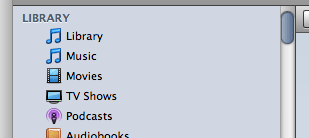
<p>Quit iTunes before entering the command. When you restart you&#8217;ll have a new playlist named &#8220;Library&#8221; at the top of your Source list, above &#8220;Music&#8221;.
<p style="text-align:center"><img class="noborder" src="http://dougscripts.com/itunes/pix/liboldschool.png" border="0" /></p>
<p>If you want to remove the &#8220;Library&#8221; again, use this command in Terminal:</p>
<pre>defaults write com.apple.iTunes show-library-playlist -bool FALSE</pre>
<p>There is a second preference called &#8220;hide-library-playlist&#8221;, which I at first thought would have to be set in tandem with the opposite of &#8220;show-library-playlist&#8221;, but this doesn&#8217;t seem necessary. In fact, you can set one or the other, apparently, and get the desired result; that is setting &#8220;show-library-playlist&#8221; to TRUE <i>or</i> setting &#8220;hide-library-playlist&#8221; to FALSE amounts to the same thing. Also, for AppleScript purposes, this playlist can be referenced as <b>library playlist 1</b>; it always could be, but now it is visible.</p>
<hr/><small><a href="http://dougscripts.com/itunes/dougsupdated.rss" title="Take me to your reader">30 Most Recent RSS Feed</a> | <a href="http://dougscripts.com/itunes/scripts/scriptcount.php?sortBy=Name&op=y">Script Stats Page</a> by <a href="http://dougscripts.com/itunes/scripts/scriptcount.php?sortBy=Name&op=y">Name</a>, <a href="http://dougscripts.com/itunes/scripts/scriptcount.php?sortBy=Most Recent&op=y">Most Recent</a>, <a href="http://dougscripts.com/itunes/scripts/scriptcount.php?sortBy=Download Count&op=y">Download Count</a></small>]]></content:encoded>
			</item>
		<item>
		<title>iTunes 8 and Genius Incompatibilities</title>
		<link>http://dougscripts.com/itunes/2008/09/itunes-8-and-genius-incompatibilities/</link>
		<comments></comments>
		<pubDate>Wed, 10 Sep 2008 16:28:12 +0000</pubDate>
		<dc:creator>dougscripts</dc:creator>
				<category><![CDATA[AppleScript]]></category>
		<category><![CDATA[AppleScript Syntax]]></category>
		<category><![CDATA[Updates]]></category>
		<category><![CDATA[iTunes]]></category>

		<guid isPermaLink="false">http://dougscripts.com/itunes/?p=218</guid>
		<description><![CDATA[As I hinted at yesterday Genius playlists are a new &#8220;species&#8221; of playlist. Several scripts are affected by their inability to correctly distinguish Genius playlists from other playlist types. I will be working on fixes for them in the coming days. I think, in fact, that you can pretty much attribute any failings of AppleScripts [...]]]></description>
			<content:encoded><![CDATA[<p>As I hinted at <a href="http://dougscripts.com/itunes/ixarch/arch.php?my=2008-09#090908c">yesterday</a> Genius playlists are a new &#8220;species&#8221; of playlist. Several scripts are affected by their inability to correctly distinguish Genius playlists from other playlist types. I will be working on fixes for them in the coming days. I think, in fact, that you can pretty much attribute any failings of AppleScripts that <i>did</i> work before iTunes 8 to the appearance of one or more Genius playlists. You may want to verify this by shutting Genius off and trying the errant script again. While some AppleScript <i>behaviors</i> have been updated/fixed in iTunes 8, I have not (yet) noticed any new AppleScript features that would otherwise cause scripts to error.</p>
<hr/><small><a href="http://dougscripts.com/itunes/dougsupdated.rss" title="Take me to your reader">30 Most Recent RSS Feed</a> | <a href="http://dougscripts.com/itunes/scripts/scriptcount.php?sortBy=Name&op=y">Script Stats Page</a> by <a href="http://dougscripts.com/itunes/scripts/scriptcount.php?sortBy=Name&op=y">Name</a>, <a href="http://dougscripts.com/itunes/scripts/scriptcount.php?sortBy=Most Recent&op=y">Most Recent</a>, <a href="http://dougscripts.com/itunes/scripts/scriptcount.php?sortBy=Download Count&op=y">Download Count</a></small>]]></content:encoded>
			</item>
		<item>
		<title>Genius Playlists and AppleScript</title>
		<link>http://dougscripts.com/itunes/2008/09/genius-playlists-and-applescript/</link>
		<comments></comments>
		<pubDate>Wed, 10 Sep 2008 01:21:16 +0000</pubDate>
		<dc:creator>dougscripts</dc:creator>
				<category><![CDATA[AppleScript Syntax]]></category>
		<category><![CDATA[Updates]]></category>
		<category><![CDATA[iTunes]]></category>

		<guid isPermaLink="false">http://dougscripts.com/itunes/?p=224</guid>
		<description><![CDATA[As far as AppleScript is concerned, iTunes 8&#8217;s Genius playlists are user playlists with a special kind of none and a smart value of true, and therefore they are indistinguishable from Smart playlists. I don&#8217;t know if eventually there will be a special kind value of &#8220;Genius&#8221;, but for now distinguishing a Genius playlist from [...]]]></description>
			<content:encoded><![CDATA[<p>As far as AppleScript is concerned, iTunes 8&#8217;s Genius playlists are <strong>user playlists</strong> with a <strong>special kind</strong> of <strong>none</strong> and a <strong>smart</strong> value of <strong>true</strong>, and therefore they are indistinguishable from Smart playlists. I don&#8217;t know if eventually there will be a <strong>special kind</strong> value of &#8220;Genius&#8221;, but for now distinguishing a Genius playlist from Smart playlists will not be easy.</p>
<hr/><small><a href="http://dougscripts.com/itunes/dougsupdated.rss" title="Take me to your reader">30 Most Recent RSS Feed</a> | <a href="http://dougscripts.com/itunes/scripts/scriptcount.php?sortBy=Name&op=y">Script Stats Page</a> by <a href="http://dougscripts.com/itunes/scripts/scriptcount.php?sortBy=Name&op=y">Name</a>, <a href="http://dougscripts.com/itunes/scripts/scriptcount.php?sortBy=Most Recent&op=y">Most Recent</a>, <a href="http://dougscripts.com/itunes/scripts/scriptcount.php?sortBy=Download Count&op=y">Download Count</a></small>]]></content:encoded>
			</item>
		<item>
		<title>Apple Updates the AppleScript Language Guide</title>
		<link>http://dougscripts.com/itunes/2008/03/apple-updates-the-applescript-language-guide/</link>
		<comments></comments>
		<pubDate>Wed, 12 Mar 2008 12:25:18 +0000</pubDate>
		<dc:creator>dougscripts</dc:creator>
				<category><![CDATA[Apple]]></category>
		<category><![CDATA[AppleScript]]></category>
		<category><![CDATA[AppleScript Syntax]]></category>

		<guid isPermaLink="false">http://dougscripts.com/itunes/?p=383</guid>
		<description><![CDATA[After nearly ten years, Apple has finally updated the Introduction to AppleScript Language Guide. Its layout and organization is more consistent with other Apple Developer Connection documentation and is much easier to grok (and much less 1999-internet-looking). It is specifically geared towards AppleScript 2.0 and Mac OS 10.5 or later.
]]></description>
			<content:encoded><![CDATA[<p>After nearly ten years, Apple has finally updated the <a href="http://developer.apple.com/documentation/AppleScript/Conceptual/AppleScriptLangGuide/introduction/ASLR_intro.html" target="_blank">Introduction to AppleScript Language Guide</a>. Its layout and organization is more consistent with other Apple Developer Connection documentation and is much easier to grok (and much less 1999-internet-looking). It is specifically geared towards AppleScript 2.0 and Mac OS 10.5 or later.</p>
<hr/><small><a href="http://dougscripts.com/itunes/dougsupdated.rss" title="Take me to your reader">30 Most Recent RSS Feed</a> | <a href="http://dougscripts.com/itunes/scripts/scriptcount.php?sortBy=Name&op=y">Script Stats Page</a> by <a href="http://dougscripts.com/itunes/scripts/scriptcount.php?sortBy=Name&op=y">Name</a>, <a href="http://dougscripts.com/itunes/scripts/scriptcount.php?sortBy=Most Recent&op=y">Most Recent</a>, <a href="http://dougscripts.com/itunes/scripts/scriptcount.php?sortBy=Download Count&op=y">Download Count</a></small>]]></content:encoded>
			</item>
	</channel>
</rss>