<?xml version="1.0" encoding="UTF-8"?>
<rss version="2.0"
	xmlns:content="http://purl.org/rss/1.0/modules/content/"
	xmlns:wfw="http://wellformedweb.org/CommentAPI/"
	xmlns:dc="http://purl.org/dc/elements/1.1/"
	xmlns:atom="http://www.w3.org/2005/Atom"
	xmlns:sy="http://purl.org/rss/1.0/modules/syndication/"
	xmlns:slash="http://purl.org/rss/1.0/modules/slash/"
	>

<channel>
	<title>Doug&#039;s AppleScripts for iTunes &#187; Controlling iTunes</title>
	<atom:link href="http://dougscripts.com/itunes/category/controlling-itunes/feed/" rel="self" type="application/rss+xml" />
	<link>http://dougscripts.com</link>
	<description>AppleScripts for iTunes</description>
	<lastBuildDate>Sun, 13 May 2012 13:40:55 +0000</lastBuildDate>
	<generator>http://wordpress.org/?v=2.8.4</generator>
	<language>en</language>
	<sy:updatePeriod>hourly</sy:updatePeriod>
	<sy:updateFrequency>1</sy:updateFrequency>
	<cloud domain='dougscripts.com' port='80' path='/itunes/?rsscloud=notify' registerProcedure='' protocol='http-post' />
		<item>
		<title>Custom Playlist Column Views, Sorta</title>
		<link>http://dougscripts.com/itunes/2012/02/custom-playlist-column-views-sorta/</link>
		<comments></comments>
		<pubDate>Mon, 27 Feb 2012 14:26:08 +0000</pubDate>
		<dc:creator>dougscripts</dc:creator>
				<category><![CDATA[Controlling iTunes]]></category>
		<category><![CDATA[Managing Playlists]]></category>

		<guid isPermaLink="false">http://dougscripts.com/itunes/?p=1533</guid>
		<description><![CDATA[Here&#8217;s something I&#8217;m often asked which Correspondent Rob Falk put succinctly: &#8220;Is there a way to clone a playlist view&#8230;other than the Library [using Assimilate View Options]? I frequently need to create a playlist that has a specific set of columns, that are not the same as the library, and was looking for a way [...]]]></description>
			<content:encoded><![CDATA[<p>Here&#8217;s something I&#8217;m often asked which Correspondent Rob Falk put succinctly: <em>&#8220;Is there a way to clone a playlist view&#8230;other than the Library [using <a href="http://dougscripts.com/itunes/scripts/ss.php?sp=assimilateviewoptions" title="Recreate a playlist such that its visible columns mirror the Music library">Assimilate View Options</a>]? I frequently need to create a playlist that has a specific set of columns, that are not the same as the library, and was looking for a way to automate that.&#8221;</em></p>
<p>There sorta kinda is.</p>
<p>My first thought was to use AppleScript to just <strong>duplicate</strong> an existing playlist that already had the requisite view settings. (The <strong>duplicate</strong> command is typically used to copy a track from one playlist to another.) Unfortunately, when iTunes&#8217; AppleScript <strong>duplicate</strong> command is used to copy a playlist it&#8212;bafflingly&#8212;creates a new untitled and empty playlist using the properties and views of the Music library playlist. Same as just creating a new playlist. That doesn&#8217;t seem right, does it? You&#8217;d think&#8212;well, <em>I</em> thought anyway&#8212;that using <strong>duplicate</strong> to copy a playlist would behave the same as the playlist contextual menu command &#8220;Duplicate&#8221; (control-click or right-click on the name of the playlist):</p>
<p><img src="http://dougscripts.com/itunes/pix/playlistcontextualmenu.png" /></p>
<p>So, my next thought was&#8230;just use &#8220;Duplicate&#8221;. The playlist will be perfectly duplicated, column views and all, and selected in the Source list. Now you&#8217;ll have a new playlist named the same as the original with a &#8220;1&#8243; at the end and which is populated with the original&#8217;s tracks (if it had any). You could create a bunch of playlists with columns set the various ways you like and then &#8220;Duplicate&#8221; them when you required one. Just rename the new duplicated playlist and delete any tracks. And that part <em>can</em> be automated.</p>
<p>The workflow, then, is to &#8220;Duplicate&#8221; a playlist manually with the contextual menu command and then run this script right afterwards:</p>
<p><span id="more-1533"></span></p>
<div class="upmproto">
<p style="margin: 0.0px 0.0px 0.0px 41.6px; text-indent: -41.6px; font: 12.0px Verdana"><b>tell</b> <span style="color: #4300ff"><i>application</i></span> &#8220;iTunes&#8221;</p>
<p style="margin: 0.0px 0.0px 0.0px 83.2px; text-indent: -83.2px; font: 12.0px Verdana"><span style="white-space:pre">	</span><b>try</b></p>
<p style="margin: 0.0px 0.0px 0.0px 124.8px; text-indent: -124.9px; font: 12.0px Verdana"><span style="white-space:pre">	</span><span style="white-space:pre">	</span><b>set</b> <span style="color: #269900">duplicatedPlaylist</span> <b>to</b> (<b>get</b> <span style="color: #9500e4">view</span> <b>of</b> <b>front</b> <span style="color: #4300ff"><i>window</i></span>)</p>
<p style="margin: 0.0px 0.0px 0.0px 124.8px; text-indent: -124.9px; font: 12.0px Verdana"><span style="white-space:pre">	</span><span style="white-space:pre">	</span><b>set</b> <span style="color: #269900">opt</span> <b>to</b> (<span style="color: #2c00c5"><b>display dialog</b></span> &#8220;Enter a name for this playlist:&#8221; <span style="color: #2c00c5">default answer</span> &#8220;&#8221;)</p>
<p style="margin: 0.0px 0.0px 0.0px 124.8px; text-indent: -124.9px; font: 12.0px Verdana"><span style="white-space:pre">	</span><span style="white-space:pre">	</span><b>set</b> <span style="color: #269900">newName</span> <b>to</b> <span style="color: #6800c5">text returned</span> <b>of</b> <span style="color: #269900">opt</span></p>
<p style="margin: 0.0px 0.0px 0.0px 124.8px; text-indent: -124.9px; font: 12.0px Verdana"><span style="white-space:pre">	</span><span style="white-space:pre">	</span><b>if</b> <span style="color: #269900">newName</span> <b>is</b> &#8220;&#8221; <b>then</b> <b>error</b></p>
<p style="margin: 0.0px 0.0px 0.0px 124.8px; text-indent: -124.9px; font: 12.0px Verdana; color: #269900"><span style="color: #000000"><span style="white-space:pre">	</span><span style="white-space:pre">	</span><b>tell</b> </span>duplicatedPlaylist</p>
<p style="margin: 0.0px 0.0px 0.0px 166.5px; text-indent: -166.5px; font: 12.0px Verdana"><span style="white-space:pre">	</span><span style="white-space:pre">	</span><span style="white-space:pre">	</span><b>try</b></p>
<p style="margin: 0.0px 0.0px 0.0px 208.1px; text-indent: -208.2px; font: 12.0px Verdana"><span style="white-space:pre">	</span><span style="white-space:pre">	</span><span style="white-space:pre">	</span><span style="white-space:pre">	</span><span style="color: #4300ff"><b>delete</b></span> <b>every</b> <span style="color: #4300ff"><i>track</i></span></p>
<p style="margin: 0.0px 0.0px 0.0px 166.5px; text-indent: -166.5px; font: 12.0px Verdana"><span style="white-space:pre">	</span><span style="white-space:pre">	</span><span style="white-space:pre">	</span><b>end</b> <b>try</b></p>
<p style="margin: 0.0px 0.0px 0.0px 166.5px; text-indent: -166.5px; font: 12.0px Verdana"><span style="white-space:pre">	</span><span style="white-space:pre">	</span><span style="white-space:pre">	</span><b>set</b> <span style="color: #9500e4">name</span> <b>to</b> <span style="color: #269900">newName</span></p>
<p style="margin: 0.0px 0.0px 0.0px 124.8px; text-indent: -124.9px; font: 12.0px Verdana"><span style="white-space:pre">	</span><span style="white-space:pre">	</span><b>end</b> <b>tell</b></p>
<p style="margin: 0.0px 0.0px 0.0px 124.8px; text-indent: -124.9px; font: 12.0px Verdana"><span style="white-space:pre">	</span><span style="white-space:pre">	</span><span style="color: #4300ff"><b>reveal</b></span> (<b>some</b> <span style="color: #4300ff"><i>playlist</i></span> <b>whose</b> <span style="color: #9500e4">special kind</span> <b>is</b> <span style="color: #690097">Music</span>)</p>
<p style="margin: 0.0px 0.0px 0.0px 124.8px; text-indent: -124.9px; font: 12.0px Verdana; color: #269900"><span style="color: #000000"><span style="white-space:pre">	</span><span style="white-space:pre">	</span></span><span style="color: #4300ff"><b>reveal</b></span><span style="color: #000000"> </span>duplicatedPlaylist</p>
<p style="margin: 0.0px 0.0px 0.0px 83.2px; text-indent: -83.2px; font: 12.0px Verdana"><span style="white-space:pre">	</span><b>on</b> <b>error</b></p>
<p style="margin: 0.0px 0.0px 0.0px 124.8px; text-indent: -124.9px; font: 12.0px Verdana"><span style="white-space:pre">	</span><span style="white-space:pre">	</span><b>return</b></p>
<p style="margin: 0.0px 0.0px 0.0px 83.2px; text-indent: -83.2px; font: 12.0px Verdana"><span style="white-space:pre">	</span><b>end</b> <b>try</b></p>
<p style="margin: 0.0px 0.0px 0.0px 41.6px; text-indent: -41.6px; font: 12.0px Verdana"><b>end</b> <b>tell</b></p>
<p><a href="applescript://com.apple.scripteditor?action=new&#038;script=tell%20application%20%22iTunes%22%0D%09try%0D%09%09set%20duplicatedPlaylist%20to%20(get%20view%20of%20front%20window)%0D%09%09set%20opt%20to%20(display%20dialog%20%22Enter%20a%20name%20for%20this%20playlist%3A%22%20default%20answer%20%22%22)%0D%09%09set%20newName%20to%20text%20returned%20of%20opt%0D%09%09if%20newName%20is%20%22%22%20then%20error%0D%09%09tell%20duplicatedPlaylist%0D%09%09%09try%0D%09%09%09%09delete%20every%20track%0D%09%09%09end%20try%0D%09%09%09set%20name%20to%20newName%0D%09%09end%20tell%0D%09%09reveal%20(some%20playlist%20whose%20special%20kind%20is%20Music)%0D%09%09reveal%20duplicatedPlaylist%0D%09on%20error%0D%09%09return%0D%09end%20try%0Dend%20tell" title="Click to open in AppleScript Editor. Works via most modern Mac browsers."><img src="http://dougscripts.com/itunes/pix/clickscriptsmall.jpg" alt="" /></a>
</div>
<p>The <strong>duplicatedPlaylist</strong> variable will be <strong>set</strong> to the currently selected playlist&#8212;as long as you haven&#8217;t clicked on something else this will be the one just created with &#8220;Duplicate&#8221;. The script then asks for a new name for the playlist, deletes any tracks from it, gives it the new name, and selects the re-named playlist. I&#8217;ve had the script <strong>reveal</strong> the Music playlist first so the Source list will scroll to the renamed playlist properly when <strong>reveal</strong> is subsequently called on it.</p>
<p>This routine works much slicker when you assign this script a <a href="http://dougscripts.com/itunes/itinfo/shortcutkeys.php">keyboard shortcut</a>. Then it&#8217;s only a matter of firing &#8220;Duplicate&#8221; with the cursor and then hitting the shortcut to fire the script. Bing-bang.</p>
<p>(I was too lazy to try and figure out if &#8220;Duplicate&#8221; can be scripted using GUI Scripting. If anyone can tell me about that I&#8217;d be obliged.)</p>
<p>I&#8217;m hoping that a future release of iTunes will allow the <strong>duplicate</strong> command to behave the same as &#8220;Duplicate&#8221;.</p>
<hr/><small><a href="http://dougscripts.com/itunes/dougsupdated.rss" title="Take me to your reader">30 Most Recent RSS Feed</a> | <a href="http://dougscripts.com/itunes/scripts/scriptcount.php?sortBy=Name&op=y">Script Stats Page</a> by <a href="http://dougscripts.com/itunes/scripts/scriptcount.php?sortBy=Name&op=y">Name</a>, <a href="http://dougscripts.com/itunes/scripts/scriptcount.php?sortBy=Most Recent&op=y">Most Recent</a>, <a href="http://dougscripts.com/itunes/scripts/scriptcount.php?sortBy=Download Count&op=y">Download Count</a></small>]]></content:encoded>
			</item>
		<item>
		<title>UPDATED: Play Random Album v3.0</title>
		<link>http://dougscripts.com/itunes/2012/01/updated-play-random-album-v3-0/</link>
		<comments></comments>
		<pubDate>Fri, 20 Jan 2012 14:40:33 +0000</pubDate>
		<dc:creator>dougscripts</dc:creator>
				<category><![CDATA[Controlling iTunes]]></category>

		<guid isPermaLink="false">http://dougscripts.com/itunes/?p=1485</guid>
		<description><![CDATA[A Particular Correspondent noticed that the previous version of Play Random Album was biased towards larger albums when selecting one at random. The problem was that it grabbed a random track first and built the album out using the album of that track. Well, of course. Albums with more tracks had a better chance of [...]]]></description>
			<content:encoded><![CDATA[<p>A Particular Correspondent noticed that the previous version of <a href="http://dougscripts.com/itunes/scripts/ss.php?sp=randomalbumplayer" title="Creates and plays playlist using tracks from album chosen at random">Play Random Album</a> was biased towards larger albums when selecting one at random. The problem was that it grabbed a random track first and built the album out using the <strong>album</strong> of that track. Well, of course. Albums with more tracks had a better chance of being selected by virtue of having more tracks in the pool, as it were.</p>
<p>The latest version of <a href="http://dougscripts.com/itunes/scripts/ss.php?sp=randomalbumplayer" title="Creates and plays playlist using tracks from album chosen at random">Play Random Album</a> actually chooses a random album name first which gives every album a fair chance. I&#8217;ve also speeded it up a little and tweaked some error checking. Attach it to a <a href="http://dougscripts.com/itunes/itinfo/shortcutkeys.php">keyboard shortcut</a> and it almost feels native.</p>
<p>I just bought a set of Bose 201 speakers and I&#8217;ve been burning &#8216;em in (ahem, letting them experience a variety of frequencies) by playing random albums using this script. Works great.</p>
<hr/><small><a href="http://dougscripts.com/itunes/dougsupdated.rss" title="Take me to your reader">30 Most Recent RSS Feed</a> | <a href="http://dougscripts.com/itunes/scripts/scriptcount.php?sortBy=Name&op=y">Script Stats Page</a> by <a href="http://dougscripts.com/itunes/scripts/scriptcount.php?sortBy=Name&op=y">Name</a>, <a href="http://dougscripts.com/itunes/scripts/scriptcount.php?sortBy=Most Recent&op=y">Most Recent</a>, <a href="http://dougscripts.com/itunes/scripts/scriptcount.php?sortBy=Download Count&op=y">Download Count</a></small>]]></content:encoded>
			</item>
		<item>
		<title>UPDATED: Update Expired Podcasts v2.2 (and launchd project)</title>
		<link>http://dougscripts.com/itunes/2011/12/updated-update-expired-podcasts-v2-2-and-launchd-project/</link>
		<comments></comments>
		<pubDate>Mon, 12 Dec 2011 15:37:01 +0000</pubDate>
		<dc:creator>dougscripts</dc:creator>
				<category><![CDATA[Controlling iTunes]]></category>
		<category><![CDATA[Podcasts]]></category>
		<category><![CDATA[launchd]]></category>

		<guid isPermaLink="false">http://dougscripts.com/itunes/?p=1445</guid>
		<description><![CDATA[iTunes will stop updating a Podcast subscription if you haven&#8217;t played at least one of its episodes in five days. Update Expired Podcasts v2.2 will go through every Podcast subscription and update it so you don&#8217;t have to manually update each one individually.
This latest version adds a routine that checks to see if iTunes is [...]]]></description>
			<content:encoded><![CDATA[<p>iTunes will stop updating a Podcast subscription if you haven&#8217;t played at least one of its episodes in five days. <a href="http://dougscripts.com/itunes/scripts/ss.php?sp=updateexpiredpodcasts" title="Update subscriptions which have expired by virtue of being ignored for five or more days">Update Expired Podcasts</a> v2.2 will go through every Podcast subscription and update it so you don&#8217;t have to manually update each one individually.</p>
<p>This latest version adds a routine that checks to see if iTunes is running before proceeding with updating the Podcasts. Now, you may be asking yourself: if I&#8217;m running the script from the iTunes Script menu then why would the script need to check if iTunes is already running? Because: I&#8217;m going to show you how to regularly launch the script automatically and invisibly in the background and you may not want iTunes to run when the script fires. If you&#8217;re not familiar with <strong>launchd</strong> then read on.</p>
<p><span id="more-1445"></span><strong>launchd</strong> is a system service that is built-in to the Mac OS. It is primarily used to run programs at startup. But it can also be configured to run <strong>jobs</strong> at various other times using launch <strong>agents</strong> (it replaces the deprecated <strong>cron</strong> which you may have heard of).</p>
<p>I&#8217;m not going to explain much about <strong>launchd</strong>&#8212;you can read more about it at <a href="http://en.wikipedia.org/wiki/Launchd">Wikipedia</a> or its <a href="http://developer.apple.com/library/mac/#documentation/darwin/reference/manpages/man5/launchd.plist.5.html">man page</a>. I&#8217;m just going to show you how to create and install the <strong>agent</strong> that runs a <strong>job</strong> to fire the <a href="http://dougscripts.com/itunes/scripts/ss.php?sp=updateexpiredpodcasts" title="Update subscriptions which have expired by virtue of being ignored for five or more days">Update Expired Podcasts</a> script at startup and every eight hours thereafter. (You will need to restart or logout/login after creating the <strong>agent</strong>, so be prepared to do that.)</p>
<p>1) First, install the <a href="http://dougscripts.com/itunes/scripts/ss.php?sp=updateexpiredpodcasts" title="Update subscriptions which have expired by virtue of being ignored for five or more days">Update Expired Podcasts</a> script in your <em>[username]/Library/iTunes/Scripts/</em> folder. (By default, the user <em>Library</em> folder is invisible in Lion. Option-click the Finder&#8217;s &#8220;Go&#8221; menu and choose &#8220;Library&#8221; from the drop down menu.</p>
<p>2) Launch your favorite text editor. TextEdit will do if you don&#8217;t have BBEdit, TextWrangler or something comparable. Copy the following into a new document (after some slight modifications this will be saved as the launchd <strong>agent</strong>):</p>
<pre>
&lt;?xml version="1.0" encoding="UTF-8"?&gt;
&lt;!DOCTYPE plist PUBLIC "-//Apple//DTD PLIST 1.0//EN" "http://www.apple.com/DTDs/PropertyList-1.0.dtd"&gt;
&lt;plist version="1.0"&gt;
&lt;dict&gt;
	&lt;key&gt;Disabled&lt;/key&gt;
	&lt;false/&gt;
	&lt;key&gt;Label&lt;/key&gt;
	&lt;string&gt;com.YOURUSERNAME.UpdatePodcastsAgent&lt;/string&gt;
	&lt;key&gt;Program&lt;/key&gt;
	&lt;string&gt;/usr/bin/osascript&lt;/string&gt;
	&lt;key&gt;ProgramArguments&lt;/key&gt;
	&lt;array&gt;
		&lt;string&gt;osascript&lt;/string&gt;
		&lt;string&gt;/Users/YOURUSERNAME/Library/iTunes/Scripts/Update Expired Podcasts.scptd&lt;/string&gt;
	&lt;/array&gt;
	&lt;key&gt;RunAtLoad&lt;/key&gt;
	&lt;true/&gt;
	&lt;key&gt;StartInterval&lt;/key&gt;
	&lt;integer&gt;28800&lt;/integer&gt;
&lt;/dict&gt;
&lt;/plist&gt;
</pre>
<p>If using TextEdit, click the &#8220;Format&#8221; menu and make sure that the document is plain text and not rich text.</p>
<p>3) Change the two occurences of &#8220;YOURUSERNAME&#8221; to, uhm, your user name. This is the same as the name of your Home folder.</p>
<p>4) Save the document as &#8220;com.YOURUSERNAME.UpdatePodcastsAgent.plist&#8221; (change that YOURUSERNAME again) in your <em>[startupdisk]/Library/LaunchAgents/</em> folder. <strong>Note:</strong> this is the root-level public <em>Library</em> folder on the startup drive and <em>not</em> the <em>user</em> <em>Library</em> folder in your Home folder or the <em>/System/Library/</em> folder! If there is no <em>LaunchAgents</em> folder there then create one and save the file in it. You will probably need to authenticate in order to save the file to this location.</p>
<p>5) Restart your computer, or logout and then login again so that your system registers the <strong>agent</strong>.</p>
<p>Yer done. Now, whenever you start your computer the <a href="http://dougscripts.com/itunes/scripts/ss.php?sp=updateexpiredpodcasts" title="Update subscriptions which have expired by virtue of being ignored for five or more days">Update Expired Podcasts</a> script will run. It will also run every eight hours (every 28800 seconds) thereafter, thus making sure that your Podcasts are always updated.</p>
<p><strong>Note</strong> that the script will check if iTunes is running and will quit if it isn&#8217;t. This is to prevent iTunes from launching when you least expect it. However, if you actually <em>want</em> iTunes to launch when the script is fired by <strong>launchd</strong> you can edit a single line in the script. Here&#8217;s how:</p>
<p>Navigate to the script in your <em>[username]/Library/iTunes/Scripts/</em> folder and double-click its icon. This will open the script in AppleScript Editor. Locate this line:</p>
<div class="upmproto">
<p style="margin: 0.0px 0.0px 0.0px 41.6px; text-indent: -41.6px; font: 12.0px Verdana">
<b>if</b> <b>not</b> <span style="color:green;">checkItunesIsActive</span>() <b>then</b> <b>return</b>
</p>
</div>
<p>Either delete this line or comment it out by placing a &#8220;#&#8221; at the front of it. Then &#8220;Save&#8221; the script and Quit AppleScript Editor.</p>
<hr/><small><a href="http://dougscripts.com/itunes/dougsupdated.rss" title="Take me to your reader">30 Most Recent RSS Feed</a> | <a href="http://dougscripts.com/itunes/scripts/scriptcount.php?sortBy=Name&op=y">Script Stats Page</a> by <a href="http://dougscripts.com/itunes/scripts/scriptcount.php?sortBy=Name&op=y">Name</a>, <a href="http://dougscripts.com/itunes/scripts/scriptcount.php?sortBy=Most Recent&op=y">Most Recent</a>, <a href="http://dougscripts.com/itunes/scripts/scriptcount.php?sortBy=Download Count&op=y">Download Count</a></small>]]></content:encoded>
			</item>
		<item>
		<title>Name New Playlist From Selection</title>
		<link>http://dougscripts.com/itunes/2011/10/name-new-playlist-from-selection/</link>
		<comments></comments>
		<pubDate>Wed, 26 Oct 2011 00:14:22 +0000</pubDate>
		<dc:creator>dougscripts</dc:creator>
				<category><![CDATA[Controlling iTunes]]></category>
		<category><![CDATA[Managing Playlists]]></category>
		<category><![CDATA[Missing Menu Commands]]></category>

		<guid isPermaLink="false">http://dougscripts.com/itunes/?p=1394</guid>
		<description><![CDATA[I use the &#8220;New Playlist from Selection&#8221; command a lot to create temporary playlists. Actually, I use the Shift-Command-N shortcut more often than clicking the command in the File menu. But I&#8217;m irritated at all the dancing I have to do to name the new &#8220;untitled playlist&#8221;. It takes my attention away from what I [...]]]></description>
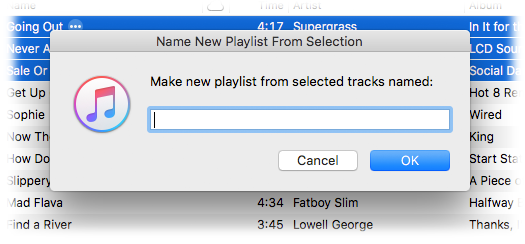
			<content:encoded><![CDATA[<p>I use the &#8220;New Playlist from Selection&#8221; command a lot to create temporary playlists. Actually, I use the Shift-Command-N shortcut more often than clicking the command in the File menu. But I&#8217;m irritated at all the dancing I have to do to name the new &#8220;untitled playlist&#8221;. It takes my attention away from what I was intending to do with the tracks. So, I rigged the script below to the <a href="http://dougscripts.com/itunes/itinfo/shortcutkeys.php">keyboard shortcut</a> Shift-Command-N&#8212;it works, luckily; sometimes assigning a shortcut that iTunes is already using doesn&#8217;t override the original command. The script does exactly what &#8220;New Playlist from Selection&#8221; does except now I can enter the name for the playlist <em>before</em> it&#8217;s created.</p>
<p><img src="http://dougscripts.com/itunes/pix/namenewplayistpic.png" /></p>
<p>Here&#8217;s the script:<br />
<span id="more-1394"></span></p>
<pre style="margin-bottom:1em;">
<b>tell</b> <span style="color:blue;">application</span> id "com.apple.iTunes"
	<b>try</b>
		<b>set</b> <span style="color:green;">sel</span> <b>to</b> <span style="color:purple;">selection</span>
		<b>if</b> <span style="color:green;">sel</span> <b>is</b> {} <b>then</b> <b>error</b>
		<b>set</b> <span style="color:green;">opt</span> <b>to</b> (<span style="color:blue;"><b>display</b></span> <span style="color:blue;"><b>dialog</b></span> "Make new playlist from selected tracks named:" <span style="color:blue;">default</span> <span style="color:blue;">answer</span> &#172;
			"" <span style="color:blue;">with</span> <span style="color:blue;">title</span> "Name New Playlist From Selection" <span style="color:blue;">with</span> <span style="color:blue;">icon</span> 1)
		<b>set</b> <span style="color:green;">newName</span> <b>to</b> (text returned <b>of</b> <span style="color:green;">opt</span>)
		<b>if</b> <span style="color:green;">newName</span> <b>is</b> "" <b>then</b> <b>error</b>
	<b>on</b> <b>error</b>
		<b>return</b>
	<b>end</b> <b>try</b>

	<b>set</b> <span style="color:green;">newPlaylist</span> <b>to</b> (<span style="color:blue;"><b>make</b></span> <span style="color:blue;">new</span> <span style="color:blue;">playlist</span> <span style="color:blue;">with</span> <span style="color:blue;">properties</span> {<span style="color:purple;">name</span>:<span style="color:green;">newName</span>})
	<b>repeat</b> <b>with</b> <span style="color:green;">t</span> <b>in</b> <span style="color:green;">sel</span>
		<b>try</b>
			<span style="color:blue;"><b>duplicate</b></span> <span style="color:green;">t</span> <span style="color:blue;">to</span> <span style="color:green;">newPlaylist</span>
		<b>end</b> <b>try</b>
	<b>end</b> <b>repeat</b>
	<span style="color:blue;"><b>reveal</b></span> <span style="color:green;">newPlaylist</span>
<b>end</b> <b>tell</b>

<a href="applescript://com.apple.scripteditor?action=new&#038;script=tell application id %22com%2Eapple%2EiTunes%22%0D%09try%0D%09%09set sel to selection%0D%09%09if sel is {} then error%0D%09%09set opt to %28display dialog %22Make new playlist from selected tracks named%3A%22 default answer %22%22 with title %22Name New Playlist From Selection%22 with icon 1%29%0D%09%09set newName to %28text returned of opt%29%0D%09%09if newName is %22%22 then error%0D%09on error%0D%09%09return%0D%09end try%0D%09%0D%09set newPlaylist to %28make new playlist with properties {name%3AnewName}%29%0D%09repeat with t in sel%0D%09%09try%0D%09%09%09duplicate t to newPlaylist%0D%09%09end try%0D%09end repeat%0D%09reveal newPlaylist%0Dend tell" title="Click to open in AppleScript Editor. Works via most modern Mac browsers."><img src="http://dougscripts.com/itunes/pix/clickscriptsmall.jpg" alt="" /></a>
</pre>
<p>I named it &#8220;Name New Playlist from Selection&#8221;, saved it to <em>~/Library/iTunes/Scripts/</em> and gave it the shortcut using <a href="http://dougscripts.com/itunes/itinfo/shortcutkeys.php">these instructions</a>.</p>
<hr/><small><a href="http://dougscripts.com/itunes/dougsupdated.rss" title="Take me to your reader">30 Most Recent RSS Feed</a> | <a href="http://dougscripts.com/itunes/scripts/scriptcount.php?sortBy=Name&op=y">Script Stats Page</a> by <a href="http://dougscripts.com/itunes/scripts/scriptcount.php?sortBy=Name&op=y">Name</a>, <a href="http://dougscripts.com/itunes/scripts/scriptcount.php?sortBy=Most Recent&op=y">Most Recent</a>, <a href="http://dougscripts.com/itunes/scripts/scriptcount.php?sortBy=Download Count&op=y">Download Count</a></small>]]></content:encoded>
			</item>
		<item>
		<title>Column Browser Go Home</title>
		<link>http://dougscripts.com/itunes/2011/09/column-browser-go-home/</link>
		<comments></comments>
		<pubDate>Wed, 28 Sep 2011 12:59:05 +0000</pubDate>
		<dc:creator>dougscripts</dc:creator>
				<category><![CDATA[Controlling iTunes]]></category>
		<category><![CDATA[GUI Scripting]]></category>
		<category><![CDATA[Missing Menu Commands]]></category>

		<guid isPermaLink="false">http://dougscripts.com/itunes/?p=1366</guid>
		<description><![CDATA[I&#8217;ve found that iTunes&#8217; Column Browser feature is one of the best ways to navigate the Music library. But I&#8217;m often annoyed that I can&#8217;t easily  restore the browser window to a full view of tracks after digging down to a particular set of tracks. To do so requires a lot of scrolling up [...]]]></description>
			<content:encoded><![CDATA[<p>I&#8217;ve found that iTunes&#8217; <a href="http://www.macworld.com/article/156388/2010/12/itunes_column_browser.html">Column Browser</a> feature is one of the best ways to navigate the Music library. But I&#8217;m often annoyed that I can&#8217;t easily  restore the browser window to a full view of tracks after digging down to a particular set of tracks. To do so requires a lot of scrolling up and clicking. Correspondent Josh Rafofsky emailed me complaining of the same frustration and his solution was pretty good: Command-B to Hide the Column Browser, fn-Left Arrow to got to the top of the browser, and the Command-B again to Show the Column Browser. But even this gets tiresome and he asked if there might be a one-step scripting solution.</p>
<p>You <em>know</em> there is.</p>
<p>I put together this script which uses a combination of standard AppleScripting and GUI Scripting to emulate Josh&#8217;s shortcuts solution:</p>
<pre style="margin-bottom:1em;">
<b>tell</b> <span style="color:blue;">application</span> "iTunes" <b>to</b> <span style="color:blue;"><b>activate</b></span>
<b>tell</b> <span style="color:blue;">application</span> "System Events"
	<span style="color:blue;"><b>key</b></span> <span style="color:blue;"><b>code</b></span> 11 <span style="color:blue;">using</span> command down
	<b>tell</b> <span style="color:blue;">application</span> "iTunes" <b>to</b> <span style="color:blue;"><b>reveal</b></span> <span style="color:blue;">track</span> 1 <b>of</b> (<b>get</b> <span style="color:purple;">view</span> <b>of</b> <b>front</b> <span style="color:blue;">window</span>)
	<span style="color:blue;"><b>key</b></span> <span style="color:blue;"><b>code</b></span> 0 <span style="color:blue;">using</span> {command down, shift down}
	<span style="color:blue;"><b>key</b></span> <span style="color:blue;"><b>code</b></span> 11 <span style="color:blue;">using</span> command down
<b>end</b> <b>tell</b>

<a href="applescript://com.apple.scripteditor?action=new&#038;script=tell application %22iTunes%22 to activate%0Dtell application %22System Events%22%0D%09key code 11 using command down%0D%09tell application %22iTunes%22 to reveal track 1 of %28get view of front window%29%0D%09key code 0 using {command down%2C shift down}%0D%09key code 11 using command down%0Dend tell" title="Click to open in AppleScript Editor. Works via most modern Mac browsers."><img src="http://dougscripts.com/itunes/pix/clickscriptsmall.jpg" alt="" /></a>
</pre>
<p>Save this as whatever you like&#8212;I call it &#8220;Column Browser Go Home&#8221;&#8212;save it to the <em>~/Library/iTunes/Scripts</em> folder, and assign it a <a href="http://dougscripts.com/itunes/itinfo/shortcutkeys.php">shortcut</a> (make sure you have enabled GUI Scripting, too, as outlined <a href="http://dougscripts.com/itunes/itinfo/keycodes.php">in this article on using key codes</a>). When launched after you&#8217;ve Column Browsed to a discrete set of tracks it will restore the entire list of tracks and jump to the top of the selected playlist. In my case this is usually the Music library playlist, but it will work with any playlist that&#8217;s being viewed with the Column Browser.</p>
<p>[UPDATE] And after all that, @tonyhazeldine tweets: &#8220;The same can be done by clicking on the column titles at the top of the column browser.&#8221; Yes, but <em>each column</em> has to be clicked.</p>
<hr/><small><a href="http://dougscripts.com/itunes/dougsupdated.rss" title="Take me to your reader">30 Most Recent RSS Feed</a> | <a href="http://dougscripts.com/itunes/scripts/scriptcount.php?sortBy=Name&op=y">Script Stats Page</a> by <a href="http://dougscripts.com/itunes/scripts/scriptcount.php?sortBy=Name&op=y">Name</a>, <a href="http://dougscripts.com/itunes/scripts/scriptcount.php?sortBy=Most Recent&op=y">Most Recent</a>, <a href="http://dougscripts.com/itunes/scripts/scriptcount.php?sortBy=Download Count&op=y">Download Count</a></small>]]></content:encoded>
			</item>
		<item>
		<title>NEW: Play in Album Context</title>
		<link>http://dougscripts.com/itunes/2011/09/new-play-in-album-context/</link>
		<comments></comments>
		<pubDate>Mon, 12 Sep 2011 13:37:49 +0000</pubDate>
		<dc:creator>dougscripts</dc:creator>
				<category><![CDATA[Cocoa-AppleScript]]></category>
		<category><![CDATA[Controlling iTunes]]></category>

		<guid isPermaLink="false">http://dougscripts.com/itunes/?p=1362</guid>
		<description><![CDATA[You can probably imagine that I hear a lot of unusual ideas for creating workflows for iTunes with AppleScript. Quite a while ago someone suggested a script that could be run when a track was playing that would find all the tracks of that track&#8217;s album, put them in track order in a new playlist, [...]]]></description>
			<content:encoded><![CDATA[<p>You can probably imagine that I hear a lot of unusual ideas for creating workflows for iTunes with AppleScript. Quite a while ago someone suggested a script that could be run when a track was playing that would find all the tracks of <em>that track&#8217;s</em> album, put them in track order in a new playlist, and then play them in order starting from the original selected track. For example, &#8220;Time&#8221; from <strong>Dark Side of the Moon</strong> comes up and you want to hear &#8220;The Great Gig in the Sky&#8221;, &#8220;Money&#8221;, etc, in their <em>album context</em>.</p>
<p>But really. How many people ever want to do that? Well it turns out that the more I thought about how quirky a suggestion it was the more often I began noticing opportunities where I&#8217;d like to do the very thing. So I caved and wrote <a href="http://dougscripts.com/itunes/scripts/ss.php?sp=playinalbumcontext" title="Play selected/playing track from new playlist containing all tracks in order from original track's album">Play In Album Context</a>.</p>
<p>If you <strong>select</strong> a track and then launch the script a new playlist will be created from the tracks of that track&#8217;s album (actually, tracks that have the same Artist, Album, and Disc Number tags&#8212;whether that results in gathering the correct tracks for the album depends on how well you&#8217;ve tagged your tracks) and the selected track will begin playing from its album position in the playlist.</p>
<p>If a track is <strong>playing</strong> and the script is launched, the album playlist is created as described above, and the current track will <em>continue</em> playing from its album position in the new playlist. The trick of the script is to <em>temporarily</em> set the playing track&#8217;s <strong>bookmarkable</strong> property, <strong>pause</strong> iTunes, and then immediately <strong>play</strong> the same track in the playlist; the track picks up playing from the <strong>bookmark</strong> set when the track was paused. There is a slight stutter when this transfer occurs, but if the goal is to hear the succeeding tracks in album context, it&#8217;s probably a small inconvenience to bear.</p>
<hr/><small><a href="http://dougscripts.com/itunes/dougsupdated.rss" title="Take me to your reader">30 Most Recent RSS Feed</a> | <a href="http://dougscripts.com/itunes/scripts/scriptcount.php?sortBy=Name&op=y">Script Stats Page</a> by <a href="http://dougscripts.com/itunes/scripts/scriptcount.php?sortBy=Name&op=y">Name</a>, <a href="http://dougscripts.com/itunes/scripts/scriptcount.php?sortBy=Most Recent&op=y">Most Recent</a>, <a href="http://dougscripts.com/itunes/scripts/scriptcount.php?sortBy=Download Count&op=y">Download Count</a></small>]]></content:encoded>
			</item>
		<item>
		<title>Key Code Searching</title>
		<link>http://dougscripts.com/itunes/2011/09/key-code-searching/</link>
		<comments></comments>
		<pubDate>Sat, 10 Sep 2011 13:49:51 +0000</pubDate>
		<dc:creator>dougscripts</dc:creator>
				<category><![CDATA[Controlling iTunes]]></category>
		<category><![CDATA[Missing Menu Commands]]></category>
		<category><![CDATA[Tips and Info]]></category>

		<guid isPermaLink="false">http://dougscripts.com/itunes/?p=1358</guid>
		<description><![CDATA[Here&#8217;s a snippet I&#8217;ve been using for awhile which I just got around to posting on the key codes page. I keep my iTunes Column Browser set with Artists and Albums listed On Left. Whenever I&#8217;m looking for a particular album I run this script to select the Music library and put focus on the [...]]]></description>
			<content:encoded><![CDATA[<p>Here&#8217;s a snippet I&#8217;ve been using for awhile which I just got around to posting on the <a href="http://dougscripts.com/itunes/itinfo/keycodes.php">key codes</a> page. I keep my iTunes Column Browser set with Artists and Albums listed On Left. Whenever I&#8217;m looking for a particular album I run this script to select the Music library and put focus on the Search box:</p>
<pre style="margin-bottom:1em;">
<b>tell</b> <span style="color:blue;">application</span> "iTunes"
	<span style="color:blue;"><b>activate</b></span>
	<span style="color:gray;">--</span> <span style="color:gray;">select</span> <span style="color:gray;">the</span> <span style="color:gray;">Music</span> <span style="color:gray;">library</span>
	<span style="color:blue;"><b>reveal</b></span> (<b>some</b> <span style="color:blue;">playlist</span> <b>whose</b> <span style="color:purple;">special</span> <span style="color:purple;">kind</span> <b>is</b> Music)
<b>end</b> <b>tell</b>
<b>tell</b> <span style="color:blue;">application</span> "System Events"
	<span style="color:gray;">--</span> <span style="color:gray;">bring</span> <span style="color:gray;">focus</span> <span style="color:gray;">to</span> <span style="color:gray;">Search</span> <span style="color:gray;">box</span> <span style="color:gray;">-</span> <span style="color:gray;">Command-Option-F</span>
	<span style="color:blue;"><b>key</b></span> <span style="color:blue;"><b>code</b></span> 3 <span style="color:blue;">using</span> {command down, option down}
<b>end</b> <b>tell</b>

<a href="applescript://com.apple.scripteditor?action=new&#038;script=tell application %22iTunes%22%0D%09activate%0D%09-- select the Music library%0D%09reveal %28some playlist whose special kind is Music%29%0Dend tell%0Dtell application %22System Events%22%0D%09-- bring focus to Search box - Command-Option-F%0D%09key code 3 using {command down%2C option down}%0Dend tell%0D" title="Click to open in AppleScript Editor. Works via most modern Mac browsers."><img src="http://dougscripts.com/itunes/pix/clickscriptsmall.jpg" alt="" /></a>
</pre>
<p>I&#8217;ve given it a <a href="http://dougscripts.com/itunes/itinfo/shortcutkeys.php">keyboard shortcut</a> of Command-Option-S.</p>
<p>More information on AppleScripting iTunes with key codes and keystrokes is <a href="http://dougscripts.com/itunes/itinfo/keycodes.php">here<a/>.</p>
<hr/><small><a href="http://dougscripts.com/itunes/dougsupdated.rss" title="Take me to your reader">30 Most Recent RSS Feed</a> | <a href="http://dougscripts.com/itunes/scripts/scriptcount.php?sortBy=Name&op=y">Script Stats Page</a> by <a href="http://dougscripts.com/itunes/scripts/scriptcount.php?sortBy=Name&op=y">Name</a>, <a href="http://dougscripts.com/itunes/scripts/scriptcount.php?sortBy=Most Recent&op=y">Most Recent</a>, <a href="http://dougscripts.com/itunes/scripts/scriptcount.php?sortBy=Download Count&op=y">Download Count</a></small>]]></content:encoded>
			</item>
		<item>
		<title>UPDATED: Quick Convert 3.0</title>
		<link>http://dougscripts.com/itunes/2011/08/updated-quick-convert-3-0/</link>
		<comments></comments>
		<pubDate>Sun, 14 Aug 2011 17:01:27 +0000</pubDate>
		<dc:creator>dougscripts</dc:creator>
				<category><![CDATA[Cocoa-AppleScript]]></category>
		<category><![CDATA[Controlling iTunes]]></category>
		<category><![CDATA[Managing Files]]></category>

		<guid isPermaLink="false">http://dougscripts.com/itunes/?p=1348</guid>
		<description><![CDATA[Quick Convert v3.0 will convert all or just the selected tracks of the selected Playlist using your choice of available iTunes encoders, restoring your Preferences-set encoder afterwards. 
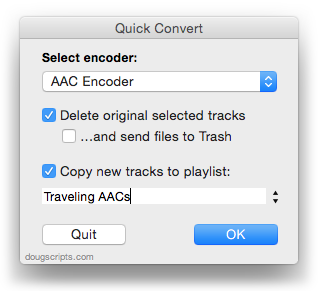
Works with importing selected CD tracks, too.

Choose to delete and/or Trash the original tracks and/or files
Copy all converted/imported tracks to a new playlist
Optionally save AAC encoded tracks as [...]]]></description>
			<content:encoded><![CDATA[<p><a href="http://dougscripts.com/itunes/scripts/ss.php?sp=quickconvert" title="Convert or import tracks with any encoder on the fly">Quick Convert</a> v3.0 will convert all or just the selected tracks of the selected Playlist using your choice of available iTunes encoders, restoring your Preferences-set encoder afterwards. </p>
<p><img src="http://dougscripts.com/itunes/pix/quickconvert.png" /></p>
<p>Works with importing selected CD tracks, too.</p>
<ul>
<li>Choose to delete and/or Trash the original tracks and/or files</li>
<li>Copy all converted/imported tracks to a new playlist</li>
<li>Optionally save AAC encoded tracks as M4B &#8220;bookmarkable&#8221; and re-add the converted files to the Books library</li>
</ul>
<p>This latest version consolidates all options into a single window and displays progress during track processing.</p>
<p><a href="http://dougscripts.com/itunes/scripts/ss.php?sp=quickconvert" title="Convert or import tracks with any encoder on the fly">Quick Convert</a> v3.0 is for <strong>OS X 10.6 or 10.7 only.</strong> Previous universal version for PowerPC machines available at the entry page.</p>
<hr/><small><a href="http://dougscripts.com/itunes/dougsupdated.rss" title="Take me to your reader">30 Most Recent RSS Feed</a> | <a href="http://dougscripts.com/itunes/scripts/scriptcount.php?sortBy=Name&op=y">Script Stats Page</a> by <a href="http://dougscripts.com/itunes/scripts/scriptcount.php?sortBy=Name&op=y">Name</a>, <a href="http://dougscripts.com/itunes/scripts/scriptcount.php?sortBy=Most Recent&op=y">Most Recent</a>, <a href="http://dougscripts.com/itunes/scripts/scriptcount.php?sortBy=Download Count&op=y">Download Count</a></small>]]></content:encoded>
			</item>
		<item>
		<title>UPDATED: Change Hidden iTunes Preferences v2.5</title>
		<link>http://dougscripts.com/itunes/2011/05/updated-change-hidden-itunes-preferences-v2-5/</link>
		<comments></comments>
		<pubDate>Sun, 29 May 2011 22:45:40 +0000</pubDate>
		<dc:creator>dougscripts</dc:creator>
				<category><![CDATA[Controlling iTunes]]></category>

		<guid isPermaLink="false">http://dougscripts.com/itunes/?p=1264</guid>
		<description><![CDATA[Found a bug in Change Hidden iTunes Preferences that affected how the &#8220;Maintain Grid View for Search Results&#8221; pref was applied. Current versions of iTunes regarded the setting somewhat ambiguously so I fixed that. Additionally, to be clearer, that pref is now labeled &#8220;Grid View Search results switch to List View&#8221;, since by default, iTunes [...]]]></description>
			<content:encoded><![CDATA[<p>Found a bug in <a href="http://dougscripts.com/itunes/scripts/ss.php?sp=changehiddenprefs" title="Change the settings of hidden iTunes preferences">Change Hidden iTunes Preferences</a> that affected how the &#8220;Maintain Grid View for Search Results&#8221; pref was applied. Current versions of iTunes regarded the setting somewhat ambiguously so I fixed that. Additionally, to be clearer, that pref is now labeled &#8220;Grid View Search results switch to List View&#8221;, since by default, iTunes maintains whatever view is in use for search.</p>
<hr/><small><a href="http://dougscripts.com/itunes/dougsupdated.rss" title="Take me to your reader">30 Most Recent RSS Feed</a> | <a href="http://dougscripts.com/itunes/scripts/scriptcount.php?sortBy=Name&op=y">Script Stats Page</a> by <a href="http://dougscripts.com/itunes/scripts/scriptcount.php?sortBy=Name&op=y">Name</a>, <a href="http://dougscripts.com/itunes/scripts/scriptcount.php?sortBy=Most Recent&op=y">Most Recent</a>, <a href="http://dougscripts.com/itunes/scripts/scriptcount.php?sortBy=Download Count&op=y">Download Count</a></small>]]></content:encoded>
			</item>
		<item>
		<title>Skip and Pretend We Played This Redux</title>
		<link>http://dougscripts.com/itunes/2011/02/skip-and-pretend-we-played-this-redux/</link>
		<comments></comments>
		<pubDate>Sat, 26 Feb 2011 15:49:14 +0000</pubDate>
		<dc:creator>dougscripts</dc:creator>
				<category><![CDATA[Controlling iTunes]]></category>
		<category><![CDATA[Missing Menu Commands]]></category>

		<guid isPermaLink="false">http://dougscripts.com/itunes/?p=1216</guid>
		<description><![CDATA[A popular item on the Missing Menu Commands page is Skip and Pretend We Played This. If a song is playing that you don&#8217;t really want to hear, you&#8217;d launch this script to increase its play count by 1 (since it would not be increased until the track actually finished playing), set the last played [...]]]></description>
			<content:encoded><![CDATA[<p>A popular item on the <a href="http://dougscripts.com/itunes/scripts/missingmenu.php">Missing Menu Commands</a> page is <a href="http://dougscripts.com/itunes/scripts/missingmenu.php#1028">Skip and Pretend We Played This</a>. If a song is playing that you don&#8217;t really want to hear, you&#8217;d launch this script to increase its play count by 1 (since it would not be increased until the track actually finished playing), set the last played date to the current date and time (ditto), and play the next track. I use it in a live-updating Smart Playlist that, among other criteria, uses the last played date to only list songs not played in the past few weeks. This keeps any track I don&#8217;t want to hear from re-appearing for another few weeks. Ideally launched via shortcut, and so on.</p>
<p>But ANYway.</p>
<p>Correspondent Dirk Scharff noted that &#8220;if used in the first 2-20 seconds of the song the skip counter is increased too and that&#8217;s somewhat undesirable as this wouldn&#8217;t happen if I played that song.&#8221; I don&#8217;t pay much attention to skips at my house, but he has a point.  So Dirk submitted a mod to the script which I have incorporated below:</p>
<p><span id="more-1216"></span>The two lines that contain the <span style="color:green;font-family:monaco;">originalSkipCount</span> variable are Dirk&#8217;s mod:</p>
<pre style="margin-bottom:1em;">
<b>tell</b> <span style="color:blue;">application</span> "iTunes"
	<b>if</b> <span style="color:purple;">player</span> <span style="color:purple;">state</span> <b>is</b> <b>not</b> stopped <b>then</b>
		<b>try</b>
			<b>set</b> <span style="color:green;">theTrack</span> <b>to</b> <span style="color:purple;">current</span> <span style="color:purple;">track</span>
			<b>tell</b> <span style="color:green;">theTrack</span>
				<b>set</b> <span style="color:green;">originalSkipCount</span> <b>to</b> (<b>get</b> <span style="color:purple;">skipped</span> <span style="color:purple;">count</span>)
				<b>set</b> <span style="color:purple;">played</span> <span style="color:purple;">count</span> <b>to</b> (<b>get</b> <span style="color:purple;">played</span> <span style="color:purple;">count</span>) + 1
				<b>set</b> <span style="color:purple;">played</span> <span style="color:purple;">date</span> <b>to</b> (<b>get</b> <span style="color:blue;"><b>current</b></span> <span style="color:blue;"><b>date</b></span>)
			<b>end</b> <b>tell</b>
			<span style="color:blue;"><b>next</b></span> <span style="color:blue;"><b>track</b></span>
			<b>set</b> <span style="color:green;">theTrack's</span> <span style="color:purple;">skipped</span> <span style="color:purple;">count</span> <b>to</b> <span style="color:green;">originalSkipCount</span>
		<b>end</b> <b>try</b>
	<b>end</b> <b>if</b>
<b>end</b> <b>tell</b>

<a href="applescript://com.apple.scripteditor?action=new&#038;script=tell application %22iTunes%22%0D%09if player state is not stopped then%0D%09%09try%0D%09%09%09set theTrack to current track%0D%09%09%09tell theTrack%0D%09%09%09%09set originalSkipCount to %28get skipped count%29%0D%09%09%09%09set played count to %28get played count%29 %2B 1%0D%09%09%09%09set played date to %28get current date%29%0D%09%09%09end tell%0D%09%09%09next track%0D%09%09%09set theTrack%27s skipped count to originalSkipCount%0D%09%09end try%0D%09end if%0Dend tell" title="Click to open in AppleScript Editor. Works via most modern Mac browsers."><img src="http://dougscripts.com/itunes/pix/clickscriptsmall.jpg" alt="" /></a>
</pre>
<p>This will keep the skip count from increasing under any circumstance (when you run the script, that is; it doesn&#8217;t change iTunes&#8217; default skip-counting behavior). If you prefer that the skip counter behave normally you can just comment out or delete the two lines with <span style="color:green;font-family:monaco;">originalSkipCount</span>.</p>
<hr/><small><a href="http://dougscripts.com/itunes/dougsupdated.rss" title="Take me to your reader">30 Most Recent RSS Feed</a> | <a href="http://dougscripts.com/itunes/scripts/scriptcount.php?sortBy=Name&op=y">Script Stats Page</a> by <a href="http://dougscripts.com/itunes/scripts/scriptcount.php?sortBy=Name&op=y">Name</a>, <a href="http://dougscripts.com/itunes/scripts/scriptcount.php?sortBy=Most Recent&op=y">Most Recent</a>, <a href="http://dougscripts.com/itunes/scripts/scriptcount.php?sortBy=Download Count&op=y">Download Count</a></small>]]></content:encoded>
			</item>
	</channel>
</rss>