<?xml version="1.0" encoding="UTF-8"?>
<rss version="2.0"
	xmlns:content="http://purl.org/rss/1.0/modules/content/"
	xmlns:wfw="http://wellformedweb.org/CommentAPI/"
	xmlns:dc="http://purl.org/dc/elements/1.1/"
	xmlns:atom="http://www.w3.org/2005/Atom"
	xmlns:sy="http://purl.org/rss/1.0/modules/syndication/"
	xmlns:slash="http://purl.org/rss/1.0/modules/slash/"
	>

<channel>
	<title>Doug&#039;s AppleScripts for iTunes &#187; Internet</title>
	<atom:link href="http://dougscripts.com/itunes/category/internet/feed/" rel="self" type="application/rss+xml" />
	<link>http://dougscripts.com</link>
	<description>AppleScripts for iTunes</description>
	<lastBuildDate>Sun, 13 May 2012 13:40:55 +0000</lastBuildDate>
	<generator>http://wordpress.org/?v=2.8.4</generator>
	<language>en</language>
	<sy:updatePeriod>hourly</sy:updatePeriod>
	<sy:updateFrequency>1</sy:updateFrequency>
	<cloud domain='dougscripts.com' port='80' path='/itunes/?rsscloud=notify' registerProcedure='' protocol='http-post' />
		<item>
		<title>NEW: Search IMDB</title>
		<link>http://dougscripts.com/itunes/2012/01/new-search-imdb/</link>
		<comments></comments>
		<pubDate>Mon, 09 Jan 2012 15:19:34 +0000</pubDate>
		<dc:creator>dougscripts</dc:creator>
				<category><![CDATA[Internet]]></category>

		<guid isPermaLink="false">http://dougscripts.com/itunes/?p=1480</guid>
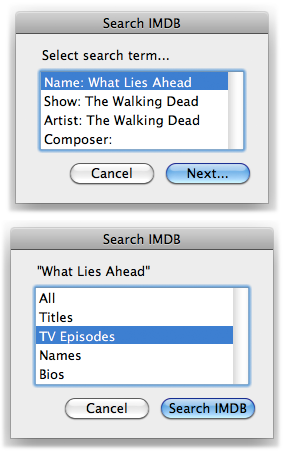
		<description><![CDATA[Search IMDB allows you to choose a search term from the pertinent tags of a selected iTunes track and then choose the type of search to make at the IMDB website.
Results are displayed in your designated default browser using a Finder routine. Most web browsers are not &#8217;scriptable which somewhat limits what you can do [...]]]></description>
			<content:encoded><![CDATA[<p><a href="http://dougscripts.com/itunes/scripts/ss.php?sp=searchimdb" title="Use info from a selected track to search IMDB">Search IMDB</a> allows you to choose a search term from the pertinent tags of a selected iTunes track and then choose the type of search to make at the IMDB website.</p>
<p><img src="http://dougscripts.com/itunes/pix/searchimdb.png" alt="" title = "" /></p>
<p>Results are displayed in your designated default browser using a <strong>Finder</strong> routine. Most web browsers are not &#8217;scriptable which somewhat limits what you can do with them with AppleScript.</p>
<p>And, what the heck. Here&#8217;s a Rotten Tomatoes script I use on my &#8220;entertainment center&#8221; Mac Mini that uses the name of the selected track for a search:</p>
<div class="upmproto">
<p style="margin: 0.0px 0.0px 0.0px 41.6px; text-indent: -41.6px; font: 12.0px Verdana"><b>tell</b> <span style="color: #4300ff"><i>application</i></span> &#8220;iTunes&#8221;</p>
<p style="margin: 0.0px 0.0px 0.0px 83.2px; text-indent: -83.2px; font: 12.0px Verdana"><span style="white-space:pre">	</span><b>set</b> <span style="color: #269900">sel</span> <b>to</b> <span style="color: #9500e4">selection</span></p>
<p style="margin: 0.0px 0.0px 0.0px 83.2px; text-indent: -83.2px; font: 12.0px Verdana"><span style="white-space:pre">	</span><b>if</b> <span style="color: #269900">sel</span> <b>is</b> <b>not</b> {} <b>and</b> (<span style="color: #9500e4">length</span> <b>of</b> <span style="color: #269900">sel</span>) <b>is</b> 1 <b>then</b></p>
<p style="margin: 0.0px 0.0px 0.0px 124.8px; text-indent: -124.9px; font: 12.0px Verdana"><span style="white-space:pre">	</span><span style="white-space:pre">	</span><b>my</b> <span style="color: #269900">processSearch</span>(<b>get</b> <span style="color: #9500e4">name</span> <b>of</b> <span style="color: #4300ff"><i>item</i></span> 1 <b>of</b> <span style="color: #269900">sel</span>)</p>
<p style="margin: 0.0px 0.0px 0.0px 83.2px; text-indent: -83.2px; font: 12.0px Verdana"><span style="white-space:pre">	</span><b>end</b> <b>if</b></p>
<p style="margin: 0.0px 0.0px 0.0px 41.6px; text-indent: -41.6px; font: 12.0px Verdana"><b>end</b> <b>tell</b></p>
<p style="margin: 0.0px 0.0px 0.0px 41.6px; text-indent: -41.6px; font: 12.0px Verdana; min-height: 15.0px"></p>
<p style="margin: 0.0px 0.0px 0.0px 41.6px; text-indent: -41.6px; font: 12.0px Verdana; color: #269900"><span style="color: #000000"><b>to</b> </span>processSearch<span style="color: #000000">(</span>n<span style="color: #000000">)</span></p>
<p style="margin: 0.0px 0.0px 0.0px 83.2px; text-indent: -83.2px; font: 12.0px Verdana"><span style="white-space:pre">	</span><b>try</b></p>
<p style="margin: 0.0px 0.0px 0.0px 124.8px; text-indent: -124.9px; font: 12.0px Verdana"><span style="white-space:pre">	</span><span style="white-space:pre">	</span><b>tell</b> <span style="color: #4300ff"><i>application</i></span> &#8220;Finder&#8221; <b>to</b> <span style="color: #2c00c5"><b>open location</b></span> (&#8221;http://www.rottentomatoes.com/search/?sitesearch=rt&amp;search=&#8221; &amp; <span style="color: #269900">n</span>) <b>as</b> <span style="color: #4300ff"><i>text</i></span></p>
<p style="margin: 0.0px 0.0px 0.0px 83.2px; text-indent: -83.2px; font: 12.0px Verdana"><span style="white-space:pre">	</span><b>end</b> <b>try</b></p>
<p style="margin: 0.0px 0.0px 0.0px 41.6px; text-indent: -41.6px; font: 12.0px Verdana; color: #269900"><span style="color: #000000"><b>end</b> </span>processSearch</p>
<p><a href="applescript://com.apple.scripteditor?action=new&#038;script=tell%20application%20%22iTunes%22%0D%09set%20sel%20to%20selection%0D%09if%20sel%20is%20not%20%7B%7D%20and%20(length%20of%20sel)%20is%201%20then%0D%09%09my%20processSearch(get%20name%20of%20item%201%20of%20sel)%0D%09end%20if%0Dend%20tell%0D%0Dto%20processSearch(n)%0D%09try%0D%09%09tell%20application%20%22Finder%22%20to%20open%20location%20(%22http%3A%2F%2Fwww.rottentomatoes.com%2Fsearch%2F%3Fsitesearch%3Drt%26search%3D%22%20%26%20n)%20as%20text%0D%09end%20try%0Dend%20processSearch" title="Click to open in AppleScript Editor. Works via most modern Mac browsers."><img src="http://dougscripts.com/itunes/pix/clickscriptsmall.jpg" alt="" /></a>
</div>
<hr/><small><a href="http://dougscripts.com/itunes/dougsupdated.rss" title="Take me to your reader">30 Most Recent RSS Feed</a> | <a href="http://dougscripts.com/itunes/scripts/scriptcount.php?sortBy=Name&op=y">Script Stats Page</a> by <a href="http://dougscripts.com/itunes/scripts/scriptcount.php?sortBy=Name&op=y">Name</a>, <a href="http://dougscripts.com/itunes/scripts/scriptcount.php?sortBy=Most Recent&op=y">Most Recent</a>, <a href="http://dougscripts.com/itunes/scripts/scriptcount.php?sortBy=Download Count&op=y">Download Count</a></small>]]></content:encoded>
			</item>
		<item>
		<title>UPDATED: Discogs Search Kit v1.1</title>
		<link>http://dougscripts.com/itunes/2011/05/updated-discogs-search-kit-v1-1/</link>
		<comments></comments>
		<pubDate>Sat, 21 May 2011 17:18:20 +0000</pubDate>
		<dc:creator>dougscripts</dc:creator>
				<category><![CDATA[Internet]]></category>
		<category><![CDATA[Managing Track Info]]></category>
		<category><![CDATA[Updates]]></category>

		<guid isPermaLink="false">http://dougscripts.com/itunes/?p=1256</guid>
		<description><![CDATA[About a month ago I started getting emails from users reporting that Discogs Search Kit wasn&#8217;t getting track info correctly. I finally got around to making some fixes. This latest version of Discogs Search Kit makes accommodations for formatting changes at Discogs, which apparently were implemented a month or so ago (April 2011).
]]></description>
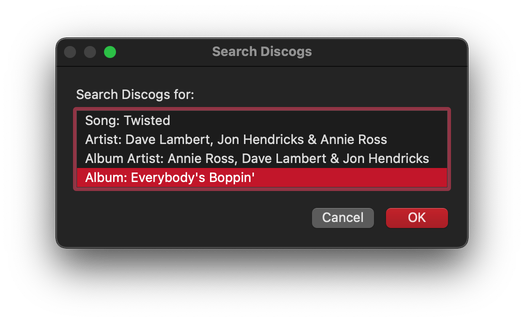
			<content:encoded><![CDATA[<p>About a month ago I started getting emails from users reporting that <a href="http://dougscripts.com/itunes/scripts/ss.php?sp=discogssearchkit" title="Search and get album, track info from Discogs.com">Discogs Search Kit</a> wasn&#8217;t getting track info correctly. I finally got around to making some fixes. This latest version of <a href="http://dougscripts.com/itunes/scripts/ss.php?sp=discogssearchkit" title="Search and get album, track info from Discogs.com">Discogs Search Kit</a> makes accommodations for formatting changes at Discogs, which apparently were implemented a month or so ago (April 2011).</p>
<hr/><small><a href="http://dougscripts.com/itunes/dougsupdated.rss" title="Take me to your reader">30 Most Recent RSS Feed</a> | <a href="http://dougscripts.com/itunes/scripts/scriptcount.php?sortBy=Name&op=y">Script Stats Page</a> by <a href="http://dougscripts.com/itunes/scripts/scriptcount.php?sortBy=Name&op=y">Name</a>, <a href="http://dougscripts.com/itunes/scripts/scriptcount.php?sortBy=Most Recent&op=y">Most Recent</a>, <a href="http://dougscripts.com/itunes/scripts/scriptcount.php?sortBy=Download Count&op=y">Download Count</a></small>]]></content:encoded>
			</item>
		<item>
		<title>UPDATED: AMG EZ Search v2.0</title>
		<link>http://dougscripts.com/itunes/2010/11/updated-amg-ez-search-v2-0/</link>
		<comments></comments>
		<pubDate>Thu, 11 Nov 2010 15:16:20 +0000</pubDate>
		<dc:creator>dougscripts</dc:creator>
				<category><![CDATA[Internet]]></category>
		<category><![CDATA[iTunes]]></category>

		<guid isPermaLink="false">http://dougscripts.com/itunes/?p=1159</guid>
		<description><![CDATA[AMG EZ Search v2.0 will use the tags of the selected or playing iTunes track as the basis for a Song/Artist/Album search at the allmusic website. This version accounts for changes in the AMG site&#8217;s search mechanism, can parse the stream title of a radio stream for tags if available.
]]></description>
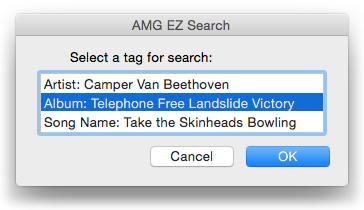
			<content:encoded><![CDATA[<p><a href="http://dougscripts.com/itunes/scripts/ss.php?sp=amgezsearch" title="Search allmusic website (AMG) with data from selected or playing track">AMG EZ Search</a> v2.0 will use the tags of the selected or playing iTunes track as the basis for a Song/Artist/Album search at the <a href="http://www.allmusic.com">allmusic</a> website. This version accounts for changes in the AMG site&#8217;s search mechanism, can parse the stream title of a radio stream for tags if available.</p>
<hr/><small><a href="http://dougscripts.com/itunes/dougsupdated.rss" title="Take me to your reader">30 Most Recent RSS Feed</a> | <a href="http://dougscripts.com/itunes/scripts/scriptcount.php?sortBy=Name&op=y">Script Stats Page</a> by <a href="http://dougscripts.com/itunes/scripts/scriptcount.php?sortBy=Name&op=y">Name</a>, <a href="http://dougscripts.com/itunes/scripts/scriptcount.php?sortBy=Most Recent&op=y">Most Recent</a>, <a href="http://dougscripts.com/itunes/scripts/scriptcount.php?sortBy=Download Count&op=y">Download Count</a></small>]]></content:encoded>
			</item>
		<item>
		<title>NEW: Search YouTube</title>
		<link>http://dougscripts.com/itunes/2010/10/new-search-youtube/</link>
		<comments></comments>
		<pubDate>Mon, 25 Oct 2010 17:07:29 +0000</pubDate>
		<dc:creator>dougscripts</dc:creator>
				<category><![CDATA[Internet]]></category>

		<guid isPermaLink="false">http://dougscripts.com/itunes/?p=1154</guid>
		<description><![CDATA[Search YouTube will use the Song Name and Artist of the selected or playing track as the basis for a search on YouTube.
I&#8217;m surprised I never had a need of this before, but I was looking for a clip from an old Dave Edmunds documentary on his sessions for the &#8220;Repeat When Necessary&#8221; album. There&#8217;s [...]]]></description>
			<content:encoded><![CDATA[<p><a href="http://dougscripts.com/itunes/scripts/ss.php?sp=searchyoutube" title="Search YouTube using tag info from selected or playing track">Search YouTube</a> will use the Song Name and Artist of the selected or playing track as the basis for a search on YouTube.</p>
<p>I&#8217;m surprised I never had a need of this before, but I was looking for <a href="http://www.youtube.com/watch?v=h1Rx-zaBjow" target="_blank">a clip</a> from an old Dave Edmunds documentary on his sessions for the &#8220;Repeat When Necessary&#8221; album. There&#8217;s a clip of Albert Lee doing solo stuff on &#8220;Sweet Little Lisa&#8221; that I wanted to check out. The script makes searching from iTunes a tad easier.</p>
<hr/><small><a href="http://dougscripts.com/itunes/dougsupdated.rss" title="Take me to your reader">30 Most Recent RSS Feed</a> | <a href="http://dougscripts.com/itunes/scripts/scriptcount.php?sortBy=Name&op=y">Script Stats Page</a> by <a href="http://dougscripts.com/itunes/scripts/scriptcount.php?sortBy=Name&op=y">Name</a>, <a href="http://dougscripts.com/itunes/scripts/scriptcount.php?sortBy=Most Recent&op=y">Most Recent</a>, <a href="http://dougscripts.com/itunes/scripts/scriptcount.php?sortBy=Download Count&op=y">Download Count</a></small>]]></content:encoded>
			</item>
		<item>
		<title>UPDATED: Search Wikipedia v2.2</title>
		<link>http://dougscripts.com/itunes/2010/09/updated-search-wikipedia-v2-2/</link>
		<comments></comments>
		<pubDate>Wed, 08 Sep 2010 20:19:42 +0000</pubDate>
		<dc:creator>dougscripts</dc:creator>
				<category><![CDATA[Internet]]></category>
		<category><![CDATA[Radio]]></category>
		<category><![CDATA[Updates]]></category>

		<guid isPermaLink="false">http://dougscripts.com/itunes/?p=1097</guid>
		<description><![CDATA[I have been doing a lot of listening to radio streams in iTunes recently. And because of the &#8220;surprise&#8221; factor inherent in radio listening, an artist will often be played in a stream that I&#8217;m curious about. A good provider will format the current stream title to the somewhat standard format of Artist &#8211; Song [...]]]></description>
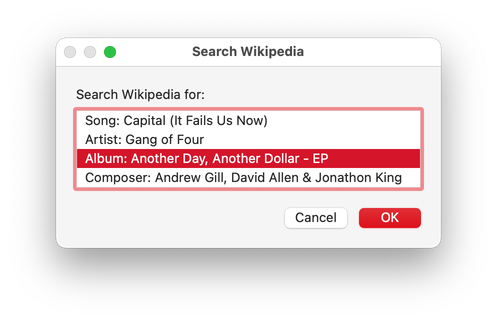
			<content:encoded><![CDATA[<p>I have been doing a lot of listening to radio streams in iTunes recently. And because of the &#8220;surprise&#8221; factor inherent in radio listening, an artist will often be played in a stream that I&#8217;m curious about. A good provider will format the current stream title to the somewhat standard format of <em>Artist &#8211; Song Name</em> which will be scrolled in the the iTunes display while the stream is, er, streaming. <a href="http://dougscripts.com/itunes/scripts/ss.php?sp=searchwikipedia" title="Search Wikipedia using the Song Name, Album, Artist, or Composer of selected or playing track">Search Wikipedia</a> v2.2 can now detect if a stream is playing, and, if the current stream title is formatted correctly, search Wikipedia using the artist portion of the title. Of course, otherwise, <a href="http://dougscripts.com/itunes/scripts/ss.php?sp=searchwikipedia" title="Search Wikipedia using the Song Name, Album, Artist, or Composer of selected or playing track">Search Wikipedia</a> will use the playing or selected track&#8217;s tags as the basis for a Wikipedia article search.</p>
<hr/><small><a href="http://dougscripts.com/itunes/dougsupdated.rss" title="Take me to your reader">30 Most Recent RSS Feed</a> | <a href="http://dougscripts.com/itunes/scripts/scriptcount.php?sortBy=Name&op=y">Script Stats Page</a> by <a href="http://dougscripts.com/itunes/scripts/scriptcount.php?sortBy=Name&op=y">Name</a>, <a href="http://dougscripts.com/itunes/scripts/scriptcount.php?sortBy=Most Recent&op=y">Most Recent</a>, <a href="http://dougscripts.com/itunes/scripts/scriptcount.php?sortBy=Download Count&op=y">Download Count</a></small>]]></content:encoded>
			</item>
		<item>
		<title>See Ya, CDDB</title>
		<link>http://dougscripts.com/itunes/2010/09/see-ya-cddb/</link>
		<comments></comments>
		<pubDate>Fri, 03 Sep 2010 14:12:11 +0000</pubDate>
		<dc:creator>dougscripts</dc:creator>
				<category><![CDATA[Internet]]></category>
		<category><![CDATA[Managing Track Info]]></category>

		<guid isPermaLink="false">http://dougscripts.com/itunes/?p=1073</guid>
		<description><![CDATA[Here&#8217;s the scoop on Gracenote and CDDB: outta here, later.
]]></description>
			<content:encoded><![CDATA[<p>Here&#8217;s the scoop on Gracenote and CDDB: <a href="http://www.gracenote.com/about/faqs/#music_search">outta here, later</a>.</p>
<hr/><small><a href="http://dougscripts.com/itunes/dougsupdated.rss" title="Take me to your reader">30 Most Recent RSS Feed</a> | <a href="http://dougscripts.com/itunes/scripts/scriptcount.php?sortBy=Name&op=y">Script Stats Page</a> by <a href="http://dougscripts.com/itunes/scripts/scriptcount.php?sortBy=Name&op=y">Name</a>, <a href="http://dougscripts.com/itunes/scripts/scriptcount.php?sortBy=Most Recent&op=y">Most Recent</a>, <a href="http://dougscripts.com/itunes/scripts/scriptcount.php?sortBy=Download Count&op=y">Download Count</a></small>]]></content:encoded>
			</item>
		<item>
		<title>Gracenote Search MIA?</title>
		<link>http://dougscripts.com/itunes/2010/09/gracenote-search-mia/</link>
		<comments></comments>
		<pubDate>Fri, 03 Sep 2010 13:35:54 +0000</pubDate>
		<dc:creator>dougscripts</dc:creator>
				<category><![CDATA[Internet]]></category>
		<category><![CDATA[Managing Track Info]]></category>

		<guid isPermaLink="false">http://dougscripts.com/itunes/?p=1071</guid>
		<description><![CDATA[I&#8217;ve never known Gracenote (CDDB) to be down for maintenance, so it&#8217;s unusual to see a 404 when going to the Gracenote search page. What&#8217;s up with that?
]]></description>
			<content:encoded><![CDATA[<p>I&#8217;ve never known Gracenote (CDDB) to be down for maintenance, so it&#8217;s unusual to see a 404 when going to the Gracenote <a href="http://www.gracenote.com/search/">search page</a>. What&#8217;s up with that?</p>
<hr/><small><a href="http://dougscripts.com/itunes/dougsupdated.rss" title="Take me to your reader">30 Most Recent RSS Feed</a> | <a href="http://dougscripts.com/itunes/scripts/scriptcount.php?sortBy=Name&op=y">Script Stats Page</a> by <a href="http://dougscripts.com/itunes/scripts/scriptcount.php?sortBy=Name&op=y">Name</a>, <a href="http://dougscripts.com/itunes/scripts/scriptcount.php?sortBy=Most Recent&op=y">Most Recent</a>, <a href="http://dougscripts.com/itunes/scripts/scriptcount.php?sortBy=Download Count&op=y">Download Count</a></small>]]></content:encoded>
			</item>
		<item>
		<title>UPDATED: Current Track to Twitter v2.0</title>
		<link>http://dougscripts.com/itunes/2010/04/updated-current-track-to-twitter-v2-0/</link>
		<comments></comments>
		<pubDate>Wed, 14 Apr 2010 20:56:30 +0000</pubDate>
		<dc:creator>dougscripts</dc:creator>
				<category><![CDATA[Internet]]></category>
		<category><![CDATA[Twitter]]></category>

		<guid isPermaLink="false">http://dougscripts.com/itunes/?p=999</guid>
		<description><![CDATA[Not necessarily to commemorate the opening of Chirp: Current Track to Twitter v2.0 will tweet information about the currently playing track to your Twitter account, either automatically every time a new track starts or manually with a click of its Dock icon. This latest version is pretty much just a maintenance update since it was [...]]]></description>
			<content:encoded><![CDATA[<p>Not necessarily to commemorate the opening of Chirp: <a href="http://dougscripts.com/itunes/scripts/ss.php?sp=currenttotwitter" title="Tweet info about the currently playing track to Twitter">Current Track to Twitter</a> v2.0 will tweet information about the currently playing track to your Twitter account, either automatically every time a new track starts or manually with a click of its Dock icon. This latest version is pretty much just a maintenance update since it was last updated in 2007. (See the screenshot I&#8217;ve included on the entry page. &#8220;Updating live every two minutes&#8221; and &#8220;What you and your friends are doing&#8221; sure bring back memories.)</p>
<hr/><small><a href="http://dougscripts.com/itunes/dougsupdated.rss" title="Take me to your reader">30 Most Recent RSS Feed</a> | <a href="http://dougscripts.com/itunes/scripts/scriptcount.php?sortBy=Name&op=y">Script Stats Page</a> by <a href="http://dougscripts.com/itunes/scripts/scriptcount.php?sortBy=Name&op=y">Name</a>, <a href="http://dougscripts.com/itunes/scripts/scriptcount.php?sortBy=Most Recent&op=y">Most Recent</a>, <a href="http://dougscripts.com/itunes/scripts/scriptcount.php?sortBy=Download Count&op=y">Download Count</a></small>]]></content:encoded>
			</item>
		<item>
		<title>UPDATED: CDDB Safari Kit v3.1</title>
		<link>http://dougscripts.com/itunes/2009/09/updated-cddb-safari-kit-v3-1/</link>
		<comments></comments>
		<pubDate>Wed, 16 Sep 2009 13:58:41 +0000</pubDate>
		<dc:creator>dougscripts</dc:creator>
				<category><![CDATA[AppleScript]]></category>
		<category><![CDATA[Internet]]></category>
		<category><![CDATA[Managing Track Info]]></category>
		<category><![CDATA[Updates]]></category>
		<category><![CDATA[iTunes]]></category>

		<guid isPermaLink="false">http://dougscripts.com/itunes/?p=812</guid>
		<description><![CDATA[These two AppleScripts, &#8220;CDDB Safari&#8221; and &#8220;CDDB Tracks to iTunes via Safari&#8221;, assist in finding and retrieving Album track information, Album, Artist, and Year from Gracenote&#8217;s CDDB website using Apple&#8217;s Safari browser. CDDB Safari Kit v3.1  addresses some minor changes in Gracenote&#8217;s page formatting.
]]></description>
			<content:encoded><![CDATA[<p>These two AppleScripts, &#8220;CDDB Safari&#8221; and &#8220;CDDB Tracks to iTunes via Safari&#8221;, assist in finding and retrieving Album track information, Album, Artist, and Year from Gracenote&#8217;s CDDB website using Apple&#8217;s <strong>Safari</strong> browser. <a href="http://dougscripts.com/itunes/scripts/ss.php?sp=cddbsafarikit" title="Search for info and get track names from Gracenote web pages using Safari">CDDB Safari Kit v3.1</a>  addresses some minor changes in Gracenote&#8217;s page formatting.</p>
<hr/><small><a href="http://dougscripts.com/itunes/dougsupdated.rss" title="Take me to your reader">30 Most Recent RSS Feed</a> | <a href="http://dougscripts.com/itunes/scripts/scriptcount.php?sortBy=Name&op=y">Script Stats Page</a> by <a href="http://dougscripts.com/itunes/scripts/scriptcount.php?sortBy=Name&op=y">Name</a>, <a href="http://dougscripts.com/itunes/scripts/scriptcount.php?sortBy=Most Recent&op=y">Most Recent</a>, <a href="http://dougscripts.com/itunes/scripts/scriptcount.php?sortBy=Download Count&op=y">Download Count</a></small>]]></content:encoded>
			</item>
		<item>
		<title>No Joy in Bugtown</title>
		<link>http://dougscripts.com/itunes/2009/07/no-joy-in-bugtown/</link>
		<comments></comments>
		<pubDate>Wed, 15 Jul 2009 17:41:44 +0000</pubDate>
		<dc:creator>dougscripts</dc:creator>
				<category><![CDATA[Apple]]></category>
		<category><![CDATA[Internet]]></category>
		<category><![CDATA[None/All Bug]]></category>
		<category><![CDATA[Updates]]></category>

		<guid isPermaLink="false">http://dougscripts.com/itunes/wpfol/?p=39</guid>
		<description><![CDATA[iTunes 8.2.1 does not fix the all/none situation.
]]></description>
			<content:encoded><![CDATA[<p>iTunes 8.2.1 does not fix the <a href="http://dougscripts.com/itunes/itinfo/noneallissue.php">all/none</a> situation.</p>
<hr/><small><a href="http://dougscripts.com/itunes/dougsupdated.rss" title="Take me to your reader">30 Most Recent RSS Feed</a> | <a href="http://dougscripts.com/itunes/scripts/scriptcount.php?sortBy=Name&op=y">Script Stats Page</a> by <a href="http://dougscripts.com/itunes/scripts/scriptcount.php?sortBy=Name&op=y">Name</a>, <a href="http://dougscripts.com/itunes/scripts/scriptcount.php?sortBy=Most Recent&op=y">Most Recent</a>, <a href="http://dougscripts.com/itunes/scripts/scriptcount.php?sortBy=Download Count&op=y">Download Count</a></small>]]></content:encoded>
			</item>
	</channel>
</rss>