<?xml version="1.0" encoding="UTF-8"?>
<rss version="2.0"
	xmlns:content="http://purl.org/rss/1.0/modules/content/"
	xmlns:wfw="http://wellformedweb.org/CommentAPI/"
	xmlns:dc="http://purl.org/dc/elements/1.1/"
	xmlns:atom="http://www.w3.org/2005/Atom"
	xmlns:sy="http://purl.org/rss/1.0/modules/syndication/"
	xmlns:slash="http://purl.org/rss/1.0/modules/slash/"
	>

<channel>
	<title>Doug&#039;s AppleScripts for iTunes &#187; iPhone</title>
	<atom:link href="http://dougscripts.com/itunes/category/iphone/feed/" rel="self" type="application/rss+xml" />
	<link>http://dougscripts.com</link>
	<description>AppleScripts for iTunes</description>
	<lastBuildDate>Sun, 13 May 2012 13:40:55 +0000</lastBuildDate>
	<generator>http://wordpress.org/?v=2.8.4</generator>
	<language>en</language>
	<sy:updatePeriod>hourly</sy:updatePeriod>
	<sy:updateFrequency>1</sy:updateFrequency>
	<cloud domain='dougscripts.com' port='80' path='/itunes/?rsscloud=notify' registerProcedure='' protocol='http-post' />
		<item>
		<title>Sync A Wi-Fi iPhone Follow Up</title>
		<link>http://dougscripts.com/itunes/2012/01/sync-a-wi-fi-iphone-follow-up/</link>
		<comments></comments>
		<pubDate>Tue, 31 Jan 2012 17:27:10 +0000</pubDate>
		<dc:creator>dougscripts</dc:creator>
				<category><![CDATA[iPad]]></category>
		<category><![CDATA[iPhone]]></category>
		<category><![CDATA[launchd]]></category>

		<guid isPermaLink="false">http://dougscripts.com/itunes/?p=1507</guid>
		<description><![CDATA[Several Correspondents have wired in to report that the Sync a Wi-Fi iPhone Once a Day With launchd tip is great and all but how can more than one Wi-Fi device be sync&#8217;d? Currently the script only targets a single iPhone or iPad. If you want to sync all connected devices you&#8217;ll need a different [...]]]></description>
			<content:encoded><![CDATA[<p>Several Correspondents have wired in to report that the <a href="http://dougscripts.com/itunes/2012/01/sync-a-wi-fi-iphone-once-a-day-with-launchd/">Sync a Wi-Fi iPhone Once a Day With launchd</a> tip is great and all but how can more than one Wi-Fi device be sync&#8217;d? Currently the script only targets a single iPhone or iPad. If you want to sync all connected devices you&#8217;ll need a different script.<span id="more-1507"></span></p>
<p>This script should replace the one named “Sync My Device” that was created in the <a href="http://dougscripts.com/itunes/2012/01/sync-a-wi-fi-iphone-once-a-day-with-launchd/">previous article</a>. If you haven&#8217;t already, create the launchd agent plist from that article.</p>
<p>This will sync every currently connected device (iPod, iPhone, or iPad are each of the kind <strong>iPod</strong> to AppleScript).</p>
<div class="upmproto">
<p style="margin: 0.0px 0.0px 0.0px 41.6px; text-indent: -41.6px; font: 12.0px Verdana"><b>if</b> <b>not</b> <span style="color: #269900">checkItunesIsActive</span>() <b>then</b> <b>return</b></p>
<p style="margin: 0.0px 0.0px 0.0px 41.6px; text-indent: -41.6px; font: 12.0px Verdana; min-height: 15.0px"></p>
<p style="margin: 0.0px 0.0px 0.0px 41.6px; text-indent: -41.6px; font: 12.0px Verdana"><b>tell</b> <span style="color: #4300ff"><i>application</i></span> &#8220;iTunes&#8221;</p>
<p style="margin: 0.0px 0.0px 0.0px 83.2px; text-indent: -83.2px; font: 12.0px Verdana"><span style="white-space:pre">	</span><b>try</b></p>
<p style="margin: 0.0px 0.0px 0.0px 124.8px; text-indent: -124.9px; font: 12.0px Verdana"><span style="white-space:pre">	</span><span style="white-space:pre">	</span><b>set</b> <span style="color: #269900">theSources</span> <b>to</b> (<b>every</b> <span style="color: #4300ff"><i>source</i></span> <b>whose</b> <span style="color: #9500e4">kind</span> <b>is</b> <span style="color: #690097">iPod</span>)</p>
<p style="margin: 0.0px 0.0px 0.0px 124.8px; text-indent: -124.9px; font: 12.0px Verdana"><span style="white-space:pre">	</span><span style="white-space:pre">	</span><b>repeat</b> <b>with</b> <span style="color: #269900">src</span> <b>in</b> <span style="color: #269900">theSources</span></p>
<p style="margin: 0.0px 0.0px 0.0px 166.5px; text-indent: -166.5px; font: 12.0px Verdana"><span style="white-space:pre">	</span><span style="white-space:pre">	</span><span style="white-space:pre">	</span><b>try</b></p>
<p style="margin: 0.0px 0.0px 0.0px 208.1px; text-indent: -208.2px; font: 12.0px Verdana"><span style="white-space:pre">	</span><span style="white-space:pre">	</span><span style="white-space:pre">	</span><span style="white-space:pre">	</span><b>with</b> <b>timeout</b> <b>of</b> 600 <span style="color: #4300ff"><i>seconds</i></span></p>
<p style="margin: 0.0px 0.0px 0.0px 249.8px; text-indent: -249.8px; font: 12.0px Verdana"><span style="white-space:pre">	</span><span style="white-space:pre">	</span><span style="white-space:pre">	</span><span style="white-space:pre">	</span><span style="white-space:pre">	</span><b>tell</b> <span style="color: #269900">src</span> <b>to</b> <span style="color: #4300ff"><b>update</b></span></p>
<p style="margin: 0.0px 0.0px 0.0px 208.1px; text-indent: -208.2px; font: 12.0px Verdana"><span style="white-space:pre">	</span><span style="white-space:pre">	</span><span style="white-space:pre">	</span><span style="white-space:pre">	</span><b>end</b> <b>timeout</b></p>
<p style="margin: 0.0px 0.0px 0.0px 166.5px; text-indent: -166.5px; font: 12.0px Verdana"><span style="white-space:pre">	</span><span style="white-space:pre">	</span><span style="white-space:pre">	</span><b>end</b> <b>try</b></p>
<p style="margin: 0.0px 0.0px 0.0px 124.8px; text-indent: -124.9px; font: 12.0px Verdana"><span style="white-space:pre">	</span><span style="white-space:pre">	</span><b>end</b> <b>repeat</b></p>
<p style="margin: 0.0px 0.0px 0.0px 83.2px; text-indent: -83.2px; font: 12.0px Verdana"><span style="white-space:pre">	</span><b>end</b> <b>try</b></p>
<p style="margin: 0.0px 0.0px 0.0px 41.6px; text-indent: -41.6px; font: 12.0px Verdana"><b>end</b> <b>tell</b></p>
<p style="margin: 0.0px 0.0px 0.0px 41.6px; text-indent: -41.6px; font: 12.0px Verdana; min-height: 15.0px"></p>
<p style="margin: 0.0px 0.0px 0.0px 41.6px; text-indent: -41.6px; font: 12.0px Verdana; color: #269900"><span style="color: #000000"><b>to</b> </span>checkItunesIsActive<span style="color: #000000">()</span></p>
<p style="margin: 0.0px 0.0px 0.0px 83.2px; text-indent: -83.2px; font: 12.0px Verdana"><span style="white-space:pre">	</span><b>tell</b> <span style="color: #4300ff"><i>application</i></span> <span style="color: #690097">id</span> &#8220;sevs&#8221; <b>to</b> <b>return</b> (<span style="color: #4300ff"><b>exists</b></span> (<b>some</b> <span style="color: #4300ff"><i>process</i></span> <b>whose</b> <span style="color: #9500e4">name</span> <b>is</b> &#8220;iTunes&#8221;))</p>
<p style="margin: 0.0px 0.0px 0.0px 41.6px; text-indent: -41.6px; font: 12.0px Verdana; color: #269900"><span style="color: #000000"><b>end</b> </span>checkItunesIsActive</p>
<p><a href="applescript://com.apple.scripteditor?action=new&#038;script=if%20not%20checkItunesIsActive()%20then%20return%0D%0Dtell%20application%20%22iTunes%22%0D%09try%0D%09%09set%20theSources%20to%20(every%20source%20whose%20kind%20is%20iPod)%0D%09%09repeat%20with%20src%20in%20theSources%0D%09%09%09try%0D%09%09%09%09with%20timeout%20of%20600%20seconds%0D%09%09%09%09%09tell%20src%20to%20update%0D%09%09%09%09end%20timeout%0D%09%09%09end%20try%0D%09%09end%20repeat%0D%09end%20try%0Dend%20tell%0D%0Dto%20checkItunesIsActive()%0D%09tell%20application%20id%20%22sevs%22%20to%20return%20(exists%20(some%20process%20whose%20name%20is%20%22iTunes%22))%0Dend%20checkItunesIsActive%0D" title="Click to open in AppleScript Editor. Works via most modern Mac browsers."><img src="http://dougscripts.com/itunes/pix/clickscriptsmall.jpg" alt="" /></a>
</div>
<p>I should say <em>try to sync</em> because if the script runs into any problems it will just quit silently.</p>
<p>If you only want to sync particular devices, you have to include a way to identify them. The best way is with their name. So if &#8220;Doug&#8217;s iPhone&#8221;, &#8220;Doug&#8217;s iPad&#8221;, and &#8220;Doug&#8217;s iPod&#8221; are connected but I only want to sync the iPhone or iPad they can be detected in the script:</p>
<div class="upmproto">
<p style="margin: 0.0px 0.0px 0.0px 41.6px; text-indent: -41.6px; font: 12.0px Verdana"><b>if</b> <b>not</b> <span style="color: #269900">checkItunesIsActive</span>() <b>then</b> <b>return</b></p>
<p style="margin: 0.0px 0.0px 0.0px 41.6px; text-indent: -41.6px; font: 12.0px Verdana; min-height: 15.0px"></p>
<p style="margin: 0.0px 0.0px 0.0px 41.6px; text-indent: -41.6px; font: 12.0px Verdana"><b>tell</b> <span style="color: #4300ff"><i>application</i></span> &#8220;iTunes&#8221;</p>
<p style="margin: 0.0px 0.0px 0.0px 83.2px; text-indent: -83.2px; font: 12.0px Verdana"><span style="white-space:pre">	</span><b>try</b></p>
<p style="margin: 0.0px 0.0px 0.0px 124.8px; text-indent: -124.9px; font: 12.0px Verdana"><span style="white-space:pre">	</span><span style="white-space:pre">	</span><b>set</b> <span style="color: #269900">theSources</span> <b>to</b> (<b>every</b> <span style="color: #4300ff"><i>source</i></span> <b>whose</b> <span style="color: #9500e4">kind</span> <b>is</b> <span style="color: #690097">iPod</span>)</p>
<p style="margin: 0.0px 0.0px 0.0px 124.8px; text-indent: -124.9px; font: 12.0px Verdana"><span style="white-space:pre">	</span><span style="white-space:pre">	</span><b>repeat</b> <b>with</b> <span style="color: #269900">src</span> <b>in</b> <span style="color: #269900">theSources</span></p>
<p style="margin: 0.0px 0.0px 0.0px 166.5px; text-indent: -166.5px; font: 12.0px Verdana"><span style="white-space:pre">	</span><span style="white-space:pre">	</span><span style="white-space:pre">	</span><b>try</b></p>
<p style="margin: 0.0px 0.0px 0.0px 208.1px; text-indent: -208.2px; font: 12.0px Verdana"><span style="white-space:pre">	</span><span style="white-space:pre">	</span><span style="white-space:pre">	</span><span style="white-space:pre">	</span><b>with</b> <b>timeout</b> <b>of</b> 600 <span style="color: #4300ff"><i>seconds</i></span></p>
<p style="margin: 0.0px 0.0px 0.0px 249.8px; text-indent: -249.8px; font: 12.0px Verdana"><span style="white-space:pre">	</span><span style="white-space:pre">	</span><span style="white-space:pre">	</span><span style="white-space:pre">	</span><span style="white-space:pre">	</span><b>if</b> (<b>get</b> <span style="color: #9500e4">name</span> <b>of</b> <span style="color: #269900">src</span>) <b>is</b> <b>in</b> {&#8221;Doug&#8217;s iPhone&#8221;, &#8220;Doug&#8217;s iPad&#8221;} <b>then</b></p>
<p style="margin: 0.0px 0.0px 0.0px 291.4px; text-indent: -291.4px; font: 12.0px Verdana"><span style="white-space:pre">	</span><span style="white-space:pre">	</span><span style="white-space:pre">	</span><span style="white-space:pre">	</span><span style="white-space:pre">	</span><span style="white-space:pre">	</span><b>tell</b> <span style="color: #269900">src</span> <b>to</b> <span style="color: #4300ff"><b>update</b></span></p>
<p style="margin: 0.0px 0.0px 0.0px 249.8px; text-indent: -249.8px; font: 12.0px Verdana"><span style="white-space:pre">	</span><span style="white-space:pre">	</span><span style="white-space:pre">	</span><span style="white-space:pre">	</span><span style="white-space:pre">	</span><b>end</b> <b>if</b></p>
<p style="margin: 0.0px 0.0px 0.0px 208.1px; text-indent: -208.2px; font: 12.0px Verdana"><span style="white-space:pre">	</span><span style="white-space:pre">	</span><span style="white-space:pre">	</span><span style="white-space:pre">	</span><b>end</b> <b>timeout</b></p>
<p style="margin: 0.0px 0.0px 0.0px 166.5px; text-indent: -166.5px; font: 12.0px Verdana"><span style="white-space:pre">	</span><span style="white-space:pre">	</span><span style="white-space:pre">	</span><b>end</b> <b>try</b></p>
<p style="margin: 0.0px 0.0px 0.0px 124.8px; text-indent: -124.9px; font: 12.0px Verdana"><span style="white-space:pre">	</span><span style="white-space:pre">	</span><b>end</b> <b>repeat</b></p>
<p style="margin: 0.0px 0.0px 0.0px 83.2px; text-indent: -83.2px; font: 12.0px Verdana"><span style="white-space:pre">	</span><b>end</b> <b>try</b></p>
<p style="margin: 0.0px 0.0px 0.0px 41.6px; text-indent: -41.6px; font: 12.0px Verdana"><b>end</b> <b>tell</b></p>
<p style="margin: 0.0px 0.0px 0.0px 41.6px; text-indent: -41.6px; font: 12.0px Verdana; min-height: 15.0px"></p>
<p style="margin: 0.0px 0.0px 0.0px 41.6px; text-indent: -41.6px; font: 12.0px Verdana; color: #269900"><span style="color: #000000"><b>to</b> </span>checkItunesIsActive<span style="color: #000000">()</span></p>
<p style="margin: 0.0px 0.0px 0.0px 83.2px; text-indent: -83.2px; font: 12.0px Verdana"><span style="white-space:pre">	</span><b>tell</b> <span style="color: #4300ff"><i>application</i></span> <span style="color: #690097">id</span> &#8220;sevs&#8221; <b>to</b> <b>return</b> (<span style="color: #4300ff"><b>exists</b></span> (<b>some</b> <span style="color: #4300ff"><i>process</i></span> <b>whose</b> <span style="color: #9500e4">name</span> <b>is</b> &#8220;iTunes&#8221;))</p>
<p style="margin: 0.0px 0.0px 0.0px 41.6px; text-indent: -41.6px; font: 12.0px Verdana; color: #269900"><span style="color: #000000"><b>end</b> </span>checkItunesIsActive</p>
<p><a href="applescript://com.apple.scripteditor?action=new&#038;script=if%20not%20checkItunesIsActive()%20then%20return%0D%0Dtell%20application%20%22iTunes%22%0D%09try%0D%09%09set%20theSources%20to%20(every%20source%20whose%20kind%20is%20iPod)%0D%09%09repeat%20with%20src%20in%20theSources%0D%09%09%09try%0D%09%09%09%09with%20timeout%20of%20600%20seconds%0D%09%09%09%09%09if%20(get%20name%20of%20src)%20is%20in%20%7B%22Doug's%20iPhone%22%2C%20%22Doug's%20iPad%22%7D%20then%0D%09%09%09%09%09%09tell%20src%20to%20update%0D%09%09%09%09%09end%20if%0D%09%09%09%09end%20timeout%0D%09%09%09end%20try%0D%09%09end%20repeat%0D%09end%20try%0Dend%20tell%0D%0Dto%20checkItunesIsActive()%0D%09tell%20application%20id%20%22sevs%22%20to%20return%20(exists%20(some%20process%20whose%20name%20is%20%22iTunes%22))%0Dend%20checkItunesIsActive%0D" title="Click to open in AppleScript Editor. Works via most modern Mac browsers."><img src="http://dougscripts.com/itunes/pix/clickscriptsmall.jpg" alt="" /></a>
</div>
<p>The bracketed <strong>list</strong> contains the names of the devices I want to sync. Edit the script to include the names of your devices as they appear in the iTunes Source list. You can enter one or more names in double-quotes, but each must be separated by a comma. Spelling counts. (And be careful to detect if your device&#8217;s name contains an apostrophe or a single-quote as a possessive character. Don&#8217;t confuse them because they are different to AppleScript.)</p>
<p>Follow the instructions for naming and saving the “Sync My Device” script from the <a href="http://dougscripts.com/itunes/2012/01/sync-a-wi-fi-iphone-once-a-day-with-launchd/">previous article</a>.</p>
<hr/><small><a href="http://dougscripts.com/itunes/dougsupdated.rss" title="Take me to your reader">30 Most Recent RSS Feed</a> | <a href="http://dougscripts.com/itunes/scripts/scriptcount.php?sortBy=Name&op=y">Script Stats Page</a> by <a href="http://dougscripts.com/itunes/scripts/scriptcount.php?sortBy=Name&op=y">Name</a>, <a href="http://dougscripts.com/itunes/scripts/scriptcount.php?sortBy=Most Recent&op=y">Most Recent</a>, <a href="http://dougscripts.com/itunes/scripts/scriptcount.php?sortBy=Download Count&op=y">Download Count</a></small>]]></content:encoded>
			</item>
		<item>
		<title>Sync a Wi-Fi iPhone Once a Day With launchd</title>
		<link>http://dougscripts.com/itunes/2012/01/sync-a-wi-fi-iphone-once-a-day-with-launchd/</link>
		<comments></comments>
		<pubDate>Thu, 26 Jan 2012 14:22:47 +0000</pubDate>
		<dc:creator>dougscripts</dc:creator>
				<category><![CDATA[Podcasts]]></category>
		<category><![CDATA[iPad]]></category>
		<category><![CDATA[iPhone]]></category>
		<category><![CDATA[launchd]]></category>

		<guid isPermaLink="false">http://dougscripts.com/itunes/?p=1489</guid>
		<description><![CDATA[A while back, I retired my iPhone 3GS to the bedside table after buying an iPhone 4. I use the 3GS pretty much as a glorified clock radio-iPod Touch. I have a few radio apps on it and the Digital Clock app. I also have it set to sync and back up over Wi-Fi to [...]]]></description>
			<content:encoded><![CDATA[<p>A while back, I retired my iPhone 3GS to the bedside table after buying an iPhone 4. I use the 3GS pretty much as a glorified clock radio-iPod Touch. I have a few radio apps on it and the <a href="http://itunes.apple.com/us/app/digital-clock/id287522924?mt=8">Digital Clock</a> app. I also have it set to sync and back up over Wi-Fi to my main iMac so I manually initiate a sync when I need to update Podcasts and apps and what have you.</p>
<p>This manual syncing has become tiresome. (I mean, if I used a traditional <a href="http://www.geekalerts.com/batman-alarm-clock-radio-with-bat-signal/">clock radio</a>, I wouldn&#8217;t have to update its content manually, right?)</p>
<p>It&#8217;s simple enough to write an AppleScript to sync a connected iPhone but I want the script to run on a regular basis without me having to fire it. I like to listen to Podcasts in the evening so sometime during dinner would be a good time to update the 3GS with any Podcasts that have arrived during the day. For this, I can create a <strong>launchd</strong> <strong>agent</strong> to fire the AppleScript that syncs the 3GS in the background. Here&#8217;s how to get all that to swing:<span id="more-1489"></span></p>
<p>First, the script.</p>
<p>Because my iPhone 3GS is set to sync via Wi-Fi, it&#8217;s always mounted in the iTunes Source list on the iMac (when iTunes is active of course). A script will need to make sure iTunes is running, target the specific iPhone (or iPad for that matter), and update it:</p>
<div class="upmproto">
<p style="margin: 0.0px 0.0px 0.0px 41.6px; text-indent: -41.6px; font: 12.0px Verdana"><b>if</b> <b>not</b> <span style="color: #269900">checkItunesIsActive</span>() <b>then</b> <b>return</b></p>
<p style="margin: 0.0px 0.0px 0.0px 41.6px; text-indent: -41.6px; font: 12.0px Verdana; min-height: 15.0px"></p>
<p style="margin: 0.0px 0.0px 0.0px 41.6px; text-indent: -41.6px; font: 12.0px Verdana"><b>tell</b> <span style="color: #4300ff"><i>application</i></span> &#8220;iTunes&#8221;</p>
<p style="margin: 0.0px 0.0px 0.0px 83.2px; text-indent: -83.2px; font: 12.0px Verdana"><span style="white-space:pre">	</span><b>try</b></p>
<p style="margin: 0.0px 0.0px 0.0px 124.8px; text-indent: -124.9px; font: 12.0px Verdana"><span style="white-space:pre">	</span><span style="white-space:pre">	</span><b>set</b> <span style="color: #269900">src</span> <b>to</b> (<b>some</b> <span style="color: #4300ff"><i>source</i></span> <b>whose</b> <span style="color: #9500e4">name</span> <b>contains</b> &#8220;3GS&#8221;)</p>
<p style="margin: 0.0px 0.0px 0.0px 124.8px; text-indent: -124.9px; font: 12.0px Verdana"><span style="white-space:pre">	</span><span style="white-space:pre">	</span><b>tell</b> <span style="color: #269900">src</span> <b>to</b> <span style="color: #4300ff"><b>update</b></span></p>
<p style="margin: 0.0px 0.0px 0.0px 83.2px; text-indent: -83.2px; font: 12.0px Verdana"><span style="white-space:pre">	</span><b>end</b> <b>try</b></p>
<p style="margin: 0.0px 0.0px 0.0px 41.6px; text-indent: -41.6px; font: 12.0px Verdana"><b>end</b> <b>tell</b></p>
<p style="margin: 0.0px 0.0px 0.0px 41.6px; text-indent: -41.6px; font: 12.0px Verdana; min-height: 15.0px"></p>
<p style="margin: 0.0px 0.0px 0.0px 41.6px; text-indent: -41.6px; font: 12.0px Verdana; color: #269900"><span style="color: #000000"><b>to</b> </span>checkItunesIsActive<span style="color: #000000">()</span></p>
<p style="margin: 0.0px 0.0px 0.0px 83.2px; text-indent: -83.2px; font: 12.0px Verdana"><span style="white-space:pre">	</span><b>tell</b> <span style="color: #4300ff"><i>application</i></span> <span style="color: #690097">id</span> &#8220;sevs&#8221; <b>to</b> <b>return</b> (<span style="color: #4300ff"><b>exists</b></span> (<b>some</b> <span style="color: #4300ff"><i>process</i></span> <b>whose</b> <span style="color: #9500e4">name</span> <b>is</b> &#8220;iTunes&#8221;))</p>
<p style="margin: 0.0px 0.0px 0.0px 41.6px; text-indent: -41.6px; font: 12.0px Verdana; color: #269900"><span style="color: #000000"><b>end</b> </span>checkItunesIsActive</p>
<p><a href="applescript://com.apple.scripteditor?action=new&#038;script=if%20not%20checkItunesIsActive()%20then%20return%0D%0Dtell%20application%20%22iTunes%22%0D%09try%0D%09%09set%20src%20to%20(some%20source%20whose%20name%20contains%20%223GS%22)%0D%09%09tell%20src%20to%20update%0D%09end%20try%0Dend%20tell%0D%0Dto%20checkItunesIsActive()%0D%09tell%20application%20id%20%22sevs%22%20to%20return%20(exists%20(some%20process%20whose%20name%20is%20%22iTunes%22))%0Dend%20checkItunesIsActive%0D" title="Click to open in AppleScript Editor. Works via most modern Mac browsers."><img src="http://dougscripts.com/itunes/pix/clickscriptsmall.jpg" alt="" /></a>
</div>
<p>(You can copy and paste the above script to your AppleScript Editor, or click the little script icon button to open it in AppleScript Editor.)</p>
<p>The call to the <strong>checkItunesIsActive</strong>() handler can be left out if you want iTunes to launch if it isn&#8217;t running when the script fires. But if iTunes has a lot of startup stuff to do the script may never get to do its thing.</p>
<p>The script gets a reference to the iPhone to target by using a distinctive part of its <strong>name</strong>. In this case, the iPhone I&#8217;m targeting is named &#8220;Doug&#8217;s iPhone3GS&#8221; so I&#8217;m using the &#8220;3GS&#8221; as a distinguishing mark. You will have to change this for your device. Make sure to use a piece of the name that isn&#8217;t in any other device&#8217;s name.</p>
<p>The <strong>update</strong> command will initiate a sync. The whole schmear is in a <strong>try</strong> block so that if something can&#8217;t be done (because, for example, the device isn&#8217;t connected) the script will fail gracefully.</p>
<p>Save the script using the File Format &#8220;Script&#8221; named &#8220;Sync My Device&#8221; in your <em>[username]/Library/iTunes/Scripts/</em> folder. (Remember to make the &#8220;Library&#8221; folder visible by Option-clicking the Finder&#8217;s &#8220;Go&#8221; menu and selecting &#8220;Library&#8221; from the drop down menu.)</p>
<p>Now for the <strong>launchd</strong> <strong>agent</strong>.</p>
<p>I&#8217;ve discussed <strong>launchd</strong> before in a <a href="http://dougscripts.com/itunes/2011/12/updated-update-expired-podcasts-v2-2-and-launchd-project">previous project</a> that updated expired podcasts. I&#8217;ll be borrowing a little from that project here. Essentially, I&#8217;ll be creating a <strong>launchd</strong> <strong>agent</strong> that runs a <strong>job</strong> that fires the script in the background.</p>
<p>1) Launch your favorite text editor. TextEdit will do if you don&#8217;t have BBEdit, TextWrangler or something comparable. Copy the following into a new document (after some slight modifications this will be saved as the <strong>launchd</strong> <strong>agent</strong>):</p>
<pre>
&lt;?xml version="1.0" encoding="UTF-8"?&gt;
&lt;!DOCTYPE plist PUBLIC "-//Apple//DTD PLIST 1.0//EN" "http://www.apple.com/DTDs/PropertyList-1.0.dtd"&gt;
&lt;plist version="1.0"&gt;
&lt;dict&gt;
	&lt;key&gt;Disabled&lt;/key&gt;
	&lt;false/&gt;
	&lt;key&gt;Label&lt;/key&gt;
	&lt;string&gt;com.YOURUSERNAME.SyncMyDeviceAgent&lt;/string&gt;
	&lt;key&gt;Program&lt;/key&gt;
	&lt;string&gt;/usr/bin/osascript&lt;/string&gt;
	&lt;key&gt;ProgramArguments&lt;/key&gt;
	&lt;array&gt;
		&lt;string&gt;osascript&lt;/string&gt;
		&lt;string&gt;/Users/YOURUSERNAME/Library/iTunes/Scripts/Sync My Device.scpt&lt;/string&gt;
	&lt;/array&gt;
	&lt;key>StartCalendarInterval&lt;/key>
	&lt;dict&gt;
		&lt;key&gt;Hour&lt;/key&gt;
		&lt;integer&gt;18&lt;/integer&gt;
		&lt;key&gt;Minute&lt;/key&gt;
		&lt;integer&gt;0&lt;/integer&gt;
	&lt;/dict&gt;
&lt;/dict&gt;
&lt;/plist&gt;
</pre>
<p>If using TextEdit, click the &#8220;Format&#8221; menu and make sure that the document is plain text and not rich text.</p>
<p>2) Change the two occurences of &#8220;YOURUSERNAME&#8221; to your user name. This is the same as the name of your Home folder.</p>
<p>3) I&#8217;ve set the time for the <strong>job</strong> to run as 6:00PM by virtue of entering an Hour of 18 and a Minute of 0. You can of course set your own time the same way.</p>
<p>4) Save the document as &#8220;com.YOURUSERNAME.SyncMyDeviceAgent.plist&#8221; (change that YOURUSERNAME again) in your <em>[startupdisk]/Library/LaunchAgents/</em> folder. <strong>Note:</strong> this is the root-level public <em>Library</em> folder on the startup drive and <em>not</em> the <em>user</em> <em>Library</em> folder in your Home folder or the <em>/System/Library/</em> folder! If there is no <em>LaunchAgents</em> folder there then create one and save the file in it. You will probably need to authenticate in order to save the file to this location.</p>
<p>5) Restart your computer, or logout and then login again so that your system registers the <strong>agent</strong>.</p>
<p>Yer done. If you&#8217;ve followed these instructions correctly, your device will update everyday at the same time without you having to do a thing. You may want to set up your Podcasts to update regularly, too, using the tools in <a href="http://dougscripts.com/itunes/2011/12/updated-update-expired-podcasts-v2-2-and-launchd-project">this project</a>.</p>
<p><em>(In an earlier version of this article I referred to my iPhone 3GS as a 3G, inadvertently dropping the &#8220;S&#8221;. The iPhone 3G cannot run iOS 5 and cannot connect wirelessly. Sorry for any confusion.)</em></p>
<p>An <a href="http://dougscripts.com/itunes/2012/01/sync-a-wi-fi-iphone-follow-up">update to this article</a> describes how to sync more than one connected device.</p>
<hr/><small><a href="http://dougscripts.com/itunes/dougsupdated.rss" title="Take me to your reader">30 Most Recent RSS Feed</a> | <a href="http://dougscripts.com/itunes/scripts/scriptcount.php?sortBy=Name&op=y">Script Stats Page</a> by <a href="http://dougscripts.com/itunes/scripts/scriptcount.php?sortBy=Name&op=y">Name</a>, <a href="http://dougscripts.com/itunes/scripts/scriptcount.php?sortBy=Most Recent&op=y">Most Recent</a>, <a href="http://dougscripts.com/itunes/scripts/scriptcount.php?sortBy=Download Count&op=y">Download Count</a></small>]]></content:encoded>
			</item>
		<item>
		<title>UPDATED: PDF Adder v4.0</title>
		<link>http://dougscripts.com/itunes/2011/08/updated-pdf-adder-v4-0/</link>
		<comments></comments>
		<pubDate>Sat, 06 Aug 2011 21:01:01 +0000</pubDate>
		<dc:creator>dougscripts</dc:creator>
				<category><![CDATA[Books]]></category>
		<category><![CDATA[Cocoa-AppleScript]]></category>
		<category><![CDATA[Managing Files]]></category>
		<category><![CDATA[iPad]]></category>
		<category><![CDATA[iPhone]]></category>

		<guid isPermaLink="false">http://dougscripts.com/itunes/?p=1340</guid>
		<description><![CDATA[Some smart-guy at Apple thought to include an alias to the iTunes.app in the /Library/PDF Services folder to make it easy to add PDFs to iTunes from the Print Dialog. But then if you want to add tags to the PDF you have to go into iTunes, dig up the track and do a Get [...]]]></description>
			<content:encoded><![CDATA[<p>Some smart-guy at Apple thought to include an alias to the iTunes.app in the /Library/PDF Services folder to make it easy to add PDFs to iTunes from the Print Dialog. But then if you want to add tags to the PDF you have to go into iTunes, dig up the track and do a Get Info.</p>
<p>Regular visitors will already be aware of the &#8220;Add as PDF to iTunes&#8221; PDF Service that is part of my three-script <a href="http://dougscripts.com/itunes/scripts/ss.php?sp=pdfadder" title="Assists with tagging and adding PDF files to the iTunes "Books" library ">PDF Adder</a> collection. I&#8217;ve just updated these as Cocoa-AppleScripts (for OS X 10.6 and 10.7 only).</p>
<p>These three AppleScripts assist with adding PDF files to iTunes as &#8220;digital booklet&#8221; PDF tracks. Each provides a method for easily supplying <strong>Author</strong> (artist), <strong>Album</strong>, <strong>Category</strong> (genre), <strong>Year</strong>, <strong>Rating</strong> and <strong>Description</strong> tag data which is then applied to the newly-added PDF track:</p>
<ul>
<li><strong>Add as PDF to iTunes</strong> is a PDF Service workflow that, when installed, will be available in the PDF pop-up menu of the Print Dialog. It allows you to save the current document as a PDF file (from any application that uses the Print Dialog) and add it to iTunes. <a href="http://dougscripts.com/itunes/2010/07/pdf-adder-and-safari-reader/">I describe here</a> how I use it with Safari Reader.</li>
<li><strong>PDF Adder</strong> is an applet that will let you choose an existing PDF file and add it to iTunes. It can be installed in iTunes&#8217; Scripts folder for easy access from iTunes Script menu.</li>
<li><strong>PDF Dropper</strong> is a droplet that lets you add a PDF file to iTunes by drag-and-drop.</li>
</ul>
<p>PDFs added to iTunes with these scripts will appear in the &#8220;Books&#8221; library and can sync with the iBooks app on <strong>iPhone</strong> or <strong>iPad</strong>. </p>
<hr/><small><a href="http://dougscripts.com/itunes/dougsupdated.rss" title="Take me to your reader">30 Most Recent RSS Feed</a> | <a href="http://dougscripts.com/itunes/scripts/scriptcount.php?sortBy=Name&op=y">Script Stats Page</a> by <a href="http://dougscripts.com/itunes/scripts/scriptcount.php?sortBy=Name&op=y">Name</a>, <a href="http://dougscripts.com/itunes/scripts/scriptcount.php?sortBy=Most Recent&op=y">Most Recent</a>, <a href="http://dougscripts.com/itunes/scripts/scriptcount.php?sortBy=Download Count&op=y">Download Count</a></small>]]></content:encoded>
			</item>
		<item>
		<title>UPDATED: New iPod Playlist From Selection v3.2</title>
		<link>http://dougscripts.com/itunes/2008/08/updated-new-ipod-playlist-from-selection-v3-2/</link>
		<comments></comments>
		<pubDate>Thu, 21 Aug 2008 20:05:36 +0000</pubDate>
		<dc:creator>dougscripts</dc:creator>
				<category><![CDATA[AppleScript]]></category>
		<category><![CDATA[Updates]]></category>
		<category><![CDATA[iPhone]]></category>
		<category><![CDATA[iPod]]></category>
		<category><![CDATA[iTunes]]></category>

		<guid isPermaLink="false">http://dougscripts.com/itunes/?p=232</guid>
		<description><![CDATA[New iPod Playlist From Selection will copy selected iTunes tracks, or the tracks of a selected iTunes playlist, to a new user-named iPod playlist.
Latest version fixes a problem with a benign &#8220;Apple Event timed out&#8221; error that would appear.
]]></description>
			<content:encoded><![CDATA[<p><a href="http://dougscripts.com/itunes/scripts/ss.php?sp=newipodplaylist" title="Copy selected tracks or playlist to a new iPod playlist ">New iPod Playlist From Selection</a> will copy selected iTunes tracks, or the tracks of a selected iTunes playlist, to a new user-named iPod playlist.</p>
<p>Latest version fixes a problem with a benign &#8220;Apple Event timed out&#8221; error that would appear.</p>
<hr/><small><a href="http://dougscripts.com/itunes/dougsupdated.rss" title="Take me to your reader">30 Most Recent RSS Feed</a> | <a href="http://dougscripts.com/itunes/scripts/scriptcount.php?sortBy=Name&op=y">Script Stats Page</a> by <a href="http://dougscripts.com/itunes/scripts/scriptcount.php?sortBy=Name&op=y">Name</a>, <a href="http://dougscripts.com/itunes/scripts/scriptcount.php?sortBy=Most Recent&op=y">Most Recent</a>, <a href="http://dougscripts.com/itunes/scripts/scriptcount.php?sortBy=Download Count&op=y">Download Count</a></small>]]></content:encoded>
			</item>
		<item>
		<title>UPDATE: Selected Tags to Lyrics v1.1</title>
		<link>http://dougscripts.com/itunes/2008/08/update-selected-tags-to-lyrics-v1-1/</link>
		<comments></comments>
		<pubDate>Thu, 21 Aug 2008 20:03:32 +0000</pubDate>
		<dc:creator>dougscripts</dc:creator>
				<category><![CDATA[AppleScript]]></category>
		<category><![CDATA[Managing Track Info]]></category>
		<category><![CDATA[Updates]]></category>
		<category><![CDATA[iPhone]]></category>
		<category><![CDATA[iPod]]></category>

		<guid isPermaLink="false">http://dougscripts.com/itunes/?p=235</guid>
		<description><![CDATA[Primarily for iPhone and iPod touch users, Selected Tags to Lyrics will copy any combination of Name, Artist, Album, Grouping, Composer, BPM, Comment, (Long) Description, Year and/or Bit Rate tags to the Lyrics tag of the selected tracks, such that this info will be available with a tap when the track is playing. Can append [...]]]></description>
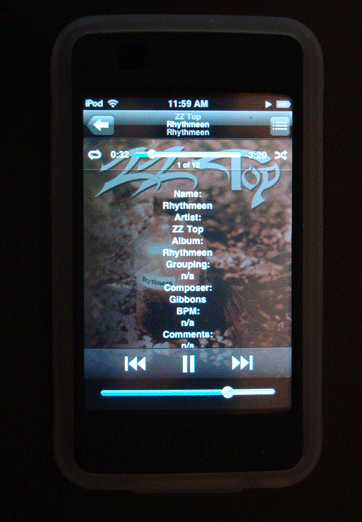
			<content:encoded><![CDATA[<p>Primarily for iPhone and iPod touch users, <a href="http://dougscripts.com/itunes/scripts/ss.php?sp=selectedtagstolyrics" title="Copy selected tags as list to Lyrics tag of selected tracks">Selected Tags to Lyrics</a> will copy any combination of <strong>Name, Artist, Album, Grouping, Composer, BPM, Comment, (Long) Description, Year and/or Bit Rate</strong> tags to the Lyrics tag of the selected tracks, such that this info will be available with a tap when the track is playing. Can append to or replace current Lyrics info.</p>
<p>Latest version accounts for <strong>description</strong> and <strong>long description</strong>, preferring the latter, and adds &#8220;year&#8221; and &#8220;bit rate&#8221; as options</p>
<hr/><small><a href="http://dougscripts.com/itunes/dougsupdated.rss" title="Take me to your reader">30 Most Recent RSS Feed</a> | <a href="http://dougscripts.com/itunes/scripts/scriptcount.php?sortBy=Name&op=y">Script Stats Page</a> by <a href="http://dougscripts.com/itunes/scripts/scriptcount.php?sortBy=Name&op=y">Name</a>, <a href="http://dougscripts.com/itunes/scripts/scriptcount.php?sortBy=Most Recent&op=y">Most Recent</a>, <a href="http://dougscripts.com/itunes/scripts/scriptcount.php?sortBy=Download Count&op=y">Download Count</a></small>]]></content:encoded>
			</item>
		<item>
		<title>UPDATE: New iPod Playlist From Selection v3.1</title>
		<link>http://dougscripts.com/itunes/2008/08/update-new-ipod-playlist-from-selection-v3-1/</link>
		<comments></comments>
		<pubDate>Sun, 17 Aug 2008 14:00:42 +0000</pubDate>
		<dc:creator>dougscripts</dc:creator>
				<category><![CDATA[AppleScript]]></category>
		<category><![CDATA[Managing Playlists]]></category>
		<category><![CDATA[Updates]]></category>
		<category><![CDATA[iPhone]]></category>
		<category><![CDATA[iPod]]></category>
		<category><![CDATA[iTunes]]></category>

		<guid isPermaLink="false">http://dougscripts.com/itunes/?p=239</guid>
		<description><![CDATA[New iPod Playlist From Selection copies selected iTunes tracks, or the tracks of a selected iTunes playlist, to a new user-named iPod playlist. Works only with iPods set to &#8220;Manually manage music and videos&#8221;, and very handily when assigned an iTunes Scripts Menu Shortcut. I use Control-Command-N.
This latest version fixes an issue with intermittent copying
]]></description>
			<content:encoded><![CDATA[<p><a href="http://dougscripts.com/itunes/scripts/ss.php?sp=newipodplaylist" title="Copy selected tracks or playlist to a new iPod playlist ">New iPod Playlist From Selection</a> copies selected iTunes tracks, or the tracks of a selected iTunes playlist, to a new user-named iPod playlist. Works only with iPods set to &#8220;Manually manage music and videos&#8221;, and very handily when assigned an <a href="http://dougscripts.com/itunes/itinfo/shortcutkeys.php" title="" target="_blank">iTunes Scripts Menu Shortcut</a>. I use Control-Command-N.</p>
<p>This latest version fixes an issue with intermittent copying</p>
<hr/><small><a href="http://dougscripts.com/itunes/dougsupdated.rss" title="Take me to your reader">30 Most Recent RSS Feed</a> | <a href="http://dougscripts.com/itunes/scripts/scriptcount.php?sortBy=Name&op=y">Script Stats Page</a> by <a href="http://dougscripts.com/itunes/scripts/scriptcount.php?sortBy=Name&op=y">Name</a>, <a href="http://dougscripts.com/itunes/scripts/scriptcount.php?sortBy=Most Recent&op=y">Most Recent</a>, <a href="http://dougscripts.com/itunes/scripts/scriptcount.php?sortBy=Download Count&op=y">Download Count</a></small>]]></content:encoded>
			</item>
		<item>
		<title>UPDATED: Lossless to AAC Workflow v2.1</title>
		<link>http://dougscripts.com/itunes/2008/08/updated-lossless-to-aac-workflow-v2-1/</link>
		<comments></comments>
		<pubDate>Sun, 17 Aug 2008 13:58:40 +0000</pubDate>
		<dc:creator>dougscripts</dc:creator>
				<category><![CDATA[AppleScript]]></category>
		<category><![CDATA[Managing Files]]></category>
		<category><![CDATA[Updates]]></category>
		<category><![CDATA[iPhone]]></category>
		<category><![CDATA[iPod]]></category>
		<category><![CDATA[iTunes]]></category>

		<guid isPermaLink="false">http://dougscripts.com/itunes/?p=241</guid>
		<description><![CDATA[Lossless to AAC Workflow is a set of two scripts which assist with importing/managing Apple Lossless audio files and sending converted AAC copies to a mounted iPod set to &#8220;manually manage songs and videos&#8221;.Lossless to AAC Workflow (CD->iPod):

Imports each enabled CD track as an Apple Lossless file
Makes a converted AAC copy of each imported Lossless [...]]]></description>
			<content:encoded><![CDATA[<p><a href="http://dougscripts.com/itunes/scripts/ss.php?sp=losslessaccworkflow" title="Two scripts assist with importing/managing Lossless files and sending converted AAC copies to iPod">Lossless to AAC Workflow</a> is a set of two scripts which assist with importing/managing Apple Lossless audio files and sending converted AAC copies to a mounted iPod set to &#8220;manually manage songs and videos&#8221;.<br/><br/><strong>Lossless to AAC Workflow (CD->iPod)</strong>:</p>
<ul>
<li>Imports each enabled CD track as an Apple Lossless file</li>
<li>Makes a converted AAC <strong>copy</strong> of each imported Lossless file</li>
<li>Adds the AAC file to iPod, <strong>deleting</strong> the original AAC from iTunes.</li>
</ul>
<p><strong>Lossless to AAC Workflow (iTunes->iPod)</strong>:</p>
<ul>
<li>Makes a converted AAC <strong>copy</strong> of each Lossless track selected in iTunes</li>
<li>Adds the AAC file to iPod, <strong>deleting</strong> the original AAC from iTunes.</li>
</ul>
<p>In this way you can keep archived Lossless files on your hard drive, and manageable AAC files on your iPod.</p>
<p>This latest version fixes an issue with intermittent copying.</p>
<hr/><small><a href="http://dougscripts.com/itunes/dougsupdated.rss" title="Take me to your reader">30 Most Recent RSS Feed</a> | <a href="http://dougscripts.com/itunes/scripts/scriptcount.php?sortBy=Name&op=y">Script Stats Page</a> by <a href="http://dougscripts.com/itunes/scripts/scriptcount.php?sortBy=Name&op=y">Name</a>, <a href="http://dougscripts.com/itunes/scripts/scriptcount.php?sortBy=Most Recent&op=y">Most Recent</a>, <a href="http://dougscripts.com/itunes/scripts/scriptcount.php?sortBy=Download Count&op=y">Download Count</a></small>]]></content:encoded>
			</item>
		<item>
		<title>UPDATED: Rip to iPod v2.1</title>
		<link>http://dougscripts.com/itunes/2008/08/updated-rip-to-ipod-v2-1/</link>
		<comments></comments>
		<pubDate>Sun, 17 Aug 2008 13:54:34 +0000</pubDate>
		<dc:creator>dougscripts</dc:creator>
				<category><![CDATA[AppleScript]]></category>
		<category><![CDATA[Managing Files]]></category>
		<category><![CDATA[Updates]]></category>
		<category><![CDATA[iPhone]]></category>
		<category><![CDATA[iPod]]></category>
		<category><![CDATA[iTunes]]></category>

		<guid isPermaLink="false">http://dougscripts.com/itunes/?p=243</guid>
		<description><![CDATA[Rip To iPod v2.1 will import each enabled (checkmarked) CD track to iTunes and immediately copy it to iPod, removing the track from the iTunes library and deleting the original file, thus giving the appearance of seamless CD-to-iPod importing. You can also change your encoder on-the-fly and your Preferences-set encoder will be restored after the [...]]]></description>
			<content:encoded><![CDATA[<p><a href="http://dougscripts.com/itunes/scripts/ss.php?sp=riptoipod" title="Rips CD tracks straight to iPod">Rip To iPod v2.1</a> will import each enabled (checkmarked) CD track to iTunes and immediately copy it to iPod, removing the track from the iTunes library and deleting the original file, thus giving the appearance of seamless CD-to-iPod importing. You can also change your encoder on-the-fly and your Preferences-set encoder will be restored after the rip. <strong>Requires</strong> that iPod be set to &#8220;Manually manage music and videos&#8221;. iPods set to sync are ignored.</p>
<p>This latest version fixes an issue with intermittent copying.</p>
<hr/><small><a href="http://dougscripts.com/itunes/dougsupdated.rss" title="Take me to your reader">30 Most Recent RSS Feed</a> | <a href="http://dougscripts.com/itunes/scripts/scriptcount.php?sortBy=Name&op=y">Script Stats Page</a> by <a href="http://dougscripts.com/itunes/scripts/scriptcount.php?sortBy=Name&op=y">Name</a>, <a href="http://dougscripts.com/itunes/scripts/scriptcount.php?sortBy=Most Recent&op=y">Most Recent</a>, <a href="http://dougscripts.com/itunes/scripts/scriptcount.php?sortBy=Download Count&op=y">Download Count</a></small>]]></content:encoded>
			</item>
		<item>
		<title>iTunes 7.7 On the Horizon</title>
		<link>http://dougscripts.com/itunes/2008/06/itunes-7-7-on-the-horizon/</link>
		<comments></comments>
		<pubDate>Mon, 09 Jun 2008 20:36:00 +0000</pubDate>
		<dc:creator>dougscripts</dc:creator>
				<category><![CDATA[Rumors]]></category>
		<category><![CDATA[iPhone]]></category>
		<category><![CDATA[iTunes]]></category>

		<guid isPermaLink="false">http://dougscripts.com/itunes/?p=303</guid>
		<description><![CDATA[The Unofficial Apple Weblog notes that the new iPhone 3G, available July 11, requires iTunes 7.7. Release date unknown, but obviously it will be before 7/11.
]]></description>
			<content:encoded><![CDATA[<p><a href="http://www.tuaw.com/2008/06/09/itunes-7-7-on-the-way/" target="_blank" title="iTunes 7.7 on the way, 20080609">The Unofficial Apple Weblog</a> notes that the <a href="http://www.apple.com/iphone/" target="_blank">new iPhone 3G</a>, available July 11, requires iTunes 7.7. Release date unknown, but obviously it will be before 7/11.</p>
<hr/><small><a href="http://dougscripts.com/itunes/dougsupdated.rss" title="Take me to your reader">30 Most Recent RSS Feed</a> | <a href="http://dougscripts.com/itunes/scripts/scriptcount.php?sortBy=Name&op=y">Script Stats Page</a> by <a href="http://dougscripts.com/itunes/scripts/scriptcount.php?sortBy=Name&op=y">Name</a>, <a href="http://dougscripts.com/itunes/scripts/scriptcount.php?sortBy=Most Recent&op=y">Most Recent</a>, <a href="http://dougscripts.com/itunes/scripts/scriptcount.php?sortBy=Download Count&op=y">Download Count</a></small>]]></content:encoded>
			</item>
		<item>
		<title>NEW: Selected Tags to Lyrics</title>
		<link>http://dougscripts.com/itunes/2008/06/new-selected-tags-to-lyrics/</link>
		<comments></comments>
		<pubDate>Thu, 05 Jun 2008 16:36:00 +0000</pubDate>
		<dc:creator>dougscripts</dc:creator>
				<category><![CDATA[AppleScript]]></category>
		<category><![CDATA[Managing Track Info]]></category>
		<category><![CDATA[New Releases]]></category>
		<category><![CDATA[iPhone]]></category>
		<category><![CDATA[iPod]]></category>

		<guid isPermaLink="false">http://dougscripts.com/itunes/?p=307</guid>
		<description><![CDATA[I never bother much with Lyrics, so I didn&#8217;t realize Lyrics for the current track on the iPhone or iPod Touch could be made visible until Far-Flung Antipodes Correspondent Jon Jong queried about putting various tags into the Lyrics tag so they could be viewed instead.Selected Tags to Lyrics will allow you to copy any [...]]]></description>
			<content:encoded><![CDATA[<p>I never bother much with Lyrics, so I didn&#8217;t realize Lyrics for the current track on the iPhone or iPod Touch could be made visible until Far-Flung Antipodes Correspondent Jon Jong queried about putting various tags into the Lyrics tag so they could be viewed instead.<br/><br/><img style="text-align:center;" src="http://dougscripts.com/itunes/pix/selectedtagstolyrics.png" /><br/><br/><a href="http://dougscripts.com/itunes/scripts/ss.php?sp=selectedtagstolyrics" title="Copy selected tags as list to Lyrics tag of selected tracks">Selected Tags to Lyrics</a> will allow you to copy any combination of the Name, Artist, Album, Grouping, Composer, BPM, Comments and/or Description of the selected tracks to the Lyrics tag of each. Tap-tap, and there you are!</p>
<hr/><small><a href="http://dougscripts.com/itunes/dougsupdated.rss" title="Take me to your reader">30 Most Recent RSS Feed</a> | <a href="http://dougscripts.com/itunes/scripts/scriptcount.php?sortBy=Name&op=y">Script Stats Page</a> by <a href="http://dougscripts.com/itunes/scripts/scriptcount.php?sortBy=Name&op=y">Name</a>, <a href="http://dougscripts.com/itunes/scripts/scriptcount.php?sortBy=Most Recent&op=y">Most Recent</a>, <a href="http://dougscripts.com/itunes/scripts/scriptcount.php?sortBy=Download Count&op=y">Download Count</a></small>]]></content:encoded>
			</item>
	</channel>
</rss>