<?xml version="1.0" encoding="UTF-8"?>
<rss version="2.0"
	xmlns:content="http://purl.org/rss/1.0/modules/content/"
	xmlns:wfw="http://wellformedweb.org/CommentAPI/"
	xmlns:dc="http://purl.org/dc/elements/1.1/"
	xmlns:atom="http://www.w3.org/2005/Atom"
	xmlns:sy="http://purl.org/rss/1.0/modules/syndication/"
	xmlns:slash="http://purl.org/rss/1.0/modules/slash/"
	>

<channel>
	<title>Doug&#039;s AppleScripts for iTunes &#187; iTunes9</title>
	<atom:link href="http://dougscripts.com/itunes/category/itunes9/feed/" rel="self" type="application/rss+xml" />
	<link>http://dougscripts.com</link>
	<description>AppleScripts for iTunes</description>
	<lastBuildDate>Sun, 13 May 2012 13:40:55 +0000</lastBuildDate>
	<generator>http://wordpress.org/?v=2.8.4</generator>
	<language>en</language>
	<sy:updatePeriod>hourly</sy:updatePeriod>
	<sy:updateFrequency>1</sy:updateFrequency>
	<cloud domain='dougscripts.com' port='80' path='/itunes/?rsscloud=notify' registerProcedure='' protocol='http-post' />
		<item>
		<title>Scripting Bug with iTunes 9.2.1?</title>
		<link>http://dougscripts.com/itunes/2010/07/scripting-bug-with-itunes-9-2-1/</link>
		<comments></comments>
		<pubDate>Sun, 25 Jul 2010 12:28:05 +0000</pubDate>
		<dc:creator>dougscripts</dc:creator>
				<category><![CDATA[Bugs]]></category>
		<category><![CDATA[iTunes9]]></category>

		<guid isPermaLink="false">http://dougscripts.com/itunes/?p=1047</guid>
		<description><![CDATA[I have received two reports over the past couple of days of some unusual behavior that occurs with iTunes 9.2.1 and some AppleScripts. After running a script that changes the track name tag, the track&#8217;s Genre tag is replaced with a number in parentheses, eg, &#8220;(10)&#8221;. In such cases, it appears that this is a [...]]]></description>
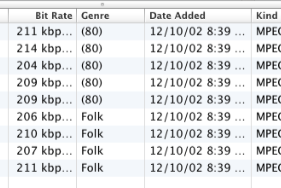
			<content:encoded><![CDATA[<p>I have received two reports over the past couple of days of some unusual behavior that occurs with iTunes 9.2.1 and some AppleScripts. After running a script that changes the track name tag, the track&#8217;s Genre tag is replaced with a number in parentheses, eg, &#8220;(10)&#8221;. In such cases, it appears that this is a number representing the specific Genre, such that Rock = 30, Jazz = 10, and so on. Like this:</p>
<p style="text-align:center;"><img src="http://dougscripts.com/itunes/pix/921genrebug.png" /></p>
<p>Each report involved a different script which until now presented no problems. Experience suggests that this is not an issue with the scripts (since nothing about the script has changed) but with iTunes.</p>
<p>I have not seen this behavior myself, but I have not yet done any rigorous testing. Since I have only received two reports at this point my guess is that this may be a problem with something else <em>and</em> iTunes; a misconfigured plug-in or background app. But that may be wishful thinking and the problem may indeed just belong to iTunes.</p>
<p>If you have seen any behavior like this please let me know as soon as you can. I&#8217;d like as much information as possible before I test and eventually report this to Apple.</p>
<p>[<strong>UPDATE</strong>: see <a href="http://dougscripts.com/itunes/2010/07/re-scripting-bug-with-itunes-9-2-1/">here for the fix</a>.]</p>
<hr/><small><a href="http://dougscripts.com/itunes/dougsupdated.rss" title="Take me to your reader">30 Most Recent RSS Feed</a> | <a href="http://dougscripts.com/itunes/scripts/scriptcount.php?sortBy=Name&op=y">Script Stats Page</a> by <a href="http://dougscripts.com/itunes/scripts/scriptcount.php?sortBy=Name&op=y">Name</a>, <a href="http://dougscripts.com/itunes/scripts/scriptcount.php?sortBy=Most Recent&op=y">Most Recent</a>, <a href="http://dougscripts.com/itunes/scripts/scriptcount.php?sortBy=Download Count&op=y">Download Count</a></small>]]></content:encoded>
			</item>
		<item>
		<title>iTunes 9.2 Now Available</title>
		<link>http://dougscripts.com/itunes/2010/06/itunes-9-2-now-available/</link>
		<comments></comments>
		<pubDate>Wed, 16 Jun 2010 21:56:42 +0000</pubDate>
		<dc:creator>dougscripts</dc:creator>
				<category><![CDATA[Updates]]></category>
		<category><![CDATA[iTunes9]]></category>

		<guid isPermaLink="false">http://dougscripts.com/itunes/?p=1021</guid>
		<description><![CDATA[Apple has made iTunes 9.2 available via Software Update. If you have the pre-release beta version that was released for devs a couple of weeks ago then you&#8217;ll have to get the official 9.2 from Apple&#8217;s iTunes download page.
]]></description>
			<content:encoded><![CDATA[<p>Apple has made iTunes 9.2 available via Software Update. If you have the pre-release beta version that was released for devs a couple of weeks ago then you&#8217;ll have to get the official 9.2 from Apple&#8217;s <a href="http://www.apple.com/itunes/download/">iTunes download</a> page.</p>
<hr/><small><a href="http://dougscripts.com/itunes/dougsupdated.rss" title="Take me to your reader">30 Most Recent RSS Feed</a> | <a href="http://dougscripts.com/itunes/scripts/scriptcount.php?sortBy=Name&op=y">Script Stats Page</a> by <a href="http://dougscripts.com/itunes/scripts/scriptcount.php?sortBy=Name&op=y">Name</a>, <a href="http://dougscripts.com/itunes/scripts/scriptcount.php?sortBy=Most Recent&op=y">Most Recent</a>, <a href="http://dougscripts.com/itunes/scripts/scriptcount.php?sortBy=Download Count&op=y">Download Count</a></small>]]></content:encoded>
			</item>
		<item>
		<title>iTunes 9.1.1 Available</title>
		<link>http://dougscripts.com/itunes/2010/04/itunes-9-1-1-available/</link>
		<comments></comments>
		<pubDate>Tue, 27 Apr 2010 21:22:24 +0000</pubDate>
		<dc:creator>dougscripts</dc:creator>
				<category><![CDATA[iTunes9]]></category>

		<guid isPermaLink="false">http://dougscripts.com/itunes/?p=1007</guid>
		<description><![CDATA[Today Apple released iTunes 9.1.1 via Software Update and its downloads page. Seems like the minor fixes are mostly related to new features introduced in v9.1.
]]></description>
			<content:encoded><![CDATA[<p>Today Apple released iTunes 9.1.1 via Software Update and its <a href="http://www.apple.com/itunes/download/">downloads page</a>. Seems like the minor fixes are mostly related to new features introduced in v9.1.</p>
<hr/><small><a href="http://dougscripts.com/itunes/dougsupdated.rss" title="Take me to your reader">30 Most Recent RSS Feed</a> | <a href="http://dougscripts.com/itunes/scripts/scriptcount.php?sortBy=Name&op=y">Script Stats Page</a> by <a href="http://dougscripts.com/itunes/scripts/scriptcount.php?sortBy=Name&op=y">Name</a>, <a href="http://dougscripts.com/itunes/scripts/scriptcount.php?sortBy=Most Recent&op=y">Most Recent</a>, <a href="http://dougscripts.com/itunes/scripts/scriptcount.php?sortBy=Download Count&op=y">Download Count</a></small>]]></content:encoded>
			</item>
		<item>
		<title>UPDATED: Change Pitch of Song v2.0</title>
		<link>http://dougscripts.com/itunes/2010/04/updated-change-pitch-of-song-v2-0/</link>
		<comments></comments>
		<pubDate>Fri, 09 Apr 2010 12:54:41 +0000</pubDate>
		<dc:creator>dougscripts</dc:creator>
				<category><![CDATA[QuickTime]]></category>
		<category><![CDATA[With Other Apps]]></category>
		<category><![CDATA[iTunes9]]></category>

		<guid isPermaLink="false">http://dougscripts.com/itunes/?p=993</guid>
		<description><![CDATA[Change Pitch of Song v2.0 will open the currently playing iTunes track in QuickTime Player 7 which will then continue to play it using user-entered pitch control settings.
This version now works in Snow Leopard but QuickTime Player 7 must be installed&#8211;even if QuickTime Player X is also installed. QTPX does not (yet) have the AppleScript [...]]]></description>
			<content:encoded><![CDATA[<p><a href="http://dougscripts.com/itunes/scripts/ss.php?sp=changepitch" title="Use QuickTime to change the pitch of selected tracks">Change Pitch of Song</a> v2.0 will open the currently playing iTunes track in QuickTime Player 7 which will then continue to play it using user-entered pitch control settings.</p>
<p>This version now works in Snow Leopard but QuickTime Player 7 must be installed&#8211;even if QuickTime Player X is also installed. QTPX does not (yet) have the AppleScript support to use this script. QTP7 can be installed from the &#8220;Optional Installs&#8221; folder on your Snow Leopard installation disc. It will be installed in your <em>/Applications/Utilities/</em> folder.</p>
<hr/><small><a href="http://dougscripts.com/itunes/dougsupdated.rss" title="Take me to your reader">30 Most Recent RSS Feed</a> | <a href="http://dougscripts.com/itunes/scripts/scriptcount.php?sortBy=Name&op=y">Script Stats Page</a> by <a href="http://dougscripts.com/itunes/scripts/scriptcount.php?sortBy=Name&op=y">Name</a>, <a href="http://dougscripts.com/itunes/scripts/scriptcount.php?sortBy=Most Recent&op=y">Most Recent</a>, <a href="http://dougscripts.com/itunes/scripts/scriptcount.php?sortBy=Download Count&op=y">Download Count</a></small>]]></content:encoded>
			</item>
		<item>
		<title>No More Mute</title>
		<link>http://dougscripts.com/itunes/2010/04/no-more-mute/</link>
		<comments></comments>
		<pubDate>Thu, 08 Apr 2010 10:57:23 +0000</pubDate>
		<dc:creator>dougscripts</dc:creator>
				<category><![CDATA[iTunes]]></category>
		<category><![CDATA[iTunes9]]></category>

		<guid isPermaLink="false">http://dougscripts.com/itunes/?p=987</guid>
		<description><![CDATA[I just noticed that &#8220;Mute&#8221; has been removed from iTunes&#8217; contextual menu in the Dock as of iTunes v9.1. Man, that was handy. Of course, a script hooked up to a shortcut does the job:

tell application "iTunes" to set mute to (not mute)


I&#8217;m pretty sure there is no other on-board control to toggle mute otherwise.
]]></description>
			<content:encoded><![CDATA[<p>I just noticed that &#8220;Mute&#8221; has been removed from iTunes&#8217; contextual menu in the Dock as of iTunes v9.1. Man, that was handy. Of course, a <a href="http://dougscripts.com/itunes/scripts/missingmenu.php#1072">script</a> hooked up to a <a href="http://dougscripts.com/itunes/itinfo/shortcutkeys.php">shortcut</a> does the job:</p>
<pre style="margin-bottom:1em;">
tell <span style="color:blue;">application</span> "iTunes" to set <span style="color:blue;">mute</span> to (not <span style="color:blue;">mute</span>)

<a href="applescript://com.apple.scripteditor?action=new&#038;script=tell application %22iTunes%22 to set mute to %28not mute%29" title="Open in Script Editor. Works via most modern Mac browsers."><img src="http://dougscripts.com/itunes/pix/clickscriptsmall.jpg" alt="" /></a>
</pre>
<p>I&#8217;m pretty sure there is no other on-board control to toggle mute otherwise.</p>
<hr/><small><a href="http://dougscripts.com/itunes/dougsupdated.rss" title="Take me to your reader">30 Most Recent RSS Feed</a> | <a href="http://dougscripts.com/itunes/scripts/scriptcount.php?sortBy=Name&op=y">Script Stats Page</a> by <a href="http://dougscripts.com/itunes/scripts/scriptcount.php?sortBy=Name&op=y">Name</a>, <a href="http://dougscripts.com/itunes/scripts/scriptcount.php?sortBy=Most Recent&op=y">Most Recent</a>, <a href="http://dougscripts.com/itunes/scripts/scriptcount.php?sortBy=Download Count&op=y">Download Count</a></small>]]></content:encoded>
			</item>
		<item>
		<title>iTunes 9.1 &#8211; Author column</title>
		<link>http://dougscripts.com/itunes/2010/03/itunes-9-1-author-column/</link>
		<comments></comments>
		<pubDate>Wed, 31 Mar 2010 12:15:08 +0000</pubDate>
		<dc:creator>dougscripts</dc:creator>
				<category><![CDATA[Books]]></category>
		<category><![CDATA[iTunes9]]></category>

		<guid isPermaLink="false">http://dougscripts.com/itunes/?p=977</guid>
		<description><![CDATA[In View Options for Books, the &#8220;Genre&#8221; column has been removed, and the &#8220;Artist&#8221; column appears to be renamed as &#8220;Author&#8221;. In AppleScript it looks like the &#8220;Author&#8221; is accessible as a book track&#8217;s artist. Also, FWIW, I&#8217;m not seeing my &#8220;Jeeves&#8221; ePub book in the XML.
]]></description>
			<content:encoded><![CDATA[<p>In View Options for Books, the &#8220;Genre&#8221; column has been removed, and the &#8220;Artist&#8221; column appears to be renamed as &#8220;Author&#8221;. In AppleScript it looks like the &#8220;Author&#8221; is accessible as a book track&#8217;s <strong>artist</strong>. Also, FWIW, I&#8217;m not seeing my &#8220;Jeeves&#8221; ePub book in the XML.</p>
<hr/><small><a href="http://dougscripts.com/itunes/dougsupdated.rss" title="Take me to your reader">30 Most Recent RSS Feed</a> | <a href="http://dougscripts.com/itunes/scripts/scriptcount.php?sortBy=Name&op=y">Script Stats Page</a> by <a href="http://dougscripts.com/itunes/scripts/scriptcount.php?sortBy=Name&op=y">Name</a>, <a href="http://dougscripts.com/itunes/scripts/scriptcount.php?sortBy=Most Recent&op=y">Most Recent</a>, <a href="http://dougscripts.com/itunes/scripts/scriptcount.php?sortBy=Download Count&op=y">Download Count</a></small>]]></content:encoded>
			</item>
		<item>
		<title>UPDATED: Append to Selected Tag v2.1</title>
		<link>http://dougscripts.com/itunes/2010/03/updated-append-to-selected-tag-v2-1/</link>
		<comments></comments>
		<pubDate>Wed, 31 Mar 2010 03:21:43 +0000</pubDate>
		<dc:creator>dougscripts</dc:creator>
				<category><![CDATA[Managing Track Info]]></category>
		<category><![CDATA[iTunes9]]></category>

		<guid isPermaLink="false">http://dougscripts.com/itunes/?p=973</guid>
		<description><![CDATA[Append to Selected Tag got an update to v2.1. A couple of days ago when I posted v2.0 I left out a line of code that prevented the thing from working most of the time. Thanks to Correspondent David R. for bringing it to my attention.
]]></description>
			<content:encoded><![CDATA[<p><a href="http://dougscripts.com/itunes/scripts/ss.php?sp=appendtoselectedtag" title="Append user-entered text to beginning or ending of selected tag of each selected track">Append to Selected Tag</a> got an update to v2.1. A couple of days ago when I posted v2.0 I left out a line of code that prevented the thing from working most of the time. Thanks to Correspondent David R. for bringing it to my attention.</p>
<hr/><small><a href="http://dougscripts.com/itunes/dougsupdated.rss" title="Take me to your reader">30 Most Recent RSS Feed</a> | <a href="http://dougscripts.com/itunes/scripts/scriptcount.php?sortBy=Name&op=y">Script Stats Page</a> by <a href="http://dougscripts.com/itunes/scripts/scriptcount.php?sortBy=Name&op=y">Name</a>, <a href="http://dougscripts.com/itunes/scripts/scriptcount.php?sortBy=Most Recent&op=y">Most Recent</a>, <a href="http://dougscripts.com/itunes/scripts/scriptcount.php?sortBy=Download Count&op=y">Download Count</a></small>]]></content:encoded>
			</item>
		<item>
		<title>iTunes 9.1 &#8211; I Got It Wrong</title>
		<link>http://dougscripts.com/itunes/2010/03/itunes-9-1-i-got-it-wrong/</link>
		<comments></comments>
		<pubDate>Wed, 31 Mar 2010 03:01:28 +0000</pubDate>
		<dc:creator>dougscripts</dc:creator>
				<category><![CDATA[iTunes9]]></category>

		<guid isPermaLink="false">http://dougscripts.com/itunes/?p=969</guid>
		<description><![CDATA[After a re-start, sure enough, AppleScript Application Bundles are back in the menu.
]]></description>
			<content:encoded><![CDATA[<p>After a re-start, sure enough, AppleScript Application Bundles are back in the menu.</p>
<hr/><small><a href="http://dougscripts.com/itunes/dougsupdated.rss" title="Take me to your reader">30 Most Recent RSS Feed</a> | <a href="http://dougscripts.com/itunes/scripts/scriptcount.php?sortBy=Name&op=y">Script Stats Page</a> by <a href="http://dougscripts.com/itunes/scripts/scriptcount.php?sortBy=Name&op=y">Name</a>, <a href="http://dougscripts.com/itunes/scripts/scriptcount.php?sortBy=Most Recent&op=y">Most Recent</a>, <a href="http://dougscripts.com/itunes/scripts/scriptcount.php?sortBy=Download Count&op=y">Download Count</a></small>]]></content:encoded>
			</item>
		<item>
		<title>iTunes 9.1 &#8211; Books</title>
		<link>http://dougscripts.com/itunes/2010/03/itunes-9-1-books/</link>
		<comments></comments>
		<pubDate>Tue, 30 Mar 2010 23:43:10 +0000</pubDate>
		<dc:creator>dougscripts</dc:creator>
				<category><![CDATA[Books]]></category>
		<category><![CDATA[Updates]]></category>
		<category><![CDATA[iTunes9]]></category>

		<guid isPermaLink="false">http://dougscripts.com/itunes/?p=957</guid>
		<description><![CDATA[Following Kirk&#8217;s tip, I downloaded a version of P.G. Wodehouse&#8217;s &#8220;Right Ho, Jeeves&#8221; from Gutenberg, added it to iTunes, and did some &#8217;script to it.
It behaves like a track in that it has most of the same properties, can be copied to playlists, and so on. The track kind of a track-that-is-a book is &#8220;Book&#8221;, [...]]]></description>
			<content:encoded><![CDATA[<p>Following <a href="http://www.mcelhearn.com/2010/03/30/itunes-9-1-now-accepts-books-in-epub-format/">Kirk&#8217;s tip</a>, I downloaded a version of P.G. Wodehouse&#8217;s &#8220;Right Ho, Jeeves&#8221; from Gutenberg, added it to iTunes, and did some &#8217;script to it.</p>
<p>It behaves like a <strong>track</strong> in that it has most of the same properties, can be copied to playlists, and so on. The track <strong>kind</strong> of a track-that-is-a book is &#8220;Book&#8221;, at least my Wodehouse book&#8217;s is &#8220;Book&#8221;.  Properties that don&#8217;t apply to &#8220;bookness&#8221;, such as <strong>start</strong> and <strong>finish</strong>, <strong>time</strong>, and so on, return zero or null values. Still, some operations you would perform on a music track will error when you run them on a book track, eg: setting the <strong>lyrics</strong> property.</p>
<p>Books can have <strong>artwork</strong>. And&#8212;perhaps obviously&#8212;Books can&#8217;t be copied to an iPod/iPhone.</p>
<p>More as it develops.</p>
<p>[UPDATE: the <strong>kind</strong> of a book track may actually vary depending on the, uh, kind of book. That is, if iTunes "knows" it's a book from iBooks, then the kind may be "Purchased iBook" for all I know.]</p>
<hr/><small><a href="http://dougscripts.com/itunes/dougsupdated.rss" title="Take me to your reader">30 Most Recent RSS Feed</a> | <a href="http://dougscripts.com/itunes/scripts/scriptcount.php?sortBy=Name&op=y">Script Stats Page</a> by <a href="http://dougscripts.com/itunes/scripts/scriptcount.php?sortBy=Name&op=y">Name</a>, <a href="http://dougscripts.com/itunes/scripts/scriptcount.php?sortBy=Most Recent&op=y">Most Recent</a>, <a href="http://dougscripts.com/itunes/scripts/scriptcount.php?sortBy=Download Count&op=y">Download Count</a></small>]]></content:encoded>
			</item>
		<item>
		<title>iTunes 9.1 &#8211; Books folder</title>
		<link>http://dougscripts.com/itunes/2010/03/itunes-9-1-books-folder/</link>
		<comments></comments>
		<pubDate>Tue, 30 Mar 2010 22:54:18 +0000</pubDate>
		<dc:creator>dougscripts</dc:creator>
				<category><![CDATA[Books]]></category>
		<category><![CDATA[iTunes9]]></category>

		<guid isPermaLink="false">http://dougscripts.com/itunes/?p=953</guid>
		<description><![CDATA[Kirk confirms a Books folder in the iTunes Media folder. He explains how he actually got an ePub book into his library.
]]></description>
			<content:encoded><![CDATA[<p>Kirk <a href="http://www.mcelhearn.com/2010/03/30/itunes-9-1-now-accepts-books-in-epub-format/">confirms</a> a Books folder in the iTunes Media folder. He explains how he actually got an ePub book into his library.</p>
<hr/><small><a href="http://dougscripts.com/itunes/dougsupdated.rss" title="Take me to your reader">30 Most Recent RSS Feed</a> | <a href="http://dougscripts.com/itunes/scripts/scriptcount.php?sortBy=Name&op=y">Script Stats Page</a> by <a href="http://dougscripts.com/itunes/scripts/scriptcount.php?sortBy=Name&op=y">Name</a>, <a href="http://dougscripts.com/itunes/scripts/scriptcount.php?sortBy=Most Recent&op=y">Most Recent</a>, <a href="http://dougscripts.com/itunes/scripts/scriptcount.php?sortBy=Download Count&op=y">Download Count</a></small>]]></content:encoded>
			</item>
	</channel>
</rss>