<?xml version="1.0" encoding="UTF-8"?>
<rss version="2.0"
	xmlns:content="http://purl.org/rss/1.0/modules/content/"
	xmlns:wfw="http://wellformedweb.org/CommentAPI/"
	xmlns:dc="http://purl.org/dc/elements/1.1/"
	xmlns:atom="http://www.w3.org/2005/Atom"
	xmlns:sy="http://purl.org/rss/1.0/modules/syndication/"
	xmlns:slash="http://purl.org/rss/1.0/modules/slash/"
	>

<channel>
	<title>Doug&#039;s AppleScripts for iTunes &#187; Managing Artwork</title>
	<atom:link href="http://dougscripts.com/itunes/category/managing-artwork/feed/" rel="self" type="application/rss+xml" />
	<link>http://dougscripts.com</link>
	<description>AppleScripts for iTunes</description>
	<lastBuildDate>Thu, 09 Feb 2012 15:10:46 +0000</lastBuildDate>
	<generator>http://wordpress.org/?v=2.8.4</generator>
	<language>en</language>
	<sy:updatePeriod>hourly</sy:updatePeriod>
	<sy:updateFrequency>1</sy:updateFrequency>
	<cloud domain='dougscripts.com' port='80' path='/itunes/?rsscloud=notify' registerProcedure='' protocol='http-post' />
		<item>
		<title>UPDATED: Restore Artwork from Album Folder v2.1</title>
		<link>http://dougscripts.com/itunes/2011/12/updated-restore-artwork-from-album-folder-v2-1/</link>
		<comments></comments>
		<pubDate>Wed, 07 Dec 2011 15:31:34 +0000</pubDate>
		<dc:creator>dougscripts</dc:creator>
				<category><![CDATA[Cocoa-AppleScript]]></category>
		<category><![CDATA[Managing Artwork]]></category>

		<guid isPermaLink="false">http://dougscripts.com/itunes/?p=1441</guid>
		<description><![CDATA[Restore Artwork from Album Folder v2.1 will look for an image file in the parent folder of each selected track&#8217;s file&#8212;presumably its &#8220;Album&#8221; folder&#8212;and apply the data from that image file as artwork for the track.
This latest version addresses an issue whereby the script stalls when no image file is found and logs folders without [...]]]></description>
			<content:encoded><![CDATA[<p><a href="http://dougscripts.com/itunes/scripts/ss.php?sp=restorealbumart" title="Restore each selected track's artwork from an image file stored in its Album folder">Restore Artwork from Album Folder</a> v2.1 will look for an image file in the parent folder of each selected track&#8217;s file&#8212;presumably its &#8220;Album&#8221; folder&#8212;and apply the data from that image file as artwork for the track.</p>
<p>This latest version addresses an issue whereby the script stalls when no image file is found and logs folders without image file to Console.</p>
<hr/><small><a href="http://dougscripts.com/itunes/dougsupdated.rss" title="Take me to your reader">30 Most Recent RSS Feed</a> | <a href="http://dougscripts.com/itunes/scripts/scriptcount.php?sortBy=Name&op=y">Script Stats Page</a> by <a href="http://dougscripts.com/itunes/scripts/scriptcount.php?sortBy=Name&op=y">Name</a>, <a href="http://dougscripts.com/itunes/scripts/scriptcount.php?sortBy=Most Recent&op=y">Most Recent</a>, <a href="http://dougscripts.com/itunes/scripts/scriptcount.php?sortBy=Download Count&op=y">Download Count</a></small>]]></content:encoded>
			</item>
		<item>
		<title>Artwork Bug in iTunes 10.4 Lion, continued</title>
		<link>http://dougscripts.com/itunes/2011/08/artwork-bug-in-itunes-10-4-lion-continued/</link>
		<comments></comments>
		<pubDate>Mon, 15 Aug 2011 14:28:02 +0000</pubDate>
		<dc:creator>dougscripts</dc:creator>
				<category><![CDATA[Managing Artwork]]></category>

		<guid isPermaLink="false">http://dougscripts.com/itunes/?p=1350</guid>
		<description><![CDATA[Regarding this note about a possible artwork bug with iTunes 10.4: There are a couple of responses to a query I made about it at Macintouch. It seems like the image data will &#8220;travel&#8221; with a file, but simply will not display as a file&#8217;s Finder icon in Lion.
]]></description>
			<content:encoded><![CDATA[<p>Regarding <a href="http://dougscripts.com/itunes/2011/08/artwork-bug-in-itunes-10-4-lion/">this note</a> about a possible artwork bug with iTunes 10.4: There are a couple of responses to a query I made about it at <a href="http://www.macintouch.com/readerreports/itunes10/index.html#d12aug2011">Macintouch</a>. It seems like the image data will &#8220;travel&#8221; with a file, but simply will not display as a file&#8217;s Finder icon in Lion.</p>
<hr/><small><a href="http://dougscripts.com/itunes/dougsupdated.rss" title="Take me to your reader">30 Most Recent RSS Feed</a> | <a href="http://dougscripts.com/itunes/scripts/scriptcount.php?sortBy=Name&op=y">Script Stats Page</a> by <a href="http://dougscripts.com/itunes/scripts/scriptcount.php?sortBy=Name&op=y">Name</a>, <a href="http://dougscripts.com/itunes/scripts/scriptcount.php?sortBy=Most Recent&op=y">Most Recent</a>, <a href="http://dougscripts.com/itunes/scripts/scriptcount.php?sortBy=Download Count&op=y">Download Count</a></small>]]></content:encoded>
			</item>
		<item>
		<title>Artwork Bug in iTunes 10.4 Lion?</title>
		<link>http://dougscripts.com/itunes/2011/08/artwork-bug-in-itunes-10-4-lion/</link>
		<comments></comments>
		<pubDate>Wed, 10 Aug 2011 13:36:04 +0000</pubDate>
		<dc:creator>dougscripts</dc:creator>
				<category><![CDATA[Lion]]></category>
		<category><![CDATA[Managing Artwork]]></category>
		<category><![CDATA[iTunes 10]]></category>

		<guid isPermaLink="false">http://dougscripts.com/itunes/?p=1344</guid>
		<description><![CDATA[I hadn&#8217;t had time to do much research on this because my head&#8217;s been in other projects, but after some tests this morning it really looks like there is a bug with adding new artwork to tracks in iTunes 10.4 running under Lion. Perhaps this is old news for some. I&#8217;ve been getting various email [...]]]></description>
			<content:encoded><![CDATA[<p>I hadn&#8217;t had time to do much research on this because my head&#8217;s been in other projects, but after some tests this morning it really looks like there is a bug with adding new artwork to tracks in iTunes 10.4 running under Lion. Perhaps this is old news for some. I&#8217;ve been getting various email reports of this, but no one ever has the same story, which makes it difficult to piece things together. The problem seems to be: while new artwork will display in iTunes, it does not travel with the file (eg, when copying to another Home Shared iTunes) nor does the Finder icon of the track&#8217;s file display the artwork. Seems like the image data isn&#8217;t being written to the file. Doesn&#8217;t seem to be a problem with iTunes 10.4 in Snow Leopard, though. There&#8217;s no homemade fix that I am aware of so we&#8217;ll have to wait to see if Apple does something about it.</p>
<hr/><small><a href="http://dougscripts.com/itunes/dougsupdated.rss" title="Take me to your reader">30 Most Recent RSS Feed</a> | <a href="http://dougscripts.com/itunes/scripts/scriptcount.php?sortBy=Name&op=y">Script Stats Page</a> by <a href="http://dougscripts.com/itunes/scripts/scriptcount.php?sortBy=Name&op=y">Name</a>, <a href="http://dougscripts.com/itunes/scripts/scriptcount.php?sortBy=Most Recent&op=y">Most Recent</a>, <a href="http://dougscripts.com/itunes/scripts/scriptcount.php?sortBy=Download Count&op=y">Download Count</a></small>]]></content:encoded>
			</item>
		<item>
		<title>NEW: Re-Embed Artwork</title>
		<link>http://dougscripts.com/itunes/2011/07/new-re-embed-artwork/</link>
		<comments></comments>
		<pubDate>Thu, 28 Jul 2011 16:27:47 +0000</pubDate>
		<dc:creator>dougscripts</dc:creator>
				<category><![CDATA[Cocoa-AppleScript]]></category>
		<category><![CDATA[Managing Artwork]]></category>

		<guid isPermaLink="false">http://dougscripts.com/itunes/?p=1336</guid>
		<description><![CDATA[I got suspicious when I received a few emails reporting that the popular Embed Artwork script wasn&#8217;t working in Lion. At first I presumed it was because iTunes wasn&#8217;t aware that artwork had been downloaded, which the script detects from a track&#8217;s downloaded property. But it appears that it just doesn&#8217;t work in Lion.
So, I [...]]]></description>
			<content:encoded><![CDATA[<p>I got suspicious when I received a few emails reporting that the popular Embed Artwork script wasn&#8217;t working in Lion. At first I presumed it was because iTunes wasn&#8217;t aware that artwork had been downloaded, which the script detects from a track&#8217;s <strong>downloaded</strong> property. But it appears that it just doesn&#8217;t work in Lion.</p>
<p>So, I wrote <a href="http://dougscripts.com/itunes/scripts/ss.php?sp=reembedartwork" title="Exports and the re-imports selected tracks' artwork">Re-Embed Artwork</a>, which sort of does the same thing by going the long way around: it exports the image data from a track with artwork as a file and then re-imports it. The image data then appears as the icon for the track&#8217;s file.</p>
<p>This particular script is a Cocoa-AppleScript applet that can only run in 10.6 and 10.7, but you&#8217;ll only need to use it in 10.7.</p>
<hr/><small><a href="http://dougscripts.com/itunes/dougsupdated.rss" title="Take me to your reader">30 Most Recent RSS Feed</a> | <a href="http://dougscripts.com/itunes/scripts/scriptcount.php?sortBy=Name&op=y">Script Stats Page</a> by <a href="http://dougscripts.com/itunes/scripts/scriptcount.php?sortBy=Name&op=y">Name</a>, <a href="http://dougscripts.com/itunes/scripts/scriptcount.php?sortBy=Most Recent&op=y">Most Recent</a>, <a href="http://dougscripts.com/itunes/scripts/scriptcount.php?sortBy=Download Count&op=y">Download Count</a></small>]]></content:encoded>
			</item>
		<item>
		<title>UPDATED: Restore Artwork from Album Folder v2.0</title>
		<link>http://dougscripts.com/itunes/2011/07/updated-restore-artwork-from-album-folder-v2-0/</link>
		<comments></comments>
		<pubDate>Thu, 28 Jul 2011 13:20:31 +0000</pubDate>
		<dc:creator>dougscripts</dc:creator>
				<category><![CDATA[Cocoa-AppleScript]]></category>
		<category><![CDATA[Managing Artwork]]></category>
		<category><![CDATA[Updates]]></category>

		<guid isPermaLink="false">http://dougscripts.com/itunes/?p=1332</guid>
		<description><![CDATA[Restore Artwork from Album Folder v2.0  will look for an image file in the parent folder of each selected track&#8217;s file&#8211;presumably its &#8220;Album&#8221; folder&#8211;and apply the data from that image file as artwork for the track.
Requires iTunes 10.3 or better. This latest version is a Cocoa-AppleScript applet for OS X 10.6 and 10.7 only. [...]]]></description>
			<content:encoded><![CDATA[<p><a href="http://dougscripts.com/itunes/scripts/ss.php?sp=restorealbumart" title="Restore each selected track's artwork from an image file stored in its Album folder">Restore Artwork from Album Folder</a> v2.0  will look for an image file in the parent folder of each selected track&#8217;s file&#8211;presumably its &#8220;Album&#8221; folder&#8211;and apply the data from that image file as artwork for the track.</p>
<p>Requires iTunes 10.3 or better. This latest version is a Cocoa-AppleScript applet for OS X 10.6 and 10.7 only. The previous version is available at the script&#8217;s <a href="http://dougscripts.com/itunes/scripts/ss.php?sp=restorealbumart" title="Restore each selected track's artwork from an image file stored in its Album folder">entry</a> page.</p>
<hr/><small><a href="http://dougscripts.com/itunes/dougsupdated.rss" title="Take me to your reader">30 Most Recent RSS Feed</a> | <a href="http://dougscripts.com/itunes/scripts/scriptcount.php?sortBy=Name&op=y">Script Stats Page</a> by <a href="http://dougscripts.com/itunes/scripts/scriptcount.php?sortBy=Name&op=y">Name</a>, <a href="http://dougscripts.com/itunes/scripts/scriptcount.php?sortBy=Most Recent&op=y">Most Recent</a>, <a href="http://dougscripts.com/itunes/scripts/scriptcount.php?sortBy=Download Count&op=y">Download Count</a></small>]]></content:encoded>
			</item>
		<item>
		<title>Bevy of Updates</title>
		<link>http://dougscripts.com/itunes/2011/07/bevy-of-updates/</link>
		<comments></comments>
		<pubDate>Wed, 27 Jul 2011 13:22:41 +0000</pubDate>
		<dc:creator>dougscripts</dc:creator>
				<category><![CDATA[Lion]]></category>
		<category><![CDATA[Managing Artwork]]></category>
		<category><![CDATA[Managing Files]]></category>
		<category><![CDATA[Managing Track Info]]></category>
		<category><![CDATA[Updates]]></category>

		<guid isPermaLink="false">http://dougscripts.com/itunes/?p=1324</guid>
		<description><![CDATA[I&#8217;ve just updated the last batch of scripts most recently posted to account for iTunes&#8217; full-screen mode in Lion. My good friend Kirk McElhearn is a devoted iTunes-in-full-screen-mode user and he describes the situation so elegantly that you might as well read about it at his site.
The latest scripts re-posted with quick updates are: Super [...]]]></description>
			<content:encoded><![CDATA[<p>I&#8217;ve just updated the last batch of scripts most recently posted to account for iTunes&#8217; full-screen mode in Lion. My good friend Kirk McElhearn is a devoted iTunes-in-full-screen-mode user and he <a href="http://www.mcelhearn.com/2011/07/26/itunes-full-screen-view-and-applescript-applets/">describes the situation so elegantly</a> that you might as well read about it at his site.</p>
<p>The latest scripts re-posted with quick updates are: <a href="http://dougscripts.com/itunes/scripts/ss.php?sp=removedeadsuper" title="Remove missing (!) tracks from entire Library">Super Remove Dead Tracks</a> v3.1, <a href="http://dougscripts.com/itunes/scripts/ss.php?sp=removenchars" title="Delete characters from the beginning or ending of selected tracks' name, artist, album, comments, composer, or show tags">Remove n Characters From Front or Back</a> v4.1, <a href="http://dougscripts.com/itunes/scripts/ss.php?sp=savealbumart" title="Export artwork of selected tracks to parent or specified folder">Save Album Art to Album Folder</a> v4.1, <a href="http://dougscripts.com/itunes/scripts/ss.php?sp=savealbumartjpeg" title="Export album artwork as folder.jpg to Album folder">Save Album Art as folder.jpg</a> v2.1, and <a href="http://dougscripts.com/itunes/scripts/ss.php?sp=reapplydownsized" title="Resample selected tracks' artwork to user-set size limit">Re-Apply Downsized Artwork</a> v2.1.</p>
<p>So, if you picked any of those up in the past couple of days, you may want to re-up to the latest versions.</p>
<hr/><small><a href="http://dougscripts.com/itunes/dougsupdated.rss" title="Take me to your reader">30 Most Recent RSS Feed</a> | <a href="http://dougscripts.com/itunes/scripts/scriptcount.php?sortBy=Name&op=y">Script Stats Page</a> by <a href="http://dougscripts.com/itunes/scripts/scriptcount.php?sortBy=Name&op=y">Name</a>, <a href="http://dougscripts.com/itunes/scripts/scriptcount.php?sortBy=Most Recent&op=y">Most Recent</a>, <a href="http://dougscripts.com/itunes/scripts/scriptcount.php?sortBy=Download Count&op=y">Download Count</a></small>]]></content:encoded>
			</item>
		<item>
		<title>UPDATED: Re-Apply Downsized Artwork</title>
		<link>http://dougscripts.com/itunes/2011/07/updated-re-apply-downsized-artwork/</link>
		<comments></comments>
		<pubDate>Sat, 23 Jul 2011 16:12:47 +0000</pubDate>
		<dc:creator>dougscripts</dc:creator>
				<category><![CDATA[Cocoa-AppleScript]]></category>
		<category><![CDATA[Managing Artwork]]></category>
		<category><![CDATA[Updates]]></category>

		<guid isPermaLink="false">http://dougscripts.com/itunes/?p=1318</guid>
		<description><![CDATA[Re-Apply Downsized Artwork v2.0 will examine the display artwork of each selected track and if greater than a user-set default size (n x n) will resample the image to that default size. Artwork already at the default size or smaller will not be affected.
This latest version is written as a Cocoa-AppleScript Applet for OS X [...]]]></description>
			<content:encoded><![CDATA[<p><a href="http://dougscripts.com/itunes/scripts/ss.php?sp=reapplydownsized" title="Resample selected tracks' artwork to user-set size limit">Re-Apply Downsized Artwork</a> v2.0 will examine the display artwork of <strong>each selected track</strong> and if greater than a user-set default size (n x n) will resample the image to that default size. Artwork already at the default size or smaller will not be affected.</p>
<p>This latest version is written as a Cocoa-AppleScript Applet for OS X 10.6 and 10.7 only. It has an improved progress indicator and is generally faster.</p>
<hr/><small><a href="http://dougscripts.com/itunes/dougsupdated.rss" title="Take me to your reader">30 Most Recent RSS Feed</a> | <a href="http://dougscripts.com/itunes/scripts/scriptcount.php?sortBy=Name&op=y">Script Stats Page</a> by <a href="http://dougscripts.com/itunes/scripts/scriptcount.php?sortBy=Name&op=y">Name</a>, <a href="http://dougscripts.com/itunes/scripts/scriptcount.php?sortBy=Most Recent&op=y">Most Recent</a>, <a href="http://dougscripts.com/itunes/scripts/scriptcount.php?sortBy=Download Count&op=y">Download Count</a></small>]]></content:encoded>
			</item>
		<item>
		<title>UPDATED: Save Album Art as folder.jpg v2.0</title>
		<link>http://dougscripts.com/itunes/2011/07/updated-save-album-art-as-folder-jpg-v2-0/</link>
		<comments></comments>
		<pubDate>Fri, 22 Jul 2011 14:21:18 +0000</pubDate>
		<dc:creator>dougscripts</dc:creator>
				<category><![CDATA[Cocoa-AppleScript]]></category>
		<category><![CDATA[Managing Artwork]]></category>
		<category><![CDATA[Updates]]></category>

		<guid isPermaLink="false">http://dougscripts.com/itunes/?p=1300</guid>
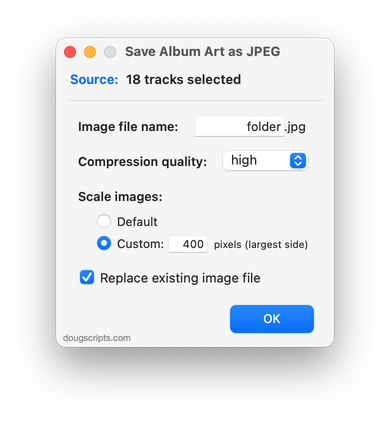
		<description><![CDATA[Save Album Art as folder.jpg v2.0 will export the artwork of the selected tracks or tracks in the selected playlist as a JPEG image file named folder.jpg to the folder which contains each selected track&#8217;s file&#8211;presumably the track&#8217;s Album folder. Many third-party music players and systems (Sonos, for example) may look for a &#8220;folder.jpg&#8221; file [...]]]></description>
			<content:encoded><![CDATA[<p><a href="http://dougscripts.com/itunes/scripts/ss.php?sp=savealbumartjpeg" title="Export album artwork as folder.jpg to Album folder">Save Album Art as folder.jpg</a> v2.0 will export the artwork of the <strong>selected tracks</strong> or tracks in the <strong>selected playlist</strong> as a JPEG image file named <em>folder.jpg</em> to the folder which contains each selected track&#8217;s file&#8211;presumably the track&#8217;s Album folder. Many third-party music players and systems (<a href="https://sonos.custhelp.com/cgi-bin/sonos.cfg/php/enduser/std_adp.php?p_faqid=59">Sonos</a>, for example) may look for a &#8220;folder.jpg&#8221; file here to use as display artwork.</p>
<p>This latest version is written as a Cocoa-AppleScript Applet and can only run on OS X 10.6 and 10.7 systems (the previous universal version is available from the script&#8217;s entry page). It consolidates all settings into a single preferences pane.</p>
<hr/><small><a href="http://dougscripts.com/itunes/dougsupdated.rss" title="Take me to your reader">30 Most Recent RSS Feed</a> | <a href="http://dougscripts.com/itunes/scripts/scriptcount.php?sortBy=Name&op=y">Script Stats Page</a> by <a href="http://dougscripts.com/itunes/scripts/scriptcount.php?sortBy=Name&op=y">Name</a>, <a href="http://dougscripts.com/itunes/scripts/scriptcount.php?sortBy=Most Recent&op=y">Most Recent</a>, <a href="http://dougscripts.com/itunes/scripts/scriptcount.php?sortBy=Download Count&op=y">Download Count</a></small>]]></content:encoded>
			</item>
		<item>
		<title>UPDATED: Save Album Art to Album Folder v4.0</title>
		<link>http://dougscripts.com/itunes/2011/07/updated-save-album-art-to-album-folder-v4-0/</link>
		<comments></comments>
		<pubDate>Thu, 21 Jul 2011 15:35:03 +0000</pubDate>
		<dc:creator>dougscripts</dc:creator>
				<category><![CDATA[Cocoa-AppleScript]]></category>
		<category><![CDATA[Managing Artwork]]></category>
		<category><![CDATA[Updates]]></category>

		<guid isPermaLink="false">http://dougscripts.com/itunes/?p=1298</guid>
		<description><![CDATA[Save Album Art to Album Folder v4.0 is a script that will export the artwork data of the selected tracks or tracks in the selected playlist as an image file to the folder which contains each selected track&#8217;s file&#8212;presumably the track&#8217;s Album folder&#8212;or a specific user-selected folder. Additionally, you can customize various settings for the [...]]]></description>
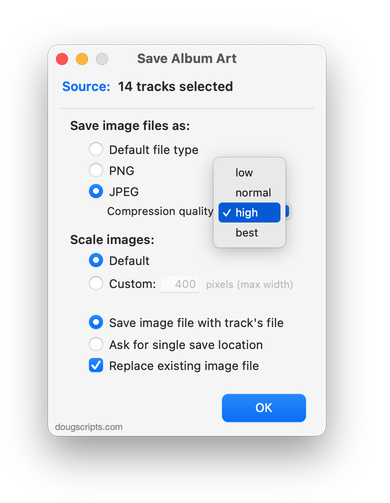
			<content:encoded><![CDATA[<p><a href="http://dougscripts.com/itunes/scripts/ss.php?sp=savealbumart" title="Export artwork of selected tracks to parent or specified folder">Save Album Art to Album Folder</a> v4.0 is a script that will export the artwork data of the <strong>selected tracks</strong> or tracks in the <strong>selected playlist</strong> as an image file to the folder which contains each selected track&#8217;s file&#8212;presumably the track&#8217;s Album folder&#8212;or a specific user-selected folder. Additionally, you can customize various settings for the image file:</p>
<p><img src="http://dougscripts.com/itunes/pix/savealbumart.png" /></p>
<p>This latest version is a Cocoa-AppleScript Applet, so it can <strong>only be run on OS X 10.6 and 10.7</strong>.</p>
<hr/><small><a href="http://dougscripts.com/itunes/dougsupdated.rss" title="Take me to your reader">30 Most Recent RSS Feed</a> | <a href="http://dougscripts.com/itunes/scripts/scriptcount.php?sortBy=Name&op=y">Script Stats Page</a> by <a href="http://dougscripts.com/itunes/scripts/scriptcount.php?sortBy=Name&op=y">Name</a>, <a href="http://dougscripts.com/itunes/scripts/scriptcount.php?sortBy=Most Recent&op=y">Most Recent</a>, <a href="http://dougscripts.com/itunes/scripts/scriptcount.php?sortBy=Download Count&op=y">Download Count</a></small>]]></content:encoded>
			</item>
		<item>
		<title>Artwork-Related Scripting Bug Follow-Up</title>
		<link>http://dougscripts.com/itunes/2011/03/artwork-related-scripting-bug-follow-up/</link>
		<comments></comments>
		<pubDate>Thu, 17 Mar 2011 16:03:01 +0000</pubDate>
		<dc:creator>dougscripts</dc:creator>
				<category><![CDATA[Bugs]]></category>
		<category><![CDATA[Managing Artwork]]></category>

		<guid isPermaLink="false">http://dougscripts.com/itunes/?p=1244</guid>
		<description><![CDATA[Not long ago I posted about a possible bug introduced with iTunes 10.2 regarding reading PICT file data for use as track artwork (Possible Artwork-Related Scripting Bug in iTunes 10.2?). Essentially, a tried-and-true AppleScript routine for importing PICT image data fails in iTunes 10.2. After some investigation, it turns out that iTunes 10.2 now uses [...]]]></description>
			<content:encoded><![CDATA[<p>Not long ago I posted about a possible bug introduced with iTunes 10.2 regarding reading PICT file data for use as track artwork (<a href="http://dougscripts.com/itunes/2011/03/possible-artwork-related-scripting-bug-in-itunes-10-2/">Possible Artwork-Related Scripting Bug in iTunes 10.2?</a>). Essentially, a tried-and-true AppleScript routine for importing PICT image data fails in iTunes 10.2. After some investigation, it turns out that iTunes 10.2 now uses ImageIO for all image handling instead of QuickTime and the ImageIO framework no longer supports PICT files. No one should really be surprised since the PICT format has largely been deprecated. But even so, until recently, PICT was still supported in iTunes.</p>
<p>So it&#8217;s not a bug but a <em>side effect of modernity</em>.</p>
<p>The fix for iTunes 10.2 and above is to simply read in the data from a PNG or JPEG file:</p>
<pre style="margin-bottom:1em;">
<b>tell</b> <span style="color:blue;">application</span> "iTunes" <b>to</b> <b>set</b> <span style="color:purple;">data</span> <b>of</b> <span style="color:blue;">artwork</span> 1 <b>of</b> <span style="color:green;">theTrack</span> <b>to</b> (<span style="color:blue;"><b>read</b></span> (<span style="color:blue;">file</span> <span style="color:green;">targetImageFile</span>) <span style="color:blue;">as</span> <span style="color:blue;">picture</span>)
</pre>
<p>Where <em>theTrack</em> is a reference to a <strong>file track</strong> in iTunes and <em>targetImageFile</em> is the path to a valid PNG or JPEG image file.</p>
<p>A couple of my scripts that need the fix will be posted later today.</p>
<hr/><small><a href="http://dougscripts.com/itunes/dougsupdated.rss" title="Take me to your reader">30 Most Recent RSS Feed</a> | <a href="http://dougscripts.com/itunes/scripts/scriptcount.php?sortBy=Name&op=y">Script Stats Page</a> by <a href="http://dougscripts.com/itunes/scripts/scriptcount.php?sortBy=Name&op=y">Name</a>, <a href="http://dougscripts.com/itunes/scripts/scriptcount.php?sortBy=Most Recent&op=y">Most Recent</a>, <a href="http://dougscripts.com/itunes/scripts/scriptcount.php?sortBy=Download Count&op=y">Download Count</a></small>]]></content:encoded>
			</item>
	</channel>
</rss>