<?xml version="1.0" encoding="UTF-8"?>
<rss version="2.0"
	xmlns:content="http://purl.org/rss/1.0/modules/content/"
	xmlns:wfw="http://wellformedweb.org/CommentAPI/"
	xmlns:dc="http://purl.org/dc/elements/1.1/"
	xmlns:atom="http://www.w3.org/2005/Atom"
	xmlns:sy="http://purl.org/rss/1.0/modules/syndication/"
	xmlns:slash="http://purl.org/rss/1.0/modules/slash/"
	>

<channel>
	<title>Doug&#039;s AppleScripts for iTunes &#187; Managing Track Info</title>
	<atom:link href="http://dougscripts.com/itunes/category/managing-track-info/feed/" rel="self" type="application/rss+xml" />
	<link>http://dougscripts.com</link>
	<description>AppleScripts for iTunes</description>
	<lastBuildDate>Sun, 13 May 2012 13:40:55 +0000</lastBuildDate>
	<generator>http://wordpress.org/?v=2.8.4</generator>
	<language>en</language>
	<sy:updatePeriod>hourly</sy:updatePeriod>
	<sy:updateFrequency>1</sy:updateFrequency>
	<cloud domain='dougscripts.com' port='80' path='/itunes/?rsscloud=notify' registerProcedure='' protocol='http-post' />
		<item>
		<title>UPDATED: This Tag That Tag v3.1</title>
		<link>http://dougscripts.com/itunes/2012/05/updated-this-tag-that-tag-v3-1/</link>
		<comments></comments>
		<pubDate>Sat, 05 May 2012 15:41:53 +0000</pubDate>
		<dc:creator>dougscripts</dc:creator>
				<category><![CDATA[Cocoa-AppleScript]]></category>
		<category><![CDATA[Managing Track Info]]></category>

		<guid isPermaLink="false">http://dougscripts.com/itunes/?p=1550</guid>
		<description><![CDATA[This Tag That Tag will assist with swapping, copying, and appending data between two user-chosen tags in selected tracks or tracks in the selected playlist:Swap &#8211; swap data between tags, ex: ARTISTCOMPOSERCopy &#8211; copy data from one to another tag, ex: ARTIST->COMPOSER ARTISTAppend &#8211; append data from one tag to the end of another, ex: [...]]]></description>
			<content:encoded><![CDATA[<p><a href="http://dougscripts.com/itunes/scripts/ss.php?sp=thistagthattag" title="Applet assists with swapping, copying, appending data between track tags">This Tag That Tag</a> will assist with swapping, copying, and appending data between two user-chosen tags in selected tracks or tracks in the selected playlist:<br/><br/><strong>Swap</strong> &#8211; swap data between tags, ex: ARTIST<->COMPOSER<br/><strong>Copy</strong> &#8211; copy data from one to another tag, ex: ARTIST-><del>COMPOSER</del> ARTIST<br/><strong>Append</strong> &#8211; append data from one tag to the end of another, ex: ARTIST->COMPOSER &#8211; <em>ARTIST</em><br/><strong>Prepend</strong> &#8211; prepend data from one tag to the beginning of another, ex: ARTIST-><em>ARTIST</em> &#8211; COMPOSER<br/><br/>The latter three actions also provide an option to delete the info from the first tag after the copy.</p>
<p><img src="http://dougscripts.com/itunes/pix/thistagthattag.png" /></p>
<p>This latest version allows numerical tag data to be copied (for example, the Year tag&#8217;s data can be copied to the Comments tag).</p>
<hr/><small><a href="http://dougscripts.com/itunes/dougsupdated.rss" title="Take me to your reader">30 Most Recent RSS Feed</a> | <a href="http://dougscripts.com/itunes/scripts/scriptcount.php?sortBy=Name&op=y">Script Stats Page</a> by <a href="http://dougscripts.com/itunes/scripts/scriptcount.php?sortBy=Name&op=y">Name</a>, <a href="http://dougscripts.com/itunes/scripts/scriptcount.php?sortBy=Most Recent&op=y">Most Recent</a>, <a href="http://dougscripts.com/itunes/scripts/scriptcount.php?sortBy=Download Count&op=y">Download Count</a></small>]]></content:encoded>
			</item>
		<item>
		<title>UPDATED: Remove n Characters from Front or Back v4.3</title>
		<link>http://dougscripts.com/itunes/2012/02/updated-remove-n-characters-from-front-or-back-v4-3/</link>
		<comments></comments>
		<pubDate>Thu, 09 Feb 2012 15:10:45 +0000</pubDate>
		<dc:creator>dougscripts</dc:creator>
				<category><![CDATA[Cocoa-AppleScript]]></category>
		<category><![CDATA[Managing Track Info]]></category>

		<guid isPermaLink="false">http://dougscripts.com/itunes/?p=1527</guid>
		<description><![CDATA[Remove n Characters From Front or Back v4.3 will let you delete a specified number of characters from either the beginning or the ending of the Song Name, Album, Artist, Comments, Composer or Show tag (or their &#8220;Sort&#8221; siblings) of each selected track. For example, delete the initial digits and the space from &#8220;01 First [...]]]></description>
			<content:encoded><![CDATA[<p><a href="http://dougscripts.com/itunes/scripts/ss.php?sp=removenchars" title="Delete characters from the beginning or ending of selected tracks' name, artist, album, comments, composer, or show tags">Remove n Characters From Front or Back</a> v4.3 will let you delete a specified number of characters from either the beginning <em>or</em> the ending of the Song Name, Album, Artist, Comments, Composer or Show tag (or their &#8220;Sort&#8221; siblings) of each selected track. For example, delete the initial digits and the space from &#8220;01 First Track&#8221;, &#8220;02 Second Track&#8221;, and so on.</p>
<p>This latest version is now stay-open and floats above iTunes, has live track selection detection, re-orients preview stepper direction to abide selected tracks&#8217; sort order, can expand horizontally to enlarge Preview box, increases <strong>n</strong>umber limit from 24 to 60, and other minor enhancements.</p>
<p>Here&#8217;s a screenshot of <a href="http://dougscripts.com/itunes/scripts/ss.php?sp=removenchars" title="Delete characters from the beginning or ending of selected tracks' name, artist, album, comments, composer, or show tags">Remove n Characters From Front or Back</a> in action during a tag editing session that also includes <a href="http://dougscripts.com/itunes/scripts/ss.php?sp=thistagthattag" title="Applet assists with swapping, copying, appending data between track tags">This Tag That Tag</a> and <a href="http://dougscripts.com/itunes/scripts/ss.php?sp=searchreplacetagtext" title="Perform search-and-replace on text in your choice of tags">Search-Replace Tag Text</a>, which are also stay-open floaters:</p>
<p><img src="http://dougscripts.com/itunes/pix/tagsurgery.png" /></p>
<hr/><small><a href="http://dougscripts.com/itunes/dougsupdated.rss" title="Take me to your reader">30 Most Recent RSS Feed</a> | <a href="http://dougscripts.com/itunes/scripts/scriptcount.php?sortBy=Name&op=y">Script Stats Page</a> by <a href="http://dougscripts.com/itunes/scripts/scriptcount.php?sortBy=Name&op=y">Name</a>, <a href="http://dougscripts.com/itunes/scripts/scriptcount.php?sortBy=Most Recent&op=y">Most Recent</a>, <a href="http://dougscripts.com/itunes/scripts/scriptcount.php?sortBy=Download Count&op=y">Download Count</a></small>]]></content:encoded>
			</item>
		<item>
		<title>UPDATED: Search-Replace Tag Text v3.1</title>
		<link>http://dougscripts.com/itunes/2012/02/updated-search-replace-tag-text-v3-1/</link>
		<comments></comments>
		<pubDate>Thu, 02 Feb 2012 13:16:50 +0000</pubDate>
		<dc:creator>dougscripts</dc:creator>
				<category><![CDATA[Cocoa-AppleScript]]></category>
		<category><![CDATA[Managing Track Info]]></category>

		<guid isPermaLink="false">http://dougscripts.com/itunes/?p=1525</guid>
		<description><![CDATA[Search-Replace Tag Text v3.1 is now posted. This applet allows you to perform search-and-replace text operations on a chosen tag in the selected tracks or tracks in a selected playlist:

This latest version fixes a problem escaping special characters, fixes a problem with operating on the Grouping tag, prevents non-results from displaying in the dry run [...]]]></description>
			<content:encoded><![CDATA[<p><a href="http://dougscripts.com/itunes/scripts/ss.php?sp=searchreplacetagtext" title="Perform search-and-replace on text in your choice of tags">Search-Replace Tag Text</a> v3.1 is now posted. This applet allows you to perform search-and-replace text operations on a chosen tag in the selected tracks or tracks in a selected playlist:</p>
<p><img src="http://dougscripts.com/itunes/pix/searchreplacetagtext.png"/></p>
<p>This latest version fixes a problem escaping special characters, fixes a problem with operating on the Grouping tag, prevents non-results from displaying in the dry run window, adds close and minimize buttons, and has a few minor code finesses.</p>
<hr/><small><a href="http://dougscripts.com/itunes/dougsupdated.rss" title="Take me to your reader">30 Most Recent RSS Feed</a> | <a href="http://dougscripts.com/itunes/scripts/scriptcount.php?sortBy=Name&op=y">Script Stats Page</a> by <a href="http://dougscripts.com/itunes/scripts/scriptcount.php?sortBy=Name&op=y">Name</a>, <a href="http://dougscripts.com/itunes/scripts/scriptcount.php?sortBy=Most Recent&op=y">Most Recent</a>, <a href="http://dougscripts.com/itunes/scripts/scriptcount.php?sortBy=Download Count&op=y">Download Count</a></small>]]></content:encoded>
			</item>
		<item>
		<title>UPDATED: New Last Played Date v3.0</title>
		<link>http://dougscripts.com/itunes/2012/01/updated-new-last-played-date-v3-0/</link>
		<comments></comments>
		<pubDate>Mon, 30 Jan 2012 17:54:13 +0000</pubDate>
		<dc:creator>dougscripts</dc:creator>
				<category><![CDATA[Cocoa-AppleScript]]></category>
		<category><![CDATA[Managing Track Info]]></category>

		<guid isPermaLink="false">http://dougscripts.com/itunes/?p=1503</guid>
		<description><![CDATA[Getting date input with plain AppleScript has always been a hassle. But Cocoa-AppleScript has access to Cocoa date pickers. Hoo. Ray. New Last Played Date v3.0 is a Cocoa-AppleScript Applet for iTunes on OS X 10.6 and better that uses a text and calendar date picker to easily enter a new date for either the [...]]]></description>
			<content:encoded><![CDATA[<p>Getting date input with plain AppleScript has always been a hassle. But <a href="http://www.macosxautomation.com/lion/applescript.html">Cocoa-AppleScript</a> has access to Cocoa date pickers. Hoo. Ray. <a href="http://dougscripts.com/itunes/scripts/ss.php?sp=newlastplayed" title="Set new Last Played/Last Skipped of selected tracks">New Last Played Date</a> v3.0 is a Cocoa-AppleScript Applet for iTunes on OS X 10.6 and better that uses a text and calendar date picker to easily enter a new date for either the Last Played or Last Skipped tags of the selected tracks:</p>
<p><img src="http://dougscripts.com/itunes/pix/newlastplayed.png" /></p>
<p>Additionally, the corresponding counts can be increased or decreased. Or the dates and counts can be set to &#8220;never&#8221;.</p>
<hr/><small><a href="http://dougscripts.com/itunes/dougsupdated.rss" title="Take me to your reader">30 Most Recent RSS Feed</a> | <a href="http://dougscripts.com/itunes/scripts/scriptcount.php?sortBy=Name&op=y">Script Stats Page</a> by <a href="http://dougscripts.com/itunes/scripts/scriptcount.php?sortBy=Name&op=y">Name</a>, <a href="http://dougscripts.com/itunes/scripts/scriptcount.php?sortBy=Most Recent&op=y">Most Recent</a>, <a href="http://dougscripts.com/itunes/scripts/scriptcount.php?sortBy=Download Count&op=y">Download Count</a></small>]]></content:encoded>
			</item>
		<item>
		<title>UPDATED: This Tag That Tag v3.0</title>
		<link>http://dougscripts.com/itunes/2012/01/updated-this-tag-that-tag-v3-0/</link>
		<comments></comments>
		<pubDate>Sun, 08 Jan 2012 16:03:38 +0000</pubDate>
		<dc:creator>dougscripts</dc:creator>
				<category><![CDATA[Cocoa-AppleScript]]></category>
		<category><![CDATA[Managing Track Info]]></category>

		<guid isPermaLink="false">http://dougscripts.com/itunes/?p=1476</guid>
		<description><![CDATA[This Tag That Tag v3.0 is now a consolidated applet that previously had been a collection of four separate scripts. It will assist with copying text between tags for each selected track or track in a selected playlist.

It will float open over iTunes while being used and detect whenever the iTunes selection has changed, as [...]]]></description>
			<content:encoded><![CDATA[<p><a href="http://dougscripts.com/itunes/scripts/ss.php?sp=thistagthattag" title="Applet assists with swapping, copying, appending data between track tags">This Tag That Tag</a> v3.0 is now a consolidated applet that previously had been a collection of four separate scripts. It will assist with copying text between tags for each selected track or track in a selected playlist.</p>
<p><img src="http://dougscripts.com/itunes/pix/thistagthattag.png"/></p>
<p>It will float open over iTunes while being used and detect whenever the iTunes selection has changed, as displayed by <strong>Target:</strong>. Also now provides a progress indicator.</p>
<hr/><small><a href="http://dougscripts.com/itunes/dougsupdated.rss" title="Take me to your reader">30 Most Recent RSS Feed</a> | <a href="http://dougscripts.com/itunes/scripts/scriptcount.php?sortBy=Name&op=y">Script Stats Page</a> by <a href="http://dougscripts.com/itunes/scripts/scriptcount.php?sortBy=Name&op=y">Name</a>, <a href="http://dougscripts.com/itunes/scripts/scriptcount.php?sortBy=Most Recent&op=y">Most Recent</a>, <a href="http://dougscripts.com/itunes/scripts/scriptcount.php?sortBy=Download Count&op=y">Download Count</a></small>]]></content:encoded>
			</item>
		<item>
		<title>NEW: Delete All Lyrics</title>
		<link>http://dougscripts.com/itunes/2011/12/new-delete-all-lyrics/</link>
		<comments></comments>
		<pubDate>Mon, 26 Dec 2011 18:07:34 +0000</pubDate>
		<dc:creator>dougscripts</dc:creator>
				<category><![CDATA[Managing Track Info]]></category>
		<category><![CDATA[lyrics]]></category>

		<guid isPermaLink="false">http://dougscripts.com/itunes/?p=1465</guid>
		<description><![CDATA[It&#8217;s often interesting to look through the search queries this site gets to see what people are looking for. Over the past few months the phrase &#8220;delete all lyrics&#8221; has been showing up pretty frequently. Don&#8217;t know why it is&#8212;seems like it wasn&#8217;t so long ago the phrase &#8220;find song lyrics&#8221; was more prominent. Fads! [...]]]></description>
			<content:encoded><![CDATA[<p>It&#8217;s often interesting to look through the search queries this site gets to see what people are looking for. Over the past few months the phrase &#8220;delete all lyrics&#8221; has been showing up pretty frequently. Don&#8217;t know why it is&#8212;seems like it wasn&#8217;t so long ago the phrase &#8220;find song lyrics&#8221; was more prominent. Fads! Who can predict &#8216;em?</p>
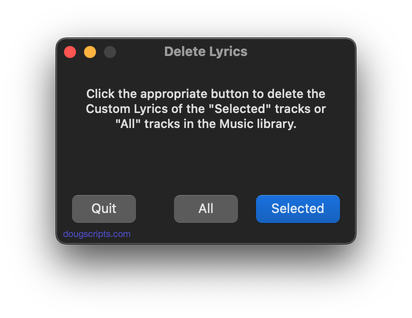
<p>I already have a script that will delete the lyrics of a <em>selection</em> of tracks. But this would be rather slow if you used it against every track in the library. So I&#8217;ve posted <a href="http://dougscripts.com/itunes/scripts/ss.php?sp=deletealllyrics" title="Deletes the lyrics of every track of the Music playlist">Delete All Lyrics</a>. This is a Cocoa-AppleScript applet (for OS 10.6 and 10.7 only) that will fairly quickly go through <strong>all</strong> the tracks in the &#8220;Music&#8221; playlist and delete the lyrics. So whether you&#8217;re tired of trying to sing-along or just need to clear out some bytes, it should do the trick.</p>
<hr/><small><a href="http://dougscripts.com/itunes/dougsupdated.rss" title="Take me to your reader">30 Most Recent RSS Feed</a> | <a href="http://dougscripts.com/itunes/scripts/scriptcount.php?sortBy=Name&op=y">Script Stats Page</a> by <a href="http://dougscripts.com/itunes/scripts/scriptcount.php?sortBy=Name&op=y">Name</a>, <a href="http://dougscripts.com/itunes/scripts/scriptcount.php?sortBy=Most Recent&op=y">Most Recent</a>, <a href="http://dougscripts.com/itunes/scripts/scriptcount.php?sortBy=Download Count&op=y">Download Count</a></small>]]></content:encoded>
			</item>
		<item>
		<title>UPDATED: Search-Replace Tag Text v3.0</title>
		<link>http://dougscripts.com/itunes/2011/11/updated-search-replace-tag-text-v3-0/</link>
		<comments></comments>
		<pubDate>Wed, 30 Nov 2011 18:32:59 +0000</pubDate>
		<dc:creator>dougscripts</dc:creator>
				<category><![CDATA[Cocoa-AppleScript]]></category>
		<category><![CDATA[Managing Track Info]]></category>

		<guid isPermaLink="false">http://dougscripts.com/itunes/?p=1439</guid>
		<description><![CDATA[Search-Replace Tag Text performs a search-and-replace with the text in your choice of tag (Song Name, Show, Artist, Album Artist, Album, Composer, Comments, Genre, or Grouping) in the selected tracks or all the tracks in the selected Playlist.

This latest version is written as a Cocoa-AppleScript applet for OS 10.6 and 10.7 only and features case [...]]]></description>
			<content:encoded><![CDATA[<p><a href="http://dougscripts.com/itunes/scripts/ss.php?sp=searchreplacetagtext" title="Perform search-and-replace on text in your choice of tags">Search-Replace Tag Text</a> performs a search-and-replace with the text in your choice of tag (<strong>Song Name</strong>, <strong>Show</strong>, <strong>Artist</strong>, <strong>Album Artist</strong>, <strong>Album</strong>, <strong>Composer</strong>, <strong>Comments</strong>, <strong>Genre</strong>, or <strong>Grouping</strong>) in the selected tracks or all the tracks in the selected Playlist.</p>
<p><img src="http://dougscripts.com/itunes/pix/searchreplacetagtext.png"/></p>
<p>This latest version is written as a Cocoa-AppleScript applet for OS 10.6 and 10.7 only and features case sensitive and whole word matching, as well as a &#8220;dry run&#8221; mode that will display a list of what will be changed before you actually commit to the search and replace.</p>
<hr/><small><a href="http://dougscripts.com/itunes/dougsupdated.rss" title="Take me to your reader">30 Most Recent RSS Feed</a> | <a href="http://dougscripts.com/itunes/scripts/scriptcount.php?sortBy=Name&op=y">Script Stats Page</a> by <a href="http://dougscripts.com/itunes/scripts/scriptcount.php?sortBy=Name&op=y">Name</a>, <a href="http://dougscripts.com/itunes/scripts/scriptcount.php?sortBy=Most Recent&op=y">Most Recent</a>, <a href="http://dougscripts.com/itunes/scripts/scriptcount.php?sortBy=Download Count&op=y">Download Count</a></small>]]></content:encoded>
			</item>
		<item>
		<title>UPDATED: Sundry Info to Comments (or Category or Description) v3.0</title>
		<link>http://dougscripts.com/itunes/2011/11/updated-sundry-info-to-comments-or-category-or-description-v3-0/</link>
		<comments></comments>
		<pubDate>Sat, 05 Nov 2011 14:42:03 +0000</pubDate>
		<dc:creator>dougscripts</dc:creator>
				<category><![CDATA[Cocoa-AppleScript]]></category>
		<category><![CDATA[Managing Track Info]]></category>

		<guid isPermaLink="false">http://dougscripts.com/itunes/?p=1400</guid>
		<description><![CDATA[I sometimes hear it lamented that tracks in iTunes don&#8217;t have a tag for file path or account ID or other sundry information. While you can&#8217;t add new tags to a track or new columns to the iTunes browser window you can use existing less-frequently-used tags to store some of that information. I often copy [...]]]></description>
			<content:encoded><![CDATA[<p>I sometimes hear it lamented that tracks in iTunes don&#8217;t have a tag for file path or account ID or other sundry information. While you can&#8217;t add new tags to a track or new columns to the iTunes browser window you can use existing less-frequently-used tags to store some of that information. I often copy a track&#8217;s <strong>location</strong> (file path) to its <strong>comment</strong> tag so I can do a sort by file location when I sort by Comments. But there&#8217;s some information about a track or its file that isn&#8217;t as easily accessible. For instance, there&#8217;s no <strong>track</strong> property for a purchased track&#8217;s account ID. You have to get that by other means. And that&#8217;s what this script does.</p>
<p><a href="http://dougscripts.com/itunes/scripts/ss.php?sp=sundryinfotocomments" title="Paste non-ID3 Tag track and file related info into Category, Comments, or Description tag">Sundry Info To Comments</a> v3.0 is a Cocoa-AppleScript applet that copies your single choice of <strong>file name</strong>, <strong>file path</strong> (location), <strong>parent folder name</strong>, <strong>current playlist</strong>, <strong>sound volume</strong>, <strong>file&#8217;s Spotlight comments</strong>, <strong>file creation date</strong>, <strong>purchase name</strong> or <strong>purchase account ID</strong> to the <strong>Category</strong>, <strong>Comments</strong> or <strong>Description</strong> tag of each selected track.</p>
<p><img src="http://dougscripts.com/itunes/pix/sundryinfo1.png" /></p>
<p>Being able to copy such data into one of these tags make it <em>sortable</em> or available for Smart Playlist criteria.</p>
<hr/><small><a href="http://dougscripts.com/itunes/dougsupdated.rss" title="Take me to your reader">30 Most Recent RSS Feed</a> | <a href="http://dougscripts.com/itunes/scripts/scriptcount.php?sortBy=Name&op=y">Script Stats Page</a> by <a href="http://dougscripts.com/itunes/scripts/scriptcount.php?sortBy=Name&op=y">Name</a>, <a href="http://dougscripts.com/itunes/scripts/scriptcount.php?sortBy=Most Recent&op=y">Most Recent</a>, <a href="http://dougscripts.com/itunes/scripts/scriptcount.php?sortBy=Download Count&op=y">Download Count</a></small>]]></content:encoded>
			</item>
		<item>
		<title>UPDATED: Rate Me! Rate Me! v4.0</title>
		<link>http://dougscripts.com/itunes/2011/10/updated-rate-me-rate-me-v4-0/</link>
		<comments></comments>
		<pubDate>Wed, 05 Oct 2011 15:21:13 +0000</pubDate>
		<dc:creator>dougscripts</dc:creator>
				<category><![CDATA[Cocoa-AppleScript]]></category>
		<category><![CDATA[Managing Track Info]]></category>

		<guid isPermaLink="false">http://dougscripts.com/itunes/?p=1376</guid>
		<description><![CDATA[Rate Me! Rate Me! watches your playing tracks and when an un-rated track starts playing displays a window with a demand it be rated.

While you could easily rate the current track from the iTunes icon in the Dock, this script interrupts you and compels you to do so.
This latest version is re-written as a Cocoa-AppleScript [...]]]></description>
			<content:encoded><![CDATA[<p><a href="http://dougscripts.com/itunes/scripts/ss.php?sp=ratemerateme" title="Applet compels you to rate unrated current track">Rate Me! Rate Me!</a> watches your playing tracks and when an <strong>un-rated</strong> track starts playing displays a window with a demand it be rated.</p>
<p><img src="http://dougscripts.com/itunes/pix/ratemerateme.png" /></p>
<p>While you could easily rate the current track from the iTunes icon in the Dock, this script interrupts you and <em>compels</em> you to do so.</p>
<p>This latest version is re-written as a Cocoa-AppleScript Applet for OS X 10.6 and 10.7 only.</p>
<hr/><small><a href="http://dougscripts.com/itunes/dougsupdated.rss" title="Take me to your reader">30 Most Recent RSS Feed</a> | <a href="http://dougscripts.com/itunes/scripts/scriptcount.php?sortBy=Name&op=y">Script Stats Page</a> by <a href="http://dougscripts.com/itunes/scripts/scriptcount.php?sortBy=Name&op=y">Name</a>, <a href="http://dougscripts.com/itunes/scripts/scriptcount.php?sortBy=Most Recent&op=y">Most Recent</a>, <a href="http://dougscripts.com/itunes/scripts/scriptcount.php?sortBy=Download Count&op=y">Download Count</a></small>]]></content:encoded>
			</item>
		<item>
		<title>UPDATED: Remove n Characters v4.2</title>
		<link>http://dougscripts.com/itunes/2011/08/updated-remove-n-characters-v4-2/</link>
		<comments></comments>
		<pubDate>Mon, 15 Aug 2011 15:47:34 +0000</pubDate>
		<dc:creator>dougscripts</dc:creator>
				<category><![CDATA[Managing Track Info]]></category>

		<guid isPermaLink="false">http://dougscripts.com/itunes/?p=1354</guid>
		<description><![CDATA[Remove n Characters From Front or Back v4.2 adds a progress display during processing and provides the ability to preview each selected track.
]]></description>
			<content:encoded><![CDATA[<p><a href="http://dougscripts.com/itunes/scripts/ss.php?sp=removenchars" title="Delete characters from the beginning or ending of selected tracks' name, artist, album, comments, composer, or show tags">Remove n Characters From Front or Back</a> v4.2 adds a progress display during processing and provides the ability to preview each selected track.</p>
<hr/><small><a href="http://dougscripts.com/itunes/dougsupdated.rss" title="Take me to your reader">30 Most Recent RSS Feed</a> | <a href="http://dougscripts.com/itunes/scripts/scriptcount.php?sortBy=Name&op=y">Script Stats Page</a> by <a href="http://dougscripts.com/itunes/scripts/scriptcount.php?sortBy=Name&op=y">Name</a>, <a href="http://dougscripts.com/itunes/scripts/scriptcount.php?sortBy=Most Recent&op=y">Most Recent</a>, <a href="http://dougscripts.com/itunes/scripts/scriptcount.php?sortBy=Download Count&op=y">Download Count</a></small>]]></content:encoded>
			</item>
	</channel>
</rss>