<?xml version="1.0" encoding="UTF-8"?>
<rss version="2.0"
	xmlns:content="http://purl.org/rss/1.0/modules/content/"
	xmlns:wfw="http://wellformedweb.org/CommentAPI/"
	xmlns:dc="http://purl.org/dc/elements/1.1/"
	xmlns:atom="http://www.w3.org/2005/Atom"
	xmlns:sy="http://purl.org/rss/1.0/modules/syndication/"
	xmlns:slash="http://purl.org/rss/1.0/modules/slash/"
	>

<channel>
	<title>Doug&#039;s AppleScripts for iTunes &#187; New Releases</title>
	<atom:link href="http://dougscripts.com/itunes/category/new-releases/feed/" rel="self" type="application/rss+xml" />
	<link>http://dougscripts.com</link>
	<description>AppleScripts for iTunes</description>
	<lastBuildDate>Thu, 09 Feb 2012 15:10:46 +0000</lastBuildDate>
	<generator>http://wordpress.org/?v=2.8.4</generator>
	<language>en</language>
	<sy:updatePeriod>hourly</sy:updatePeriod>
	<sy:updateFrequency>1</sy:updateFrequency>
	<cloud domain='dougscripts.com' port='80' path='/itunes/?rsscloud=notify' registerProcedure='' protocol='http-post' />
		<item>
		<title>NEW: Drop to Playlist</title>
		<link>http://dougscripts.com/itunes/2009/09/new-drop-to-playlist/</link>
		<comments></comments>
		<pubDate>Fri, 25 Sep 2009 11:35:22 +0000</pubDate>
		<dc:creator>dougscripts</dc:creator>
				<category><![CDATA[AppleScript]]></category>
		<category><![CDATA[Managing Files]]></category>
		<category><![CDATA[New Releases]]></category>
		<category><![CDATA[iTunes]]></category>

		<guid isPermaLink="false">http://dougscripts.com/itunes/?p=852</guid>
		<description><![CDATA[If you like the &#8220;Automatically Add to iTunes&#8221; folder that is created with iTunes 9, which allows you to drop files to it to add to iTunes, you may like Drop to Playlist. This is a droplet that will add files dropped on it to your iTunes library and then copy them to a specific [...]]]></description>
			<content:encoded><![CDATA[<p>If you like the &#8220;Automatically Add to iTunes&#8221; folder that is created with iTunes 9, which allows you to drop files to it to add to iTunes, you may like <a href="http://dougscripts.com/itunes/scripts/ss.php?sp=droptoplaylist" title="Droplet adds files dragged on it to a preferences-set playlist">Drop to Playlist</a>. This is a droplet that will add files dropped on it to your iTunes library and then copy them to a specific user playlist that you set in the droplet&#8217;s preferences. The preference setting is accessed by double-clicking the droplet, and can be changed when required. Handy when placed in the Finder toolbar or sidebar.</p>
<hr/><small><a href="http://dougscripts.com/itunes/dougsupdated.rss" title="Take me to your reader">30 Most Recent RSS Feed</a> | <a href="http://dougscripts.com/itunes/scripts/scriptcount.php?sortBy=Name&op=y">Script Stats Page</a> by <a href="http://dougscripts.com/itunes/scripts/scriptcount.php?sortBy=Name&op=y">Name</a>, <a href="http://dougscripts.com/itunes/scripts/scriptcount.php?sortBy=Most Recent&op=y">Most Recent</a>, <a href="http://dougscripts.com/itunes/scripts/scriptcount.php?sortBy=Download Count&op=y">Download Count</a></small>]]></content:encoded>
			</item>
		<item>
		<title>NEW: Lyrics via LyricWiki</title>
		<link>http://dougscripts.com/itunes/2009/02/new-lyrics-via-lyricwiki/</link>
		<comments></comments>
		<pubDate>Sat, 28 Feb 2009 13:28:00 +0000</pubDate>
		<dc:creator>dougscripts</dc:creator>
				<category><![CDATA[AppleScript]]></category>
		<category><![CDATA[New Releases]]></category>
		<category><![CDATA[iTunes]]></category>
		<category><![CDATA[lyrics]]></category>

		<guid isPermaLink="false">http://dougscripts.com/itunes/wpfol/?p=100</guid>
		<description><![CDATA[Lyrics Via LyricWiki will use the name and artist of the selected or playing track as the basis for a SOAP query to LyricWiki.org; fruitful results will be displayed so you can choose to apply the lyrics to the particular track.If I had a dollar for all the Correspondents who sent me the AppleScript SOAP [...]]]></description>
			<content:encoded><![CDATA[<p><a href="http://dougscripts.com/itunes/scripts/ss.php?sp=lyricslyricwiki" title="Get lyrics for selected or playing track from LyricWiki.org">Lyrics Via LyricWiki</a> will use the name and artist of the selected or playing track as the basis for a SOAP query to LyricWiki.org; fruitful results will be displayed so you can choose to apply the lyrics to the particular track.<br/><br/>If I had a dollar for all the Correspondents who sent me the AppleScript SOAP call used in this script, I could take a week off. Well, maybe take a long weekend. Information on LyricWiki&#8217;s SOAP webservice is <a href="http://lyricwiki.org/LyricWiki_talk:SOAP">here</a>. </p>
<hr/><small><a href="http://dougscripts.com/itunes/dougsupdated.rss" title="Take me to your reader">30 Most Recent RSS Feed</a> | <a href="http://dougscripts.com/itunes/scripts/scriptcount.php?sortBy=Name&op=y">Script Stats Page</a> by <a href="http://dougscripts.com/itunes/scripts/scriptcount.php?sortBy=Name&op=y">Name</a>, <a href="http://dougscripts.com/itunes/scripts/scriptcount.php?sortBy=Most Recent&op=y">Most Recent</a>, <a href="http://dougscripts.com/itunes/scripts/scriptcount.php?sortBy=Download Count&op=y">Download Count</a></small>]]></content:encoded>
			</item>
		<item>
		<title>NEW: Purchase Date to Comments</title>
		<link>http://dougscripts.com/itunes/2009/02/new-purchase-date-to-comments/</link>
		<comments></comments>
		<pubDate>Fri, 27 Feb 2009 13:40:21 +0000</pubDate>
		<dc:creator>dougscripts</dc:creator>
				<category><![CDATA[AppleScript]]></category>
		<category><![CDATA[Managing Track Info]]></category>
		<category><![CDATA[New Releases]]></category>
		<category><![CDATA[iTunes]]></category>

		<guid isPermaLink="false">http://dougscripts.com/itunes/wpfol/?p=104</guid>
		<description><![CDATA[Purchase Date to Comments will copy the purchased date&#8211;if available&#8211;of the selected tracks to the comment tag of each. You can choose either UTC format (&#8221;2008-12-27&#8243;) or localized Short date format (&#8221;12/27/08&#8243;). UTC dates will be placed at the beginning of any existing comment text to allow tracks to be sorted by comment. Short dates [...]]]></description>
			<content:encoded><![CDATA[<p><a href="http://dougscripts.com/itunes/scripts/ss.php?sp=purchasedatetocomments" title="Copy the purchased date--if available--of selected tracks to comment tag">Purchase Date to Comments</a> will copy the purchased date&#8211;if available&#8211;of the selected tracks to the comment tag of each. You can choose either UTC format (&#8221;2008-12-27&#8243;) or localized Short date format (&#8221;12/27/08&#8243;). UTC dates will be placed at the beginning of any existing comment text to allow tracks to be sorted by comment. Short dates will be placed after any existing comment text. (In either case, Smart Playlists could be created using &#8220;Comment contains 2008-12&#8243; or &#8220;Comment starts with 2008-12&#8243;.) </p>
<hr/><small><a href="http://dougscripts.com/itunes/dougsupdated.rss" title="Take me to your reader">30 Most Recent RSS Feed</a> | <a href="http://dougscripts.com/itunes/scripts/scriptcount.php?sortBy=Name&op=y">Script Stats Page</a> by <a href="http://dougscripts.com/itunes/scripts/scriptcount.php?sortBy=Name&op=y">Name</a>, <a href="http://dougscripts.com/itunes/scripts/scriptcount.php?sortBy=Most Recent&op=y">Most Recent</a>, <a href="http://dougscripts.com/itunes/scripts/scriptcount.php?sortBy=Download Count&op=y">Download Count</a></small>]]></content:encoded>
			</item>
		<item>
		<title>NEW: Change Hidden iTunes Preferences</title>
		<link>http://dougscripts.com/itunes/2009/01/new-change-hidden-itunes-preferences/</link>
		<comments></comments>
		<pubDate>Tue, 13 Jan 2009 18:52:59 +0000</pubDate>
		<dc:creator>dougscripts</dc:creator>
				<category><![CDATA[Apple]]></category>
		<category><![CDATA[Controlling iTunes]]></category>
		<category><![CDATA[New Releases]]></category>
		<category><![CDATA[Tips and Info]]></category>
		<category><![CDATA[iTunes]]></category>

		<guid isPermaLink="false">http://dougscripts.com/itunes/wpfol/?p=119</guid>
		<description><![CDATA[Change Hidden iTunes Preferences is an application that will let you invoke some so-called &#8220;hidden&#8221; iTunes preferences: Show &#8220;Library&#8221; playlist, Show genre while browsing, Allow half-stars in ratings, Show arrow links &#8212; to either search the iTunes Store or search your library, Load complete iTunes Store preview before playing, Play songs while importing or converting, [...]]]></description>
			<content:encoded><![CDATA[<p><a href="http://dougscripts.com/itunes/scripts/ss.php?sp=changehiddenprefs">Change Hidden iTunes Preferences</a> is an application that will let you invoke some so-called &#8220;hidden&#8221; iTunes preferences: Show &#8220;Library&#8221; playlist, Show genre while browsing, Allow half-stars in ratings, Show arrow links &#8212; to either search the iTunes Store or search your library, Load complete iTunes Store preview before playing, Play songs while importing or converting, and Create file names with track number. Some of these preferences, as some users may recognize, used to be available in iTunes&#8217; Preferences. Others, like the &#8220;Library&#8221; and half-stars prefs, have recently been discovered. This is for use with iTunes 8 or better only.<br/><br/>The download disk image contains the actual application (which is not an AppleScript) and an AppleScript to launch the app from your iTunes Script menu. Make sure you copy both of them off the .dmg.</p>
<hr/><small><a href="http://dougscripts.com/itunes/dougsupdated.rss" title="Take me to your reader">30 Most Recent RSS Feed</a> | <a href="http://dougscripts.com/itunes/scripts/scriptcount.php?sortBy=Name&op=y">Script Stats Page</a> by <a href="http://dougscripts.com/itunes/scripts/scriptcount.php?sortBy=Name&op=y">Name</a>, <a href="http://dougscripts.com/itunes/scripts/scriptcount.php?sortBy=Most Recent&op=y">Most Recent</a>, <a href="http://dougscripts.com/itunes/scripts/scriptcount.php?sortBy=Download Count&op=y">Download Count</a></small>]]></content:encoded>
			</item>
		<item>
		<title>Daypart Released</title>
		<link>http://dougscripts.com/itunes/2009/01/daypart-released/</link>
		<comments></comments>
		<pubDate>Mon, 12 Jan 2009 12:31:01 +0000</pubDate>
		<dc:creator>dougscripts</dc:creator>
				<category><![CDATA[Controlling iTunes]]></category>
		<category><![CDATA[Daypart]]></category>
		<category><![CDATA[Managing Playlists]]></category>
		<category><![CDATA[New Releases]]></category>
		<category><![CDATA[iTunes]]></category>

		<guid isPermaLink="false">http://dougscripts.com/itunes/wpfol/?p=110</guid>
		<description><![CDATA[Daypart is a simple yet full-featured application that allows you to schedule iTunes playlists when to play, giving you an easy way to program varied musical content throughout the week in your home or workplace.


Program your iTunes music when you want, the way you want.


Smart Playlists, Playlist Folders, and Genius Playlists provide some degree of [...]]]></description>
			<content:encoded><![CDATA[<p><a href="http://dougscripts.com/itunes/itinfo/daypart.php">Daypart</a> is a simple yet full-featured application that allows you to schedule iTunes playlists when to play, giving you an easy way to program varied musical content throughout the week in your home or workplace.
</p>
<p>
Program your iTunes music when you want, the way you want.
</p>
<p>
Smart Playlists, Playlist Folders, and Genius Playlists provide some degree of musical variety in iTunes, but you still have to manually select, start, and stop each playlist one at a time whenever you want to switch from one to another. Daypart does all that for you and lets you program every day of the week with different playlists at different times. You can have Daypart play your Party Shuffle playlist in the morning, Most Recently Added around lunch, dance music in the afternoon, Classical for dinner, and audiobooks in the evening. And on the following day schedule something completely different. Plus, you can create more than one schedule to accommodate your many listening habits.
</p>
<p><strong>With <a href="http://dougscripts.com/itunes/itinfo/daypart.php">Daypart</a> you can:</strong></p>
<ul>
<li>Schedule playlists flexibly, for just a few minutes or several hours</li>
<li>Schedule intricate configurations of playlists on a weekly basis</li>
<li>Segue between playlists without cutting off songs</li>
<li>Automatically shuffle and/or repeat playlists</li>
<li>Store and re-use frequently used scheduling criteria</li>
<li>See how playlists are scheduled over a period of days</li>
<li>Automatically load and engage a schedule at startup</li>
</ul>
<p>
<strong>Plus, <a href="http://dougscripts.com/itunes/itinfo/daypart.php">Daypart</a> features:</strong>
</p>
<ul>
<li>Uncluttered, easy-to-use interface</li>
<li>Scheduling tips</li>
<li>Scheduling conflict-awareness</li>
<li>Customizable windows positioning</li>
<li>Ample keyboard shortcuts</li>
<li>Detailed Help book</li>
</ul>
<p>More information, link to video demonstration, and download is <a href="http://dougscripts.com/itunes/itinfo/daypart.php">here</a>.</p>
<hr/><small><a href="http://dougscripts.com/itunes/dougsupdated.rss" title="Take me to your reader">30 Most Recent RSS Feed</a> | <a href="http://dougscripts.com/itunes/scripts/scriptcount.php?sortBy=Name&op=y">Script Stats Page</a> by <a href="http://dougscripts.com/itunes/scripts/scriptcount.php?sortBy=Name&op=y">Name</a>, <a href="http://dougscripts.com/itunes/scripts/scriptcount.php?sortBy=Most Recent&op=y">Most Recent</a>, <a href="http://dougscripts.com/itunes/scripts/scriptcount.php?sortBy=Download Count&op=y">Download Count</a></small>]]></content:encoded>
			</item>
		<item>
		<title>NEW: Search Amazon UK MP3</title>
		<link>http://dougscripts.com/itunes/2008/12/new-search-amazon-uk-mp3/</link>
		<comments></comments>
		<pubDate>Thu, 04 Dec 2008 23:11:04 +0000</pubDate>
		<dc:creator>dougscripts</dc:creator>
				<category><![CDATA[Amazon MP3]]></category>
		<category><![CDATA[AppleScript]]></category>
		<category><![CDATA[Internet]]></category>
		<category><![CDATA[New Releases]]></category>
		<category><![CDATA[iTunes]]></category>

		<guid isPermaLink="false">http://dougscripts.com/itunes/?p=162</guid>
		<description><![CDATA[Search Amazon UK MP3 uses terms from the selected iTunes track as the basis for a search of the Amazon UK&#8217;s MP3 site.
]]></description>
			<content:encoded><![CDATA[<p><a href="http://dougscripts.com/itunes/scripts/ss.php?sp=searchamazonukmp3" title="Search Amazon UK's MP3 website using terms from selected iTunes track">Search Amazon UK MP3</a> uses terms from the selected iTunes track as the basis for a search of the Amazon UK&#8217;s MP3 site.</p>
<hr/><small><a href="http://dougscripts.com/itunes/dougsupdated.rss" title="Take me to your reader">30 Most Recent RSS Feed</a> | <a href="http://dougscripts.com/itunes/scripts/scriptcount.php?sortBy=Name&op=y">Script Stats Page</a> by <a href="http://dougscripts.com/itunes/scripts/scriptcount.php?sortBy=Name&op=y">Name</a>, <a href="http://dougscripts.com/itunes/scripts/scriptcount.php?sortBy=Most Recent&op=y">Most Recent</a>, <a href="http://dougscripts.com/itunes/scripts/scriptcount.php?sortBy=Download Count&op=y">Download Count</a></small>]]></content:encoded>
			</item>
		<item>
		<title>NEW: Reset Tracks Start-Stop</title>
		<link>http://dougscripts.com/itunes/2008/12/new-reset-tracks-start-stop/</link>
		<comments></comments>
		<pubDate>Wed, 03 Dec 2008 14:17:28 +0000</pubDate>
		<dc:creator>dougscripts</dc:creator>
				<category><![CDATA[AppleScript]]></category>
		<category><![CDATA[Managing Track Info]]></category>
		<category><![CDATA[New Releases]]></category>
		<category><![CDATA[iTunes]]></category>

		<guid isPermaLink="false">http://dougscripts.com/itunes/?p=168</guid>
		<description><![CDATA[Reset Tracks Start-Stop will reset the Start and (optionally) the Stop Time of the selected tracks&#8211;or all the tracks of the selected playlist&#8211;to &#8220;0:00&#8243; and (optionally) their entire duration, respectively. (Erg, that could have been written better.)
]]></description>
			<content:encoded><![CDATA[<p><a href="http://dougscripts.com/itunes/scripts/ss.php?sp=resettracksstartstop" title="Batch-reset the Start and Stop Time of selected tracks to their entire duration">Reset Tracks Start-Stop</a> will reset the Start and (optionally) the Stop Time of the selected tracks&#8211;or all the tracks of the selected playlist&#8211;to &#8220;0:00&#8243; and (optionally) their entire duration, respectively. (Erg, <i>that</i> could have been written better.)</p>
<hr/><small><a href="http://dougscripts.com/itunes/dougsupdated.rss" title="Take me to your reader">30 Most Recent RSS Feed</a> | <a href="http://dougscripts.com/itunes/scripts/scriptcount.php?sortBy=Name&op=y">Script Stats Page</a> by <a href="http://dougscripts.com/itunes/scripts/scriptcount.php?sortBy=Name&op=y">Name</a>, <a href="http://dougscripts.com/itunes/scripts/scriptcount.php?sortBy=Most Recent&op=y">Most Recent</a>, <a href="http://dougscripts.com/itunes/scripts/scriptcount.php?sortBy=Download Count&op=y">Download Count</a></small>]]></content:encoded>
			</item>
		<item>
		<title>NEW: Add from Amazon MP3 Folder v1.0</title>
		<link>http://dougscripts.com/itunes/2008/08/new-add-from-amazon-mp3-folder-v1-0/</link>
		<comments></comments>
		<pubDate>Wed, 13 Aug 2008 15:40:30 +0000</pubDate>
		<dc:creator>dougscripts</dc:creator>
				<category><![CDATA[Amazon MP3]]></category>
		<category><![CDATA[AppleScript]]></category>
		<category><![CDATA[Managing Files]]></category>
		<category><![CDATA[Managing Tracks]]></category>
		<category><![CDATA[New Releases]]></category>
		<category><![CDATA[iTunes]]></category>

		<guid isPermaLink="false">http://dougscripts.com/itunes/?p=247</guid>
		<description><![CDATA[Is it just that the Amazon MP3 Downloader application won&#8217;t automatically add downloads to my iTunes or is this a Windows-only feature? Didn&#8217;t bother to find out for myself because I decided to have a script do it instead. Add from Amazon MP3 Folder will let you choose the Album folders from your &#8220;Amazon MP3&#8243; [...]]]></description>
			<content:encoded><![CDATA[<p>Is it just that the Amazon MP3 Downloader application won&#8217;t automatically add downloads to <em>my</em> iTunes or is this a Windows-only feature? Didn&#8217;t bother to find out for myself because I decided to have a script do it instead. <a href="http://dougscripts.com/itunes/scripts/ss.php?sp=addfromamazon" title="Add files from the Amazon MP3 downloads folder to iTunes">Add from Amazon MP3 Folder</a> will let you choose the Album folders from your &#8220;Amazon MP3&#8243; downloads folder and add their files to iTunes. Optionally, if you allow iTunes to &#8220;Copy files to iTunes Music folder when adding to library&#8221;, you can choose to move the original folder(s) and files out of the &#8220;Amazon MP3&#8243; download folder and to the Trash after they&#8217;re added to iTunes. Saves a few keystrokes.</p>
<p>It occurred to me to make this a Folder Action&#8211;so that files get added as soon as they hit the &#8220;Amazon MP3&#8243; downloads folder&#8211;but Folder Actions can be dicey when working with internet-downloading files. So, you&#8217;ve got to run this from the iTunes Script menu.</p>
<p>I&#8217;ve also included the script &#8220;Open Amazon MP3 Folder&#8221; that will open your Amazon MP3 downloads folder and make it the frontmost window in the Finder. This script can be run from iTunes&#8217; Script menu as well.</p>
<hr/><small><a href="http://dougscripts.com/itunes/dougsupdated.rss" title="Take me to your reader">30 Most Recent RSS Feed</a> | <a href="http://dougscripts.com/itunes/scripts/scriptcount.php?sortBy=Name&op=y">Script Stats Page</a> by <a href="http://dougscripts.com/itunes/scripts/scriptcount.php?sortBy=Name&op=y">Name</a>, <a href="http://dougscripts.com/itunes/scripts/scriptcount.php?sortBy=Most Recent&op=y">Most Recent</a>, <a href="http://dougscripts.com/itunes/scripts/scriptcount.php?sortBy=Download Count&op=y">Download Count</a></small>]]></content:encoded>
			</item>
		<item>
		<title>NEW: Selected Tags to Lyrics</title>
		<link>http://dougscripts.com/itunes/2008/06/new-selected-tags-to-lyrics/</link>
		<comments></comments>
		<pubDate>Thu, 05 Jun 2008 16:36:00 +0000</pubDate>
		<dc:creator>dougscripts</dc:creator>
				<category><![CDATA[AppleScript]]></category>
		<category><![CDATA[Managing Track Info]]></category>
		<category><![CDATA[New Releases]]></category>
		<category><![CDATA[iPhone]]></category>
		<category><![CDATA[iPod]]></category>

		<guid isPermaLink="false">http://dougscripts.com/itunes/?p=307</guid>
		<description><![CDATA[I never bother much with Lyrics, so I didn&#8217;t realize Lyrics for the current track on the iPhone or iPod Touch could be made visible until Far-Flung Antipodes Correspondent Jon Jong queried about putting various tags into the Lyrics tag so they could be viewed instead.Selected Tags to Lyrics will allow you to copy any [...]]]></description>
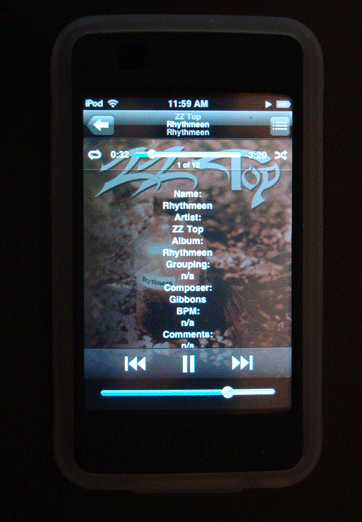
			<content:encoded><![CDATA[<p>I never bother much with Lyrics, so I didn&#8217;t realize Lyrics for the current track on the iPhone or iPod Touch could be made visible until Far-Flung Antipodes Correspondent Jon Jong queried about putting various tags into the Lyrics tag so they could be viewed instead.<br/><br/><img style="text-align:center;" src="http://dougscripts.com/itunes/pix/selectedtagstolyrics.png" /><br/><br/><a href="http://dougscripts.com/itunes/scripts/ss.php?sp=selectedtagstolyrics" title="Copy selected tags as list to Lyrics tag of selected tracks">Selected Tags to Lyrics</a> will allow you to copy any combination of the Name, Artist, Album, Grouping, Composer, BPM, Comments and/or Description of the selected tracks to the Lyrics tag of each. Tap-tap, and there you are!</p>
<hr/><small><a href="http://dougscripts.com/itunes/dougsupdated.rss" title="Take me to your reader">30 Most Recent RSS Feed</a> | <a href="http://dougscripts.com/itunes/scripts/scriptcount.php?sortBy=Name&op=y">Script Stats Page</a> by <a href="http://dougscripts.com/itunes/scripts/scriptcount.php?sortBy=Name&op=y">Name</a>, <a href="http://dougscripts.com/itunes/scripts/scriptcount.php?sortBy=Most Recent&op=y">Most Recent</a>, <a href="http://dougscripts.com/itunes/scripts/scriptcount.php?sortBy=Download Count&op=y">Download Count</a></small>]]></content:encoded>
			</item>
		<item>
		<title>NEW: Export Artwork v1.0</title>
		<link>http://dougscripts.com/itunes/2008/05/new-export-artwork-v1-0/</link>
		<comments></comments>
		<pubDate>Thu, 22 May 2008 15:08:00 +0000</pubDate>
		<dc:creator>dougscripts</dc:creator>
				<category><![CDATA[AppleScript]]></category>
		<category><![CDATA[Managing Artwork]]></category>
		<category><![CDATA[New Releases]]></category>
		<category><![CDATA[iTunes]]></category>

		<guid isPermaLink="false">http://dougscripts.com/itunes/?p=315</guid>
		<description><![CDATA[Export Artwork replaces the script &#8220;Save Artwork to Folder&#8221;. This script will save the artwork of the single selected track to a user-chosen folder as a PNG or JPG file, with scaling options. Default location is the folder containing the selected track&#8217;s file (or your Desktop if an iPod track is selected), however any location [...]]]></description>
			<content:encoded><![CDATA[<p><a href="http://dougscripts.com/itunes/scripts/ss.php?sp=exportartwork" title="Save the display artwork of the selected track to a file">Export Artwork</a> replaces the script &#8220;Save Artwork to Folder&#8221;. This script will save the artwork of the single selected track to a user-chosen folder as a PNG or JPG file, with scaling options. Default location is the folder containing the selected track&#8217;s file (or your Desktop if an iPod track is selected), however any location can be selected.</p>
<hr/><small><a href="http://dougscripts.com/itunes/dougsupdated.rss" title="Take me to your reader">30 Most Recent RSS Feed</a> | <a href="http://dougscripts.com/itunes/scripts/scriptcount.php?sortBy=Name&op=y">Script Stats Page</a> by <a href="http://dougscripts.com/itunes/scripts/scriptcount.php?sortBy=Name&op=y">Name</a>, <a href="http://dougscripts.com/itunes/scripts/scriptcount.php?sortBy=Most Recent&op=y">Most Recent</a>, <a href="http://dougscripts.com/itunes/scripts/scriptcount.php?sortBy=Download Count&op=y">Download Count</a></small>]]></content:encoded>
			</item>
	</channel>
</rss>