
<?xml version="1.0" encoding="UTF-8"?>
<rss version="2.0"
	xmlns:content="http://purl.org/rss/1.0/modules/content/"
	xmlns:wfw="http://wellformedweb.org/CommentAPI/"
	xmlns:dc="http://purl.org/dc/elements/1.1/"
	xmlns:atom="http://www.w3.org/2005/Atom"
	xmlns:sy="http://purl.org/rss/1.0/modules/syndication/"
	xmlns:slash="http://purl.org/rss/1.0/modules/slash/"
	>

<channel>
	<title>Doug&#039;s AppleScripts for iTunes &#187; None/All Bug</title>
	<atom:link href="http://dougscripts.com/itunes/category/noneall-bug/feed/" rel="self" type="application/rss+xml" />
	<link>http://dougscripts.com</link>
	<description>AppleScripts for iTunes</description>
	<lastBuildDate>Thu, 09 Feb 2012 15:10:46 +0000</lastBuildDate>
	<generator>http://wordpress.org/?v=2.8.4</generator>
	<language>en</language>
	<sy:updatePeriod>hourly</sy:updatePeriod>
	<sy:updateFrequency>1</sy:updateFrequency>
	<cloud domain='dougscripts.com' port='80' path='/itunes/?rsscloud=notify' registerProcedure='' protocol='http-post' />
		<item>
		<title>Updated a Handful</title>
		<link>http://dougscripts.com/itunes/2009/08/updated-a-handful/</link>
		<comments></comments>
		<pubDate>Fri, 28 Aug 2009 18:56:00 +0000</pubDate>
		<dc:creator>dougscripts</dc:creator>
				<category><![CDATA[AppleScript]]></category>
		<category><![CDATA[Exporting Info]]></category>
		<category><![CDATA[Managing Playlists]]></category>
		<category><![CDATA[Managing Track Info]]></category>
		<category><![CDATA[Managing Tracks]]></category>
		<category><![CDATA[None/All Bug]]></category>
		<category><![CDATA[Updates]]></category>
		<category><![CDATA[iTunes]]></category>

		<guid isPermaLink="false">http://dougscripts.com/itunes/wpfol/?p=6</guid>
		<description><![CDATA[Nothing to do with Snow Leopard&#8211;what a relief, eh? I&#8217;ve updated seven scripts today:

Assimilate View Options
Batch-Delete Playlists
Block Party!
Compare Two Playlists
Export Smart Playlist Criteria
Move Playlists to Folder
Selected Playlists To iPod

These seem to be the most popular scripts that are affected by the &#8220;none/all&#8221; issue introduced in iTunes 8.2. There may be a few others, but I [...]]]></description>
			<content:encoded><![CDATA[<p>Nothing to do with Snow Leopard&#8211;what a relief, eh? I&#8217;ve updated seven scripts today:</p>
<ul>
<li><a href="http://dougscripts.com/itunes/scripts/ss.php?sp=assimilateviewoptions" title="Recreate a playlist such that its view options mirror the Music library">Assimilate View Options</a></li>
<li><a href="http://dougscripts.com/itunes/scripts/ss.php?sp=batchdeleteplaylists" title="Delete several playlists at once in either iTunes or iPod">Batch-Delete Playlists</a></li>
<li><a href="http://dougscripts.com/itunes/scripts/ss.php?sp=blockparty" title="Create a Block Party! playlist of random Artists and specific number of their random songs to be played in a row">Block Party!</a></li>
<li><a href="http://dougscripts.com/itunes/scripts/ss.php?sp=comparetwoplaylists" title="Create text file listing tracks common to and exclusive to two playlists">Compare Two Playlists</a></li>
<li><a href="http://dougscripts.com/itunes/scripts/ss.php?sp=exportsmartcriteria" title="Export just the criteria of Smart Playlist(s) to XML, import later">Export Smart Playlist Criteria</a></li>
<li><a href="http://dougscripts.com/itunes/scripts/ss.php?sp=moveplaylisttofolder" title="Move selected playlists to a new or existing folder">Move Playlists to Folder</a></li>
<li><a href="http://dougscripts.com/itunes/scripts/ss.php?sp=selectedplayliststoipod" title="Copy multiple playlists from iTunes to iPod">Selected Playlists To iPod</a></li>
</ul>
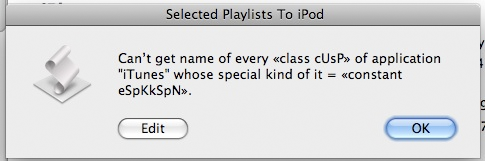
<p>These seem to be the most popular scripts that are affected by the <a href="http://dougscripts.com/itunes/itinfo/noneallissue.php">&#8220;none/all&#8221; issue</a> introduced in iTunes 8.2. There may be a few others, but I haven&#8217;t gotten email feedback on those nor have I run across a problem with any other scripts I use regularly. But if you ever get a error like this:</p>
<p style="text-align:center;overflow: hidden;"><img src="http://dougscripts.com/itunes/pix/noneallerror.png" border="0"  alt="" /></p>
<p>&#8230;then let me know.</p>
<hr/><small><a href="http://dougscripts.com/itunes/dougsupdated.rss" title="Take me to your reader">30 Most Recent RSS Feed</a> | <a href="http://dougscripts.com/itunes/scripts/scriptcount.php?sortBy=Name&op=y">Script Stats Page</a> by <a href="http://dougscripts.com/itunes/scripts/scriptcount.php?sortBy=Name&op=y">Name</a>, <a href="http://dougscripts.com/itunes/scripts/scriptcount.php?sortBy=Most Recent&op=y">Most Recent</a>, <a href="http://dougscripts.com/itunes/scripts/scriptcount.php?sortBy=Download Count&op=y">Download Count</a></small>]]></content:encoded>
			</item>
		<item>
		<title>No Joy in Bugtown</title>
		<link>http://dougscripts.com/itunes/2009/07/no-joy-in-bugtown/</link>
		<comments></comments>
		<pubDate>Wed, 15 Jul 2009 17:41:44 +0000</pubDate>
		<dc:creator>dougscripts</dc:creator>
				<category><![CDATA[Apple]]></category>
		<category><![CDATA[Internet]]></category>
		<category><![CDATA[None/All Bug]]></category>
		<category><![CDATA[Updates]]></category>

		<guid isPermaLink="false">http://dougscripts.com/itunes/wpfol/?p=39</guid>
		<description><![CDATA[iTunes 8.2.1 does not fix the all/none situation.
]]></description>
			<content:encoded><![CDATA[<p>iTunes 8.2.1 does not fix the <a href="http://dougscripts.com/itunes/itinfo/noneallissue.php">all/none</a> situation.</p>
<hr/><small><a href="http://dougscripts.com/itunes/dougsupdated.rss" title="Take me to your reader">30 Most Recent RSS Feed</a> | <a href="http://dougscripts.com/itunes/scripts/scriptcount.php?sortBy=Name&op=y">Script Stats Page</a> by <a href="http://dougscripts.com/itunes/scripts/scriptcount.php?sortBy=Name&op=y">Name</a>, <a href="http://dougscripts.com/itunes/scripts/scriptcount.php?sortBy=Most Recent&op=y">Most Recent</a>, <a href="http://dougscripts.com/itunes/scripts/scriptcount.php?sortBy=Download Count&op=y">Download Count</a></small>]]></content:encoded>
			</item>
		<item>
		<title>It&#8217;s a None/All Bug</title>
		<link>http://dougscripts.com/itunes/2009/06/its-a-noneall-bug/</link>
		<comments></comments>
		<pubDate>Wed, 10 Jun 2009 12:15:21 +0000</pubDate>
		<dc:creator>dougscripts</dc:creator>
				<category><![CDATA[AppleScript]]></category>
		<category><![CDATA[None/All Bug]]></category>
		<category><![CDATA[Tips and Info]]></category>
		<category><![CDATA[iTunes]]></category>

		<guid isPermaLink="false">http://dougscripts.com/itunes/wpfol/?p=47</guid>
		<description><![CDATA[The &#8220;none&#8221; bug I described yesterday turns out to be a bit more extensive: it&#8217;s a &#8220;none/all&#8221; bug.iTunes 8.2 introduces a bug whereby the the use of the none value with special kind and video kind, and the all value with song repeat in AppleScripts compiled in iTunes 8.1.1 and earlier will not work correctly [...]]]></description>
			<content:encoded><![CDATA[<p>The &#8220;none&#8221; bug I described yesterday turns out to be a bit more extensive: it&#8217;s a &#8220;none/all&#8221; bug.<br/><br/>iTunes 8.2 introduces a bug whereby the the use of the <b>none</b> value with <b>special kind</b> and <b>video kind</b>, and the <b>all</b> value with <b>song repeat</b> in AppleScripts <i>compiled in iTunes 8.1.1 and earlier</i> will not work correctly in iTunes 8.2. I understand that Apple is aware of this situation and assume a fix will be forthcoming in a future version.<br/><br/>If you encounter an error caused by this bug, chances are you are running iTunes 8.2 and the script had been compiled and saved with an earlier version of iTunes.<br/><br/>The fix is to open the script in Script Editor, look for chevron-bound raw constants, and replace them with the appropriate bare-word value. For example, if you see  «constant eSpKkSpN» change this to <b>none</b>. (I&#8217;m afraid I don&#8217;t know what the raw constant for &#8220;all&#8221; is, but it would appear with a <b>song repeat</b> command; <b>song repeat</b> takes the values &#8220;off&#8221;, &#8220;one&#8221;, and &#8220;all&#8221;). Then re-save the script; it will compile referencing iTunes 8.2 aete and will work fine. Such recompiled scripts, however, will then not work with pre-iTunes 8.2.</p>
<hr/><small><a href="http://dougscripts.com/itunes/dougsupdated.rss" title="Take me to your reader">30 Most Recent RSS Feed</a> | <a href="http://dougscripts.com/itunes/scripts/scriptcount.php?sortBy=Name&op=y">Script Stats Page</a> by <a href="http://dougscripts.com/itunes/scripts/scriptcount.php?sortBy=Name&op=y">Name</a>, <a href="http://dougscripts.com/itunes/scripts/scriptcount.php?sortBy=Most Recent&op=y">Most Recent</a>, <a href="http://dougscripts.com/itunes/scripts/scriptcount.php?sortBy=Download Count&op=y">Download Count</a></small>]]></content:encoded>
			</item>
		<item>
		<title>Special Kind Playlist Property Weirdness, ctd</title>
		<link>http://dougscripts.com/itunes/2009/06/special-kind-playlist-property-weirdness-ctd/</link>
		<comments></comments>
		<pubDate>Wed, 10 Jun 2009 00:14:35 +0000</pubDate>
		<dc:creator>dougscripts</dc:creator>
				<category><![CDATA[AppleScript]]></category>
		<category><![CDATA[None/All Bug]]></category>
		<category><![CDATA[iTunes]]></category>

		<guid isPermaLink="false">http://dougscripts.com/itunes/wpfol/?p=49</guid>
		<description><![CDATA[A little more about the &#8220;none&#8221; bug, mentioned earlier today. Any script compiled and saved before iTunes 8.2 which uses the &#8220;none&#8221; constant with playlist&#8217;s special kind property will error. Thus, if you get an error concerning &#8220;«constant eSpKkSpN»&#8221; then it is most likely this bug.The fix, as I also mentioned earlier, is to open [...]]]></description>
			<content:encoded><![CDATA[<p>A little more about the &#8220;none&#8221; bug, mentioned earlier today. Any script compiled and saved before iTunes 8.2 which uses the &#8220;none&#8221; constant with <b>playlist</b>&#8217;s <b>special kind</b> property will error. Thus, if you get an error concerning &#8220;«constant eSpKkSpN»&#8221; then it is most likely this bug.<br/><br/>The fix, as I also mentioned earlier, is to open the script with Script Editor, making a note  of whether the script&#8217;s format is compiled (.scpt or .scptd extension) or application (.app extension), and replacing any occurrence of «constant eSpKkSpN» with the bare word <b>none</b>. Then &#8220;Save as&#8230;&#8221; the script, making sure the File Format in the save dialog is set as you noted.<br/><br/>The script should run fine under iTunes 8.2, but, because it has been re-compiled, will not under iTunes 8.1.1 and earlier.</p>
<hr/><small><a href="http://dougscripts.com/itunes/dougsupdated.rss" title="Take me to your reader">30 Most Recent RSS Feed</a> | <a href="http://dougscripts.com/itunes/scripts/scriptcount.php?sortBy=Name&op=y">Script Stats Page</a> by <a href="http://dougscripts.com/itunes/scripts/scriptcount.php?sortBy=Name&op=y">Name</a>, <a href="http://dougscripts.com/itunes/scripts/scriptcount.php?sortBy=Most Recent&op=y">Most Recent</a>, <a href="http://dougscripts.com/itunes/scripts/scriptcount.php?sortBy=Download Count&op=y">Download Count</a></small>]]></content:encoded>
			</item>
		<item>
		<title>Special Kind Playlist Property Weirdness</title>
		<link>http://dougscripts.com/itunes/2009/06/special-kind-playlist-property-weirdness/</link>
		<comments></comments>
		<pubDate>Tue, 09 Jun 2009 17:11:37 +0000</pubDate>
		<dc:creator>dougscripts</dc:creator>
				<category><![CDATA[AppleScript]]></category>
		<category><![CDATA[None/All Bug]]></category>
		<category><![CDATA[iTunes]]></category>

		<guid isPermaLink="false">http://dougscripts.com/itunes/wpfol/?p=51</guid>
		<description><![CDATA[A script I had written a year ago looks for playlists whose smart is false and special kind is none. Since updating to iTunes 8.2 it is showing as raw «constant eSpKkSpN». The error is: &#8220;Can’t get name of every user playlist whose smart = true and special kind = «constant eSpKkSpN».&#8221;

If I open the [...]]]></description>
			<content:encoded><![CDATA[<p>A script I had written a year ago looks for playlists whose smart is false and special kind is none. Since updating to iTunes 8.2 it is showing as raw «constant eSpKkSpN». The error is: &#8220;Can’t get name of every user playlist whose smart = true and special kind = «constant eSpKkSpN».&#8221;
</p>
<p>If I open the script and change «constant eSpKkSpN»  to &#8220;none&#8221; then save, all&#8217;s OK.</p>
<hr/><small><a href="http://dougscripts.com/itunes/dougsupdated.rss" title="Take me to your reader">30 Most Recent RSS Feed</a> | <a href="http://dougscripts.com/itunes/scripts/scriptcount.php?sortBy=Name&op=y">Script Stats Page</a> by <a href="http://dougscripts.com/itunes/scripts/scriptcount.php?sortBy=Name&op=y">Name</a>, <a href="http://dougscripts.com/itunes/scripts/scriptcount.php?sortBy=Most Recent&op=y">Most Recent</a>, <a href="http://dougscripts.com/itunes/scripts/scriptcount.php?sortBy=Download Count&op=y">Download Count</a></small>]]></content:encoded>
			</item>
	</channel>
</rss>



