
 Apple Music Profile
 YouTube Channel
 RSS Feed
 Play Play
 Murph
Murph Yer Stack
 Block Party Weekend
 Elevendy
 Dupin v4.0.0
 Join Together
 M3Unify
 30 Most Recent RSS Feed
Snippets
Disc 1 of 1
A Corespondent laments:
My personal preference when dealing with the disc count field (1 of 2, etc) is to leave it blank for single CD albums instead of tagging them as "1 of 1." There is something about 1 of 1 that just bugs me so I try to clear those out. Can you think of anything you have that can search in those fields? Sorting the library by disc number [is an unsatisfactory solution] because every disc 1—regardless if there is a second disc—gets sorted.
Yeah. It would be easy to do a Multi-Item edit on these guys if you could only corral 'em all together somehow. But: sorting by Disc # sorts by Disc Number alone and ignores the Disc Count so the "1 of 1" tracks are not necessarily sorted together; rather, they're sorted by Album (all the Disc 1 albums A-Z, followed by all the Disc 2 albums A-Z, and so on). Smart Playlists are of little use to gather up these tracks since Disc Count is not a smart criterion.
So here's a script that will look at each track in a selection or all the tracks in the selected playlist; if the track's Disc Count is 1 the script will set it to 0, effectively blanking it:
tell application id "com.apple.iTunes"
set thePlaylist to (get view of front window)
set sel to selection
if sel is {} then
# all tracks in playlist
repeat with i from 1 to (get index of last track of thePlaylist)
my processTheTrack(track i of thePlaylist)
end repeat
else
# selected tracks
repeat with i from 1 to (length of sel)
my processTheTrack(item i of sel)
end repeat
end if
end tell
to processTheTrack(t)
tell application id "com.apple.iTunes"
try
if disc count of t is 1 then set disc count of t to 0
end try
end tell
end processTheTrack

You can save that in AppleScript Editor named whatever you like and using "Script" as the file format to your ~/Library/iTunes/Scripts/ folder whereupon it will appear in the iTunes Scripts menu.
The script iterates through each track individually, so if you run it against your entire Music library playlist you'll have time to file nails, tidy bookshelves, re-string guitar, or perform some other menial task.
UPDATE: To eliminate the disc number as well (although I prefer to keep it) change the handler to this:
to processTheTrack(t)
tell application id "com.apple.iTunes"
try
if disc count of t is 1 then
set disc number of t to 0
set disc count of t to 0
end if
end try
end tell
end processTheTrack
Search iTunes Store via Google
Kirk had a tip about using Google to search the iTunes Store in his Macworld column today. Here's a script for that:
try
set searchText to text returned of (display dialog "Search the iTunes Music Store for:" default answer "")
tell application "Finder" to open location "http://www.google.com/search?q=site:itunes.apple.com " & searchText
end try
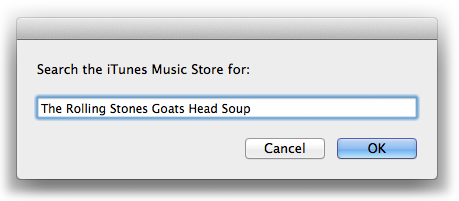
Launch and enter some search text and click the "OK" button. A new window with Google results will be displayed by your default browser.
iBooks is Not Scriptable. Much.
iBooks is built without AppleScript support so I'm still using iTunes to manage my PDFs. But if you need to programmatically add a file—like a PDF—to iBooks you can use this trick, where filePath is an alias:
using terms from application "iTunes"
tell application "iBooks" to open filePath
end using terms from
Unfortunately, you can't edit the tags in iBooks. Nor does iBooks seem to use any existing PDF metadata except "Author". Strangely, in fact, it uses the PDF's file name (without extension) for "Title" instead of checking the PDF's metadata for "Title". And while I'm making wishes, "Keyword" metadata could be parsed for a Category and perhaps a way could be found to use the PDF "Subject" metadata as a description tag somewhere.
iBooks, which seems to me to be a pretty basic database manager, stores much more metadata for other types of books (have a look at ~/Library/Containers/com.apple.BKAgentService/Data/Documents/iBooks/Books and the Books.plist there) so it doesn't seem like it would be much of a bother to accommodate PDFs a little better.
Create Shortcut Keys to Select Libraries
There are no shortcut keys to select the Music, Podcast, TV Shows, and other libraries. But you can use AppleScript to create some. Here's how:
What you'll end up doing is creating a small script for each of the libraries you'll want to access. Here's the script for the Music library:
tell application "iTunes"
	try
		set view of front browser window to (get some playlist whose special kind is Music)
	end try
end tell
Some might suggest using this syntax instead:
set view of front browser window to playlist "Music"
That's fine, too. I just prefer using special kind to avoid any ambiguity. Save that as "select_music.scpt" in your ~/Library/iTunes/Scripts/ folder so it will appear in the iTunes Script menu. Now, assign the script a "Command-1" keyboard shortcut.
I think you can see where this is going. You'll create a "select-movies.scpt" and assign it "Command-2", and so on. The special kind parameters for other libraries are Books, iTunes U, Movies, Podcasts, and TV Shows. For other libraries you may have to use the name parameter.
Updated Spareparts Section
A Correspondent via the AppleScript Users email list detected a problem with a script snippet of mine regarding grabbing the artwork data from an iTunes track with iTunes 9 and Snow Leopard. That very day I also had updated Export Artwork with a fix for a similar issue. At any rate, the snippet resides in the Spare Parts section and, to be more exact, the updated snippet with the fix is here.
Re-Posting Stream Startup Script
A couple few days ago I posted a script here that would ping the Radio Paradise stream until its server accepted the connection, suppressing the error dialog that would appear when a connection was denied. Well, that was the wrong version of the script. Here is the correct version, and the one I fire up every morning. You must select a radio stream track first, then run the script:
tell application "iTunes"
	if selection is {} then return
	set strm to (item 1 of selection)
	if (get class of strm) is not URL track then return
	repeat
		try
			play strm
			exit repeat
		on error m number n
			delay 15
		end try
	end repeat
end tell

The earlier script used the open location command, errors from which could not be defeated with the try block.
