<?xml version="1.0" encoding="UTF-8"?>
<rss version="2.0"
	xmlns:content="http://purl.org/rss/1.0/modules/content/"
	xmlns:wfw="http://wellformedweb.org/CommentAPI/"
	xmlns:dc="http://purl.org/dc/elements/1.1/"
	xmlns:atom="http://www.w3.org/2005/Atom"
	xmlns:sy="http://purl.org/rss/1.0/modules/syndication/"
	xmlns:slash="http://purl.org/rss/1.0/modules/slash/"
	>

<channel>
	<title>Doug&#039;s AppleScripts for iTunes &#187; unix</title>
	<atom:link href="http://dougscripts.com/itunes/category/unix/feed/" rel="self" type="application/rss+xml" />
	<link>http://dougscripts.com</link>
	<description>AppleScripts for iTunes</description>
	<lastBuildDate>Thu, 09 Feb 2012 15:10:46 +0000</lastBuildDate>
	<generator>http://wordpress.org/?v=2.8.4</generator>
	<language>en</language>
	<sy:updatePeriod>hourly</sy:updatePeriod>
	<sy:updateFrequency>1</sy:updateFrequency>
	<cloud domain='dougscripts.com' port='80' path='/itunes/?rsscloud=notify' registerProcedure='' protocol='http-post' />
		<item>
		<title>NEW: Have a Quick Look v1.0</title>
		<link>http://dougscripts.com/itunes/2010/07/new-have-a-quick-look-v1-0/</link>
		<comments></comments>
		<pubDate>Thu, 15 Jul 2010 14:16:50 +0000</pubDate>
		<dc:creator>dougscripts</dc:creator>
				<category><![CDATA[Miscellaneous]]></category>
		<category><![CDATA[unix]]></category>

		<guid isPermaLink="false">http://dougscripts.com/itunes/?p=1031</guid>
		<description><![CDATA[Inspired by this recent Mac OS X Hint, I&#8217;ve posted Have a Quick Look. This script uses the UNIX qlmanage command to display a Quick Look window of the selected iTunes track(s), which can be audio, video, and, perhaps most usefully, PDF, whereby Preview.app is not necessary. Need I add that a keyboard shortcut makes [...]]]></description>
			<content:encoded><![CDATA[<p>Inspired by <a href="http://www.macosxhints.com/article.php?story=20100712090451517">this recent Mac OS X Hint</a>, I&#8217;ve posted <a href="http://dougscripts.com/itunes/scripts/ss.php?sp=haveaquicklook" title="View selected iTunes tracks in Quick Look windows">Have a Quick Look</a>. This script uses the UNIX <strong>qlmanage</strong> command to display a Quick Look window of the selected iTunes track(s), which can be audio, video, and, perhaps most usefully, PDF, whereby Preview.app is not necessary. Need I add that a <a href="http://dougscripts.com/itunes/itinfo/shortcutkeys.php">keyboard shortcut</a> makes this very handy.</p>
<hr/><small><a href="http://dougscripts.com/itunes/dougsupdated.rss" title="Take me to your reader">30 Most Recent RSS Feed</a> | <a href="http://dougscripts.com/itunes/scripts/scriptcount.php?sortBy=Name&op=y">Script Stats Page</a> by <a href="http://dougscripts.com/itunes/scripts/scriptcount.php?sortBy=Name&op=y">Name</a>, <a href="http://dougscripts.com/itunes/scripts/scriptcount.php?sortBy=Most Recent&op=y">Most Recent</a>, <a href="http://dougscripts.com/itunes/scripts/scriptcount.php?sortBy=Download Count&op=y">Download Count</a></small>]]></content:encoded>
			</item>
		<item>
		<title>Need More Sharing From Home Sharing?</title>
		<link>http://dougscripts.com/itunes/2009/09/need-more-sharing-from-home-sharing/</link>
		<comments></comments>
		<pubDate>Fri, 11 Sep 2009 13:17:26 +0000</pubDate>
		<dc:creator>dougscripts</dc:creator>
				<category><![CDATA[AppleScript]]></category>
		<category><![CDATA[Networking]]></category>
		<category><![CDATA[iTunes]]></category>
		<category><![CDATA[iTunes9]]></category>
		<category><![CDATA[ssh]]></category>
		<category><![CDATA[unix]]></category>

		<guid isPermaLink="false">http://dougscripts.com/itunes/?p=796</guid>
		<description><![CDATA[If you find the new iTunes 9 feature &#8220;Home Sharing&#8221; a bit lacking then you may be interested in this remote management compendium I put together a few months ago. If you&#8217;re ready to really get your hands dirty with things like ssh, rsync, launchd, and more, you can design a system to copy/backup/add any [...]]]></description>
			<content:encoded><![CDATA[<p>If you find the new iTunes 9 feature &#8220;Home Sharing&#8221; a bit lacking then you may be interested in <a href="http://dougscripts.com/itunes/itinfo/diy1network1.php">this remote management compendium</a> I put together a few months ago. If you&#8217;re ready to really get your hands dirty with things like <strong>ssh</strong>, <strong>rsync</strong>, <strong>launchd</strong>, and more, you can design a system to copy/backup/add any iTunes files to other iTunes apps on your network in the background.</p>
<hr/><small><a href="http://dougscripts.com/itunes/dougsupdated.rss" title="Take me to your reader">30 Most Recent RSS Feed</a> | <a href="http://dougscripts.com/itunes/scripts/scriptcount.php?sortBy=Name&op=y">Script Stats Page</a> by <a href="http://dougscripts.com/itunes/scripts/scriptcount.php?sortBy=Name&op=y">Name</a>, <a href="http://dougscripts.com/itunes/scripts/scriptcount.php?sortBy=Most Recent&op=y">Most Recent</a>, <a href="http://dougscripts.com/itunes/scripts/scriptcount.php?sortBy=Download Count&op=y">Download Count</a></small>]]></content:encoded>
			</item>
		<item>
		<title>DIY: Remote Management Assortment, Part 5</title>
		<link>http://dougscripts.com/itunes/2009/07/diy-remote-management-assortment-part-5/</link>
		<comments></comments>
		<pubDate>Mon, 13 Jul 2009 15:35:47 +0000</pubDate>
		<dc:creator>dougscripts</dc:creator>
				<category><![CDATA[Networking]]></category>
		<category><![CDATA[Tips and Info]]></category>
		<category><![CDATA[osascript]]></category>
		<category><![CDATA[rsync]]></category>
		<category><![CDATA[ssh]]></category>
		<category><![CDATA[unix]]></category>

		<guid isPermaLink="false">http://dougscripts.com/itunes/wpfol/?p=43</guid>
		<description><![CDATA[I&#8217;ve added a Part 5 to DIY: Remote Management Assortment that describes how to create and delete playlists on a remote user&#8217;s iTunes with ssh and osascript. If you haven&#8217;t been following along in this series of projects, you may want to start at the beginning; this newest addition builds on routines and concepts from [...]]]></description>
			<content:encoded><![CDATA[<p>I&#8217;ve added a Part 5 to <a href="http://dougscripts.com/itunes/itinfo/diy1network19.php">DIY: Remote Management Assortment</a> that describes how to create and delete playlists on a remote user&#8217;s iTunes with <b>ssh</b> and <b>osascript</b>. If you haven&#8217;t been following along in this series of projects, you may want to start at the <a href="http://dougscripts.com/itunes/itinfo/diy1network0.php">beginning</a>; this newest addition builds on routines and concepts from earlier in the series.</p>
<hr/><small><a href="http://dougscripts.com/itunes/dougsupdated.rss" title="Take me to your reader">30 Most Recent RSS Feed</a> | <a href="http://dougscripts.com/itunes/scripts/scriptcount.php?sortBy=Name&op=y">Script Stats Page</a> by <a href="http://dougscripts.com/itunes/scripts/scriptcount.php?sortBy=Name&op=y">Name</a>, <a href="http://dougscripts.com/itunes/scripts/scriptcount.php?sortBy=Most Recent&op=y">Most Recent</a>, <a href="http://dougscripts.com/itunes/scripts/scriptcount.php?sortBy=Download Count&op=y">Download Count</a></small>]]></content:encoded>
			</item>
		<item>
		<title>DIY: iTunes Remote Management Assortment</title>
		<link>http://dougscripts.com/itunes/2009/06/diy-itunes-remote-management-assortment/</link>
		<comments></comments>
		<pubDate>Wed, 24 Jun 2009 20:29:05 +0000</pubDate>
		<dc:creator>dougscripts</dc:creator>
				<category><![CDATA[Controlling iTunes]]></category>
		<category><![CDATA[Networking]]></category>
		<category><![CDATA[Tips and Info]]></category>
		<category><![CDATA[iTunes]]></category>
		<category><![CDATA[unix]]></category>

		<guid isPermaLink="false">http://dougscripts.com/itunes/wpfol/?p=45</guid>
		<description><![CDATA[DIY: Remote Management Assortment is a tutorial suggesting several methods of manipulating iTunes files among users on a network, with particular emphasis on using AppleScript to swing passwordless ssh, rsync, scp, osascript, and other utilities. Rather than develop a batch of scripts for you to download (and have to support), you can use the fundamentals [...]]]></description>
			<content:encoded><![CDATA[<p><a href="http://dougscripts.com/itunes/itinfo/diy1network0.php">DIY: Remote Management Assortment</a> is a tutorial suggesting several methods of manipulating iTunes files among users on a network, with particular emphasis on using AppleScript to swing passwordless <b>ssh</b>, <b>rsync</b>, <b>scp</b>, <b>osascript</b>, and other utilities. Rather than develop a batch of scripts for you to download (and have to support), you can use the fundamentals described here as the basis for your own AppleScript projects.</p>
<hr/><small><a href="http://dougscripts.com/itunes/dougsupdated.rss" title="Take me to your reader">30 Most Recent RSS Feed</a> | <a href="http://dougscripts.com/itunes/scripts/scriptcount.php?sortBy=Name&op=y">Script Stats Page</a> by <a href="http://dougscripts.com/itunes/scripts/scriptcount.php?sortBy=Name&op=y">Name</a>, <a href="http://dougscripts.com/itunes/scripts/scriptcount.php?sortBy=Most Recent&op=y">Most Recent</a>, <a href="http://dougscripts.com/itunes/scripts/scriptcount.php?sortBy=Download Count&op=y">Download Count</a></small>]]></content:encoded>
			</item>
		<item>
		<title>Library Follow-Up</title>
		<link>http://dougscripts.com/itunes/2009/01/library-follow-up/</link>
		<comments></comments>
		<pubDate>Fri, 02 Jan 2009 11:06:13 +0000</pubDate>
		<dc:creator>dougscripts</dc:creator>
				<category><![CDATA[AppleScript]]></category>
		<category><![CDATA[AppleScript Syntax]]></category>
		<category><![CDATA[Controlling iTunes]]></category>
		<category><![CDATA[iTunes]]></category>
		<category><![CDATA[unix]]></category>

		<guid isPermaLink="false">http://dougscripts.com/itunes/wpfol/?p=121</guid>
		<description><![CDATA[After playing around with the &#8220;show-library-playlist&#8221; setting, it looks like you do have to set &#8220;hide-library-playlist&#8221; also. So, to show the &#8220;Library&#8221;, run these two commands in Terminal one after the other (that is, press Return after entering each):
defaults write com.apple.iTunes show-library-playlist -bool TRUE
defaults write com.apple.iTunes hide-library-playlist -bool FALSE
To hide the Library again, run the [...]]]></description>
			<content:encoded><![CDATA[<p>After playing around with the &#8220;show-library-playlist&#8221; setting, it looks like you do have to set &#8220;hide-library-playlist&#8221; also. So, to show the &#8220;Library&#8221;, run these two commands in Terminal one after the other (that is, press Return after entering each):</p>
<pre>defaults write com.apple.iTunes show-library-playlist -bool TRUE
defaults write com.apple.iTunes hide-library-playlist -bool FALSE</pre>
<p>To hide the Library again, run the same commands, but reverse the TRUE/FALSE values.</p>
<hr/><small><a href="http://dougscripts.com/itunes/dougsupdated.rss" title="Take me to your reader">30 Most Recent RSS Feed</a> | <a href="http://dougscripts.com/itunes/scripts/scriptcount.php?sortBy=Name&op=y">Script Stats Page</a> by <a href="http://dougscripts.com/itunes/scripts/scriptcount.php?sortBy=Name&op=y">Name</a>, <a href="http://dougscripts.com/itunes/scripts/scriptcount.php?sortBy=Most Recent&op=y">Most Recent</a>, <a href="http://dougscripts.com/itunes/scripts/scriptcount.php?sortBy=Download Count&op=y">Download Count</a></small>]]></content:encoded>
			</item>
		<item>
		<title>Show the iTunes Library Old School</title>
		<link>http://dougscripts.com/itunes/2009/01/show-the-itunes-library-old-school/</link>
		<comments></comments>
		<pubDate>Thu, 01 Jan 2009 17:59:15 +0000</pubDate>
		<dc:creator>dougscripts</dc:creator>
				<category><![CDATA[AppleScript]]></category>
		<category><![CDATA[AppleScript Syntax]]></category>
		<category><![CDATA[Controlling iTunes]]></category>
		<category><![CDATA[Tips and Info]]></category>
		<category><![CDATA[iTunes]]></category>
		<category><![CDATA[unix]]></category>

		<guid isPermaLink="false">http://dougscripts.com/itunes/wpfol/?p=123</guid>
		<description><![CDATA[I&#8217;m not certain if this has been mentioned anywhere&#8211;I haven&#8217;t seen it&#8211;but I found the defaults command for displaying the entire iTunes library. Remember when you actually had a large playlist named &#8220;Library&#8221;, before Apple split it up into&#8211;what I call&#8211;&#8221;Master&#8221; libraries of &#8220;Music&#8221;, &#8220;Movies&#8221;, &#8220;Podcasts&#8221;, and so on? The &#8220;Library&#8221; listed everything in your [...]]]></description>
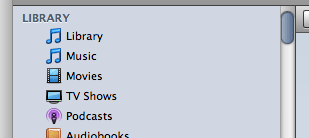
			<content:encoded><![CDATA[<p>I&#8217;m not certain if this has been mentioned anywhere&#8211;I haven&#8217;t seen it&#8211;but I found the defaults command for displaying the <i>entire</i> iTunes library. Remember when you actually had a large playlist named &#8220;Library&#8221;, before Apple split it up into&#8211;what I call&#8211;&#8221;Master&#8221; libraries of &#8220;Music&#8221;, &#8220;Movies&#8221;, &#8220;Podcasts&#8221;, and so on? The &#8220;Library&#8221; listed <i>everything</i> in your iTunes library. Well, you can get that back using this command in Terminal:</p>
<pre>defaults write com.apple.iTunes show-library-playlist -bool TRUE</pre>
<p>Quit iTunes before entering the command. When you restart you&#8217;ll have a new playlist named &#8220;Library&#8221; at the top of your Source list, above &#8220;Music&#8221;.
<p style="text-align:center"><img class="noborder" src="http://dougscripts.com/itunes/pix/liboldschool.png" border="0" /></p>
<p>If you want to remove the &#8220;Library&#8221; again, use this command in Terminal:</p>
<pre>defaults write com.apple.iTunes show-library-playlist -bool FALSE</pre>
<p>There is a second preference called &#8220;hide-library-playlist&#8221;, which I at first thought would have to be set in tandem with the opposite of &#8220;show-library-playlist&#8221;, but this doesn&#8217;t seem necessary. In fact, you can set one or the other, apparently, and get the desired result; that is setting &#8220;show-library-playlist&#8221; to TRUE <i>or</i> setting &#8220;hide-library-playlist&#8221; to FALSE amounts to the same thing. Also, for AppleScript purposes, this playlist can be referenced as <b>library playlist 1</b>; it always could be, but now it is visible.</p>
<hr/><small><a href="http://dougscripts.com/itunes/dougsupdated.rss" title="Take me to your reader">30 Most Recent RSS Feed</a> | <a href="http://dougscripts.com/itunes/scripts/scriptcount.php?sortBy=Name&op=y">Script Stats Page</a> by <a href="http://dougscripts.com/itunes/scripts/scriptcount.php?sortBy=Name&op=y">Name</a>, <a href="http://dougscripts.com/itunes/scripts/scriptcount.php?sortBy=Most Recent&op=y">Most Recent</a>, <a href="http://dougscripts.com/itunes/scripts/scriptcount.php?sortBy=Download Count&op=y">Download Count</a></small>]]></content:encoded>
			</item>
		<item>
		<title>Native Half-Star Ratings</title>
		<link>http://dougscripts.com/itunes/2008/12/native-half-star-ratings/</link>
		<comments></comments>
		<pubDate>Tue, 23 Dec 2008 17:26:58 +0000</pubDate>
		<dc:creator>dougscripts</dc:creator>
				<category><![CDATA[AppleScript]]></category>
		<category><![CDATA[Tips and Info]]></category>
		<category><![CDATA[iTunes]]></category>
		<category><![CDATA[unix]]></category>

		<guid isPermaLink="false">http://dougscripts.com/itunes/?p=152</guid>
		<description><![CDATA[This hint at Mac OS X Hints describes a simple terminal defaults command that allows iTunes to accept half-star ratings by drag or inter-star-clicking.
]]></description>
			<content:encoded><![CDATA[<p>This hint at <a href="http://www.macosxhints.com/article.php?story=20081220090352648" target="_blank">Mac OS X Hints</a> describes a simple terminal defaults command that allows iTunes to accept half-star ratings by drag or inter-star-clicking.</p>
<hr/><small><a href="http://dougscripts.com/itunes/dougsupdated.rss" title="Take me to your reader">30 Most Recent RSS Feed</a> | <a href="http://dougscripts.com/itunes/scripts/scriptcount.php?sortBy=Name&op=y">Script Stats Page</a> by <a href="http://dougscripts.com/itunes/scripts/scriptcount.php?sortBy=Name&op=y">Name</a>, <a href="http://dougscripts.com/itunes/scripts/scriptcount.php?sortBy=Most Recent&op=y">Most Recent</a>, <a href="http://dougscripts.com/itunes/scripts/scriptcount.php?sortBy=Download Count&op=y">Download Count</a></small>]]></content:encoded>
			</item>
		<item>
		<title>Banish the Track Numbers from Imported Files</title>
		<link>http://dougscripts.com/itunes/2008/10/banish-the-track-numbers-from-imported-files/</link>
		<comments></comments>
		<pubDate>Wed, 01 Oct 2008 19:29:23 +0000</pubDate>
		<dc:creator>dougscripts</dc:creator>
				<category><![CDATA[Advice]]></category>
		<category><![CDATA[Tips and Info]]></category>
		<category><![CDATA[unix]]></category>

		<guid isPermaLink="false">http://dougscripts.com/itunes/?p=200</guid>
		<description><![CDATA[This tip at Mac OS X Hints reveals the defaults command to keep track numbers from being added to the beginning of filenames after importing, a feature that was removed from iTunes&#8217; Preferences in iTunes 8. Of course, as one commenter laments, this won&#8217;t remove the track numbers from files you have already ripped in [...]]]></description>
			<content:encoded><![CDATA[<p><a href="http://www.macosxhints.com/article.php?story=20080930161619878">This tip</a> at Mac OS X Hints reveals the <strong>defaults</strong> command to keep track numbers from being added to the beginning of filenames after importing, a feature that was removed from iTunes&#8217; Preferences in iTunes 8. Of course, as one commenter laments, this won&#8217;t remove the track numbers from files you have already ripped in iTunes 8.</p>
<hr/><small><a href="http://dougscripts.com/itunes/dougsupdated.rss" title="Take me to your reader">30 Most Recent RSS Feed</a> | <a href="http://dougscripts.com/itunes/scripts/scriptcount.php?sortBy=Name&op=y">Script Stats Page</a> by <a href="http://dougscripts.com/itunes/scripts/scriptcount.php?sortBy=Name&op=y">Name</a>, <a href="http://dougscripts.com/itunes/scripts/scriptcount.php?sortBy=Most Recent&op=y">Most Recent</a>, <a href="http://dougscripts.com/itunes/scripts/scriptcount.php?sortBy=Download Count&op=y">Download Count</a></small>]]></content:encoded>
			</item>
		<item>
		<title>iTunes 8 Loses Prefs Control for Genre Browser</title>
		<link>http://dougscripts.com/itunes/2008/09/itunes-8-loses-prefs-control-for-genre-browser/</link>
		<comments></comments>
		<pubDate>Wed, 10 Sep 2008 01:15:11 +0000</pubDate>
		<dc:creator>dougscripts</dc:creator>
				<category><![CDATA[Advice]]></category>
		<category><![CDATA[Apple]]></category>
		<category><![CDATA[iTunes]]></category>
		<category><![CDATA[unix]]></category>

		<guid isPermaLink="false">http://dougscripts.com/itunes/?p=226</guid>
		<description><![CDATA[Switch off the iTunes 8 Genre browser via a defaults write command in Terminal.
]]></description>
			<content:encoded><![CDATA[<p><a href="http://blech.vox.com/library/post/switch-off-the-itunes-8-genre-browser.html">Switch off the iTunes 8 Genre browser</a> via a <b>defaults write</b> command in Terminal.</p>
<hr/><small><a href="http://dougscripts.com/itunes/dougsupdated.rss" title="Take me to your reader">30 Most Recent RSS Feed</a> | <a href="http://dougscripts.com/itunes/scripts/scriptcount.php?sortBy=Name&op=y">Script Stats Page</a> by <a href="http://dougscripts.com/itunes/scripts/scriptcount.php?sortBy=Name&op=y">Name</a>, <a href="http://dougscripts.com/itunes/scripts/scriptcount.php?sortBy=Most Recent&op=y">Most Recent</a>, <a href="http://dougscripts.com/itunes/scripts/scriptcount.php?sortBy=Download Count&op=y">Download Count</a></small>]]></content:encoded>
			</item>
		<item>
		<title>NEW: Rip AAC Old School v0.9</title>
		<link>http://dougscripts.com/itunes/2007/11/new-rip-aac-old-school-v0-9/</link>
		<comments></comments>
		<pubDate>Fri, 16 Nov 2007 14:16:32 +0000</pubDate>
		<dc:creator>dougscripts</dc:creator>
				<category><![CDATA[AppleScript]]></category>
		<category><![CDATA[New Releases]]></category>
		<category><![CDATA[iTunes]]></category>
		<category><![CDATA[unix]]></category>

		<guid isPermaLink="false">http://dougscripts.com/itunes/?p=430</guid>
		<description><![CDATA[Now that iTunes doesn&#8217;t rip or convert AACs using constant bit rates (see this MacFixIt article), users of Join Together can&#8217;t take advantage of the Pass-through option, which encodes the final joined file much faster. Rip AAC Old School is an AppleScript wrapper for the command line tool afconvert. It will rip CD tracks as [...]]]></description>
			<content:encoded><![CDATA[<p>Now that iTunes doesn&#8217;t rip or convert AACs using constant bit rates (see <a href="http://www.macfixit.com/article.php?story=20071112114918992">this MacFixIt</a> article), users of <a href="http://dougscripts.com/itunes/scripts/ss.php?sp=jointogether">Join Together</a> can&#8217;t take advantage of the Pass-through option, which encodes the final joined file much faster. <a href="http://dougscripts.com/itunes/scripts/ss.php?sp=ripaacoldschool" title="AppleScript wrapper for afconvert rips CD tracks as Constant Bit Rate AACs">Rip AAC Old School</a> is an AppleScript wrapper for the command line tool <strong>afconvert</strong>. It will rip CD tracks as AAC using Constant Bit Rate (CBR) so that ripped tracks will all have the same bit rate. I tested it pretty thoroughly here, but I&#8217;m still keeping my fingers crossed.</p>
<hr/><small><a href="http://dougscripts.com/itunes/dougsupdated.rss" title="Take me to your reader">30 Most Recent RSS Feed</a> | <a href="http://dougscripts.com/itunes/scripts/scriptcount.php?sortBy=Name&op=y">Script Stats Page</a> by <a href="http://dougscripts.com/itunes/scripts/scriptcount.php?sortBy=Name&op=y">Name</a>, <a href="http://dougscripts.com/itunes/scripts/scriptcount.php?sortBy=Most Recent&op=y">Most Recent</a>, <a href="http://dougscripts.com/itunes/scripts/scriptcount.php?sortBy=Download Count&op=y">Download Count</a></small>]]></content:encoded>
			</item>
	</channel>
</rss>