<?xml version="1.0" encoding="UTF-8"?>
<rss version="2.0"
	xmlns:content="http://purl.org/rss/1.0/modules/content/"
	xmlns:wfw="http://wellformedweb.org/CommentAPI/"
	xmlns:dc="http://purl.org/dc/elements/1.1/"
	xmlns:atom="http://www.w3.org/2005/Atom"
	xmlns:sy="http://purl.org/rss/1.0/modules/syndication/"
	xmlns:slash="http://purl.org/rss/1.0/modules/slash/"
	>

<channel>
	<title>Doug&#039;s AppleScripts for iTunes &#187; Updates</title>
	<atom:link href="http://dougscripts.com/itunes/category/updates/feed/" rel="self" type="application/rss+xml" />
	<link>http://dougscripts.com</link>
	<description>AppleScripts for iTunes</description>
	<lastBuildDate>Sun, 13 May 2012 13:40:55 +0000</lastBuildDate>
	<generator>http://wordpress.org/?v=2.8.4</generator>
	<language>en</language>
	<sy:updatePeriod>hourly</sy:updatePeriod>
	<sy:updateFrequency>1</sy:updateFrequency>
	<cloud domain='dougscripts.com' port='80' path='/itunes/?rsscloud=notify' registerProcedure='' protocol='http-post' />
		<item>
		<title>UPDATED: Restore Artwork from Album Folder v2.0</title>
		<link>http://dougscripts.com/itunes/2011/07/updated-restore-artwork-from-album-folder-v2-0/</link>
		<comments></comments>
		<pubDate>Thu, 28 Jul 2011 13:20:31 +0000</pubDate>
		<dc:creator>dougscripts</dc:creator>
				<category><![CDATA[Cocoa-AppleScript]]></category>
		<category><![CDATA[Managing Artwork]]></category>
		<category><![CDATA[Updates]]></category>

		<guid isPermaLink="false">http://dougscripts.com/itunes/?p=1332</guid>
		<description><![CDATA[Restore Artwork from Album Folder v2.0  will look for an image file in the parent folder of each selected track&#8217;s file&#8211;presumably its &#8220;Album&#8221; folder&#8211;and apply the data from that image file as artwork for the track.
Requires iTunes 10.3 or better. This latest version is a Cocoa-AppleScript applet for OS X 10.6 and 10.7 only. [...]]]></description>
			<content:encoded><![CDATA[<p><a href="http://dougscripts.com/itunes/scripts/ss.php?sp=restorealbumart" title="Restore each selected track's artwork from an image file stored in its Album folder">Restore Artwork from Album Folder</a> v2.0  will look for an image file in the parent folder of each selected track&#8217;s file&#8211;presumably its &#8220;Album&#8221; folder&#8211;and apply the data from that image file as artwork for the track.</p>
<p>Requires iTunes 10.3 or better. This latest version is a Cocoa-AppleScript applet for OS X 10.6 and 10.7 only. The previous version is available at the script&#8217;s <a href="http://dougscripts.com/itunes/scripts/ss.php?sp=restorealbumart" title="Restore each selected track's artwork from an image file stored in its Album folder">entry</a> page.</p>
<hr/><small><a href="http://dougscripts.com/itunes/dougsupdated.rss" title="Take me to your reader">30 Most Recent RSS Feed</a> | <a href="http://dougscripts.com/itunes/scripts/scriptcount.php?sortBy=Name&op=y">Script Stats Page</a> by <a href="http://dougscripts.com/itunes/scripts/scriptcount.php?sortBy=Name&op=y">Name</a>, <a href="http://dougscripts.com/itunes/scripts/scriptcount.php?sortBy=Most Recent&op=y">Most Recent</a>, <a href="http://dougscripts.com/itunes/scripts/scriptcount.php?sortBy=Download Count&op=y">Download Count</a></small>]]></content:encoded>
			</item>
		<item>
		<title>UPDATED: Drop to Add and Give Info v2.0</title>
		<link>http://dougscripts.com/itunes/2011/07/updated-drop-to-add-and-give-info-v2-0/</link>
		<comments></comments>
		<pubDate>Wed, 27 Jul 2011 14:57:22 +0000</pubDate>
		<dc:creator>dougscripts</dc:creator>
				<category><![CDATA[Cocoa-AppleScript]]></category>
		<category><![CDATA[Lion]]></category>
		<category><![CDATA[Managing Files]]></category>
		<category><![CDATA[Updates]]></category>

		<guid isPermaLink="false">http://dougscripts.com/itunes/?p=1328</guid>
		<description><![CDATA[Drop to Add and Give Info v2.0 is a Cocoa-AppleScript Droplet. Drag audio files to its icon in the Finder (or Finder bar) and a multi-edit window will allow you to set many common tags before the script adds the files to iTunes, after which your tag info will be applied to the new tracks. [...]]]></description>
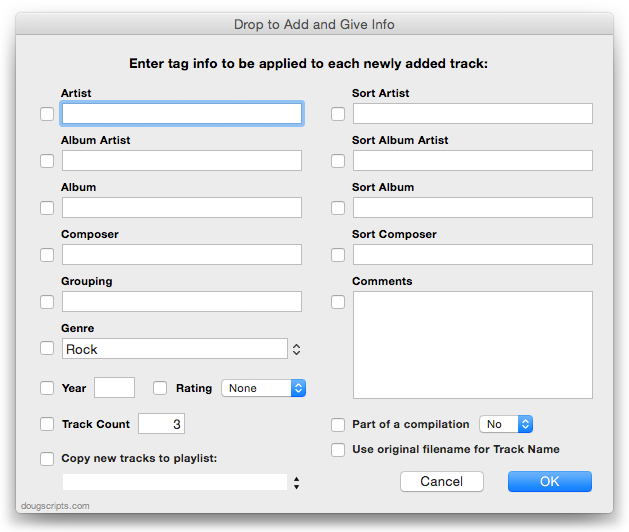
			<content:encoded><![CDATA[<p><a href="http://dougscripts.com/itunes/scripts/ss.php?sp=droptoaddandgiveinfo" title="Drag and drop files and enter multi-edit tag info before files are added to iTunes">Drop to Add and Give Info</a> v2.0 is a Cocoa-AppleScript Droplet. Drag audio files to its icon in the Finder (or Finder bar) and a multi-edit window will allow you to set many common tags before the script adds the files to iTunes, after which your tag info will be applied to the new tracks. Saves trips to iTunes when batch-adding files.  Additionally, tracks can be copied to a new or existing playlist.</p>
<p><img src="http://dougscripts.com/itunes/pix/droptoaddandgiveinfo.png" /></p>
<p>For OS X 10.6 or 10.7 only. The previous universal version is available via direct download at the script&#8217;s <a href="http://dougscripts.com/itunes/scripts/ss.php?sp=droptoaddandgiveinfo" title="Drag and drop files and enter multi-edit tag info before files are added to iTunes">entry page</a>.</p>
<hr/><small><a href="http://dougscripts.com/itunes/dougsupdated.rss" title="Take me to your reader">30 Most Recent RSS Feed</a> | <a href="http://dougscripts.com/itunes/scripts/scriptcount.php?sortBy=Name&op=y">Script Stats Page</a> by <a href="http://dougscripts.com/itunes/scripts/scriptcount.php?sortBy=Name&op=y">Name</a>, <a href="http://dougscripts.com/itunes/scripts/scriptcount.php?sortBy=Most Recent&op=y">Most Recent</a>, <a href="http://dougscripts.com/itunes/scripts/scriptcount.php?sortBy=Download Count&op=y">Download Count</a></small>]]></content:encoded>
			</item>
		<item>
		<title>Bevy of Updates</title>
		<link>http://dougscripts.com/itunes/2011/07/bevy-of-updates/</link>
		<comments></comments>
		<pubDate>Wed, 27 Jul 2011 13:22:41 +0000</pubDate>
		<dc:creator>dougscripts</dc:creator>
				<category><![CDATA[Lion]]></category>
		<category><![CDATA[Managing Artwork]]></category>
		<category><![CDATA[Managing Files]]></category>
		<category><![CDATA[Managing Track Info]]></category>
		<category><![CDATA[Updates]]></category>

		<guid isPermaLink="false">http://dougscripts.com/itunes/?p=1324</guid>
		<description><![CDATA[I&#8217;ve just updated the last batch of scripts most recently posted to account for iTunes&#8217; full-screen mode in Lion. My good friend Kirk McElhearn is a devoted iTunes-in-full-screen-mode user and he describes the situation so elegantly that you might as well read about it at his site.
The latest scripts re-posted with quick updates are: Super [...]]]></description>
			<content:encoded><![CDATA[<p>I&#8217;ve just updated the last batch of scripts most recently posted to account for iTunes&#8217; full-screen mode in Lion. My good friend Kirk McElhearn is a devoted iTunes-in-full-screen-mode user and he <a href="http://www.mcelhearn.com/2011/07/26/itunes-full-screen-view-and-applescript-applets/">describes the situation so elegantly</a> that you might as well read about it at his site.</p>
<p>The latest scripts re-posted with quick updates are: <a href="http://dougscripts.com/itunes/scripts/ss.php?sp=removedeadsuper" title="Remove missing (!) tracks from entire Library">Super Remove Dead Tracks</a> v3.1, <a href="http://dougscripts.com/itunes/scripts/ss.php?sp=removenchars" title="Delete characters from the beginning or ending of selected tracks' name, artist, album, comments, composer, or show tags">Remove n Characters From Front or Back</a> v4.1, <a href="http://dougscripts.com/itunes/scripts/ss.php?sp=savealbumart" title="Export artwork of selected tracks to parent or specified folder">Save Album Art to Album Folder</a> v4.1, <a href="http://dougscripts.com/itunes/scripts/ss.php?sp=savealbumartjpeg" title="Export album artwork as folder.jpg to Album folder">Save Album Art as folder.jpg</a> v2.1, and <a href="http://dougscripts.com/itunes/scripts/ss.php?sp=reapplydownsized" title="Resample selected tracks' artwork to user-set size limit">Re-Apply Downsized Artwork</a> v2.1.</p>
<p>So, if you picked any of those up in the past couple of days, you may want to re-up to the latest versions.</p>
<hr/><small><a href="http://dougscripts.com/itunes/dougsupdated.rss" title="Take me to your reader">30 Most Recent RSS Feed</a> | <a href="http://dougscripts.com/itunes/scripts/scriptcount.php?sortBy=Name&op=y">Script Stats Page</a> by <a href="http://dougscripts.com/itunes/scripts/scriptcount.php?sortBy=Name&op=y">Name</a>, <a href="http://dougscripts.com/itunes/scripts/scriptcount.php?sortBy=Most Recent&op=y">Most Recent</a>, <a href="http://dougscripts.com/itunes/scripts/scriptcount.php?sortBy=Download Count&op=y">Download Count</a></small>]]></content:encoded>
			</item>
		<item>
		<title>UPDATED: Remove n Characters from Front or Back v4.0</title>
		<link>http://dougscripts.com/itunes/2011/07/updated-remove-n-characters-from-front-or-back-v4-0/</link>
		<comments></comments>
		<pubDate>Mon, 25 Jul 2011 15:43:46 +0000</pubDate>
		<dc:creator>dougscripts</dc:creator>
				<category><![CDATA[Cocoa-AppleScript]]></category>
		<category><![CDATA[Managing Tracks]]></category>
		<category><![CDATA[Updates]]></category>

		<guid isPermaLink="false">http://dougscripts.com/itunes/?p=1320</guid>
		<description><![CDATA[Remove n Characters From Front or Back v4.0 helps you delete a specified number of characters from either the beginning or the ending of the Song Name, Album, Artist, Comments, Composer or Show tag (or their &#8220;Sort&#8221; siblings) of each selected track. For example, delete the initial digits and the space from &#8220;01 First Track&#8221;, [...]]]></description>
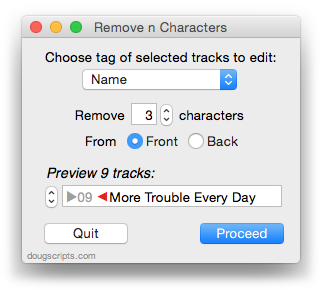
			<content:encoded><![CDATA[<p><a href="http://dougscripts.com/itunes/scripts/ss.php?sp=removenchars" title="Delete characters from the beginning or ending of selected tracks' name, artist, album, comments, composer, or show tags">Remove n Characters From Front or Back</a> v4.0 helps you delete a specified number of characters from either the beginning <em>or</em> the ending of the Song Name, Album, Artist, Comments, Composer or Show tag (or their &#8220;Sort&#8221; siblings) of each selected track. For example, delete the initial digits and the space from &#8220;01 First Track&#8221;, &#8220;02 Second Track&#8221;, and so on.</p>
<p><img src="http://dougscripts.com/itunes/pix/removenchars.png" /></p>
<p>This latest version is written as a Cocoa-AppleScript Applet and can only run in OS X 10.6 or 10.7. As you can see from the pic above, it consolidates all settings into a single window and provides an example that is updated as the settings are changed. Text between the arrows would be removed.</p>
<hr/><small><a href="http://dougscripts.com/itunes/dougsupdated.rss" title="Take me to your reader">30 Most Recent RSS Feed</a> | <a href="http://dougscripts.com/itunes/scripts/scriptcount.php?sortBy=Name&op=y">Script Stats Page</a> by <a href="http://dougscripts.com/itunes/scripts/scriptcount.php?sortBy=Name&op=y">Name</a>, <a href="http://dougscripts.com/itunes/scripts/scriptcount.php?sortBy=Most Recent&op=y">Most Recent</a>, <a href="http://dougscripts.com/itunes/scripts/scriptcount.php?sortBy=Download Count&op=y">Download Count</a></small>]]></content:encoded>
			</item>
		<item>
		<title>UPDATED: Re-Apply Downsized Artwork</title>
		<link>http://dougscripts.com/itunes/2011/07/updated-re-apply-downsized-artwork/</link>
		<comments></comments>
		<pubDate>Sat, 23 Jul 2011 16:12:47 +0000</pubDate>
		<dc:creator>dougscripts</dc:creator>
				<category><![CDATA[Cocoa-AppleScript]]></category>
		<category><![CDATA[Managing Artwork]]></category>
		<category><![CDATA[Updates]]></category>

		<guid isPermaLink="false">http://dougscripts.com/itunes/?p=1318</guid>
		<description><![CDATA[Re-Apply Downsized Artwork v2.0 will examine the display artwork of each selected track and if greater than a user-set default size (n x n) will resample the image to that default size. Artwork already at the default size or smaller will not be affected.
This latest version is written as a Cocoa-AppleScript Applet for OS X [...]]]></description>
			<content:encoded><![CDATA[<p><a href="http://dougscripts.com/itunes/scripts/ss.php?sp=reapplydownsized" title="Resample selected tracks' artwork to user-set size limit">Re-Apply Downsized Artwork</a> v2.0 will examine the display artwork of <strong>each selected track</strong> and if greater than a user-set default size (n x n) will resample the image to that default size. Artwork already at the default size or smaller will not be affected.</p>
<p>This latest version is written as a Cocoa-AppleScript Applet for OS X 10.6 and 10.7 only. It has an improved progress indicator and is generally faster.</p>
<hr/><small><a href="http://dougscripts.com/itunes/dougsupdated.rss" title="Take me to your reader">30 Most Recent RSS Feed</a> | <a href="http://dougscripts.com/itunes/scripts/scriptcount.php?sortBy=Name&op=y">Script Stats Page</a> by <a href="http://dougscripts.com/itunes/scripts/scriptcount.php?sortBy=Name&op=y">Name</a>, <a href="http://dougscripts.com/itunes/scripts/scriptcount.php?sortBy=Most Recent&op=y">Most Recent</a>, <a href="http://dougscripts.com/itunes/scripts/scriptcount.php?sortBy=Download Count&op=y">Download Count</a></small>]]></content:encoded>
			</item>
		<item>
		<title>Status of Lion Updates</title>
		<link>http://dougscripts.com/itunes/2011/07/status-of-lion-updates/</link>
		<comments></comments>
		<pubDate>Fri, 22 Jul 2011 15:18:59 +0000</pubDate>
		<dc:creator>dougscripts</dc:creator>
				<category><![CDATA[Lion]]></category>
		<category><![CDATA[Updates]]></category>

		<guid isPermaLink="false">http://dougscripts.com/itunes/?p=1314</guid>
		<description><![CDATA[Since OS X 10.7 was released on July 20, the number of visitors to this site using Lion has grown from less than 3 percent to about 25 percent&#8212;and growing. Apple reported a million downloads of Lion on the first day alone. Therefore, I expect that a lot of Saturday Geek Dads (and Moms and [...]]]></description>
			<content:encoded><![CDATA[<p>Since OS X 10.7 was released on July 20, the number of visitors to this site using Lion has grown from less than 3 percent to about 25 percent&#8212;and growing. Apple <a href="http://www.apple.com/pr/library/2011/07/21Lion-Downloads-Top-One-Million-in-First-Day.html">reported</a> a million downloads of Lion on the first day alone. Therefore, I expect that a lot of Saturday Geek Dads (and Moms and Kiddies) will be updating to Lion this coming weekend.</p>
<p>Several of my applications are not yet ready for Lion. Those with the largest install-base (Dupin and Join Together) and those apps available on the Mac App Store have been updated. However, Daypart, iTunes Library Manager, and ScriptPal have not and I will be working on those in the coming days. (Actually, I expect to finish a new version of Daypart by the end of August.) And, of course, <a href="http://dougscripts.com/itunes/2011/07/lion/">I need to update</a> any AppleScripts that require compatibility with Lion.</p>
<p>Perhaps needless to say: I&#8217;m going to be very busy.</p>
<p>I&#8217;m pretty much aware of what needs updating and what doesn&#8217;t, but if you run into a particular problem, I won&#8217;t mind getting a quick email. Please don&#8217;t tweet troubles, though. It&#8217;s impossible to troubleshoot via Twitter. I&#8217;d much rather keep a record using email. Thanks.</p>
<hr/><small><a href="http://dougscripts.com/itunes/dougsupdated.rss" title="Take me to your reader">30 Most Recent RSS Feed</a> | <a href="http://dougscripts.com/itunes/scripts/scriptcount.php?sortBy=Name&op=y">Script Stats Page</a> by <a href="http://dougscripts.com/itunes/scripts/scriptcount.php?sortBy=Name&op=y">Name</a>, <a href="http://dougscripts.com/itunes/scripts/scriptcount.php?sortBy=Most Recent&op=y">Most Recent</a>, <a href="http://dougscripts.com/itunes/scripts/scriptcount.php?sortBy=Download Count&op=y">Download Count</a></small>]]></content:encoded>
			</item>
		<item>
		<title>UPDATED: Save Album Art as folder.jpg v2.0</title>
		<link>http://dougscripts.com/itunes/2011/07/updated-save-album-art-as-folder-jpg-v2-0/</link>
		<comments></comments>
		<pubDate>Fri, 22 Jul 2011 14:21:18 +0000</pubDate>
		<dc:creator>dougscripts</dc:creator>
				<category><![CDATA[Cocoa-AppleScript]]></category>
		<category><![CDATA[Managing Artwork]]></category>
		<category><![CDATA[Updates]]></category>

		<guid isPermaLink="false">http://dougscripts.com/itunes/?p=1300</guid>
		<description><![CDATA[Save Album Art as folder.jpg v2.0 will export the artwork of the selected tracks or tracks in the selected playlist as a JPEG image file named folder.jpg to the folder which contains each selected track&#8217;s file&#8211;presumably the track&#8217;s Album folder. Many third-party music players and systems (Sonos, for example) may look for a &#8220;folder.jpg&#8221; file [...]]]></description>
			<content:encoded><![CDATA[<p><a href="http://dougscripts.com/itunes/scripts/ss.php?sp=savealbumartjpeg" title="Export album artwork as folder.jpg to Album folder">Save Album Art as folder.jpg</a> v2.0 will export the artwork of the <strong>selected tracks</strong> or tracks in the <strong>selected playlist</strong> as a JPEG image file named <em>folder.jpg</em> to the folder which contains each selected track&#8217;s file&#8211;presumably the track&#8217;s Album folder. Many third-party music players and systems (<a href="https://sonos.custhelp.com/cgi-bin/sonos.cfg/php/enduser/std_adp.php?p_faqid=59">Sonos</a>, for example) may look for a &#8220;folder.jpg&#8221; file here to use as display artwork.</p>
<p>This latest version is written as a Cocoa-AppleScript Applet and can only run on OS X 10.6 and 10.7 systems (the previous universal version is available from the script&#8217;s entry page). It consolidates all settings into a single preferences pane.</p>
<hr/><small><a href="http://dougscripts.com/itunes/dougsupdated.rss" title="Take me to your reader">30 Most Recent RSS Feed</a> | <a href="http://dougscripts.com/itunes/scripts/scriptcount.php?sortBy=Name&op=y">Script Stats Page</a> by <a href="http://dougscripts.com/itunes/scripts/scriptcount.php?sortBy=Name&op=y">Name</a>, <a href="http://dougscripts.com/itunes/scripts/scriptcount.php?sortBy=Most Recent&op=y">Most Recent</a>, <a href="http://dougscripts.com/itunes/scripts/scriptcount.php?sortBy=Download Count&op=y">Download Count</a></small>]]></content:encoded>
			</item>
		<item>
		<title>UPDATED: Save Album Art to Album Folder v4.0</title>
		<link>http://dougscripts.com/itunes/2011/07/updated-save-album-art-to-album-folder-v4-0/</link>
		<comments></comments>
		<pubDate>Thu, 21 Jul 2011 15:35:03 +0000</pubDate>
		<dc:creator>dougscripts</dc:creator>
				<category><![CDATA[Cocoa-AppleScript]]></category>
		<category><![CDATA[Managing Artwork]]></category>
		<category><![CDATA[Updates]]></category>

		<guid isPermaLink="false">http://dougscripts.com/itunes/?p=1298</guid>
		<description><![CDATA[Save Album Art to Album Folder v4.0 is a script that will export the artwork data of the selected tracks or tracks in the selected playlist as an image file to the folder which contains each selected track&#8217;s file&#8212;presumably the track&#8217;s Album folder&#8212;or a specific user-selected folder. Additionally, you can customize various settings for the [...]]]></description>
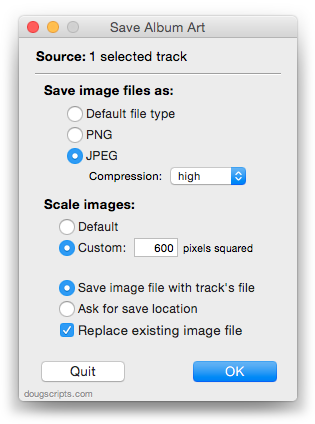
			<content:encoded><![CDATA[<p><a href="http://dougscripts.com/itunes/scripts/ss.php?sp=savealbumart" title="Export artwork of selected tracks to parent or specified folder">Save Album Art to Album Folder</a> v4.0 is a script that will export the artwork data of the <strong>selected tracks</strong> or tracks in the <strong>selected playlist</strong> as an image file to the folder which contains each selected track&#8217;s file&#8212;presumably the track&#8217;s Album folder&#8212;or a specific user-selected folder. Additionally, you can customize various settings for the image file:</p>
<p><img src="http://dougscripts.com/itunes/pix/savealbumart.png" /></p>
<p>This latest version is a Cocoa-AppleScript Applet, so it can <strong>only be run on OS X 10.6 and 10.7</strong>.</p>
<hr/><small><a href="http://dougscripts.com/itunes/dougsupdated.rss" title="Take me to your reader">30 Most Recent RSS Feed</a> | <a href="http://dougscripts.com/itunes/scripts/scriptcount.php?sortBy=Name&op=y">Script Stats Page</a> by <a href="http://dougscripts.com/itunes/scripts/scriptcount.php?sortBy=Name&op=y">Name</a>, <a href="http://dougscripts.com/itunes/scripts/scriptcount.php?sortBy=Most Recent&op=y">Most Recent</a>, <a href="http://dougscripts.com/itunes/scripts/scriptcount.php?sortBy=Download Count&op=y">Download Count</a></small>]]></content:encoded>
			</item>
		<item>
		<title>UPDATED: Discogs Search Kit v1.1</title>
		<link>http://dougscripts.com/itunes/2011/05/updated-discogs-search-kit-v1-1/</link>
		<comments></comments>
		<pubDate>Sat, 21 May 2011 17:18:20 +0000</pubDate>
		<dc:creator>dougscripts</dc:creator>
				<category><![CDATA[Internet]]></category>
		<category><![CDATA[Managing Track Info]]></category>
		<category><![CDATA[Updates]]></category>

		<guid isPermaLink="false">http://dougscripts.com/itunes/?p=1256</guid>
		<description><![CDATA[About a month ago I started getting emails from users reporting that Discogs Search Kit wasn&#8217;t getting track info correctly. I finally got around to making some fixes. This latest version of Discogs Search Kit makes accommodations for formatting changes at Discogs, which apparently were implemented a month or so ago (April 2011).
]]></description>
			<content:encoded><![CDATA[<p>About a month ago I started getting emails from users reporting that <a href="http://dougscripts.com/itunes/scripts/ss.php?sp=discogssearchkit" title="Search and get album, track info from Discogs.com">Discogs Search Kit</a> wasn&#8217;t getting track info correctly. I finally got around to making some fixes. This latest version of <a href="http://dougscripts.com/itunes/scripts/ss.php?sp=discogssearchkit" title="Search and get album, track info from Discogs.com">Discogs Search Kit</a> makes accommodations for formatting changes at Discogs, which apparently were implemented a month or so ago (April 2011).</p>
<hr/><small><a href="http://dougscripts.com/itunes/dougsupdated.rss" title="Take me to your reader">30 Most Recent RSS Feed</a> | <a href="http://dougscripts.com/itunes/scripts/scriptcount.php?sortBy=Name&op=y">Script Stats Page</a> by <a href="http://dougscripts.com/itunes/scripts/scriptcount.php?sortBy=Name&op=y">Name</a>, <a href="http://dougscripts.com/itunes/scripts/scriptcount.php?sortBy=Most Recent&op=y">Most Recent</a>, <a href="http://dougscripts.com/itunes/scripts/scriptcount.php?sortBy=Download Count&op=y">Download Count</a></small>]]></content:encoded>
			</item>
		<item>
		<title>Apple Releases iTunes 10.2.1</title>
		<link>http://dougscripts.com/itunes/2011/03/apple-releases-itunes-10-2-1/</link>
		<comments></comments>
		<pubDate>Wed, 09 Mar 2011 01:05:16 +0000</pubDate>
		<dc:creator>dougscripts</dc:creator>
				<category><![CDATA[Updates]]></category>
		<category><![CDATA[iTunes 10]]></category>

		<guid isPermaLink="false">http://dougscripts.com/itunes/?p=1238</guid>
		<description><![CDATA[iTunes v10.2.1 is out now.
]]></description>
			<content:encoded><![CDATA[<p><a href="http://www.apple.com/itunes/download/">iTunes v10.2.1</a> is out now.</p>
<hr/><small><a href="http://dougscripts.com/itunes/dougsupdated.rss" title="Take me to your reader">30 Most Recent RSS Feed</a> | <a href="http://dougscripts.com/itunes/scripts/scriptcount.php?sortBy=Name&op=y">Script Stats Page</a> by <a href="http://dougscripts.com/itunes/scripts/scriptcount.php?sortBy=Name&op=y">Name</a>, <a href="http://dougscripts.com/itunes/scripts/scriptcount.php?sortBy=Most Recent&op=y">Most Recent</a>, <a href="http://dougscripts.com/itunes/scripts/scriptcount.php?sortBy=Download Count&op=y">Download Count</a></small>]]></content:encoded>
			</item>
	</channel>
</rss>