<?xml version="1.0" encoding="UTF-8"?>
<rss version="2.0"
	xmlns:content="http://purl.org/rss/1.0/modules/content/"
	xmlns:wfw="http://wellformedweb.org/CommentAPI/"
	xmlns:dc="http://purl.org/dc/elements/1.1/"
	xmlns:atom="http://www.w3.org/2005/Atom"
	xmlns:sy="http://purl.org/rss/1.0/modules/syndication/"
	xmlns:slash="http://purl.org/rss/1.0/modules/slash/"
	>

<channel>
	<title>Doug&#039;s AppleScripts for iTunes &#187; With Other Apps</title>
	<atom:link href="http://dougscripts.com/itunes/category/with-other-apps/feed/" rel="self" type="application/rss+xml" />
	<link>http://dougscripts.com</link>
	<description>AppleScripts for iTunes</description>
	<lastBuildDate>Sun, 13 May 2012 13:40:55 +0000</lastBuildDate>
	<generator>http://wordpress.org/?v=2.8.4</generator>
	<language>en</language>
	<sy:updatePeriod>hourly</sy:updatePeriod>
	<sy:updateFrequency>1</sy:updateFrequency>
	<cloud domain='dougscripts.com' port='80' path='/itunes/?rsscloud=notify' registerProcedure='' protocol='http-post' />
		<item>
		<title>Add Pages ePubs to iTunes Automatically for iBooks Sync</title>
		<link>http://dougscripts.com/itunes/2010/08/add-pages-epubs-to-itunes-automatically-for-ibooks-sync/</link>
		<comments></comments>
		<pubDate>Sat, 28 Aug 2010 14:32:40 +0000</pubDate>
		<dc:creator>dougscripts</dc:creator>
				<category><![CDATA[Books]]></category>
		<category><![CDATA[With Other Apps]]></category>
		<category><![CDATA[iTunes]]></category>

		<guid isPermaLink="false">http://dougscripts.com/itunes/?p=1059</guid>
		<description><![CDATA[The latest update to Pages.app allows docs to be exported in the ePub format. ePub is one of the formats that can be read by the iBooks app. Now, in order for documents to get onto your iPhone/iPad you have to add them to iTunes. By hand? No! Automatically with a Folder Action! Below is [...]]]></description>
			<content:encoded><![CDATA[<p>The latest update to Pages.app allows docs to be exported in the <a href="http://support.apple.com/kb/HT4168">ePub format</a>. ePub is one of the formats that can be read by the iBooks app. Now, in order for documents to get onto your iPhone/iPad you have to add them to iTunes. By hand? No! Automatically with a Folder Action! Below is a script which you should save to your <em>/Library/Scripts/Folder Action Scripts</em> folder. Attach the script as a folder action to a designated &#8220;ePub Export&#8221; folder, which you will create. Whenever you &#8220;Export&#8230;&#8221; a Pages doc to that &#8220;ePub Export&#8221; folder, it will automatically be added to iTunes&#8217; Books library and eventually sync to your iPhone/iPad.</p>
<p>If your iTunes is set to &#8220;Copy files to iTunes Media folder when adding to library&#8221;, then you may want to delete the original from the &#8220;ePub Export&#8221; folder; just un-comment the (* *) section in the script by removing the (* and *) and saving the script.</p>
<pre style="margin-bottom:1em;">
<span style="color:blue;"><b>on</b></span> <span style="color:blue;">adding</span> <span style="color:blue;">folder</span> <span style="color:blue;">items</span> <span style="color:blue;">to</span> <span style="color:green;">my_folder</span> <span style="color:blue;">after</span> <span style="color:blue;">receiving</span> <span style="color:green;">the_files</span>
	<span style="color:blue;"><b>repeat</b></span> <span style="color:blue;"><b>with</b></span> <span style="color:green;">i</span> <span style="color:blue;"><b>from</b></span> 1 <span style="color:blue;"><b>to</b></span> <span style="color:blue;">number</span> <span style="color:blue;"><b>of</b></span> <span style="color:blue;">items</span> <span style="color:blue;"><b>in</b></span> <span style="color:green;">the_files</span>
		<span style="color:blue;"><b>set</b></span> <span style="color:green;">this_file</span> <span style="color:blue;"><b>to</b></span> (<span style="color:blue;">item</span> <span style="color:green;">i</span> <span style="color:blue;"><b>of</b></span> <span style="color:green;">the_files</span>)
		<span style="color:blue;"><b>tell</b></span> <span style="color:blue;">application</span> "Finder"
			<span style="color:blue;"><b>if</b></span> (<span style="color:blue;"><b>get</b></span> <span style="color:blue;">name</span> <span style="color:blue;">extension</span> <span style="color:blue;"><b>of</b></span> <span style="color:green;">this_file</span>) <span style="color:blue;"><b>is</b></span> <span style="color:blue;"><b>not</b></span> "epub" <span style="color:blue;"><b>then</b></span> <span style="color:blue;"><b>return</b></span>
		<span style="color:blue;"><b>end</b></span> <span style="color:blue;"><b>tell</b></span>
		<span style="color:blue;"><b>tell</b></span> <span style="color:blue;">application</span> "iTunes"
			<span style="color:blue;"><b>try</b></span>
				<span style="color:blue;">add</span> <span style="color:green;">this_file</span>

				(*
				<span style="color:gray;">--</span> <span style="color:gray;">if</span> <span style="color:gray;">you</span> <span style="color:gray;">have</span> <span style="color:gray;">iTunes</span> <span style="color:gray;">set</span> <span style="color:gray;">to</span>
				<span style="color:gray;">--</span>"<span style="color:gray;">Copy</span> <span style="color:gray;">files</span> <span style="color:gray;">to</span> <span style="color:gray;">iTunes</span> <span style="color:gray;">Media</span> <span style="color:gray;">folder</span> <span style="color:gray;">when</span> <span style="color:gray;">adding</span> <span style="color:gray;">to</span> <span style="color:gray;">library</span>"
				<span style="color:gray;">--</span> <span style="color:gray;">then</span> <span style="color:gray;">you</span> <span style="color:gray;">might</span> <span style="color:gray;">want</span> <span style="color:gray;">to</span> <span style="color:gray;">delete</span> <span style="color:gray;">the</span> <span style="color:gray;">original</span> <span style="color:gray;">file</span>...
				<span style="color:gray;">--</span> <span style="color:gray;">if</span> <span style="color:gray;">so</span>, <span style="color:gray;">remove</span> <span style="color:gray;">comments</span> <span style="color:gray;">from</span> <span style="color:gray;">this</span> <span style="color:gray;">block</span> <span style="color:gray;">and</span>
				<span style="color:gray;">--</span> <span style="color:gray;">use</span> <span style="color:gray;">the</span> <span style="color:gray;">UNIX</span> <span style="color:gray;">commands</span> <span style="color:gray;">below</span> <span style="color:gray;">to</span> <span style="color:gray;">delete</span> <span style="color:gray;">the</span> <span style="color:gray;">file</span>

				<span style="color:gray;">do</span> <span style="color:gray;">shell</span> <span style="color:gray;">script</span> ("<span style="color:gray;">rm</span> <span style="color:gray;">-f</span> " <span style="color:gray;">&#038;</span> <span style="color:gray;">quoted</span> <span style="color:gray;">form</span> <span style="color:gray;">of</span>  <span style="color:gray;">POSIX</span> <span style="color:gray;">path</span> <span style="color:gray;">of</span> (<span style="color:gray;">this_file</span> <span style="color:gray;">as</span> <span style="color:gray;">text</span>))

				*)
			<span style="color:blue;"><b>end</b></span> <span style="color:blue;"><b>try</b></span>
		<span style="color:blue;"><b>end</b></span> <span style="color:blue;"><b>tell</b></span>
	<span style="color:blue;"><b>end</b></span> <span style="color:blue;"><b>repeat</b></span>
<span style="color:blue;"><b>end</b></span> <span style="color:blue;">adding</span> <span style="color:blue;">folder</span> <span style="color:blue;">items</span> <span style="color:blue;">to</span>

<a href="applescript://com.apple.scripteditor?action=new&#038;script=on adding folder items to my_folder after receiving the_files%0D%09repeat with i from 1 to number of items in the_files%0D%09%09set this_file to %28item i of the_files%29%0D%09%09tell application %22Finder%22%0D%09%09%09if %28get name extension of this_file%29 is not %22epub%22 then return%0D%09%09end tell%0D%09%09tell application %22iTunes%22%0D%09%09%09try%0D%09%09%09%09add this_file%0D%09%09%09%09%0D%09%09%09%09%28%2A%0D%09%09%09%09-- if you have iTunes set to %0D%09%09%09%09--%22Copy files to iTunes Media folder when adding to library%22%0D%09%09%09%09-- then you might want to delete the original file%2E%2E%2E%0D%09%09%09%09-- if so%2C remove comments from this block and %0D%09%09%09%09-- use the UNIX commands below to delete the file%0D%09%09%09%09%0D%09%09%09%09do shell script %28%22rm -f %22 %26 quoted form of  POSIX path of %28this_file as text%29%29%0D%09%09%09%09%0D%09%09%09%09%2A%29%0D%09%09%09end try%0D%09%09end tell%0D%09end repeat%0Dend adding folder items to%0D" title="Open in Script Editor. Works via most modern Mac browsers."><img src="pix/clickscriptsmall.jpg" alt="" /></a>
</pre>
<p>More info on Folder Actions for iTunes is <a href="http://dougscripts.com/itunes/itinfo/folderaction01.php">located here</a>.</p>
<hr/><small><a href="http://dougscripts.com/itunes/dougsupdated.rss" title="Take me to your reader">30 Most Recent RSS Feed</a> | <a href="http://dougscripts.com/itunes/scripts/scriptcount.php?sortBy=Name&op=y">Script Stats Page</a> by <a href="http://dougscripts.com/itunes/scripts/scriptcount.php?sortBy=Name&op=y">Name</a>, <a href="http://dougscripts.com/itunes/scripts/scriptcount.php?sortBy=Most Recent&op=y">Most Recent</a>, <a href="http://dougscripts.com/itunes/scripts/scriptcount.php?sortBy=Download Count&op=y">Download Count</a></small>]]></content:encoded>
			</item>
		<item>
		<title>PDF Adder and Safari Reader</title>
		<link>http://dougscripts.com/itunes/2010/07/pdf-adder-and-safari-reader/</link>
		<comments></comments>
		<pubDate>Tue, 20 Jul 2010 12:51:06 +0000</pubDate>
		<dc:creator>dougscripts</dc:creator>
				<category><![CDATA[Safari]]></category>
		<category><![CDATA[With Other Apps]]></category>
		<category><![CDATA[iTunes]]></category>

		<guid isPermaLink="false">http://dougscripts.com/itunes/?p=1039</guid>
		<description><![CDATA[I hadn&#8217;t realized this until giving it a shot this morning, and I haven&#8217;t seen this mentioned elsewhere: I&#8217;ve been taking advantage of Safari Reader mostly for reading long form stuff (Esquire magazine has a lot of their classic articles on line, for example). For laughs, while the Reader window was open, I hit Safari&#8217;s [...]]]></description>
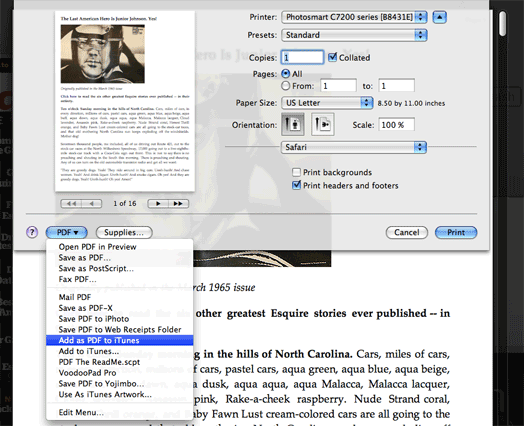
			<content:encoded><![CDATA[<p>I hadn&#8217;t realized this until giving it a shot this morning, and I haven&#8217;t seen this mentioned elsewhere: I&#8217;ve been taking advantage of <a href="http://www.apple.com/safari/whats-new.html">Safari Reader</a> mostly for reading long form stuff (Esquire magazine has a lot of their <a href="http://www.esquire.com/features/life-of-junior-johnson-tom-wolfe-0365">classic articles</a> on line, for example). For laughs, while the Reader window was open, I hit Safari&#8217;s Print button to see if the Reader formatting is what gets recognized, rather than the original page. Perhaps not so surprisingly, it is!</p>
<p style="text-align:center;"><img src="http://dougscripts.com/itunes/pix/pdfsafarireader.png" /></p>
<p>Now it&#8217;s a simple matter of using the &#8220;Add as PDF to iTunes&#8221; PDF Service in the <a href="http://dougscripts.com/itunes/scripts/ss.php?sp=pdfadder" title="Assists with adding PDF files to iTunes as digital booklets">PDF Adder</a> collection to add the Reader-formatted page to iTunes&#8217; Books category and from there sync to iBooks. Of course, I&#8217;ve been PDFing stuff like this from Safari for awhile, but hadn&#8217;t thought to try it with Safari Reader. Neat!</p>
<hr/><small><a href="http://dougscripts.com/itunes/dougsupdated.rss" title="Take me to your reader">30 Most Recent RSS Feed</a> | <a href="http://dougscripts.com/itunes/scripts/scriptcount.php?sortBy=Name&op=y">Script Stats Page</a> by <a href="http://dougscripts.com/itunes/scripts/scriptcount.php?sortBy=Name&op=y">Name</a>, <a href="http://dougscripts.com/itunes/scripts/scriptcount.php?sortBy=Most Recent&op=y">Most Recent</a>, <a href="http://dougscripts.com/itunes/scripts/scriptcount.php?sortBy=Download Count&op=y">Download Count</a></small>]]></content:encoded>
			</item>
		<item>
		<title>UPDATED: Change Pitch of Song v2.0</title>
		<link>http://dougscripts.com/itunes/2010/04/updated-change-pitch-of-song-v2-0/</link>
		<comments></comments>
		<pubDate>Fri, 09 Apr 2010 12:54:41 +0000</pubDate>
		<dc:creator>dougscripts</dc:creator>
				<category><![CDATA[QuickTime]]></category>
		<category><![CDATA[With Other Apps]]></category>
		<category><![CDATA[iTunes9]]></category>

		<guid isPermaLink="false">http://dougscripts.com/itunes/?p=993</guid>
		<description><![CDATA[Change Pitch of Song v2.0 will open the currently playing iTunes track in QuickTime Player 7 which will then continue to play it using user-entered pitch control settings.
This version now works in Snow Leopard but QuickTime Player 7 must be installed&#8211;even if QuickTime Player X is also installed. QTPX does not (yet) have the AppleScript [...]]]></description>
			<content:encoded><![CDATA[<p><a href="http://dougscripts.com/itunes/scripts/ss.php?sp=changepitch" title="Use QuickTime to change the pitch of selected tracks">Change Pitch of Song</a> v2.0 will open the currently playing iTunes track in QuickTime Player 7 which will then continue to play it using user-entered pitch control settings.</p>
<p>This version now works in Snow Leopard but QuickTime Player 7 must be installed&#8211;even if QuickTime Player X is also installed. QTPX does not (yet) have the AppleScript support to use this script. QTP7 can be installed from the &#8220;Optional Installs&#8221; folder on your Snow Leopard installation disc. It will be installed in your <em>/Applications/Utilities/</em> folder.</p>
<hr/><small><a href="http://dougscripts.com/itunes/dougsupdated.rss" title="Take me to your reader">30 Most Recent RSS Feed</a> | <a href="http://dougscripts.com/itunes/scripts/scriptcount.php?sortBy=Name&op=y">Script Stats Page</a> by <a href="http://dougscripts.com/itunes/scripts/scriptcount.php?sortBy=Name&op=y">Name</a>, <a href="http://dougscripts.com/itunes/scripts/scriptcount.php?sortBy=Most Recent&op=y">Most Recent</a>, <a href="http://dougscripts.com/itunes/scripts/scriptcount.php?sortBy=Download Count&op=y">Download Count</a></small>]]></content:encoded>
			</item>
		<item>
		<title>NEW: Pages CD Label of Selected Playlist</title>
		<link>http://dougscripts.com/itunes/2007/08/new-pages-cd-label-of-selected-playlist/</link>
		<comments></comments>
		<pubDate>Mon, 13 Aug 2007 21:34:52 +0000</pubDate>
		<dc:creator>dougscripts</dc:creator>
				<category><![CDATA[AppleScript]]></category>
		<category><![CDATA[New Releases]]></category>
		<category><![CDATA[With Other Apps]]></category>
		<category><![CDATA[iTunes]]></category>

		<guid isPermaLink="false">http://dougscripts.com/itunes/?p=502</guid>
		<description><![CDATA[I downloaded the iWork Trial and have been playing around with Pages. I&#8217;ve never bothered before and I wanted to see the word processing in action. I think I&#8217;ll be buying it. Anyway, I came up with Pages CD Label of Selected Playlist, which is an update to the AppleWorks  version . It assists [...]]]></description>
			<content:encoded><![CDATA[<p>I downloaded the <a href="http://www.apple.com/iwork/trial/" target="_blank">iWork Trial</a> and have been playing around with Pages. I&#8217;ve never bothered before and I wanted to see the word processing in action. I think I&#8217;ll be buying it. Anyway, I came up with <a href="http://dougscripts.com/itunes/scripts/ss.php?sp=pagescdlabel" title="Create CD labels with iTunes and Pages">Pages CD Label of Selected Playlist</a>, which is an update to the AppleWorks <a href="http://dougscripts.com/itunes/scripts/ss.php?sp=cdlabelofplaylist"> version </a>. It assists in constructing printable CD Labels (the sticky circular kind) in <strong>Pages</strong> using exported track data from the selected iTunes playlist. Requires included Pages Template and uses <strong>Avery 5692/8692</strong> labels. Read Me explains more. I&#8217;ve only tested it in Pages 3.0.</p>
<hr/><small><a href="http://dougscripts.com/itunes/dougsupdated.rss" title="Take me to your reader">30 Most Recent RSS Feed</a> | <a href="http://dougscripts.com/itunes/scripts/scriptcount.php?sortBy=Name&op=y">Script Stats Page</a> by <a href="http://dougscripts.com/itunes/scripts/scriptcount.php?sortBy=Name&op=y">Name</a>, <a href="http://dougscripts.com/itunes/scripts/scriptcount.php?sortBy=Most Recent&op=y">Most Recent</a>, <a href="http://dougscripts.com/itunes/scripts/scriptcount.php?sortBy=Download Count&op=y">Download Count</a></small>]]></content:encoded>
			</item>
	</channel>
</rss>