frontpage : scripts : here

Managing Track Info 1 2 3 4 5 6 7 8 9 

Hey! Because a script entry's location can change over time, the URL in the address bar of your browser should not be copied or bookmarked. To accurately bookmark or copy the URL of an entry, control-click or right-click on its title or permalink for this entry button and select an option from the pop-up.


Number Song Names by Play Order v2.0

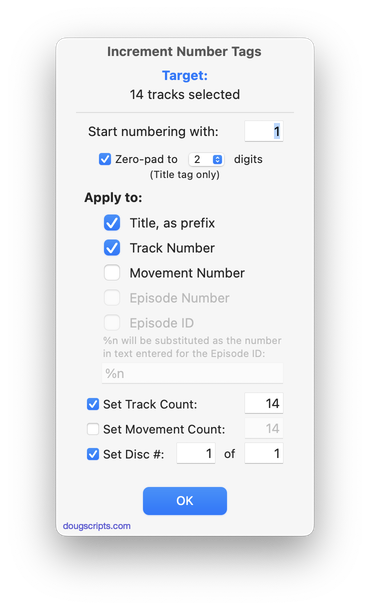
This script will prefix each selected track's Song Name with the number of its order in the selection (01, 02, 03...and so on). The selected tracks must be in a playlist that can be sorted by Play Order, that is, a user-created playlist, and not a library category playlist. The selection of tracks need not be contiguous but it is important to have already established the Play Order. Read Me explains more.

    Latest version:
  • Maintenance release
  • Universal binary
  • Now also sets track number
  • No longer intentionally affects file name
    Info:
  • build type: Universal Binary
  • written by Doug Adams
  • latest version posted: October 6, 2009
  • latest version downloads: 1039 | total downloads: 3704
  • zip download size: 799.7K
 

Artist to Album Artist v2.0

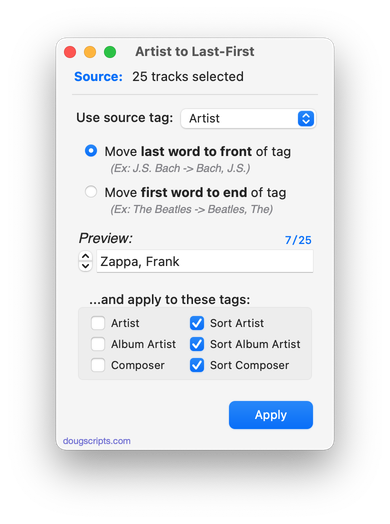
This script will copy the Artist tag to the Album Artist tag of the selected tracks. Requires iTunes 7 or better.

    Latest version:
  • Universal binary
    Info:
  • build type: Universal Binary
  • written by Doug Adams
  • latest version posted: October 1, 2009
  • latest version downloads: 1728 | total downloads: 9023
  • zip download size: 123.4K
 

De-Genre v3.0

This script re-assigns the Library tracks of selected Genres to another Genre so that the original--and consequently un-assigned--Genres disappear from iTunes' Genre pop-up list.

As you may know, you can make many superfluous Genres vanish from iTunes' Genres pop-up list simply by eliminating a reference to them in your tracks; when no tracks are assigned to a particular Genre, that Genre will be dropped. (iTunes' original Genre names cannot be removed this way; only those accumulated from other sources or created by you.) Of course, you could use iTunes' multiple editing feature to do this as well, but the script doesn't require you to select batches of tracks and thus saves a few steps.

    Latest version:
  • Updated as universal binary
  • Code finessings
    Info:
  • build type: Universal Binary
  • written by Doug Adams
  • latest version posted: September 30, 2009
  • latest version downloads: 1886 | total downloads: 10624
  • zip download size: 133.1K
 

Track Parser v1.3.1

Use scanf-like and regular expressions pattern-matching to disassemble groups of song names and reassign text to correct tags. For example, parse the song name XTC - English Settlement - 15 - Snowman using the pattern %a - %l - %t - %n, sending artist, album, and track number to their appropriate tags. Read Me is quite clear and helpful.

    Latest version:
  • minor bug fix update
    Info:
  • build type: Universal Binary
  • written by Dan Vanderkam
  • latest version posted: July 14, 2009
  • latest version downloads: 3345 | total downloads: 14215
  • zip download size: 202.8K
 

Embed Disc Number in Track Number v1.0

This script creates a new track number for each selected track combining the original track number and disc number such that the disc number becomes the "hundreds" digit of the track number (track number 100 * disc number). Thus, disc 1 track 1 becomes track 101, disc 3 track 12 becomes track 312 etc. Where no disc number is given, the track number stays as is.

Helpful when using devices that may ignore the disc number tag so that tracks play in correct sequence.

    Info:
  • build type: Universal Binary
  • written by Miles Berry
  • posted: July 14, 2009
  • total downloads: 362
  • zip download size: 92.1K
 

Add or Subtract Play Count v2.0

Add or subtract a user-entered number from the current Play Count of each selected track. If the Play count is 0 then its Last Played date will be earsed (iTunes 8.1 or better).

Also see New Play Count.

    Latest version:
  • Erases played count when play count is '0' - iTunes 8.1 or better
    Info:
  • build type: Universal Binary
  • written by Doug Adams
  • latest version posted: March 12, 2009
  • latest version downloads: 3762 | total downloads: 12214
  • zip download size: 94.2K
 

New Play Count v2.0

Set the Play Count of the selected tracks to the same number. (iTunes has the ability to "Reset Play Count" to 0 from a track's contextual menu.)

Also see Add or Subtract Play Count.

    Latest version:
  • Universal binary
  • Erases play date if play count is 0 - (iTunes 8.1 or better)
    Info:
  • build type: Universal Binary
  • written by Doug Adams
  • latest version posted: March 12, 2009
  • latest version downloads: 2846 | total downloads: 10278
  • zip download size: 93K
 

Add or Subtract Skip Count v2.0

Add or subtract a user-entered number from the current Skip Count of each selected track. If the Skip count is 0 then its Last Skipped date will be earsed (iTunes 8.1 or better).

    Latest version:
  • Universal binary
  • Erases played count when play count is '0' - iTunes 8.1 or better
    Info:
  • build type: Plain AppleScript
  • written by Doug Adams
  • latest version posted: March 12, 2009
  • latest version downloads: 321 | total downloads: 1505
  • zip download size: 94.2K
 

Purchase Date to Comments v1.0

This script will copy the purchased date--if available--of the selected tracks to the comment tag of each. You can choose either UTC format ("2008-12-27") or localized Short date format ("12/27/08"). UTC dates will be placed at the beginning of any existing comment text to allow tracks to be sorted by comment. Short dates will be placed after any existing comment text. (In either case, Smart Playlists could be created using "Comment contains 2008-12" or "Comment starts with 2008-12".)

    Info:
  • build type: Universal Binary
  • written by Doug Adams
  • posted: February 26, 2009
  • total downloads: 453
  • zip download size: 169.3K
 

Reset Bookmarks to Start v2.0

(Formerly "Reset Bookmarks".) This script will reset the bookmark of each selected track to its Start Time, effectively clearing the bookmark from its position later in the track. Tracks which have been set to "remember playback position" or which are "M4B" types will have a bookmark position.

    Info:
  • build type: Universal Binary
  • written by Doug Adams
  • latest version posted: December 3, 2008
  • latest version downloads: 565 | total downloads: 1919
  • zip download size: 124.8K
Managing Track Info
2 3 4 5 6 7 8 9  >>
This column is printer-friendly.
Site contents © 2001 - 2010 Doug Adams and weblished by Doug Adams, dougscripts AT mac DOT com.
All rights reserved. Legal.
AppleScript, iTunes, and iPod are registered trademarks of Apple Inc.
Image 01 Image 01 Image 01 Image 01 Image 01 Image 01 Image 01 Image 01 Image 02 Image 03 Image 03 Image 03 Image 03