
 Apple Music Profile
 YouTube Channel
 RSS Feed
 Play Play
 Murph
Murph Yer Stack
 Block Party Weekend
 30 Most Recent RSS Feed
UPDATED: Remove n Characters From Front or Back v4.6
Remove n Characters From Front or Back lets you delete a specified number of characters from either the beginning or the ending of the Song Name, Album, Artist, Comments, Composer or Show tag (or their "Sort" siblings) of each selected track. For example, delete the initial digits and the space from "01 First Track", "02 Second Track", and so on.
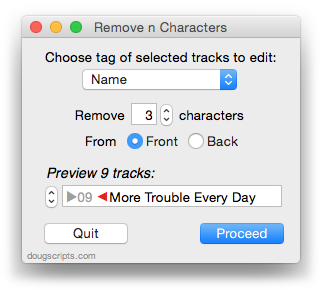
This updated version caps the maximum number of characters to the length of the shortest text in the selected tags, preventing inadvertent deletion of tag text that may be shorter than the user-set number of characters to remove.
iTunes 10.7 Released
Apple has released iTunes 10.7—which is not the version unveiled at today's event to be released in October. This modest update contains support for iOS 6 and the new iPod models.
UPDATED: Search-Replace Tag Text v3.3
Search-Replace Tag Text v3.3 performs a search-and-replace with the text in your choice of tag (Song Name, Show, Artist, Album Artist, Album, Composer, Comments, Genre, or Grouping) in the selected tracks or all the tracks in the selected Playlist. Features case sensitivity and whole word match options and dry run preview.
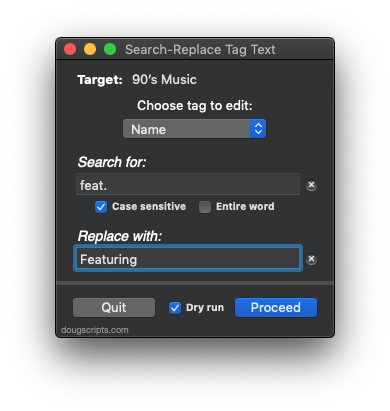
The latest version sports conventional search fields and has some minor code tweaks.
UPDATED: Drop to Add and Make Playlists v2.2
Drop to Add and Make Playlists v2.2 will accept a single dropped folder containing media files and will add each file to iTunes and then distribute the tracks to playlists named using your choice of the tracks' "Artist - Album" tags or the name(s) of the folder(s) containing the file.
This latest version fixes a problem with trying to process files that cannot be added to iTunes.
TrackSift is a Mac Gem
I think I'll take the day off! Macworld reviews TrackSift as a Mac Gem and awards it four mice. Thanks!
AppleScript Save Changes in Mountain Lion
I've been meaning to post this for the record. Shane Stanley has written up How Mountain Lion Changes the Rules for AppleScript at TidBITS. He explains how scripts and AppleScript applications can be saved in an uncompiled state. If you distribute or system manage AppleScripts and develop on Mountain Lion you really should be aware of these changes.
Dupin 2.5.1 Posted
The latest version of Dupin, the iTunes duplicates manager, fixes a couple of bugs that cropped up in v2.5 as a result of some minor inconsistencies between Snow Leopard and Mountain Lion operating systems. New in version 2.5.1:
- Improves compatibility with OS X 10.8
- Fixes UI glitch in Re-Playlist window
- Fixes errant track analysis in Re-Playlist under Snow Leopard
- Fixes issue which could cause crash during Consolidate History under 10.8
- Fixes issue whereby ratings may not be displayed correctly after Consolidate History
This version of Dupin is a free update if your current Dupin registration was purchased after June 2011. If your registration was purchased before July 2011 then you can upgrade your registration for $7.
More information is available on the Dupin product page.
Gatekeeper Settings, Redux
As I mentioned previously, some scripts from this site when downloaded to OS X 10.8 may not pass Gatekeeper Security when set to the "Mac App Store or Developer ID" setting (the default Gatekeeper setting). To over-ride Gatekeeper settings, Control-click/Right-click the script in the Finder and choose Open from the contextual menu, then allow the script to be opened.
However, for a small number of scripts, even this may not work. You may see an OSStatus error message and the script will still be unable to run.
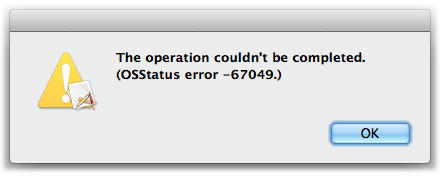
It appears to occur with a few .app scripts, but not all.
I'll try to catch these scripts (and if you run into one, let me know) and update them. In the meantime, the fix is to temporarily lower your Gatekeeper Security settings to allow apps from anywhere to launch. Once the script is launched, you can restore your Gatekeeper settings.
PITA, I know.
Web Sharing and Mountain Lion
I hadn't gotten around to noticing myself so I just learned from this hint at Mac OS X Hints that Web Sharing is no longer available in Mountain Lion. Web Sharing enables the use of the Apache web server built in to the OS. If you need to get Web Sharing back on Mountain Lion the above mentioned hint contains some links on how to do so.
Unfortunately, the script Re-Add Selected Tracks as Podcast requires Web Sharing be activated, since it uses the local server to re-import files as faux RSS enclosures. So if you want to continue using it on 10.8 you'll have to restore Web Sharing.
Update: Topher Kessler has a very good Web Sharing restoration tutorial at CNET.
