 30 Most Recent RSS Feed
 Apple Music Profile
 YouTube Channel
 RSS Feed
 Play Play
 Murph
Murph Yer Stack
 Block Party Weekend
 Elevendy
 Dupin v4.0.0
 Join Together
 M3Unify
UPDATED: Save Album Art as folder.jpg v2.5
Save Album Art as folder.jpg will export the artwork of the selected tracks or tracks in the selected playlist as a JPEG image file named folder.jpg to the folder which contains each selected track’s file–presumably the track’s Album folder. Many third-party music players and systems (Sonos, for example) may look for a “folder.jpg” here to use as display artwork.
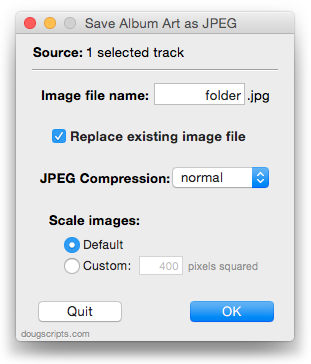
Very similar to the just updated Save Album Art to Album Folder.
This latest version makes some tweaks for Mavericks compatibility.
More info and download here.
UPDATED: Save Album Art to Album Folder v4.4
Save Album Art to Album Folder is one of the handful of Artwork Managment scripts suffering from a bit of trouble running under Mavericks.
This script will export the artwork of the selected tracks, or the tracks in a selected playlist, as an image file to the folder which contains each selected track’s file—presumably the track’s Album folder—or a specific user-selected folder. If multiple album tracks are selected, the script will make sure only one artwork file per Album is exported.
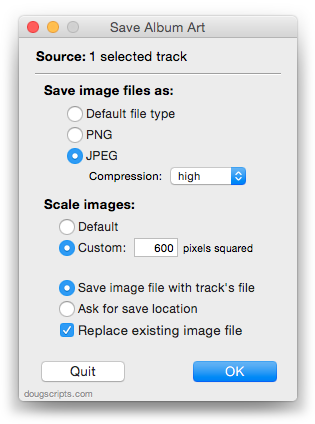
This latest version fixes the problem with Mavericks and makes some minor maintenance tweaks.
More info and download is here.
Artwork Scripts and Mavericks
Some of the newer Artwork Management scripts will fail in Mavericks. They each use a routine that dumps artwork to a file which doesn’t work very well under OS X 10.9:
tell me to set fileRef to (open for access pathToNewFile with write permission)
tell application id “com.apple.iTunes” to write (get raw data of artwork 1 of theTrack) to fileRef starting at 0
tell me to close access fileRef

iTunes will give up an error like this: “AppleEvents/sandbox: Returning errAEPrivilegeError/-10004 and denying dispatch of event rdwr/writ from process ‘Save Album Art to Album Folder’ because it is not entitled to send an AppleEvent to this process.”
(Two words I didn’t want to see side-by-side: “AppleEvents” and “sandbox”.)
The fix is to just stuff the raw data into a variable first then write the data to the file from the variable. I’ll be working this fix into all the scripts affected over the next days and weeks.
But There’s Good AppleScript News, Too
While losing iWorks AppleScript support is anxiety-inducing, some great new features have been added to AppleScript in Mavericks that are pretty exciting. I’ve played a little with libraries and Notifications in the DPs, but haven’t incorporated anything into my scripts since most a few of these features are not backwards-compatible on earlier operating systems.
Don Southard has a good article at MacStories outlining the latest stuff.
AppleScript Support Killed In Latest iWorks
Apple has effectively killed AppleScript support in its latest versions of the iWorks apps. Probably not a surprise but a shock just the same. It’s not a surprise because AppleScript support in Pages.app et al has never been very glamorous. But I don’t have any doubts that the main consideration is the big part the iWorks apps play in Apple’s iCloud/iCloud.com stategy and the security ramifications thereof. Anything that touches iCloud is pretty much hands-off to AppleScript.
Still, it’s hard to sit helpless and watch AppleScript’s maddeningly sad and frustrating march to irrelevance as iOS usage inevitably overtakes OS X.
Inter-app automation on iOS. Now that would cheer me up. There’s hope, right?
Apple Releases iTunes 11.1.2
iTunes 11.1.2 adds support for OS X Mavericks, also released today.
Mavericks and These AppleScripts
For the most part the most recent versions of AppleScripts from this site which ran well under Mountain Lion should run fine under Mavericks.
Over the past few months, while Apple was releasing Developer Previews, I would often hear from Correspondents who had deployed one or more DPs that some scripts would not work. Invariably, however, the problem would be fixed in the next DP (filed a few bug reports myself that I saw fixed). But, as I mention whenever a new OS comes out, I can’t possibly test all the scripts on the site. So, if you run across something unusual while running scripts in the release version of Mavericks then let me know.
I’m sure that over the next few weeks there’ll be caveats and fixes aplenty to make.
OS X 10.9: AppleScripts and Accessibility Control
With OS X 10.9 Apple takes security more seriously than it ever has. In this regard, Apple has added an additional level of security for apps that access the Accessibility API via “System Events”. Here’s how that new level of security may affect the way you use some AppleScripts downloaded from this site.
First of all: Some of my script applets (the ones with user interfaces) cannot run effectively while iTunes is in full screen mode. This is because only one of them, iTunes or the script, can be frontmost. So, when these scripts are launched they will detect and alert you if iTunes is in full screen mode.
To do this the script targets “System Events” to check for an accessibility property of the iTunes user interface indicating whether or not full screen is on. “System Events” is in the purview of Accessibility. If you’ve ever used GUI Scripting—to script key codes for example—you’ve had to set “Enable access for assistive devices” in the Accessibility pane of System Preferences. Well, as of OS X 10.9, this is no longer a global setting and must be set on a per-app basis.
UPDATED: Search-Replace Tag Text v3.5
Search-Replace Tag Text v3.5 performs a search-and-replace on the text in your choice of tag (Song Name, Show, Artist, Album Artist, Album, Composer, Comments, Genre, or Grouping) in the selected tracks or all the tracks in the selected Playlist. Features case sensitivity and whole word match options and dry run preview.
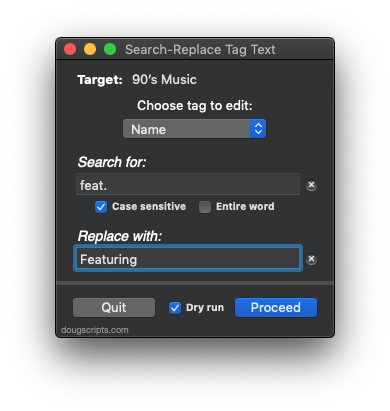
This new version stores the dry run setting between launches, has some additional minor tweaks and is ready for Mavericks.
More information and download is here.
AirPlay Scripting Workaround
As previously noted, you can’t do this without getting -1728 errors:
tell application "iTunes"
set apDevices to (get AirPlay devices)
end tell
But you can do this:
tell application "iTunes"
set apDevices to (get a reference to AirPlay devices)
— see?
log (get name of apDevices)
— or
repeat with aDevice in apDevices
log (get aDevice‘s name)
end repeat
— or
repeat with aDevice in AirPlay devices
log (get aDevice‘s name)
end repeat
end tell
That’s if you need to do that.
