 30 Most Recent RSS Feed
 Apple Music Profile
 YouTube Channel
 RSS Feed
 Play Play
 Murph
Murph Yer Stack
 Block Party Weekend
 Elevendy
 Dupin v4.0.0
 Join Together
 M3Unify
NEW: Save Album Art as folder.jpg
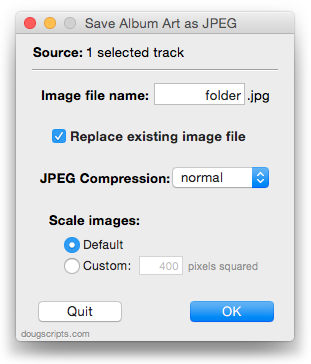
Shortly after updating Save Album Art to Album Folder I got a few emails from users who wanted to save iTunes track artwork as a single “folder.jpg” image file in the track’s Album folder. Some third-party music devices and systems, like Sonos, may use a “folder.jpg” file found here as display artwork for the audio files that accompany it in the folder. (Sonos is apparently also capable of using embedded artwork, but I understand there is some restriction here size-wise or something. And, of course, not all audio file formats allow image data to be embedded.)
At first I thought I’d post a quick how-to-mod, but it was eventually easier to just write a new script. Save Album Art as folder.jpg will do what I said above about the “folder.jpg” thing. Like the other script mentioned, it has an additional settings panel that you can access by Option-launching the script:
iTunes 10.2 Available
This afternoon, Apple posted iTunes v10.2. According to the Apple blurb it mostly provides accommodation for iOS 4.3.
Dupin v2.2.3 Available
My app that assists with managing your duplicate tracks in iTunes, Dupin, has been updated to v2.2.3. This is a minor maintenance update. I fixed a column re-sizing issue and made a few small performance tweaks. The update is free for registered users of Dupin v2.x.x.
NEW: A Space Between v1.0
iTunes has had the Crossfade feature for a while, whereby consecutive songs will overlap for a few seconds at end-to-beginning. But what if you want the opposite effect: a set amount of silence between each song? But you can’t set a negative Crossfade. A Space Between is an AppleScript applet that will wait a user-set number of seconds between plays of consecutive tracks in a playlist. Just select a playlist, or a track in a playlist, launch the applet, and enter a number of seconds.
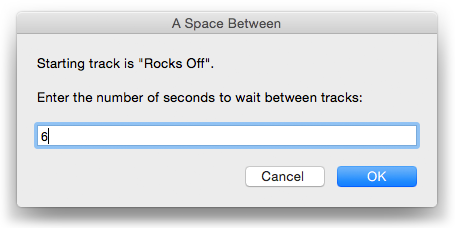
The tracks will play, pausing for the entered number of seconds between each track.
Ten Years
February 15th is the anniversary date of this site and this year makes ten anniversaries. Wow, huh? Actually, I had some stuff up slightly earlier than that, but I can’t Wayback much of it and the original files are probably on a Zip disc or something. Closet > Back of Closet > Milk Crate > Shoebox > Zip Discs. Like I’m going back there to even look, right?
Thanks for visiting and making it a lot of fun. I use iTunes with AppleScripts everyday and can’t believe how geeked-out I still am about it.
Spins v1.0.3
I’ve updated Spins to v1.0.3. Spins examines your iTunes library and displays stats about your most played tracks. Left to right, its “Breakouts” window, main window displaying one of four panels, and “Live Spins” floating display:
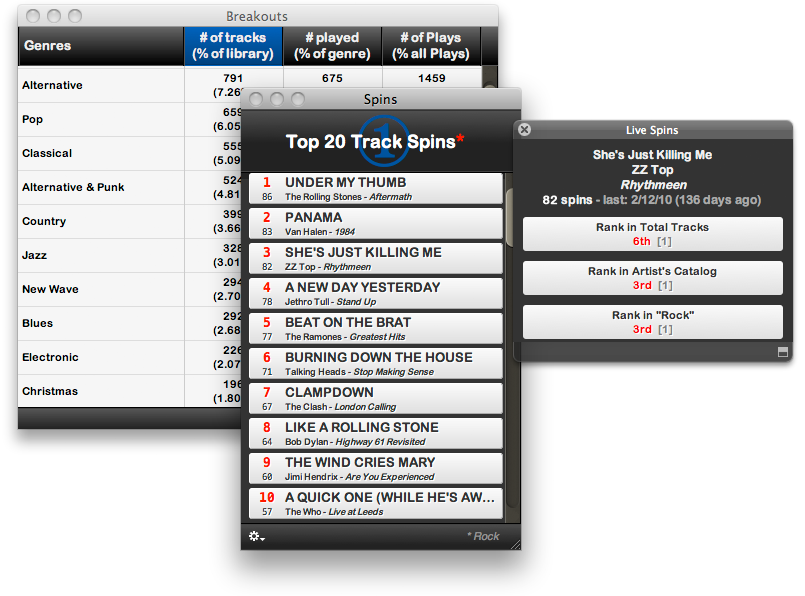
This latest version fixes an issue configuring hours for display, changes how the total tracks of the same rank are displayed in the Live Spins window, and makes some enhancements for stability. Spins is $10 shareware but the un-registered demo is free to use with limited features. Version 1.0.3 is a free update for registered users.
Create Shortcut Keys to Select Libraries
There are no shortcut keys to select the Music, Podcast, TV Shows, and other libraries. But you can use AppleScript to create some. Here’s how:
NEW: Restore Artwork from Album Folder
Restore Artwork from Album Folder will look for an image file in the parent folder of each selected track’s file–presumably its “Album” folder–and apply the data from that image file as artwork for the track. If more than one image file is found in the target folder than the first one found will be used. I didn’t include a preferences pane as I did for Save Album Art to Album Folder, but you can hard-code the kind of image file to look for, JPEG or PNG, in the script.
UPDATED: Save Album Art to Album Folder v3.0
The script Save Album Art to Album Folder will export the display artwork of each selected track as an image file to the folder which contains each selected track’s file—presumably the track’s Album folder—or a single user-selected folder. The script will try to ensure that only one copy of an album’s artwork is exported to the folder if multiple album tracks are selected.
This newest version provides a special Preference pane that enables additional sips image processing options to be set:
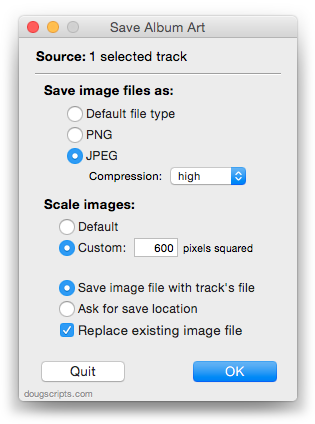
This can be accessed by pressing and holding the keyboard’s Option key while launching the script from iTunes’ Scripts menu.
