
 Apple Music Profile
 YouTube Channel
 RSS Feed
 Play Play
 Murph
Murph Yer Stack
 Block Party Weekend
 30 Most Recent RSS Feed
Busted: special kind syntax?
In iTunes 12.4, I can't get a reference to the Music library playlist by doing this:
tell application "iTunes"
set musicPlaylist to (get some playlist whose special kind is Music)
end tell
...because iTunes apparently doesn't recognize the Music value for special kind. When the script is compiled it changes the Music value to lower case:
tell application "iTunes"
set musicPlaylist to (get some playlist whose special kind is music)
end tell
...and the script fails. A lot of my scripts use this to target a particular media library, like Music or Movies.
I suspect, (maybe? perhaps?) that the new select command is related? But, until now, I haven't been able to get any object to react to select. More as it develops.
UPDATE: Well, this works (coercing the value of special kind to text), but it shouldn't have to be done this way:
tell application "iTunes"
set nonSpecial to every user playlist whose special kind is not none
repeat with aP in nonSpecial
if (special kind of aP as text) is "Music" then
log "HEY"
end if
end repeat
end tell

UPDATE ALSO: Correspondent Nate Weaver tweeted to remind me that the event code «class kSpZ» can be used instead of the boinked Music value.
UPDATE ALSO ALSO: Here's the problem.
current playlist
Like current track, current playlist will recognize an Apple Music playlist. Should have mentioned that before, eh? While you can get properties of cloud tracks and playlists—say, the description of a For You playlist—you cannot change them.
purchaser
Along with downloader Apple ID/name (mentioned earlier), there are also purchaser Apple ID and purchaser name properties of track.
media kind
Previously, one could only change the video kind of a track. A new media kind property handles switching among alert tone/ audiobook/ book/ home video/ iTunes U/ movie/ music/ music video/ podcast/ ringtone/ TV show/ voice memo/ unknown. Changing this will place the track entry into the appropriate library; it will remain in any current playlists. Again, another highly desirable ability, AppleScript-wise.
cloud status of a track is a Thing
iTunes 12.4 now has a new cloud status property of a shared track whereby such a track will be one of the following: unknown/ purchased/ matched/ uploaded/ ineligible/ removed/ error/ duplicate/ subscription/ no longer available/ not uploaded. This has been long in coming.
description of a Playlist now 'Scriptable
You can do this:
tell application "iTunes"
-- the selected playlist
set thePlaylist to (get view of front window)
-- write the description
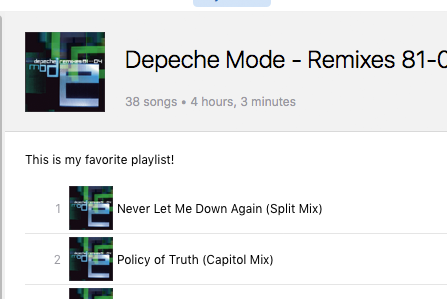
tell thePlaylist to set description to "This is my favorite playlist!"
end tell
This changes the description for the playlist in Playlist View:
iTunes 12.4 Released
Apple released iTunes 12.4 today. It features a significant UI change as well as updates under the hood. And AppleScript additions!
I've just installed it and note these AppleScript changes right off the bat:
current track - now recognizes tracks being played from "For You" and "New" sections. The tracks will be URL class.
download - originally for podcast episodes, now includes the ability to download cloud tracks or playlists to your library.
select - tell iTunes which objects you want to select (as opposed to selection objects already selected manually). [UPDATE: This is incorrect; see here.]
downloader Apple ID and downloader name properties of track.
New subscription playlist (an Apple Music playlist), miniplayer window and video window classes.
I haven't tested any of these very thoroughly yet. In fact, only current track. And of course, there is likely more stuff to discover. More as it develops.
UPDATED: Needle Drop v5.2
Needle Drop is an applet that plays each track in the selected iTunes playlist for a set time interval optionally starting at a set number of seconds into each track, beginning with the selected track.
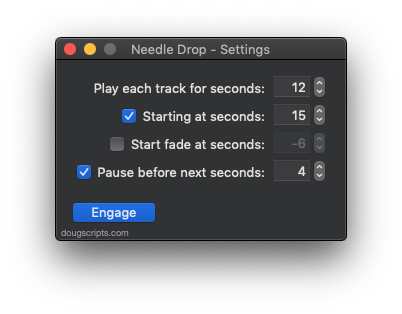
This latest version adds the "Start fade at seconds" option, which is the number of seconds from the end of the full duration to start fading iTunes' volume for each track. Using the settings above, each track in a playlist would: 1) play for :30 seconds 2) starting at the :10 second mark, 3) begin fading at :24 seconds (30 - 6) and then 4) wait :03 before the next track begins.
Needle Drop is free (donation requested) and more details and download are on this page.
UPDATED: M3Unify v1.4.4
M3Unify is a flexible file exporter and M3U playlist creator that will allow you to off-load copies of your iTunes songs to a user-chosen location—separate folder, external drive, USB thumb drive, SD card and so on—the way you and your audio player want.
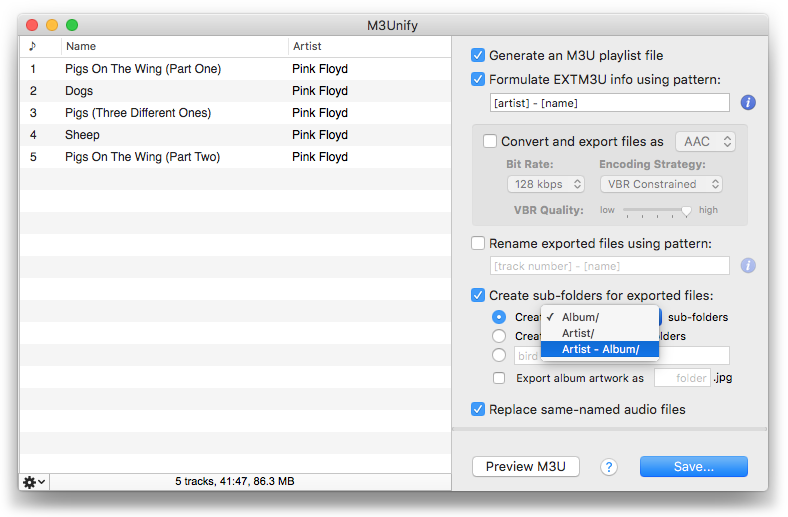
As you'll know from watching my AV presentation, I use M3Unify to stuff a USB thumb drive with music files to use in my car's audio player. It sure beats racking a mini CD collection to the driver's side sun visor. I still see people doing that. Retro.
This latest version of M3Unify now has an option to name sub-folders configured as "Artist - Album"; apparently, some audio players will only scan one folder deep such that files at the bottom of a folder hierarchy like Artist/Album/ will be ignored. Sad!
This is a free update for registered users. It's free to try with a 15-track limitation and $5.00 to purchase. More information and the informative video is on this page.
Play Counts Bug
There seems to be a fairly recent bug affecting track play counts--or plays--when the played count property of an iTunes track is changed with AppleScript. If iCloud Music Library or iTunes Match is enabled, the value will revert to what it was before being changed by AppleScript. It seems as though either the new play count for a track doesn't get synced to the cloud or that the original value in the cloud has over-written the new plays value. Or something like that.
Several scripts here (Multi-Item Edit, New Play Count, New Last Played Date, et al) that allow you to edit the play counts of your tracks are affected by this bug, which only occurs if you're also using iCloud Music Library or iTunes Match. I am not sure if versions of iTunes prior to 12.3.3.17 are affected or if, perhaps, the bug also occurs with a track's skipped count (I wouldn't be surprised).
I filed a bug report with Apple and it turns out it's already an open issue, so Apple knows about it. Now we wait.
