 30 Most Recent RSS Feed
 Apple Music Profile
 YouTube Channel
 RSS Feed
 Play Play
 Murph
Murph Yer Stack
 Block Party Weekend
 Elevendy
 Dupin v4.0.0
 Join Together
 M3Unify
Bug or Feature?
Busted in the Beta
Now that the macOS 27 Public Beta is available I feel like I can raise a little clamor about the Music app’s failing AppleScript delete command. It has been broken since the first Developer Beta. I hoped it would be restored for the Public Beta but it has not.
The delete command is a standard AppleScript command. It’s used in scripts for the Music app to automate track removal from playlists, removing tracks from the library, and deleting playlists. As you can imagine, it is a commonly used command in AppleScript Music workflows.
I don’t know if this is a permanent condition. I can’t imagine not being able to delete items—which is what you aren’t able to do under macOS 27 Beta with a small number of AppleScripts and applications from this site.
I never expect macOS beta software to be complete until the release candidate, so until then, as I annually warn, if you’ve installed macOS 27 Beta then don’t expect scripts to work 100%.
But it’d be good to get delete back soon.
UPDATE: July 20th’s Golden Gate Beta 4 restored the delete command.
The mute Command is Busted
Just noticed that setting the mute AppleScript command is busted in the Music app. I’m pretty sure it was the only way to actually mute the audio without just setting the volume to 0. I don’t know how long it hasn’t worked. The end of the mute command deserves a short moment of silence. Oh wait…
Another Thing You Thought Was OK to Do
Want to know a thing that can severely mess up your music library? I know you do. This has never happened to me because, well, because….But if you really want to mess things up, use emoji in your songs’ tags and/or playlist names. It’ll screw things up like you read about. Good luck! Or, bad luck! as the case may be.
Thought I’d pass that along.
Apple TV AppleScript is Busted
Correspondents have been reporting that scripts which were working fine with the TV app pre-Tahoe are now not working very well at all. After finally getting around to having a look, I can confirm that things like “get view of front browser window” and getting a selection—essentially the way to get the selected playlist or the selected tracks in the TV app—do not work. You will invariably see a “No tracks selected” alert under such circumstances.
As you were.
Select None Lives
Did I say there was no “Select None” in Music app’s Edit menu? Something had to be done.
tell application “Music”
tell (get view of front browser window)
try
reveal track 1 of it
reveal track 1 of it
end try
end tell
end tell

Run this when tracks are selected in a playlist and muscle memory has you going for Shift-Command-A. It first selects (reveal) the first track of the playlist, which clears any other selection. Then, (because of a bug?) the reveal command run a second time de-selects the first track, leaving no tracks selected.
Bug or Feature? Non-Persistent Permission to Read the Media Library
If you’ve been following along, you will have noticed how Apple has, over the years, gotten stingier with which and how certain “protected resources” on your Mac can be accessed by third parties. One of these resources is your Media library. In order to access information about your Media library, a third party app has to declare its intentions to the user. This is a typical dialog you will see in such a situation:
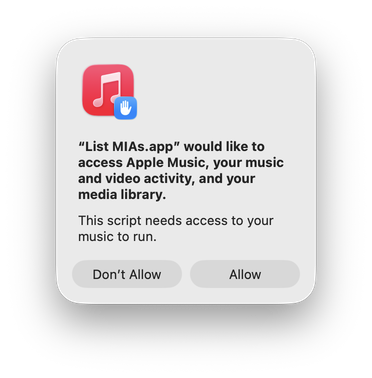
Conventionally, this will be displayed as you launch the script app for the first time. Then the user’s “Allow” decision will be remembered every time you launch it thereafter.
This is not happening in macOS 26/Tahoe. Every time you launch such a script you will see this dialog.
Not every script requires access to the Media library so this doesn’t happen with every script. But it does with enough of the popular ones.
I’m not sure if this is the intended behavior. I filed a bug report.
New Way to Make Playlists Comes to Sonoma 14.2
I have the Sonoma 14.2 Release Candidate and Apple has changed the way new playlists are created in the Music app. When the File > New > Playlist menu item is clicked, or Command-N is pressed, a panel will display allowing you to enter a name and provide artwork for the new playlist.
I dislike this. But there doesn’t seem to be a way to shut it off.
Happily, creating a playlist with AppleScript hasn’t changed. Here’s a very simple script that when run will just create a new playlists named “Playlist” like it used to be.
tell application “Music” to reveal (make new playlist)
You can save this in Script Editor as a “.scpt” (Script) file in the ~Library/Music/Scripts/ folder and even give it a keyboard shortcut.
A more advanced version of this script, “Name New Playlist From Selection” is explained in this link. It was originally written for iTunes. But just substitute “Music” where “iTunes” appears in the script and it should work fine.
UPDATED: Scan For Double Entries v4.0
I first posted Scan For Double Entries in 2014 when a strange iTunes issue was somehow allowing two or more track entries to point to the same media file. The script surveys the library for sets of such tracks and then isolates them in their own playlist for further scrutiny; presumably, all but one of these tracks should be deleted.
Anyway, I hadn’t updated the script lately because I figured, “Aw heck. That can’t still be happening.”
Silly me.
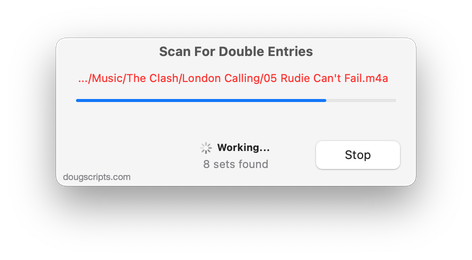
The updated version of Scan For Double Entries found 32 sets of two or more tracks where this was still happening—or, at least, had happened and that I hadn’t detected ’til now.
The latest version, v4.0, has initial accommodation for macOS 12 Monterey and some UI and security updates. Specifically, it gives you a better idea of what’s happening during the search for the tracks, as in the screenshot above. Earlier versions looked like they weren’t doing anything during this particular part of the process.
More information for Scan For Double Entries v4.0 and download link is here.
macOS 11.2.3 Peculiarities
After upgrading today to macOS 11.2.3, I noticed that my scripts and apps that employ the iTunesLibrary framework are having trouble accessing media information. This includes my app “Dupin” and the script “Media Folder Files Not Added” and a small number of others. Affected apps/scripts will likely be unable to complete an initialization routine and stall at “Indexing” or similar stage. I am actively investigating this issue.
UPDATE, March 9, 2021: After several machine reboots (and fsck, disengaging connected devices and so on; the usual start-up regimens), things are now working as expected. I could not say what caused the issue I was experiencing or why it came and went.
Getting properties of Streaming Tracks
When a track is playing in the Music app, Music’s AppleScript properties current track and current playlist will be references to that track and the playlist it is playing from. If you have written a script or an app that, for example, displays a notification with the title, artist, album and duration of the currently playing track, current track is who to ask.
Now in Big Sur and Music v1.1, the current track and current playlist will be an “unknown object type” if the track is streaming from Apple Music; this is not a problem if a current track is a local track.
I’ve already heard from a couple of devs who’ve run into this issue with their apps and I’m afraid there’s no workaround that I’m aware of. The best you can do is account for the error that the call to current track will generate if a non-local track is playing.
I never know if these sorts of things are intentional or not. You certainly shouldn’t be able to edit the tags of a streaming track. But I’m not sure why grabbing displayable info—that, to a degree, is otherwise available via “Get Info”—should be hands-off.
