
 Apple Music Profile
 YouTube Channel
 RSS Feed
 Play Play
 Murph
Murph Yer Stack
 Block Party Weekend
 30 Most Recent RSS Feed
Smarts is a Mac Gem
Thanks to Dan Frakes for the great write-up at Macworld on my Smarts Smart Playlist manager app. It's free from the Mac App Store.
Column Browser Go Home
I've found that iTunes' Column Browser feature is one of the best ways to navigate the Music library. But I'm often annoyed that I can't easily restore the browser window to a full view of tracks after digging down to a particular set of tracks. To do so requires a lot of scrolling up and clicking. Correspondent Josh Rafofsky emailed me complaining of the same frustration and his solution was pretty good: Command-B to Hide the Column Browser, fn-Left Arrow to got to the top of the browser, and the Command-B again to Show the Column Browser. But even this gets tiresome and he asked if there might be a one-step scripting solution.
You know there is.
I put together this script which uses a combination of standard AppleScripting and GUI Scripting to emulate Josh's shortcuts solution:
tell application "iTunes" to activate
tell application "System Events"
	key code 11 using command down
	tell application "iTunes" to reveal track 1 of (get view of front window)
	key code 0 using {command down, shift down}
	key code 11 using command down
end tell
Save this as whatever you like—I call it "Column Browser Go Home"—save it to the ~/Library/iTunes/Scripts folder, and assign it a shortcut (make sure you have enabled GUI Scripting, too, as outlined in this article on using key codes). When launched after you've Column Browsed to a discrete set of tracks it will restore the entire list of tracks and jump to the top of the selected playlist. In my case this is usually the Music library playlist, but it will work with any playlist that's being viewed with the Column Browser.
[UPDATE] And after all that, @tonyhazeldine tweets: "The same can be done by clicking on the column titles at the top of the column browser." Yes, but each column has to be clicked.
Daypart v2.0.0 Released
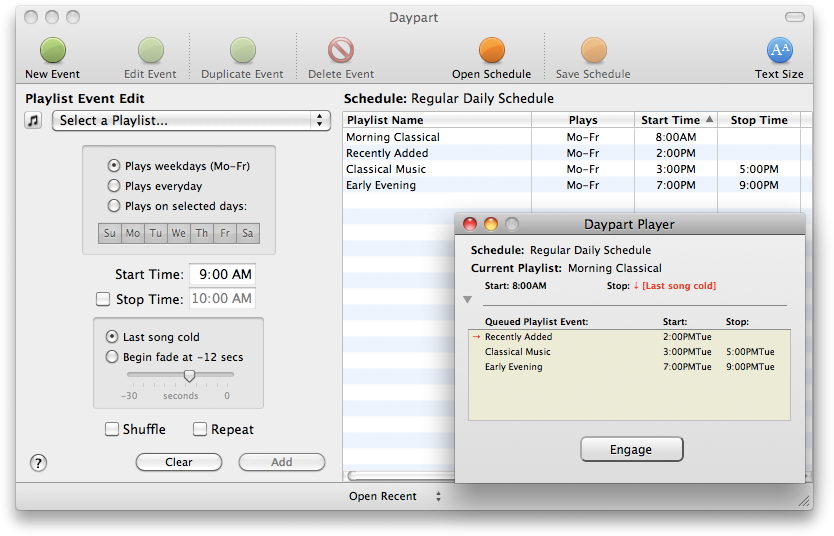
Daypart is a simple yet full-featured Mac application that allows you to schedule iTunes playlists when to play, giving you an easy way to program varied musical content throughout the week in your home or workplace.
NEW: Play in Album Context
You can probably imagine that I hear a lot of unusual ideas for creating workflows for iTunes with AppleScript. Quite a while ago someone suggested a script that could be run when a track was playing that would find all the tracks of that track's album, put them in track order in a new playlist, and then play them in order starting from the original selected track. For example, "Time" from Dark Side of the Moon comes up and you want to hear "The Great Gig in the Sky", "Money", etc, in their album context.
But really. How many people ever want to do that? Well it turns out that the more I thought about how quirky a suggestion it was the more often I began noticing opportunities where I'd like to do the very thing. So I caved and wrote Play In Album Context.
If you select a track and then launch the script a new playlist will be created from the tracks of that track's album (actually, tracks that have the same Artist, Album, and Disc Number tags—whether that results in gathering the correct tracks for the album depends on how well you've tagged your tracks) and the selected track will begin playing from its album position in the playlist.
If a track is playing and the script is launched, the album playlist is created as described above, and the current track will continue playing from its album position in the new playlist. The trick of the script is to temporarily set the playing track's bookmarkable property, pause iTunes, and then immediately play the same track in the playlist; the track picks up playing from the bookmark set when the track was paused. There is a slight stutter when this transfer occurs, but if the goal is to hear the succeeding tracks in album context, it's probably a small inconvenience to bear.
Key Code Searching
Here's a snippet I've been using for awhile which I just got around to posting on the key codes page. I keep my iTunes Column Browser set with Artists and Albums listed On Left. Whenever I'm looking for a particular album I run this script to select the Music library and put focus on the Search box:
tell application "iTunes"
	activate
	-- select the Music library
	reveal (some playlist whose special kind is Music)
end tell
tell application "System Events"
	-- bring focus to Search box - Command-Option-F
	key code 3 using {command down, option down}
end tell
I've given it a keyboard shortcut of Command-Option-S.
More information on AppleScripting iTunes with key codes and keystrokes is here.
iTunes 10.4.1 Available
Apple released iTunes 10.4.1 today.
Despite what the release notes mention about addressing "issues with adding artwork to songs and videos", I was unable to get album artwork to display as a track's file's Finder icon. Personally, I don't care if this is a bug or a feature. But I know it really annoys a lot of people.
UPDATED: Remove n Characters v4.2
Remove n Characters From Front or Back v4.2 adds a progress display during processing and provides the ability to preview each selected track.
Join Together v6.1.2
Join Together v6.1.2 addresses an artwork-related issue that would cause a stall when adding the final file to to iTunes and fixes an issue with the shareware notice in Lion.
Artwork Bug in iTunes 10.4 Lion, continued
Regarding this note about a possible artwork bug with iTunes 10.4: There are a couple of responses to a query I made about it at Macintouch. It seems like the image data will "travel" with a file, but simply will not display as a file's Finder icon in Lion.
UPDATED: Quick Convert 3.0
Quick Convert v3.0 will convert all or just the selected tracks of the selected Playlist using your choice of available iTunes encoders, restoring your Preferences-set encoder afterwards.
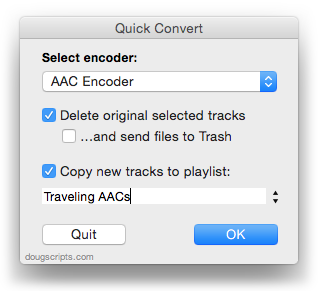
Works with importing selected CD tracks, too.
- Choose to delete and/or Trash the original tracks and/or files
- Copy all converted/imported tracks to a new playlist
- Optionally save AAC encoded tracks as M4B "bookmarkable" and re-add the converted files to the Books library
This latest version consolidates all options into a single window and displays progress during track processing.
Quick Convert v3.0 is for OS X 10.6 or 10.7 only. Previous universal version for PowerPC machines available at the entry page.
