 30 Most Recent RSS Feed
 Apple Music Profile
 YouTube Channel
 RSS Feed
 Play Play
 Murph
Murph Yer Stack
 Block Party Weekend
 Elevendy
 Dupin v4.0.0
 Join Together
 M3Unify
Go to Music Library Shortcut
I’m often hopping around in iTunes among the “Library”, “For You”, “Browse”, “Radio” and “Store” tabs and likewise apt to be in a specific media library, like Podcasts or Movies. As such, it can be a minor pain to get back to my local Music library.
Okay, it’s only a couple of clicks. But it does elicit from me a small “arghh” burp from time to time.
So here’s a very simple script to which you can assign a keyboard shortcut that will display the Music library in the Library tab:
tell application "iTunes" to reveal (some playlist whose special kind is Music)

Save this in your home/Library/iTunes/Scripts/ folder and name it “Go to Music Library.scpt”. The script will appear in the iTunes Script menu. Then, open System Preferences and go to the Keyboard panel. Select “Shortcuts” and then “App Shortcuts” from the list on the left. Click the “+” button on the right side. In the drop down panel, select “iTunes” in the Application popup. Enter the name of the script, “Go to Music Library”, in the Menu Title text field. Enter your shortcut combination in the Keyboard Shortcut text field (I use Control-Command-H, where the “H” stands for “home”). Click the “Add” button and then close out of System Preferences. Thus, whenever you want to get back to your Music library, just hit the shortcut.
I’ve done something similar for my Internet Radio Station playlist.
UPDATED: Selected Playlists to iPod v3.0
Every so often I become re-enamored with my iPods. I have a 30GB “Video” iPod (5th gen) and a 160GB iPod Classic both of which still work very well. We talked about it on this episode of The Next Track podcast.
I recently heard from 3 different Correspondents within a single week who had updated their old iPods with 512GB SD cards—a procedure that I understand is very difficult.
The film “Baby Driver” has re-ignited the iPod love.
Vinyl is resurging. Cassettes are on a come-back. Could MP3 players be next?
Probably not. But, if you do still use an iPod from time to time then you might be interested in the update to Selected Playlists To iPod.
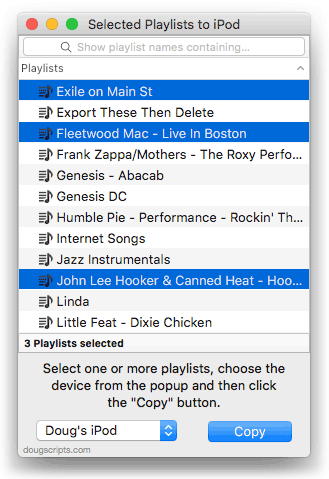
I sync music to one of my iPods, but the other is manually managed. There’s an Autofill feature but I prefer to manually drag tracks and playlists to fill it up the old-fashioned way. Or use a script. Selected Playlists To iPod will allow you to select a batch of playlists in iTunes and have them copied to a connected iPod, rather than have to drag each one individually in iTunes.
This only works with “conventional” iPods—and not the iPod Shuffle. It may work with iOS devices, but iOS doesn’t always buy what AppleScript is selling, if you know what I mean. The older iPod operating system works more co-operatively with iTunes.
Selected Playlists To iPod v3.0 is free to use with donation in appreciation requested. More information and download is here.
iTunes 12.7.3 Available
Apple has released iTunes 12.7.3 with support for HomePod and improved AirPlay interface. (Update: I’m not sure I am able to detect the “improved AirPlay menu”.) More as it develops.
Segregate Shufflable Tracks
A Correspondent queries:
“Do you have a script that can create a playlist of songs if they have the “Skip when shuffling” attribute ticked in the info panel? The reason is because when I sync those songs to the iPhone that feature doesn’t sync along with it so they play regardless. The feature works on the Mac, just not on the iPhone.”
The shufflable property of a track does not have a corresponding Smart playlist criterion or Songs view column. So, looks like the only way to identify these tracks en masse is with AppleScript.
Interestingly, the shufflable property works somewhat backwards. If the “Skip when shuffling” checkbox is set (and a checkbox when checked has a “true” value) the corresponding shufflable property is set to false; that is, “not shufflable”. This might be the opposite of what you’d expect. For instance, when “Remember playback position” is set to true with a checkmark, its correponding bookmarkable property is set set to true (yes, allow this track to be bookmarked). Just kind of interesting. A little. But its important to keep in mind when you want to detect the correct (and not opposite) value.
Anyway, here’s a script that will copy any tracks in the Music library set to “skip when shuffling” to an existing playlist:
tell application "iTunes"
set targetPlaylist to playlist "Skip Shuffle Tracks"
set musicPlaylist to (some playlist whose special kind is Music)
set theTracks to every track of musicPlaylist whose shufflable is false
repeat with aTrack in theTracks
set db to database ID of aTrack
try
if not (exists (get some track of targetPlaylist whose database ID = db)) then error
on error
try
duplicate aTrack to targetPlaylist
end try
end try
end repeat
reveal targetPlaylist
end tell
Open this in Script Editor by clicking the little script icon. Save it named whatever you like as a Script Bundle in your ~/Library/iTunes/Scripts/ folder so that it will be listed in the iTunes Script menu. I have already created a playlist in iTunes named “Skip Shuffle Tracks” so make sure you do, too. if you want to use a playlist with a different name then you will have to hard-code that name in the script where I have used “Skip Shuffle Tracks”.
Whenever you run the script it will get a list of track references from the Music playlist where each has its shufflable set to false. It will iterate over this list and for each track it will first see if the track already exists in the target playlist; and if it does not the track will be copied to the playlist.
The second try block around the duplicate command ensures that if any track cannot be copied, such as a “dead” track, the script will skip it without erroring.
Exporting Voice Memos
A Correspondent asked how to deal with Voice Memos when the Voice Memo track in iTunes is named using the text that was entered after recording it and its associated file is named using a date and time format. Specifically, he wanted to offload and archive some of the recordings but was concerned that the filenames were not sufficient to describe the contents of the file. Could the track name be transferred to the filename?
The script File Renamer is ostensibly for renaming a track’s file in-place. But it can also be used to rename a copy of a file which can be saved to a user-chosen folder.
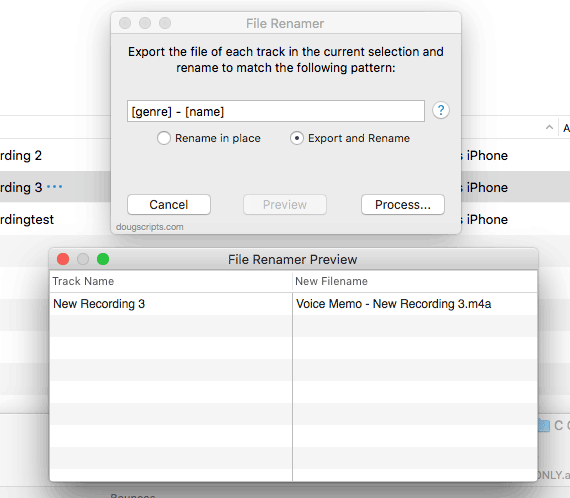
In this case, the Voice Memos have already been sync’d to iTunes from the iPhone. I’ve selected a single Voice Memo track in the screenshot, but batches are acceptable as well.
I originally named the Voice Memo “New Recording 3”. But the filename of the selected track is something like “20180105 060425.m4a”, indicating that I recorded it on January 5, 2018 a little after 6AM. File Renamer will create a copy of the file and name it “Voice Memo – New Recording 3.m4a” using the genre and name tags of the track, as well as some additional separator text. The original file remains unaffected.
BTW: I wasn’t able to find a specific Voice Memos playlist in iTunes. (Was there ever one? I’m not a Voice Memos Guy.) So I created my own with a Smart Playlist matching all media where Media Kind is Voice Memo.
For more sophisticated offloading options, you may also want to try M3Unify.
CD Support in iTunes 12.7.2
iTunes 12.7.2 will detect if an optical drive is available on the system and if one isn’t, you won’t see the CD Actions settings in iTunes > Preferences… > General. Kirk has posted more details at his blog.
iTunes 12.7.2 Available
Apple has released iTunes 12.7.2 (build 12.7.2.58). I’m not aware of specific fixes or features. They’ve also posted macOS 10.13.2, which seems to resolve the problem with displaying album artwork as the file icon for audio files.
Internet Radio Streams Playlist
I recently swapped receivers (or, I should say, amplifiers) in my office. I was using a decent mid-priced Sony receiver to power two zones of speakers: a set of Bose 301s and a “near-field” set of cheap desktop speakers and sub-woofer. I replaced it with an unused Onkyo amp I had purchased a few years ago. As a result of the switch, I no longer have a radio tuner in the configuration.
But, as it turns out, I don’t need one. I’m lucky enough to have all the local Boston-area stations I listen to available in the Internet Radio section of iTunes. I never paid much attention to them before since I had a receiver. This gives me some nice advantages:
- Internet radio feeds seem to precede the part of the broadcast audio chain where the signal has the life processed out of it. I no longer have to tolerate crappy broadcast audio.
- Almost all my music sources are available digitally in one application, iTunes. Pandora is the only audio service I use requiring another app, but I mostly listen to it on mobile.
- I can AirPlay iTunes all over my house.
The only downside so far is that I can’t listen to live local play-by-play sports broadcasts because, for various “contractual obligations”, these broadcasts can’t be internet-‘casted.
One quibble I’ve always had with iTunes Internet Radio is that it’s not exactly easy to manage the stream tracks. Finding them in the Radio list can be a chore and sometimes stations will disappear and the re-appear with a different URL. There’s not much I can do about either of those issues.
But to make life a little easier, I have created a “__Radio” playlist to which I have dragged the stream URLs I regularly listen to. I’ve also create a little script to quickly pull up the __Radio playlist with a keyboard shortcut:
tell application "iTunes" to reveal playlist "__Radio"
I’ve assigned Option-Command-R as a keyboard shortcut to the script.
One other thing I’ve done is to store the URL address of each stream track in the __Radio playlist. I grab the address property of each URL track and then paste it into a text document for safe keeping:
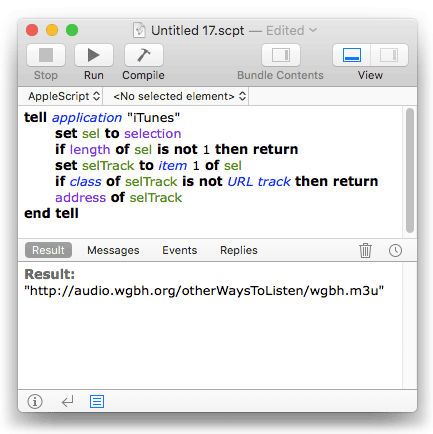
Later, if necessary for any reason, I can open the address with something like this:
set theStream to "https://audio.wgbh.org/otherWaysToListen/wgbh.m3u"
tell application "iTunes" to open location theStream
This will create a new URL track in a playlist called “Internet Songs”. I then drag the track to my __Radio playlist and usually delete the “Internet Songs” playlist, although keeping it around isn’t a bad idea either.
NEW: Remove From Other Playlists
Remove From Other Playlists will remove the selected tracks in the selected playlist from every other user-created playlist, such that the selected playlist is the only user-created playlist that contains them. The track entries in the Media Library playlists (Music, TV Shows, Audiobooks, etc) will not be affected. And, perhaps obviously, the script cannot remove tracks from Smart playlists since they are created dynamically; it’s likely any track you remove would just be sucked back in.
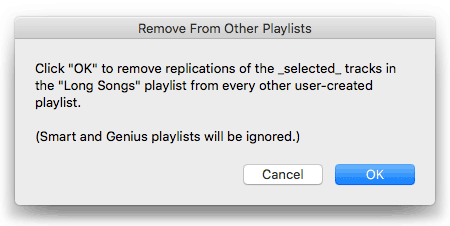
More information and download for Remove From Other Playlists is on this page.
Album Artwork in the Finder
I have seen some observations on the interwebs that some AAC and MP3 files are not displaying their artwork metadata as the file’s icon under High Sierra 10.13.1. That is: the file for a track with assigned artwork in iTunes displays in the Finder with a generic audio icon rather than the album artwork. If I recall correctly, there have been periods over the years where this has both worked and not worked as expected.
I’ve paid little attention to this issue because I don’t care about artwork for my audio files. Assigned artwork for tracks in iTunes is one thing, but how the files appear in the Finder is of little interest to me. But obviously this is something that many users have come to expect if not rely on.
My understanding is that Apple is aware of this issue. In fact, I’m running the latest High Sierra 10.13.2 beta and don’t detect a problem. So don’t sweat it.
UPDATE, December 6, 2017: This issue appears resolved after installing macOS 10.13.2.
