
 Apple Music Profile
 YouTube Channel
 RSS Feed
 Play Play
 Murph
Murph Yer Stack
 Block Party Weekend
 Elevendy
 Dupin v3.2
 Join Together
 M3Unify
 30 Most Recent RSS Feed
The reveal Command is Acting Up Again
I don't know when it happened, but the AppleScript reveal command, used to select a track or a playlist in AppleScript code, fails. A similar failure has been happening for a longer while with the "TV" app also and nobody has been able to fix that either. There seem to be changes being made to how playlists work but without bringing the AppleScript along very quickly, if even at all. Oop. Did I say that out loud?
Did I tell you I've been building my own players?
NEW: Elevendy
The manic episode I've been experiencing lately whereby I am compelled to build tinker-toy audio players has not yet subsided. My story is that once I figured out how simple it is to incorporate the AVAudioPlayer framework into an AppleScript app, I can't stop making music boxes. I just threw another one on to the pile.
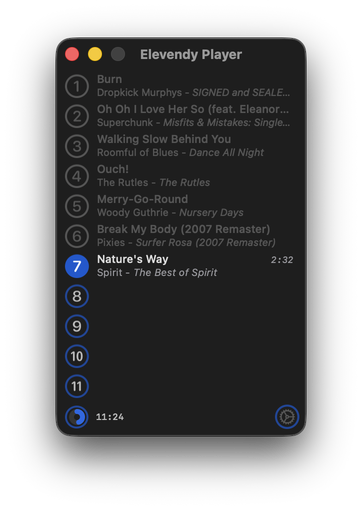
Elevendy plays 11 random songs in a row that are between the lengths of 1:30 and 2:40. Then, if you want, it will do it again with a different (maybe) random 11 tracks. And so on.
Because why not, that's why.
NEW: Who Da Album Artist v1.0
As you likely know, individual music tracks can each have their own individual artist tag. But there are situations when a single mega-artist is handy-like-a-handle for an album of tracks. Like "Various Artists" for compilation albums or "Ray Charles" if it's Ray with different artists on each track. That's why our Founding Fathers created the album artist tag.
Every discreet album in your collection should have an associated "album artist". It's what you'd see as the display artist on the cover or spine of a physical album, for example. Here in the digital future, where albums have been disintegrated into tracks, there is no "album"; the "album" information is born by the tracks it "contains" so the tracks can be re-integrated as an "album" in yer third-party devices there. Thus, the album artist tag is more like an "album tag", rather than a "track tag". Each track of an album should have the same text in its album artist tag. In fact, having mixed text in an album's tracks' album artist tags completely neutralizes the purpose of the mononymnic album artist tag. And some screwing up your music library royally is also nominally possible.
I thought I had album artist configurations handily and dandily in hand over the years. So I was recently in mid-to-high dudgeon after noticing a bunch of albums whose tracks had incorrect or inconsistent or missing album artist tags. CHAAAArrrristopher Columbus! Like I really wanna spend a lot of time going through my library looking for albums with problem album artist tags. So instead I spent what probably would have been the same amount of time making an app that would do the album artist wrangling for me.
Who Da Album Artist will scan your Music library and if it finds any album whose tracks' album artist tags are missing or inconsistent (more than one per album, for example), will give you the opportunity to enter the appropriate album artist and sort album artist tags.
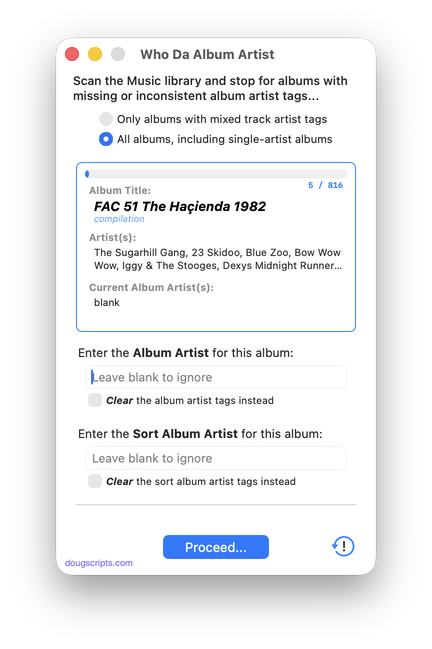
Latest version:
- Initial release
More information for Who Da Album Artist v1.0 and download link is here.
UPDATED: Playlist XML Librarian v1.3
This applet will list the exported Playlist XML files collected in a specified folder with options to view, edit, search and send (import) them to the Music app. Makes it easy to maintain an organized stockpile of exported Playlist XMLs to reduce the number of onboard Music playlists.
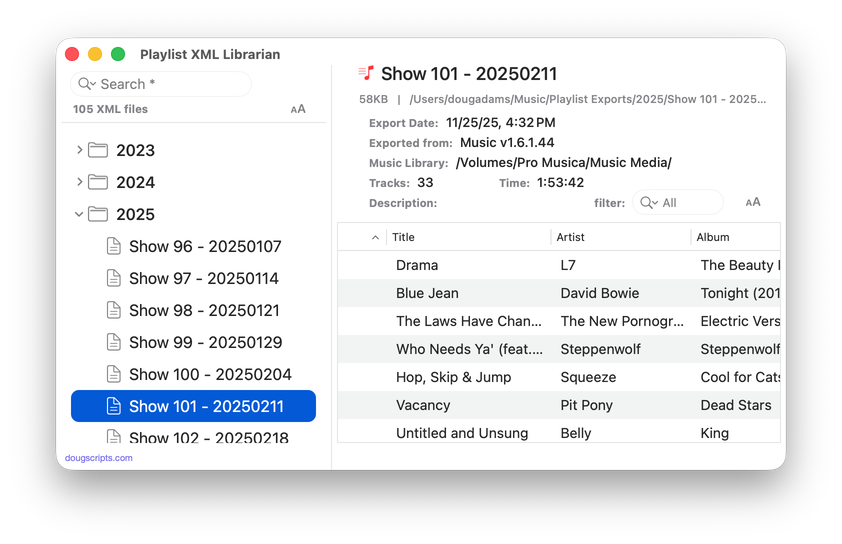
Latest version:
- UI adjustments and detailing; minimal Liquid Glass added
- Accepts Open'd and drag-and-dropped Playlist XMLs
- Description field displays popover for longer text
- Table displays Normalization value if present
- Adds "Send to Music app" and "Reveal Default Folder" buttons in main window
- Adds File and Remote Track Type counts to header display
- Handles :00.0 length URL entries properly
- Fixed issue with Filter
Frankly, I would rarely export a playlist as an XML file because traveling to the command to do it—buried in the Music app's File menu—always seemed like a long arduous journey for my mouse. That all changed when I assigned the keyboard shortcut Command-E to the File -> Library -> Export Playlist... menu command. Then I couldn't stop exporting playlists.
(more…)
The Bathroom Music Server
I've mentioned my Bathroom Music Server on The Next Track Podcast and other places so I thought I'd tell a little about it.
First of all: you know how when you're at the market and you hear music playing over the speakers? You did not enter the market to hear music, but There It Is. Or when you're drivin' down the Mass Pike and you gotta make a pitstop just west of the Middle of Nowhere in Blandford and there's music playing in the lav'? You did not enter the lav' to hear music, but There It Is. Or when you go get a haircut at Tony's. You did not enter Tony's to hear non-stop Italian Opera, but There It Is.
(more…)
NEW: Block Party Weekend
We used to get a lot of beer ad money by staging "Double Shot Weekends" and bonus'ing the Beer Guys weekend sponsorships. As seemingly popular as "Double Shot Tuesdays" and Three-Fer Thursdays" may have been, normal listeners hate more than one song by an artist. Major tune-out. But the hardcore P1's, they love that stuff. Suckers. That's how we kept them listening over the weekend, which is not a great radio listening time period. And the Beer Guys owned the weekend. Everybody's happy.
Anyway. How'd you like a batch of two-fers for old times' sake?
Block Party Weekend is a stand-alone music player that can devise and play artist blocks of various size and criteria.
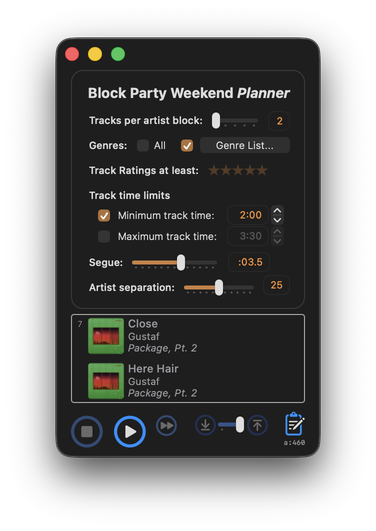
If you have enough variety in your music library, Block Party Weekend will likely play continuously for longer than any weekend.
Block Party Weekend is fully-featured donationware for macOS 26/Tahoe and later only.
Some Players
Realized a couple of days ago that I completely missed the twenty-fifth anniversary of this site, which was February 15th. It's in Calendar app and everything.
I have been a bit distracted lately. I recently discovered that it's remarkably easy (and barrels of fun) to use NSAudioPlayer in an AppleScript app. At least, the kind that I make. I anticipated threading issues and all that kinda thing. Works just great.
It has never seriously occurred to me to make a fully-fledged audio player. But now I feel like I've discovered model aeroplaning or something. Like that German designer in "Flight of the Phoenix". I don't build real big airplanes, just little ones that you fly in your driveway.
If you have an opportunity, try Play Play, Murph and/or Yer Stack.
Twenty-sixth anniversary will be comin' at you fast.
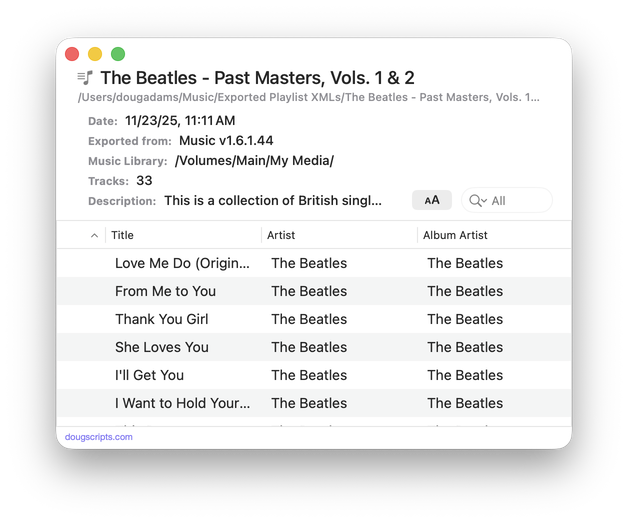
UPDATED: Playlist XML Viewer v2.0
Open (or drag-and-drop) and view the contents of a playlist XML file exported from the Music app in a conventional table layout. Includes options to play local files, send (import) the XML to the Music app, export a TXT, CSV or M3U version, copy info to clipboard and reveal existing files in the Finder. (Not for use with exported Library XML files.)
Also see Playlist XML Librarian which can manage a folder-full of exported Playist XML files.
Latest version:
- Adds audio player features
- Adds Open Recent Items subfolder
More information for Playlist XML Viewer v2.0 and download link is here.
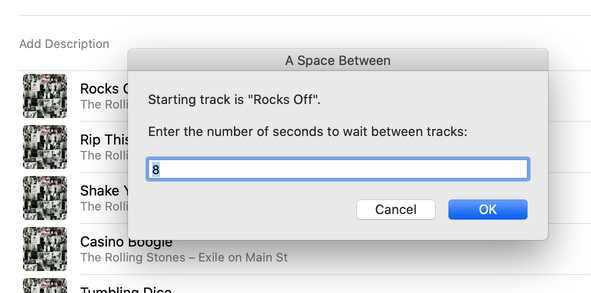
UPDATED: A Space Between v3.5
This stay-open applet will play each track in the selected playlist and will wait (you might say insert but that's technically incorrect) a user-set number of seconds between each. Play can commence at the "top" of the playlist or from a selected track and, optionally, in random track order.
Latest version:
- Fixed problem presenting donation panel
- Minor UI updates
More information for A Space Between v3.5 and download link is here.
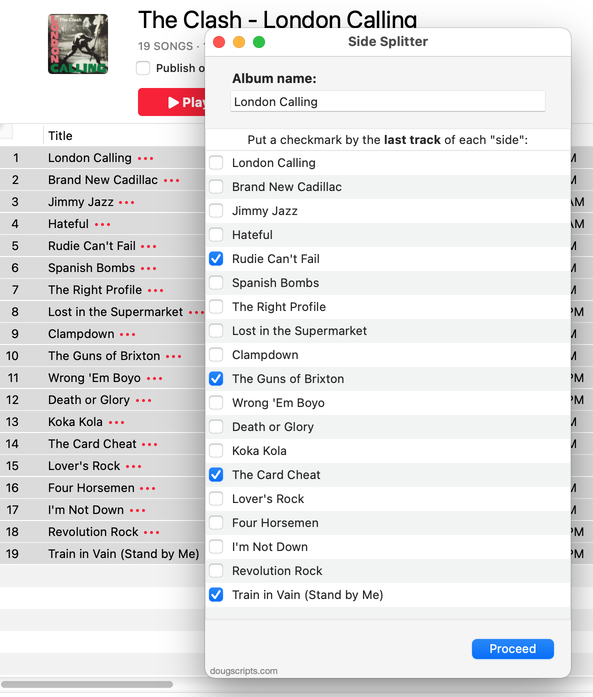
UPDATED: Side Splitter v3.0
Side Splitter will allow you to configure a selection of tracks (presumably the tracks of a single particular album, although any tracks will do) like the sides of an analog LP. The script will then have the Music app play each "side" one at a time, with a few seconds of space between each track and slightly more space between sides (to emulate the time it would take to flip the record over).
The playback experience is, surprisingly, kinda remarkable, if I do say so myself. (Meanwhile, apparently there's some new Apple Music feature that forces tracks to seg even closer.)
You can get the track order for an album if you Search Discogs or Search Wikipedia.
Latest version:
- Accommodations for macOS 26 Tahoe
- Redesigned UI and concept
More information for Side Splitter v3.0 and download link is here.
