
 Apple Music Profile
 YouTube Channel
 RSS Feed
 Play Play
 Murph
Murph Yer Stack
 Block Party Weekend
 Elevendy
 Dupin v3.2
 Join Together
 M3Unify
 30 Most Recent RSS Feed
NEW: Dumb Down Genius Mix Playlist v1.0
Dumb Down Genius Mix Playlist will copy the tracks of a playing Genius Mix playlist to a new "dumb" (regular) playlist, which, for example, can be copied/sync'd to older iPods that do not accommodate Genius Mixes. You can subsequently copy the contents of additional Genius Mix playlists to the new playlist, refill it, or create more. (Each Genius Mix playlist only references about 70 tracks maximum, which is why you may have several, say, "Rock Mix" playlists.)
Thanks to Correspondent Pedro Espinosa for coming up with the basic work for this clever script.
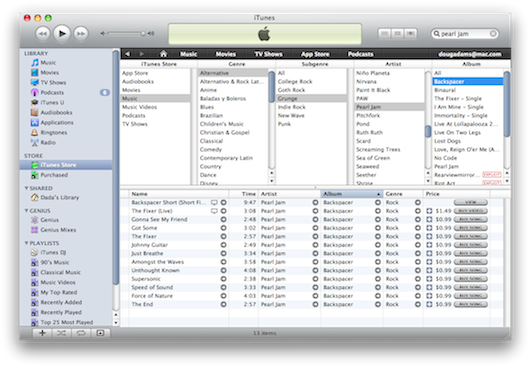
Copy iTunes Store Tracks in Browse Mode
You may have been (prematurely) lamenting the inability to drag tracks from the iTunes Store to a playlist on your machine for later purchase because of the new format. Well, just put the store in Browse mode (Command-B). Tracks will be available the old-fashioned way, more or less:
USB-IF Responds Against Palm
John Paczkowski reports the USB Implementers Forum has decided that Apple is not hampering competition by blocking the Pre from syncing with iTunes. The USB-IF additionally suggests that it is Palm that may be in violation of the rules. Ruh-roh.
iTunes 9.0.1 Released
Apple has released an iTunes update and describes pretty explicitly (for Apple) what the fixes are, like the issue with the zoom button, unexpected quits, and unresponsiveness, the latter two of which I experienced a couple few times.
Tell you one thing. It installed a lot faster on Leopard than it did on Snow Leopard.
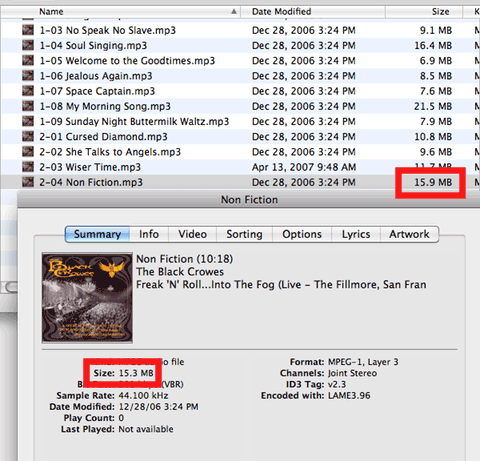
Now, did they fix the discrepancy with displayed track sizes versus displayed Finder file sizes under Snow Leopard (my pet radar report)? No:
UPDATED: PDF Adder v3.0
PDF Adder v3.0 is a collection of three AppleScripts that assist with adding PDF files to iTunes as "digital booklet" PDF tracks. Each provides a method for easily supplying Artist and Album tag data which is then applied to the newly-added PDF track:
- Add as PDF to iTunes is a PDF Service workflow that, when installed, will be available in the PDF pop-up menu of the Print Dialog. It allows you to save the current document as a PDF file (from any application that uses the Print Dialog) and add it to iTunes.
- PDF Adder is an applet that will let you choose an existing PDF file and add it to iTunes. It can be installed in iTunes' Scripts folder for easy access from iTunes Script menu.
- PDF Dropper is a droplet that lets you add a PDF file to iTunes by drag-and-drop.
This latest incarnation has been updated for Leopard/Snow Leopard. The last update was in 2006.
Music Publishers vs Record Labels
Just so you know, there really is a difference between the music publishing industry and the music recording industry: Millions Owed by Labels to Publishers.
Visitors' Operating Systems
I've been keeping an eye on Google Analytics to track the operating systems of visitors to help me determine who I should be writing AppleScripts for. Looking at August 28 (SL's debut) thru September 20 (about 90k visits):
- Intel 10.6 - 44.38%
- Intel 10.5 - 43.91%
- PPC 10.5 - 4.0%
- Intel 10.4 - 3.04%
- PPC 10.4 - 2.84%
To put a finer point on it, here are the stats for the week September 13 thru September 20 (about 25k visits):
- Intel 10.6 - 52.24%
- Intel 10.5 - 36.54%
- PPC 10.5 - 3.83%
- PPC 10.4 - 2.90%
- Intel 10.4 - 2.72%
I think I can pretty much drop explicit support for Tiger and PPCs. Snow Leopard adoption appears to be somewhat brisk, which is fine by me because I've been writing stuff on two machines running Leopard and Snow Leopard respectively and it's making my brain hurt.
Grab Lyrics from iTunes LP? No.
If you are about to email me with something along these lines: Hey! Is it possible to get the lyrics from an iTunes LP and put them in the individual tracks' lyrics tag? That'd be great!
The lyrics you see displayed in an iTunes LP are .png image files and the lyrics cannot be scraped as text.
About That New Playlist Default Screen
Betalogue's post, iTunes 9: About that new ‘Playlist’ screen, may be a bit hypercritical but on target. Being an iTunes user since it was SoundJam I definitely find the In-Case-You're-A-Total-N00b aspect of it unnecessary. After seeing it, maybe, three times it's become just plain annoying. A preference to shut the thing off would be great.
Can They Fix This, Please?
Why does this dialog in AppleScript Editor still prevent me from seeing the changes? I just know there's something important behind there...
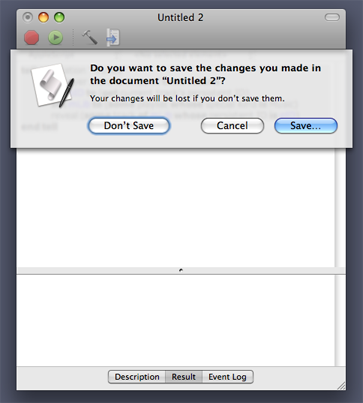
I see this about half a dozen times a day and it drives me crazy.
