 30 Most Recent RSS Feed
 Apple Music Profile
 YouTube Channel
 RSS Feed
 Play Play
 Murph
Murph Yer Stack
 Block Party Weekend
 Elevendy
 Dupin v4.0.0
 Join Together
 M3Unify
iTunes 12.6.0.100
Apple has released another update to iTunes. The 12.6 release the other day was version 12.6.0.95. This new release is 12.6.0.100.
This has happened previously. Apple released iTunes 12.5.0.63 on August 2, 2016 and then released 12.5.0.68 a short time thereafter—I think it was certainly by August 12.
Sometimes you just don’t know how something is going to work until it’s tossed into the wild. And you have to appreciate Apple’s short turnaround.
Playlist Windows
iTunes 12.6 has brought back Playlist windows and, judging from the reaction in my Twitter feed, they’re receiving a hearty welcome back. Couple of things, though: 1) The names of the open Playlist windows are not listed in the iTunes “Window” menu and 2) window names are blank for any Apple Music playlists opened as Playlist windows; they actually default to the name “iTunes” but this isn’t displayed either To be clear, the AppleScript name for the window of a subscription playlist is “iTunes” and not the name of the playlist. (Update: And now I’m not seeing this at all and all seems correct as far as names go; don’t know what I was seeing previously!)
I’m not so much concerned about the latter thing. But if you have a batch of Playlist windows open it can be an ordeal to select one you’d like to work in. This script will list all open Playlist windows in a choose from list panel so one can be chosen and then made frontmost:
tell application "iTunes"
if (count of playlist windows) < 2 then return
set windowList to playlist windows
set nameList to name of view of playlist windows
try
set chosenName to (choose from list nameList)
if chosenName is false then error
on error
return
end try
set chosenName to (chosenName as text)
repeat with i from 1 to (count of nameList)
if chosenName is item i of nameList then select item i of windowList
end repeat
end tell

Click on the little AppleScript icon above to open the script in Script Editor at your house—don’t copy the text in the browser.
Save the script as a compiled Script (“.scpt”) with Script Editor named whatever you like in your [home]/Library/iTunes/Scripts/ folder. When there are too many Playlist windows open and you can’t find any real estate to click on, launch the script to select the one you want brought to the front.
(Update: Of course, after I post this I immediately discovered that you can Command-tilde (~) through open Playlist windows.)
Tunes 12.6 Restores Playlist Windows
Playlist windows are back in iTunes 12.6. This is the feature in iTunes whereby an individual playlist can be opened in a separate window from the main iTunes browser window. There is a command in a playlist’s contextual menu to “Open in New Window”. It used to be you could double-click on a playlist to open it into a playlist window but this has not returned (Update, 3/22/2017: Command-double-click on the name of a Playlist in the Sidebar to open it in a Playlist window).
Playlist windows disappeared with iTunes 11 and at the time I suspected it had something to do with the way playlists were being re-designed for integration into iTunes Match/iCloud Music Library. I guess they figured it out.
The AppleScript property for playlist window has always been around but was ineffective once the actual UI element was removed. It still works. However, many of my scripts have been updated over the past few years to ignore playlist windows; perhaps there will be some opportunities to bring back this option. For the most part, scripts that require tracks to be selected will still only look for a selection in the browser window. One other thing: you can’t make a playlist window with AppleScript—something I’d always pined for—so you have to manually create the window. And, as Kirk points out, there’s no separate window for Store and For You and stuff of that ilk.
Still, nice to see playlist windows are back. Those of us who spend a lot of time tinkering with tracks really missed them.
iTunes 12.6 Released
Apple has released iTunes 12.6, which features the ability to watch rental movies across devices (using iOS 10.3 and tvOS 10.2). More as it develops.
Preserve a Genius Shuffle Playlist
One of my favorite features of iTunes is Genius Shuffle. By pressing the Option key and Space Bar simultaneously, iTunes will construct a 25-track Genius-type playlist in Up Next around a “seed” track it chooses at random from your library. Typically, I’ll slap Option-Space Bar repeatedly until I get the type of songs I’m in the mood for. Sometimes though—because I have an itchy DJ finger—I’ll abandon the current set of tracks after a few songs and create a new different Genius Shuffle arrangement. But still I’d like to have been able to save the playlist I had abandoned because, at least for a while there, I really liked it. Well, you can do this with AppleScript.
When iTunes is playing Up Next like this the track references are available in current playlist. It is a simple matter to copy them to a new playlist. The script I’ve listed below asks for a name for the new playlist; I’ve set the default answer in the display dialog to “Genius Shuffle” and when I run the script I’ll keep that in the name, for example: “Rockin’ Blues – Genius Shuffle”, “70’s Funk – Genius Shuffle”, and so on.
tell application "iTunes"
try
if not (exists current playlist) then error
set opt to (display dialog “Enter a name for the new playlist:” default answer "Genius Shuffle")
set newP to (make new user playlist with properties {name:text returned of opt})
duplicate every track of current playlist to newP
reveal newP
on error
return
end try
end tell
Click on the little AppleScript icon above to open the script in Script Editor at your house—don’t copy the text in the browser.
Save the script as a Compiled “.scpt” with Script Editor named whatever you like in your [home]/Library/iTunes/Scripts/ folder.
One issue is that if any of the tracks in Up Next are “dead” tracks then the script will fail (a repeat loop could duplicate each track individually to filter dead tracks, but I wanted to keep this simple). On the other hand, I think iTunes will ignore dead tracks when it creates a Genius Shuffle playlist.
Also I would only run this after creating a Genius Shuffle playlist; it doesn’t make much sense to run it when anything else is playing.
How to Blankety-Blank Blank
As you may have noticed, the last few versions of iTunes have been gradually “contextualizing” the interface. For example, the Info window will only display the kind-pertinent tags for a selected track. (Remember: it used to be that the Info window displayed the same configuration for any track; so that Music tracks had access to TV-kind tags, like Season and Episode ID, and so on.)
Despite this, when the iTunes browser window is in Songs view, non-contextual tags can still be displayed and tracks can still be sorted using them. This is because every track entry in the database has the same columns whether they are used for that kind of track or not. Thus, for example, Music tracks have “season” and “episode ID” track tags even though they are not used for Music tracks.
AppleScript can access these tags and a script of mine, Sort by Artwork Size, can store the dimensions of a track’s artwork (eg, “600×600”) to the Category or Episode ID tag. Tracks can then be sorted by their “artwork size” or those tags can be used when constructing Smart playlist criteria.
However, since these tags can’t be accessed very easily it is a chore to clear them if they are no longer required. So here’s a script that will blank a particular tag of all the selected tracks. In this case, it blanks the episode ID tag. For people who already know how to script such a thing, this will be easy as pie. But, if your skill level as a scripter is below Dabbler, you may want to use this as a template for your own blanking scripts: (more…)
UPDATED: Join Together 7.7.1
Join Together has been updated to version 7.7.1. I am extremely gratified that this venerable software of mine—which began its life at the turn of the century as a basic AppleScript workflow between iTunes and QuickTime—has remained popular.
Join Together will create a single AAC or Apple Lossles file from the audio of tracks dragged from iTunes or files dragged from the Finder.
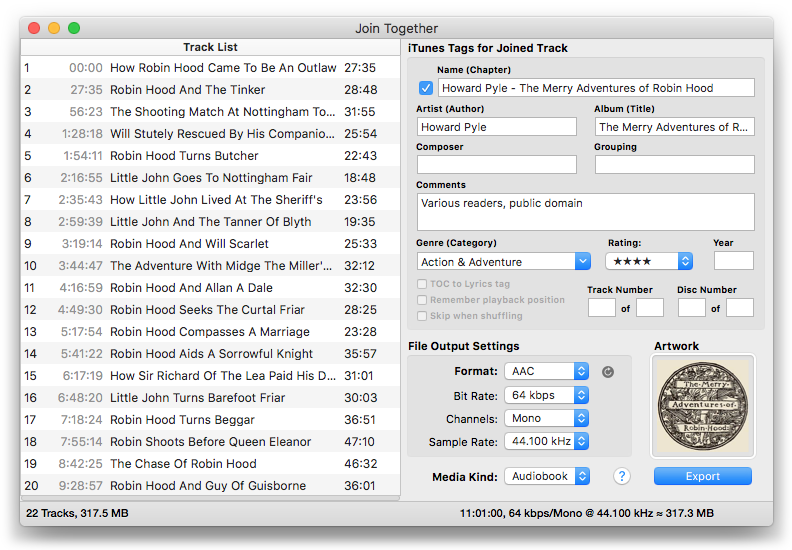
While many people use this for audiobooks, I’ve lately taken to creating Sides of music albums. For example, “Exile on Main Street” is one of my favorite albums. I’m old enough to have purchased the original vinyl version and so I’m quite innately used to experiencing it as four separate record sides. I used Join Together to re-create four audio files comprised of the album’s four album sides. I even found the artwork for the original album’s sleeves, which has the track and personnel listings:
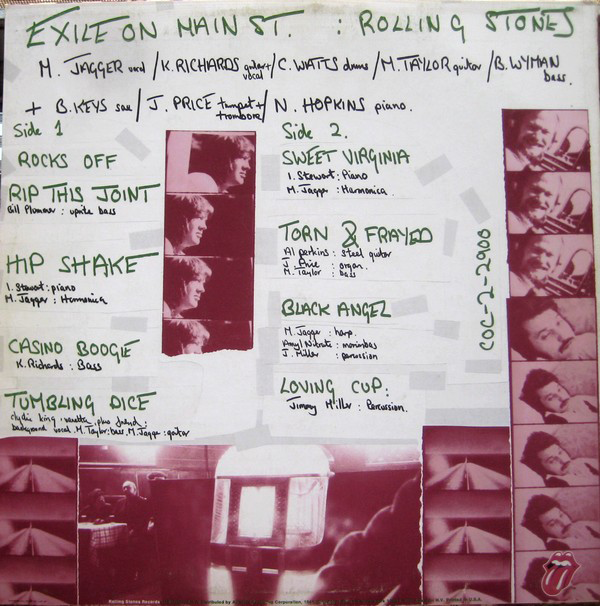
Great album artwork concept, right?
Anyway. This is a free update to registered Join Together users and $5 to purchase. More info and download is on this page.
UPDATED: M3Unify v1.7.1
I neglected to post that I have updated M3Unify to version 1.7.1. There were a couple of compatibilty issues with macOS 10.9 that had to be fixed.
M3Unify accepts tracks dragged from iTunes or audio files from the Finder and can export copies or converted versions of the files to portable media, primarily for car audio use. But it’s also useful for archiving and back-ups.
Had a nice email from a fan named Rick: “I was searching Prius chat, Toyota chat and others to solve the dreaded playlist problem with the in-car players. No one there knew how to solve the problem. And then through a Google search, I found M3Unify. It is the simplest, most powerful little app for dealing with iTunes and USB drives used in cars. Thanks for such a well thought design and it’s cheap too!”
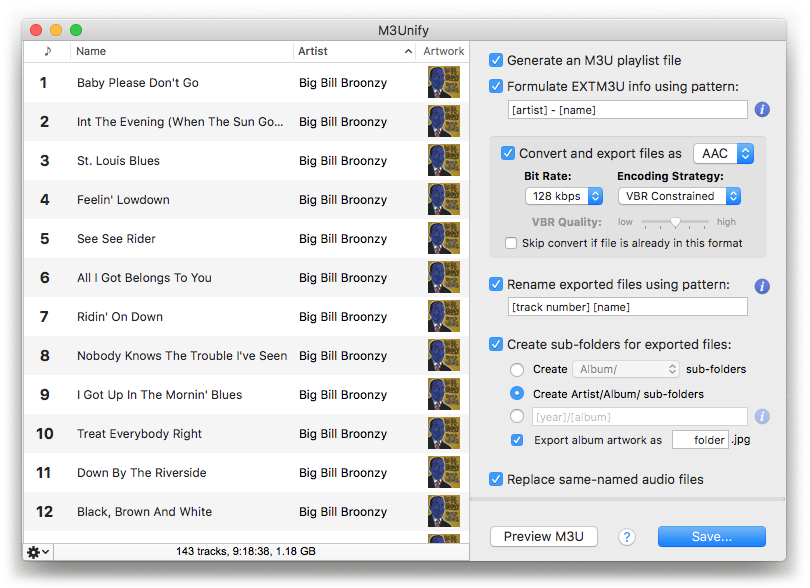
This is a free update for registered M3Unify users, $5 otherwise; watch the video and download the free demo from this page.
NEW: Launch at Login v1.0
It is often convenient and desirable to have your designated iTunes Media folder—the folder pointed to in the “Advanced” tab of iTunes’ Preferences—located on a large external drive or server. Those of you who do this know the advantages.
But.
An issue that has been known to occur with this configuration is that if the volume or server containing the designated iTunes Media folder does not mount during the computer’s startup before iTunes launches, iTunes will presume that this folder is inaccessible and it will default to using the ~/Music/iTunes/iTunes Media/ folder instead. It does this because it needs a definitive place in which to save CD rips (which still happen at my house), converted files and Store purchases.
(More modern versions of iTunes are much better at reverting to the designated iTunes Media folder if its volume is mounted later. But for years this was always dicey and still can be.)
This swapping of designated iTunes Media folders can be problematic. It can render tracks in the iTunes library dead, duplicated, missing, orphaned. And so on.
My podcast partner, Kirk McElhearn, and I discuss this issue on an upcoming episode of The Next Track podcast concerning using a network-attached storage device (NAS) to store iTunes media. In conjunction with that episode, I wrote a script applet to be used as a “Login Item”, Launch at Login, that will attempt to mount the volume at startup, confirm it is actually mounted and only then launch iTunes.
Typically, AppleScript can use the mount volume command, which under some circumstances requires providing a username and password. I didn’t want to do that because 1) it is difficult for AppleScript to securely manage storing that data and 2) it is awkward having users edit the script to “hard-code” their username and password. But this script avoids having to do that—and not in any devious way—by attempting to open a folder on the volume pointed to by an alias to it in a specific local folder on the startup drive. In order to open this alias’d folder the operating system will be obliged to mount the volume/server it is on; the script will wait until that folder is accessible and then will launch iTunes. If, for some reason, the folder does not become accessible within a reasonable amount of time because the volume didn’t mount, the script will not launch iTunes and will display an alert saying so. At that point the user can decide what to do; presumably, mount the server and then launch iTunes manually.
The anxious part of me feels obliged to note that this script does not use any security (other than being signed with my Developer ID) so if you do not want a volume or server to be mounted in unattended startup situations then do not use it.
There are some simple yet specific instructions and caveats to heed before using the script at your house so be sure to read the documentation that accompanies the script in the download. More information about the Launch at Login applet and download is on this page.
The Next Track – Episode 38 – Audio at CES
 The Consumer Electronics Show was held a few weeks ago and Chris Connaker from Computer Audiophile joins me and Kirk to talk about audio gear at the show and some interesting information about the future of the MQA audio format.
You can listen to the episode at The Next Track website here or subscribe here in iTunes to make sure you get all future episodes.
