 30 Most Recent RSS Feed
 Apple Music Profile
 YouTube Channel
 RSS Feed
 Play Play
 Murph
Murph Yer Stack
 Block Party Weekend
 Elevendy
 Dupin v4.0.0
 Join Together
 M3Unify
NEW: Make Playlists By Tag
I’m finding it difficult to describe what this script does despite its seeming obviousness.
Make Playlists By Tag will create new playlists based on a particular tag. For example, in the screenshot below “Artist” is selected in the popup:
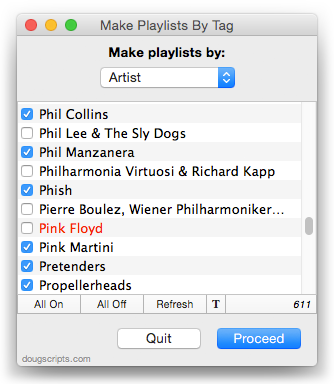
(You can also choose Album Artist, Album, Composer and their “Sort” siblings, Genre, or Year.) Each artist is listed with a checkbox. When the Proceed button is clicked, each checkmarked entry will be used as the name of a new playlist and every track whose artist tag is that entry will be copied to it. And so on if “Year” or “Album Artist” was selected.
As it happens, “Patti Smith Group” and “Pearl Jam” already exist as playlists so they are distinguished in the list by being colored red. I may not want to re-create these.
I’m not sure if I would use it to create a playlist of every Artist or Album; that may bloat iTunes’ database.
A great companion to this app is Merge-Delete Playlists, which was just updated with some minor fixes.
UPDATED: Remove n Characters from Front or Back v4.3
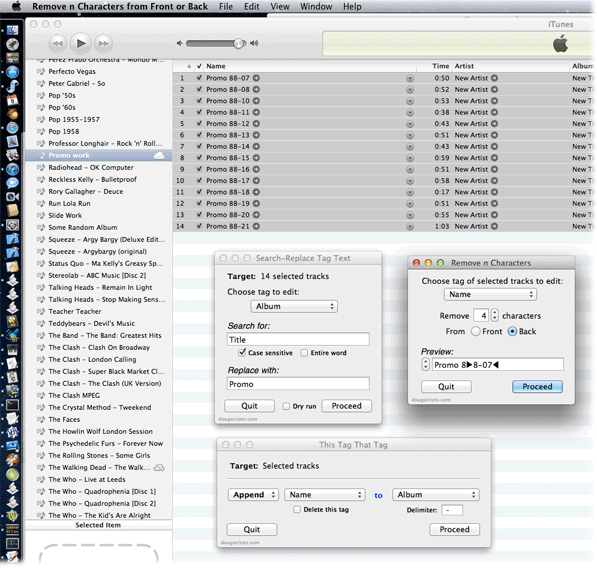
Remove n Characters From Front or Back v4.3 will let you delete a specified number of characters from either the beginning or the ending of the Song Name, Album, Artist, Comments, Composer or Show tag (or their “Sort” siblings) of each selected track. For example, delete the initial digits and the space from “01 First Track”, “02 Second Track”, and so on.
This latest version is now stay-open and floats above iTunes, has live track selection detection, re-orients preview stepper direction to abide selected tracks’ sort order, can expand horizontally to enlarge Preview box, increases number limit from 24 to 60, and other minor enhancements.
Here’s a screenshot of Remove n Characters From Front or Back in action during a tag editing session that also includes This Tag That Tag and Search-Replace Tag Text, which are also stay-open floaters:
UPDATED: Search-Replace Tag Text v3.1
Search-Replace Tag Text v3.1 is now posted. This applet allows you to perform search-and-replace text operations on a chosen tag in the selected tracks or tracks in a selected playlist:
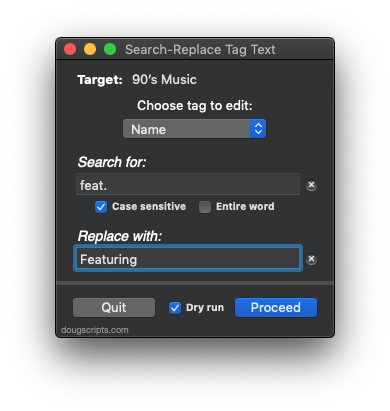
This latest version fixes a problem escaping special characters, fixes a problem with operating on the Grouping tag, prevents non-results from displaying in the dry run window, adds close and minimize buttons, and has a few minor code finesses.
Sync A Wi-Fi iPhone Follow Up
Several Correspondents have wired in to report that the Sync a Wi-Fi iPhone Once a Day With launchd tip is great and all but how can more than one Wi-Fi device be sync’d? Currently the script only targets a single iPhone or iPad. If you want to sync all connected devices you’ll need a different script. (more…)
UPDATED: New Last Played Date v3.0
Getting date input with plain AppleScript has always been a hassle. But Cocoa-AppleScript has access to Cocoa date pickers. Hoo. Ray. New Last Played Date v3.0 is a Cocoa-AppleScript Applet for iTunes on OS X 10.6 and better that uses a text and calendar date picker to easily enter a new date for either the Last Played or Last Skipped tags of the selected tracks:
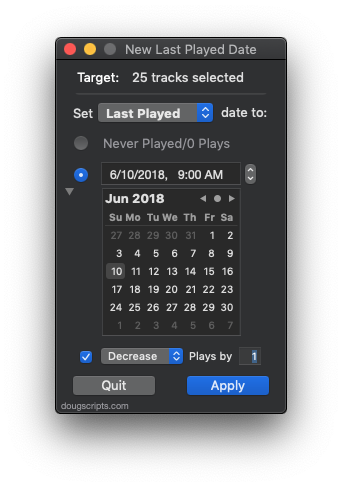
Additionally, the corresponding counts can be increased or decreased. Or the dates and counts can be set to “never”.
Sync a Wi-Fi iPhone Once a Day With launchd
A while back, I retired my iPhone 3GS to the bedside table after buying an iPhone 4. I use the 3GS pretty much as a glorified clock radio-iPod Touch. I have a few radio apps on it and the Digital Clock app. I also have it set to sync and back up over Wi-Fi to my main iMac so I manually initiate a sync when I need to update Podcasts and apps and what have you.
This manual syncing has become tiresome. (I mean, if I used a traditional clock radio, I wouldn’t have to update its content manually, right?)
It’s simple enough to write an AppleScript to sync a connected iPhone but I want the script to run on a regular basis without me having to fire it. I like to listen to Podcasts in the evening so sometime during dinner would be a good time to update the 3GS with any Podcasts that have arrived during the day. For this, I can create a launchd agent to fire the AppleScript that syncs the 3GS in the background. Here’s how to get all that to swing: (more…)
Thousands of Empty Playlists? Redux
So there’s this glitch with iTunes Match that somehow creates thousands of empty playlists. I posted earlier about this and snippeted a simple script to scratch the empties from your iTunes. Too simple since it appears to get really bogged down trying to examine playlists while iTunes is deleting them. Correspondent Lowell Stewart suggested deleting in batches to give the processing some breathing room, and I’ve incorporated this in an update to Delete Empty Playlists. It’s definetly speedier using Lowell’s suggestion.
If you’ve been affected by an iTunes Match Empty Playlist Glitch then use Delete Empty Playlists v2.0.
UPDATED: Play Random Album v3.0
A Particular Correspondent noticed that the previous version of Play Random Album was biased towards larger albums when selecting one at random. The problem was that it grabbed a random track first and built the album out using the album of that track. Well, of course. Albums with more tracks had a better chance of being selected by virtue of having more tracks in the pool, as it were.
The latest version of Play Random Album actually chooses a random album name first which gives every album a fair chance. I’ve also speeded it up a little and tweaked some error checking. Attach it to a keyboard shortcut and it almost feels native.
I just bought a set of Bose 201 speakers and I’ve been burning ’em in (ahem, letting them experience a variety of frequencies) by playing random albums using this script. Works great.
iTunes 10.5.3 Available
Apple has released iTunes 10.5.3, which features support for the new iBooks textbook format.
NEW: Search IMDB
Search IMDB allows you to choose a search term from the pertinent tags of a selected iTunes track and then choose the type of search to make at the IMDB website.
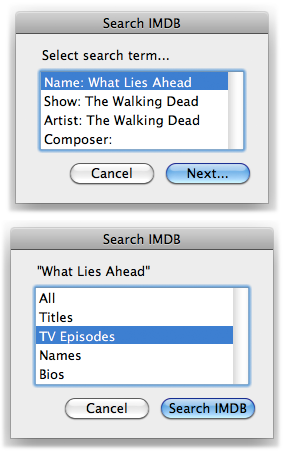
Results are displayed in your designated default browser using a Finder routine. Most web browsers are not ‘scriptable which somewhat limits what you can do with them with AppleScript.
And, what the heck. Here’s a Rotten Tomatoes script I use on my “entertainment center” Mac Mini that uses the name of the selected track for a search:
tell application “iTunes”
set sel to selection
if sel is not {} and (length of sel) is 1 then
my processSearch(get name of item 1 of sel)
end if
end tell
to processSearch(n)
try
tell application “Finder” to open location (“http://www.rottentomatoes.com/search/?sitesearch=rt&search=” & n) as text
end try
end processSearch

