 30 Most Recent RSS Feed
 Apple Music Profile
 YouTube Channel
 RSS Feed
 Play Play
 Murph
Murph Yer Stack
 Block Party Weekend
 Elevendy
 Dupin v4.0.0
 Join Together
 M3Unify
Refresh Smart Playlist Scripts
I still like me them Smart Playlists, arguably one of the best features of iTunes. I mostly use them for organizing and sorting purposes. For example, I have a bunch that segregate tracks by various iCloud Status. But I also maintain a handful that I actually play. And sometimes it’s advantageous to refresh them by removing all their tracks and letting them repopulate with different tracks. These sorts of Smart Playlists use “Live updating” and “Limit to” settings in their criteria—iTunes will prevent the removal of tracks from a Smart Playlist if it contains all the tracks from the library that meet its criteria.
Anyway, here’s one new and one updated script to assist with refereshing Smart Playlists:
Refresh Selected Smart Playlist v1.0 will remove the tracks from a single Smart Playlist selected in iTunes. It works effortlessly when you assign it a keyboard shortcut.
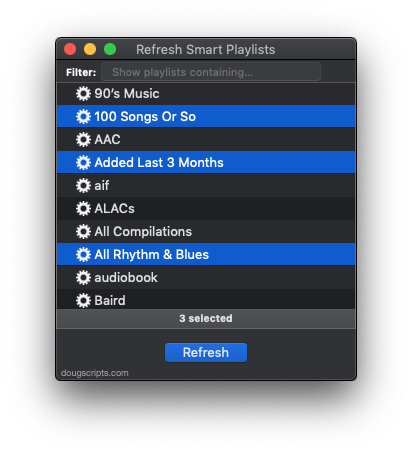
Refresh Smart Playlists v2.0 has been resurrected from a version I had abandoned. It’s an applet that will display all the user-created Smart Playlists in iTunes so you can select the ones you want to batch-refresh:
Both are free to download and use, but a donation for my efforts will always leave you with a satisfied feeling afterwards.
The Next Track – Episode 27 – Paul Englishby
 Kirk and I wanted to find out what writing music for soundtracks was all about and so our guest for this episode is UK composer Paul Englishby. You may not have heard of him but you certainly may have heard his music, which he writes for TV, film, and stage. His latest project was composing the music for a high-tech production of “The Tempest” being staged by the Royal Shakespeare Company. He also does the music for the British TV shows “Luther” and “The Musketeers”, both of which are favorites at my house.
You can listen to the episode at The Next Track website here or subscribe here in iTunes.
Sal Soghoian
According to several sources, including MacStories, Sal Soghoian’s position as Product Manager of Automation Technologies at Apple has been terminated. Sal oversaw AppleScript, Automator, JavaScript, Terminal and like-technologies.
Before we get all crazy, it is Sal that is no longer at Apple. The technologies remain. Let’s hope it stays that way.
Sal is a great guy. I’ve met him and chatted with him numerous times. He’s been evangelizing AppleScript since the System 7 days when he caught the AppleScript fever through his desktop publishing work with Quark. He always paid thoughtful attention to me and my site. He once told me he would make a point of showing my site to Apple engineers as an example of the power and public popularity of AppleScript.
Meanwhile, I am optimistic about the future of desktop automation on the Mac. I guess I have to be.
UPDATE: Sal has written some thoughts about this at his website. Most importantly:
“Seriously, if you have any questions or concerns about the future of user automation, ask Apple. If user automation technologies are important to you, then now is the time for all good men and women to reach out, speak up and ask questions. The macOS user automation technologies include: UNIX CLI (shell, python, ruby, perl), System Services, Apple Events (JavaScript, AppleScript, AppleScriptObj-C, Scripting Bridge), Automator, Apple Configurator (AppleScript, Automator), and Application scripting support in Photos, iWork, Finder, Mail, and other Apple applications.”
“Other Apple applications.” Like iTunes.
UPDATED: CD Text to CD Info v4.3
In our recent The Next Track episode where we discussed CD Text, I brought up the script CD Text to CD Info, which will grab the CD Text from a CD (if it uses CD Text) and apply the data to the appropriate CD tags. Then I thought: “Hmm, better have a look at that to make sure it still goes good.”
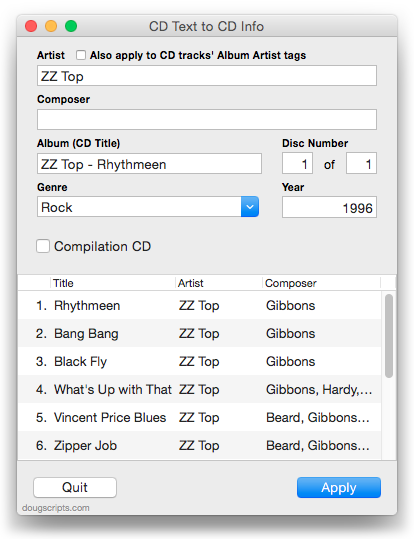
It does, but it occurred to me that I could tidy some things up. So this latest version removes a launch reminder about making sure the CD is sorted by play order; this is no longer necessary as the tracks are identified by their track number. I also added a “Export CD Text as XML” feature that will export the CD Text as a property list file. Probably not useful for most users but there it is.
This latest version is for OS X 10.10 and later only, free to use with a donate nag, and can be downloaded from this page.
Another Ambiguous Property Value
Not too long ago, a version of the iTunes scripting definition used the new value “music” for the media kind property. Unfortunately, this caused confusion with the similar “Music” value for a playlist’s special kind property. This was eventually fixed such that “song” was used instead of “music” for the media kind property. All’s well now, right? We’ll never see a mistake like that again, right?
Never say never.
It happens that “songs” is an enumerator value for the search command as well as for the new shuffle mode property. And, unfortunately, when “songs” is used as the search command’s only value—eg: search somePlaylist for “my search text” only songs, indicating that one wants to search just song titles—some kind of ambiguity issue causes a reversion to the default all value. Thus, every tag is searched for the search term instead of only the song titles and you’ll get a lot more search results than expected. For example, in searching my Movies library for “Big”, I not only got “The Big Lebowski” and “The Big Chill”, but a bunch of other movies that had the word “big” in their description tag.
Ironically, a search of the scripting definition file may have caught this before “songs” was re-purposed for shuffle mode.
This affects at least one script of mine, Search Results to Playlist, which I’m fixing with a silly workaround using hard-coded enumerator codes in a run script handler. Yech.
Artist Photos
Kirk wrote about missing artist photos in iTunes for one of his Macworld columns recently. This is an effect that was introduced in iTunes 12.5 and the iOS 10 Music app. It is disappointing to have so many microphone logos and tiny artist photos in one’s library.
Several correspondents have inquired about fixing this with some kind of homebrewed kludge, but I’m afraid not. Artist images are handled internally by Apple and the iTunes/Music apps. There is no “artist image tag” or hook or cache or anything like that such that images can be supplied by the user.
UPDATED: Doug’s Check For Update v1.2
Doug’s Check For Update v1.2 is now available. This applet/droplet will check if an AppleScript that has been downloaded from this site to your computer has a newer version available.
This latest version fixes a problem that was occurring on some systems whereby the droplet function was not recognizing dropped files. It could still be used as an applet by double-clicking, but the handy drag-and-drop feature was amiss; this is fixed.
The script, for macOS 10.8 and later only, is free and can be downloaded from this page.
The Next Track – Episode 26 – Ask Andy #1
Kirk and I asked our pal Andy Doe to come on the show for the first of an every-now-and-then feature we’re calling “Ask Andy”. We get lots of techy queries from listeners that we’re under-prepared to answer but that Andy is happy to take a crack at. Topics in this episode include stereo speaker placement, iTunes playback effects, new (and dubiously useful) audio file formats and more.
Check out the episode at The Next Track website or subscribe here in iTunes.
Brought to you by Drobo, simple to use storage arrays designed to protect your important data forever. Visit Drobo.com.
iTunes 12.5.3 Released
Hot on the heels of v12.5.2 on October 28, Apple has released iTunes 12.5.3. The description
in the App Store app is the same as the previous version, so perhaps there are just additional “stability and performance improvements” that were caught over the weekend.
[UPDATE: The 12.5.3 release is apparently for Mac OS X 10.11 and macOS 10.12 only.]
[UPDATE ALSO: Curiously, after I originally updated to 12.5.3.16, the App Store app notified me of another 12.5.3 update about a day later. This turned out to be version 12.5.3.17. Just sayin’.]
iTunes 12.5.2 Released
Apple has released the latest version of iTunes, 12.5.2. It has fixes for an issue whereby Albums do not always play in order and for Lyrics not always being available over Beats 1. More as it develops.
