
 Apple Music Profile
 YouTube Channel
 RSS Feed
 Play Play
 Murph
Murph Yer Stack
 Block Party Weekend
 30 Most Recent RSS Feed
Site Issues Update
The site issues I mentioned previously are fixed. However, please don't hesitate to contact me if you experience any problems on the site. I'm still tying up loose ends. Thanks for your patience!
Site Issues
The site is experiencing some issues. I may be moving to a new hosting server as a result. Please excuse any disruptions or anomalies.
UPDATED: Music Folder Files Not Added v5.0
Music Folder Files Not Added v5.0 will list the file paths of the files in your designated "iTunes Media" folder which are not in iTunes' track library.
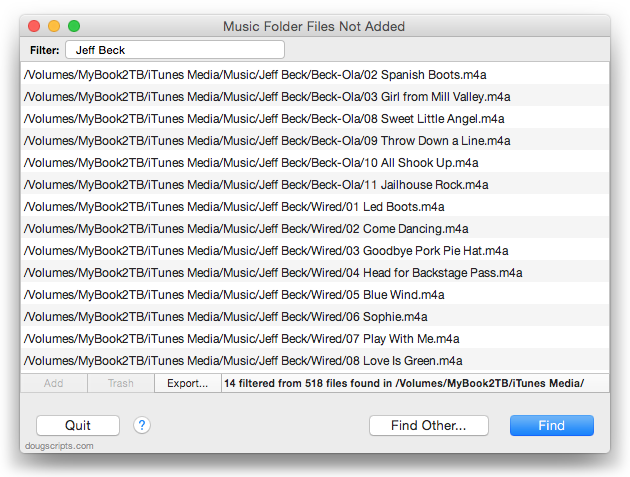
The files listed in this screenshot are in my iTunes Media/Music/ folder but are not in the iTunes track library. In my case, this iTunes Media folder is used by two different iTunes installations on different partitions, so it is also possible that these files are added as track entries in the iTunes on the other partition. However, it is not uncommon to delete the tracks from iTunes without choosing to Trash the files.
Additionally, you can select a different parent folder and its contents will be compared to the iTunes library. Includes options to Filter results, Add a selection of found files to iTunes (Mobile Applications can not be added this way), move them to the Trash, and Export a text file listing the file paths.
This latest version includes PDF, Mobile Application, iTunes LP and iTunes Extra files when used with iTunes 12.2 or later; adds a Filter option to show only file paths containing entered text; has general performance tweaks.
Music Folder Files Not Added is free to try for 10 days and is $1.99 thereafter. More information and download is on this page.
iTunes 12.2 and AppleScript Issues, Volume 2
I have already noted the new loved properties for tracks and playlists. I must admit that an update to the iTunes sdef was heartening (pun not much intended). However, there are some lingering issues and new issues with the latest incarnation of iTunes. Perhaps they have yet to be got to. Yeah, that's it. They'll fix it, fingers crossed.
Pretty much anything to do with the Apple Music tabs is off limits to AppleScript. So, for example, you can't select a track or playlist in "For You" and get info about it or manipulate it. I don't mind this so much. Once tracks are added to "My Music", they are accessible as shared tracks. It'd been the same with iTunes Match tracks. You can get and set the conventional track properties, you just can't access file metadata because, by definition, there are no local files for tracks in the cloud. Still, access to tracks and playlists in "For You" and "New" might be convenient, if even for accessibility purposes.
I am disappointed that current track does not work with playing Apple Music tracks (if playing from within the "For You" tab). I'm not sure if there's a security issue here, or it's just not hooked up yet. Definetly screws up anything watching for current track to change. Notifications is aware of playing Apple Music tracks, so why not AppleScript? Even as read-only. I'd be cool with that.
The new Playlist view doesn't seem quite hooked-up yet either. This is the new default view for local playlists. Anyone who's ever worked with broadcast automation will note that the abridged track information in Playlist view is reminiscent of a music log. (Note to Apple: please let us change this default view. As much as I really like the Playlist view I prefer Songs view as default to work with track tagging and only switch to Playlist view on formal occasions.) AppleScript-wise, it's all OK. But the reason I don't think it's hooked-up properly yet is by observing the pasteboard data from a playlist in Playlist view. Now, pasteboard data for dragged tracks and playlists typically contain metadata about the playlist and tracks being dragged. Except when the drag originates from a local playlist in Playlist view. In such cases, only the file paths are available in the pasteboard. And if cloud tracks are included in the drag, well, they don't have local files, so nothing about them at all appears in the pasteboard. However, when the very same playlist is in Songs view, the metadata is available from the dragged tracks' pasteboard as expected. So the data is already permissibly available, just not (yet?) in Playlist view. I suspect that, because it seems to be the same view used in "For You" when you play a playlist there, it has no provision for includiing metadata. Someone should get on that.
Also, there's no AppleScript way to access the artwork(s) or description that is a part of the new playlist header. It would be convenient to be able to script a playlist's description at least.
Many of my scripts and apps access the iTunes Library.xml file to get information about tracks and playlists. That's what it's there for. iTunes 12.2 has, uhm, mucked around with the format of this file. As a result, there's been a big scramble by all of us who develop iTunes apps to re-jigger our stuff. The XML now contains information about mobile apps, Ringtones, iTunes LP, iTunes Extras, and books. The "Master" playlist has a name of "####!####" where it used to be "Library". "Smart Info" and "Smart Criteria" keys are now being used with playlists other than the Smart variety. Additionally, there is now no way to tell the difference between Genius and Smart playlists; they look identical in the XML. Previously, a Genius playlist would key the persistent ID of its seed track and this would be a differentiating factor. But the "Genius Track ID" key is gone.
The new "Share iTunes Library XML with other applications" Preference setting is still a mystery to me, but I suppose there could be situations whereby you'd want this off. Sometimes I'm just plain dumb about things like that. But because some users think it looks like the perfect thing to uncheck I've needed to include a check for access to the XML at the start of many apps. Because if it's off, the script or app won't work.
On the bright-side though, despite the Apple Music considerations, iTunes still has pretty robust AppleScript support! So thanks for that, Apple.
"When Is [insert name of script] Going to be Updated?"
Short answer: Soon.
Less-short answer: Pretty soon.
Long answer: There are about three dozen or so scripts that are affected by changes in iTunes 12.2. I'm updating those first and those updates should be finished within a couple of weeks. You may have noticed a number of updates in the past two weeks already. (Apple did not make a pre-release version of iTunes 12.2 available to developers, unlike the El Capitan developer releases. So I found out about changes when you did.)
Many other scripts need to be fixed for El Capitan specifically, but those are lower priority since 10.11 won't be officially released until the Fall. However, when I have had the opportunity, I've included fixes for 10.11 when making changes for the latest iTunes. But, generally, if you are using the El Capitan Public Beta, don't expect many scripts to be updated for at least a few weeks, until the scripts requiring updates for iTunes 12.2+ are updated.
As always, thanks for your support and patience.
UPDATED: Multi-Item Edit v4.3
Multi-Item Edit v4.3 will allow you to edit most tags (and some additional options) of the selected track(s) in a single floating window using single-edit mode (one selected track) or multi-edit mode, which emulates the pre-iTunes 12 "multiple items" format; that is, a checkbox adjacent to each tag allows you to select which changes are to be applied to the selection's tags.
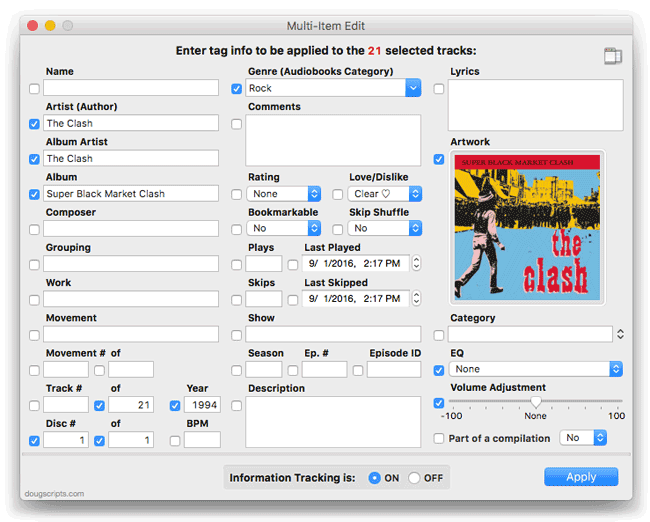
This latest version adds support for iTunes 12.2 including the new "Loved" (or "Likes", I suppose) rating tag. I removed the "Album Rating" tag setting to make room for "Loved", but "Album Rating" was proving difficult to reliably compute when tracks were from disparate albums. I don't think it will be missed. You'll also be able to edit tags when a selection of tracks contains more than one kind of media.
This update is free for registered users. New users can try it free for 10 days; it's $1.99 thereafter.
More information—including video—and download is on this page.
iTunes 12.2 Issues With Popular DJ Software
The DJ TechTools website reports that several popular DJ apps, including Rekordbox, Traktor, and Serato are having problems integrating with the latest iTunes.
iTunes 12.2 Playlist View Issues
iTunes 12.2 introduces a new View by which to display tracks in a playlist: "Playlist". It displays a nice header with artwork from the tracks in the playlist and abbreviated tag information. I like it.
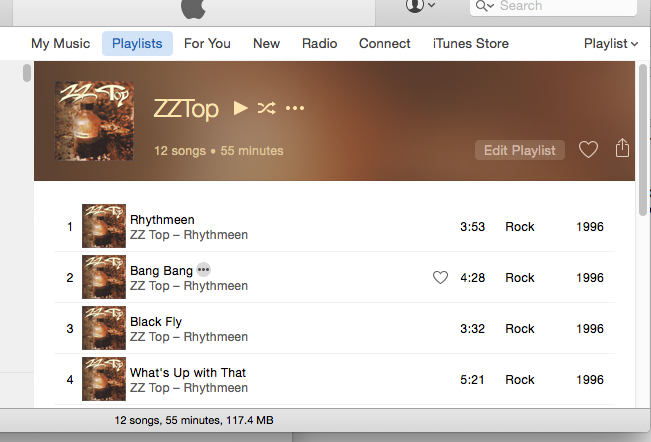
Except that there is an issue when dragging tracks from a playlist set to "Playlist" view to another drag-and-drop enabled application. The pasteboard that should contain metadata information about the tracks being dragged ("com.apple.itunes.metadata" is the name of the pasteboard type) only supplies the file paths ("NSFilenamesPboardType").
This affects my apps "Join Together", "M3Unify" and "Playlist Assist". The workaround is to either drag tracks while the playlist is in "Songs" view or drag the entire playlist by selecting its name in the Playlist Column and dragging.
I'm working on fixes for those apps.
Share iTunes XML with other applications
iTunes 12.2 has a new setting in the Advanced pane of Preferences:
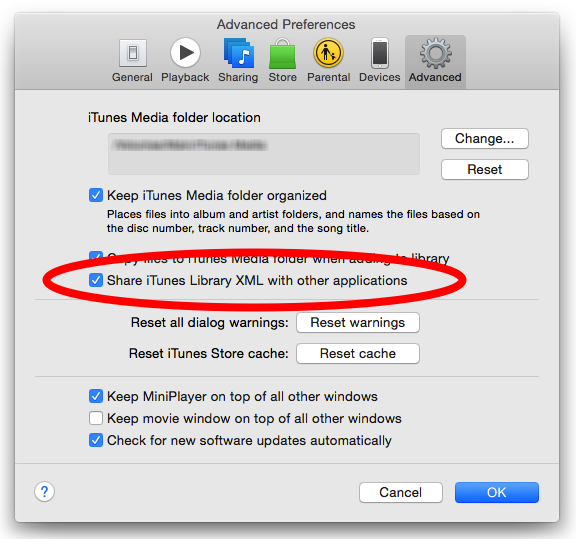
If you download and use any of my apps or scripts you should probably leave that checked. In fact, if you use any software that may interact with iTunes you should leave it checked. The iTunes XML file is a way for other applications to easily get information about your current iTunes library. Denying access to this file will most likely cause these apps to fail.
I have already gotten reports of users experiencing mysterious issues with my software, only to find out they had unchecked this preference. I'm not sure what issues this setting is supposed to address but unless you are aware of a particular issue, I don't see why you shouldn't leave it checkmarked.
Update October 2, 2015: It appears that iTunes may install with this setting un-checked.
Update November 1, 2015: This Apple support document explains that iTunes 12.2 and later does not automatically create a "legacy" iTunes Library XML file and thus this setting will be off by default.
play with once Is Broken
(I have updated this post. See below.)
To play a track just once and then stop you're to do something like this, using the once modifier with the play command:
tell application "iTunes"
set aTrack to item 1 of selection
play aTrack with once
end tell

Well, that doesn't work in iTunes 12.2. The tracks just keep on coming. In fact, a few times some random track in some other playlist started playing afterwards or queues up in Up Next.
UPDATE (July 1, 2015, 6:39PM) - I think I may be wrong about this. I cannot replicate the original set of issues I describe above.
