
 Apple Music Profile
 YouTube Channel
 RSS Feed
 Play Play
 Murph
Murph Yer Stack
 Block Party Weekend
 30 Most Recent RSS Feed
Script of the Day: CD Text to CD Info
CD Text to CD Info will attempt to extract the CD Text information from the selected audio CD in iTunes and apply it to the CD's disc and track tags.
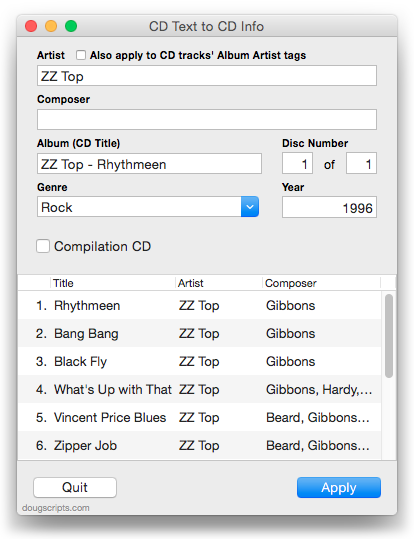
Some commercial CDs and commercial CD burning software (including iTunes) can use CD Text as a method of including text data on an audio CD. This data can include Artist (Performer), Album, Composer, Track Title, and Genre info. See the Read Me for more information.
More info and download here.
Subscribe to my RSS feed or follow @dougscripts on Twitter to get daily "Script of the Day" notifications.
UPDATED: Make Playlists By Tag v2.0
Make Playlists By Tag v2.0 will create Music track playlists based on each selected entry of a specified tag. That is, create individual playlists by Artist, Album Artist, Album, Composer (and their "Sort" siblings), Genre, or Year.
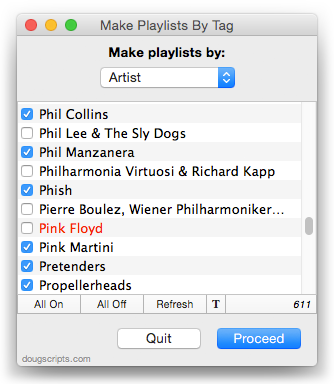
In the screenshot above, the script will create a playlist for each checkmarked Artist.
This latest version is essentially a maintenance update for better compatibility with Yosemite and also fixes an issue where tags containing white space characters would appear as blank; now the script ignores such tags.
OS X 10.8 and later only. More info and download is here.
UPDATED: Copy From Start to Stop v2.1
Copy From Start to Stop v2.1 makes a copy of the selected track using its Start and Stop times as the beginning and ending of the new file and adds to Library, with option to name new track/file. It's handy for creating a new file from a portion of a larger file.
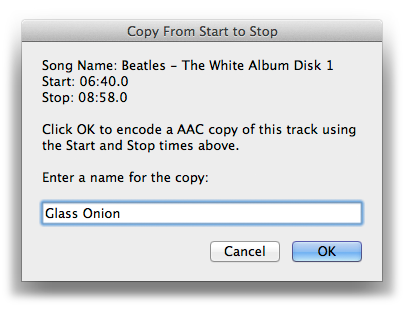
Works as a fine companion to the script Player Position to Start or Stop, which sets the Start or Stop time of the currently loaded track to the time of the paused player position.
This latest version is a general maintenance update because it may have appeared damaged on recent operating systems.
More info and download is here.
TrackSift 2 v1.0.2
TrackSift 2 rolls nine tools for iTunes into a single easy to use app. With TrackSift you can:
- • Sort tracks into playlists by Apple ID • Merge two or more playlists
- • Delete "dead" tracks • Delete unused non-Tunes Genre names
- • Create "One-Hit Wonder" and "𝑛 Songs by Artist" playlists
- • Find songs without album art, without lyrics, and not in playlists
This lateset version fixes a problem with unresponsive clicks in the launch verification panel; improves library parsing; improves Notifications; other minor fixes.
TrackSift 2 is available exclusively on the Mac App Store.
M3Unify v1.2.3
M3Unify is a flexible M3U playlist creator and file exporter that will allow you to load a USB thumb drive or SD card with copies of your iTunes songs the way you and your audio player want. M3Unify can archive playlists and audio files to a folder, volume or portable media and includes options to create Artist/Album sub-folders, rename files, convert to AAC or MP3, and more.
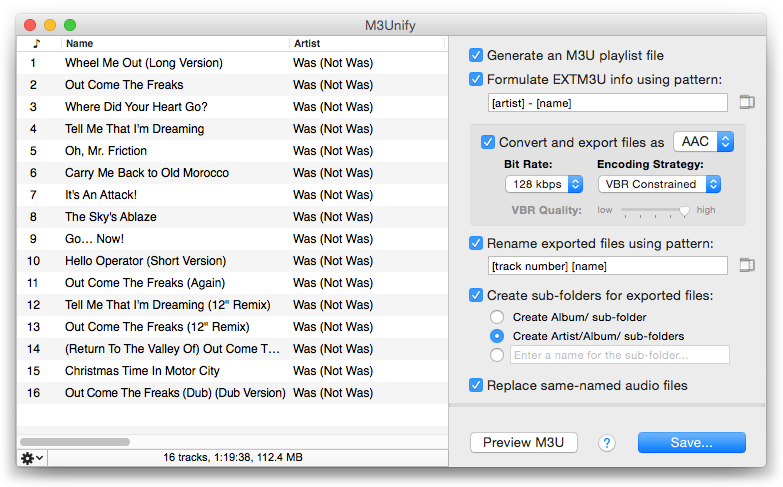
This latest version fixes an issue with embedded artwork in converted AAC files not appearing in some Android players (and perhaps other non-Apple devices).
For OS X 10.8 and later. M3Unify is $5.00, but free to use in demo mode with a fifteen track limit. This is a free update for registered users.
More information, video demo and download is here.
UPDATED: This Tag That Tag v4.3
This Tag That Tag will assist with swapping, copying, and appending data between two user-chosen tags in selected tracks or tracks in the selected playlist:
Swap - swap data between tags, ex: ARTIST<->COMPOSER
Copy - copy data from one to another tag, ex: ARTIST->COMPOSER ARTIST
Append - append data from one tag to the end of another, ex: ARTIST->COMPOSER - ARTIST
Prepend - prepend data from one tag to the beginning of another, ex: ARTIST->ARTIST - COMPOSER
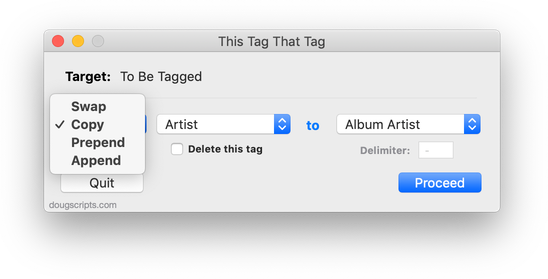
This lateset version adds "Date Added" and "Release Date" to the "This" tags. Like the number properties already available, date properties cannot Swap with the text properties available as "That" tags because date properties can't accept text. The dates can be coerced to text in this format: YYYY-MM-DD HH:MM:SS so that they can be sorted properly.
This Tag That Tag is free to try for 10 days, $1.99 thereafter, free for registered users. More info and download is available here.
iTunes 12.1.2 Available
Apple has released iTunes 12.1.2 (strangely, we never saw v12.1.1). Improves photo syncing issues and fixes to the Get Info window. More as it develops.
[UPDATE 1] No fix to selection object in "Music Videos", still no fixes to CD Get Info and CD View Options shortcuts (probably a lost cause).
Security Update 2015-004 Fixes EPPC Issue
Good news, everyone. Today, in addition to releasing OS X 10.10.3 and iOS 8.3, Apple released Security Update 2015-004 for 10.9 and 10.8. This update appears to fix the EPPC bug introduced in Security Update 2015-002. The bug prevented access to Remote Apple Events over the EPPC protocal. Anyway, I had no problems with a couple of simple tests.
Fast turnaround, actually.
UPDATED: M3Unify v1.2.1
I made a couple of minor fixes to M3Unify which corrects some rare issues with SD card formatting errors. In any case, you should update to v1.2.1, either in-app via M3Unify's "Check for Update..." option or direct download from this page. This is a free update for registered users.
Latest Security Update Affects EPPC Protocol
Apple's latest Security Update (2015-002) apparently affects the EPPC protocol on OS X 10.8 and 10.9 and prevents Remote Apple Events from being sent/received correctly. Topher Kessler has more at MacIssues and there is this thread at MacScripter.
UPDATE: This issue was fixed with Security Update 2015-004 for 10.9 and 10.8.
