 30 Most Recent RSS Feed
 Apple Music Profile
 YouTube Channel
 RSS Feed
 Play Play
 Murph
Murph Yer Stack
 Block Party Weekend
 Elevendy
 Dupin v4.0.0
 Join Together
 M3Unify
NEW: Multi-Item Edit
You may have been surprised, as I was, by the new Get Info panel in iTunes 12. While it provides pretty much the same utility as the previous incarnation’s Get Info panel, it’s souped-up UI-wise. One function that’s missing is the Multiple-Items Edit checkbox feature to designate what tag changes to apply to the selection of tracks. I think what it does now is just detect changes and apply only the changes. I think. Not sure. Anyway, I’m not 100% comfortable with that.
Here’s Multi-Item Edit:
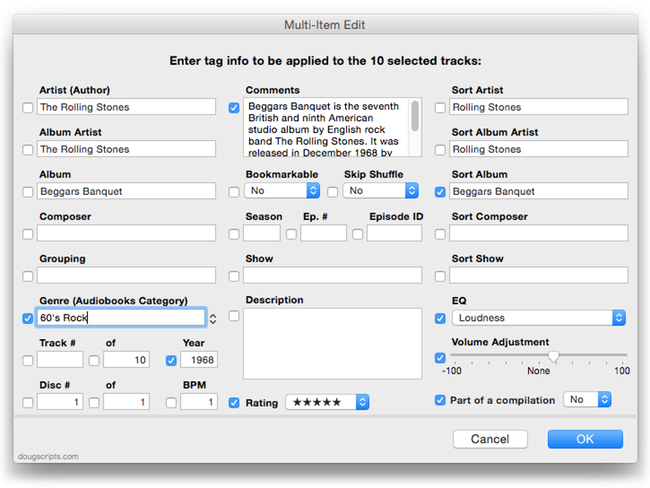
It works just like the old Get Info window in Multiple Item mode: It recognizes any common tags and displays them. Just enter/change some text or options and checkmark the boxes for the tags you want applied to a multiple selection of tracks, including “blank” entries.
This was something I was working on over the Summer so I could batch edit tags without having to switch among Get Info window tabs. But I re-jiggered it a bit as a new release for people who like their Get Info panel old-school.
I want to note that if you notice some tags and options missing (artwork, obviously), well, this is only v1.0.
Multi-Item Edit is $1.99 with a ten day full-featured trial period.
UPDATED: Enter Description Tag for Selected v2.0
iTunes 12 no longer provides a means for editing the Description tag of multiple-selected tracks. This oldie, Enter Description Text for Selected, was just updated to v2.0 and will let you enter text for the Description tag of the selected tracks.
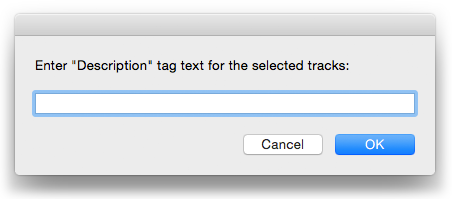
Technically (according to iTunes), the Description tag isn’t supposed to be applicable to music tracks. But all track entries have an AppleScript description property.
iTunes 12.0.1 is Available
Apple has released iTunes 12.0.1. It’s not just available for Yosemite, but Mavericks as well. You’ll find it via the Mac App Store in the “Updates” section.
[UPDATE: According to Apple’s iTunes download page, iTunes 12 can run on OS X 10.7.5 and later.]
Dupin v2.8.2 Available
You’re probably getting your iTunes library all in order to make it ready for a nice new operating system. If so, you’ll want to pick up the latest version of Dupin, the iTunes Duplicates Manager.
This latest version fixes a few rare bugs: a case-sensitivity issue with files located on an NAS that prevented Purging, errant detection of iTunes Match being enabled when it actually isn’t, a Selection Window flickering problem, no longer wheezes if you happen to move the iTunes Media folder while Dupin is running, and a few other way-out-there situations are accomodated.
You can get version 2.8.2 by using Dupin’s “Check for Update…” command in its app menu, or download it directly from here.
This is a free update for registered users of v2.5 and later. Otherwise, Dupin is $15.
Hi-Yo, Yosemite!
Looks like OS X 10.10 Yosemite will see an official release sometime next week (at the earliest) now that Apple has announced a Special Event for October 16.
Perhaps you’ve noticed that over the past few of months I’ve been updating some of the more popular scripts and applets for Yosemite compatibility. Updating stuff for the latest OS has become an annual ordeal. I spend most of the Summer and Fall updating old stuff for compatibility, and then the next six months working on feature upgrades and new scripts. And then another WWDC arrives, and the cycle continues.
As a result, not everything gets the attention it deserves. So if there’s a script or app you use that needs to be updated for Yosemite, let me know. I’ve got a pretty long list, but I’d prefer to prioritize based on popular usage.
Many of the Yosemite-ready scripts are dropping support for pre-10.8 OSes. Frankly, keeping scripts working over five operating systems (10.6-10.10) and two processor platforms and making them work great for everybody is not fair to the majority of users who want modern features without compromise (nevermind the support issues). In many cases, older versions of the scripts will still be available. (Although, if you can get off of 10.7 I really believe you’ll be doing yourself a favor. It’s my least favorite OS ever.)
And then there’s iTunes 12. For the most part, and with the exception of UI changes and the like, iTunes 12’s scripting infrastructure is pretty much the same. I do worry that as new features are added cloud-wise some of iTunes’ AppleScript goodness will fall to the wayside (eg: shuffle, song repeat, gapless, playlist window, updatePodcast, and so on). But accessing playlists, tracks, files and tags in general is still pretty healthy. Apple even introduced a new iTunes Library framework with Mavericks. So things are looking pretty good in that department for the foreseeable future. And as I often say, I don’t care what iTunes used to do or what would be good if it could do; I just care about what it does now.
And “now” arrives next week. Hi-yo!
UPDATED: List MIAs v4.0
List MIAs v4.0 will check your entire iTunes library for missing and presumed dead tracks—those tracks that iTunes is unable to associate with a file and which are listed in iTunes with a “!”—and can create a text file listing these tracks by alleged File Path (if available), Song Name, Artist and Album, which you can view using TextEdit.
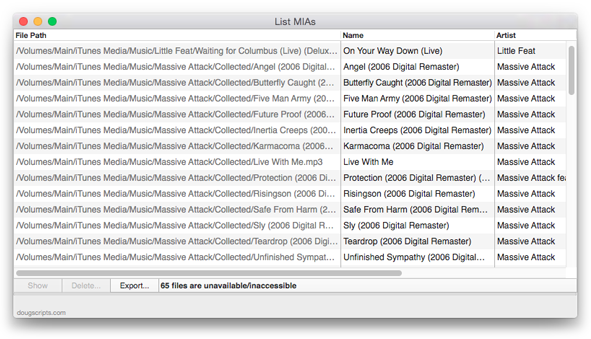
This latest version has additional support for OS X 10.10 Yosemite/iTunes 12, drops support for pre-OS X 10.8, adds a “Check for Update” menu command, and tweaks to improve performance.
By the way, to actually remove dead tracks from iTunes use Super Remove Dead Tracks or TrackSift 2.
More info and download is here.
UPDATED: Music Folder Files Not Added v4.1
Music Folder Files Not Added v4.1 will list the file paths of the files in your designated “iTunes Media” folder which are not in iTunes’ track library. Additionally, you can select a different parent folder and its contents will be compared to the iTunes library. Includes options to Add a selection of found files to iTunes, move them to the Trash, and export a text file listing the file paths.
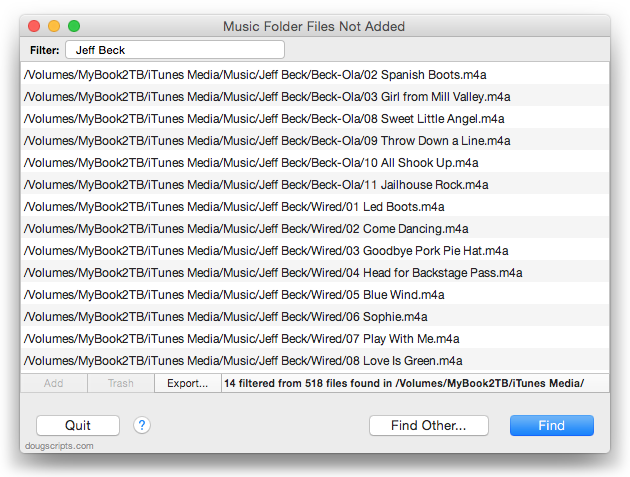
This latest version has additional support for OS X 10.10 Yosemite.
See the video on YouTube.
Duplicate Purchases Syncing Bug in iTunes and iOS 8
Rob Griffiths (of Many Tricks and founder of Mac OS X Hints) had a rough couple of days this past weekend trying to get his new iPhone 6 to sync with his iTunes library. It just wouldn’t. He writes about the ordeal in “An iPhone 6, (no) movies, and me”.
It turns out, as Rob reports in a follow-up, “A nasty little iTunes/iOS bug may be causing media sync issues”, that there’s a bug in the pipeline between the current versions of iTunes and iOS 8. The syncing may stop if you have duplicates of purchased media files.
At first, Rob tried using iTunes’ “Show Duplicates” tool to locate any duplicates. But it didn’t find every duplicate track entry (it’s not very rigorous, even using “Show Exact Duplicates”). He then turned to my duplicate managing app Dupin and was able to find the dupes by jiggering the Criteria settings to find album tracks with the same track number—matching using the name of the tracks failed because the duplicates had slightly different titles. (I’m pretty sure iTunes’ “Show Duplicates” always considers the name of the tracks.) Once he eliminated the duplicates the syncing went fine.
I must admit, this doesn’t affect me and I hadn’t even heard about this issue until now. Of course, it’s still early days with iOS 8 adoption.
UPDATED: Needle Drop v5.0
Needle Drop v5.0 will play each track in the selected iTunes playlist for a set time interval optionally starting at a set number of seconds into each track, beginning with the selected track. Handy for ‘scoping playlists.
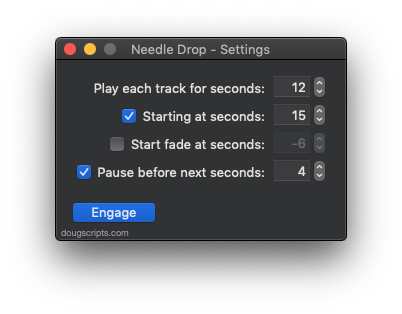
The latest version adds support for OS X 10.10 Yosemite and iTunes 12 and has other minor tweaks.
More information and download is here.
UPDATED: Save Album Art to Album Folder v5.0
Save Album Art to Album Folder v5.0 will export the artwork of the selected tracks (or the tracks in a selected playlist) as an image file to the folder which contains each selected track’s file—presumably the track’s Album folder—or a single user-selected folder.
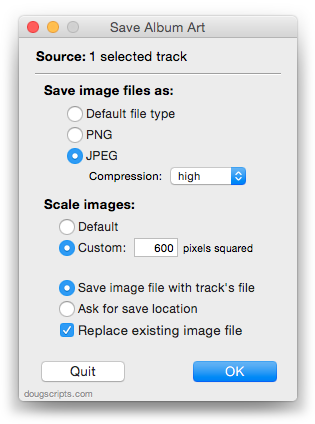
Version 5.0 adds support for OS X 10.10 Yosemite and iTunes 12 (dropping support for pre-10.8), adds “Replace existing image file” toggle, adds “Check for Update” menu command, and has some minor maintenance tweaks.
More information and download is here.
