
 Apple Music Profile
 YouTube Channel
 RSS Feed
 Play Play
 Murph
Murph Yer Stack
 Block Party Weekend
 30 Most Recent RSS Feed
March 2026
UPDATED: File Renamer v2.2
File Renamer will rename the files of the selected tracks (or the files of the tracks in the selected playlist) with a filename pattern that is formulated using the tracks' tag data. Optionally, export a copy of the files to a chosen location and rename the files in that location.
This latest version fixes a problem with escaping file path delimiters, fixes an issue with closing the Preview window, and has other minor fixes and enhancements.
You can download it here.
UPDATED: Export Selected With M3U v1.1
I've been wrestling with how to get files onto a USB stick for my car's audio system for some time now. The system can read files on a stick and then sort them by Songs, Artist, Album, Genre, Folders, and Playlist; but unless the files are loaded just-so, playlists are empty, data goes missing, files can't be played. I've also heard from Correspondents who report similar difficulties with their devices and it's obvious that there is no single standard convention for file storage among the many types of media players out there. Some players can't read subfolders, some require subfolders; some need everything in a "MUSIC" folder; some need specialized file-naming; and so on. (My car can also read the data from various generations of iPods and iPhones but, again, not consistently.)
Export Selected With M3U v1.1 will copy the files of the selected tracks to a user-chosen location—presumably some kind of portable media—and then create a M3U playlist file in the same location with relative file path references to the copied files.
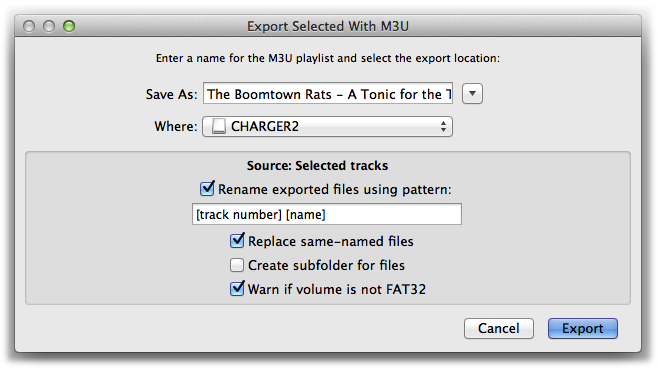
The options available should be able to contend with any configuration required by any particular player. This latest version adds pattern-substitution file renaming and can optionally detect if the selected volume is FAT32 formatted which some players require.
More information, screenshot of results, and download is here.
