
 Apple Music Profile
 YouTube Channel
 RSS Feed
 Play Play
 Murph
Murph Yer Stack
 Block Party Weekend
 30 Most Recent RSS Feed
NEW: Playlist XML Librarian
I don't know what I've been thinking over the years not using exported Playlist XMLs to offload and store superfluous playlists.
For a couple of years recently, I did a weekly two hour streaming radio show. I created a playlist of songs for a each show and kept the playlists in a "Shows Folder" in the Music app. All one hundred or so of them. I didn't want to delete them. But having them around, even inside a Playlist Folder, didn't make a lot of sense either. So it occurred to me to just export them as XML files and keep them Just In Case.
After exporting a few, as mentioned previously, I assigned a Command-E keyboard shortcut to Music app's File->Library->Export Playlist... command. That restored about six weeks to my life.
Once all the playlists were offloaded and deleted from Music, Man, oh Boy, did I feel great.
But then it occurred to me that if or when I ever wanted to reload a Playlist XML I wouldn't be able to know what tracks were in it. Unless I loaded it in Music first. That would be dumb. So I whipped up Playlist XML Viewer, which could load an exported Playlist XML so I could look at it in a table format. Boy, was I cruising on a wave of joy.
But then it occurred to me that...
Well. Perhaps you can imagine what I needed to do:
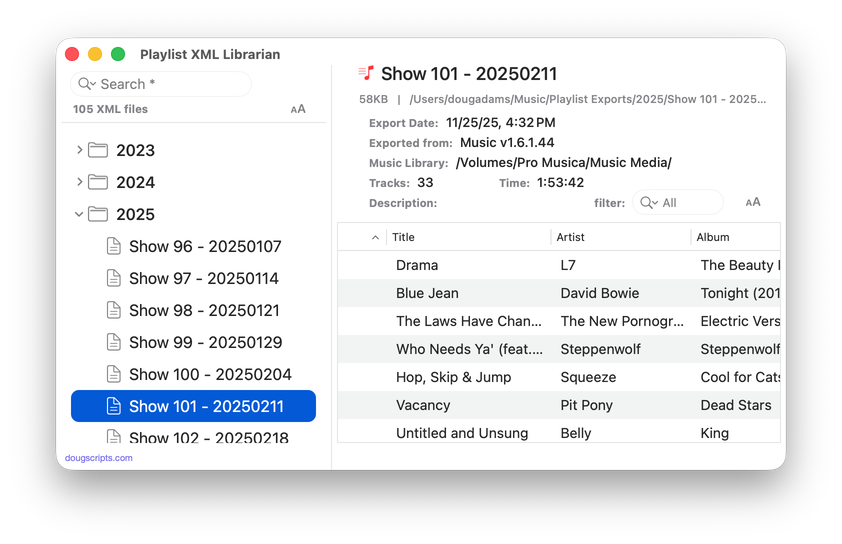
Playlist XML Librarian will list the exported Playlist XML files collected in a specified folder with options to view, search and send (import) them to the Music app. Makes it easy to maintain an organized stockpile of exported Playlist XMLs to reduce the number of onboard Music playlists.
More information for Playlist XML Librarian and download link is here.
