
 Apple Music Profile
 YouTube Channel
 RSS Feed
 Play Play
 Murph
Murph Yer Stack
 Block Party Weekend
 30 Most Recent RSS Feed
UPDATED: Track CPR v5.0
Man, this thing really needed some work done. Seems it takes some disaster to befall on me to find out about a script's inadequacies. As it happens, I accidently lost a few audio files and there were these dead tracks cluttering up the place. I knew I had the files, it was just a matter of applying some Track CPR.
Unfortunately, Track CPR couldn't help me out right then because it was trying to reassociate files by comparing Title, Artist and Album. But my replacement files all had "Remastered" tacked on to the Album name, which the original tracks did not. Thus, no matches.
So I fixed that. And then I fixed that other thing. And why not put this over here...and so on. Work better now.
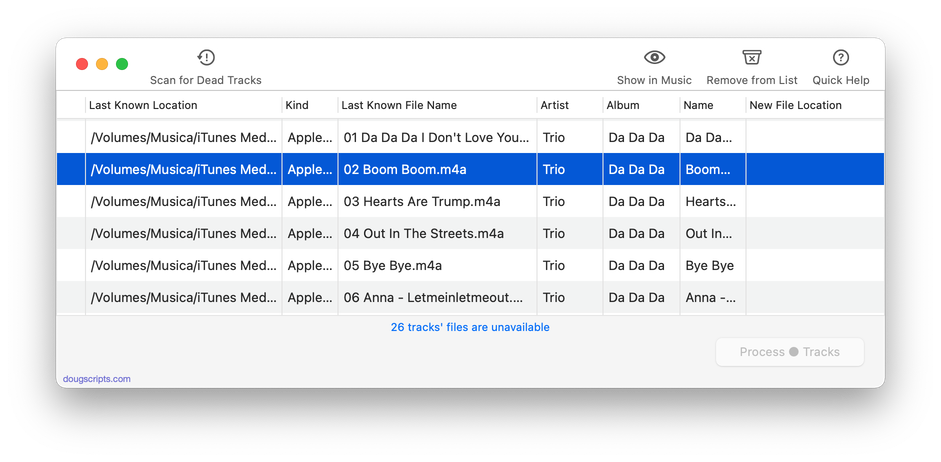
Track CPR will assist with re-associating replacement files with dead tracks. The Music app can perform this task, too, but only one. track. at. a. time.
The process takes 3 steps:
- The script finds and lists the "dead" tracks in the Music library
- User drag-and-drops potential replacement files to the window; a viable replacement file is one whose Title and Artist metadata matches a dead track's
- Re-associate viable replacement files with their matched track entries
The Read Me contains additional important details and cautions.
Latest version:
- Accommodations for macOS 26 Tahoe
- Maintenance and performance fixes
More information for Track CPR v5.0 and download link is here.
