
 Apple Music Profile
 YouTube Channel
 RSS Feed
 Play Play
 Murph
Murph Yer Stack
 Block Party Weekend
 30 Most Recent RSS Feed
UPDATED: Playlist XML Librarian v1.3
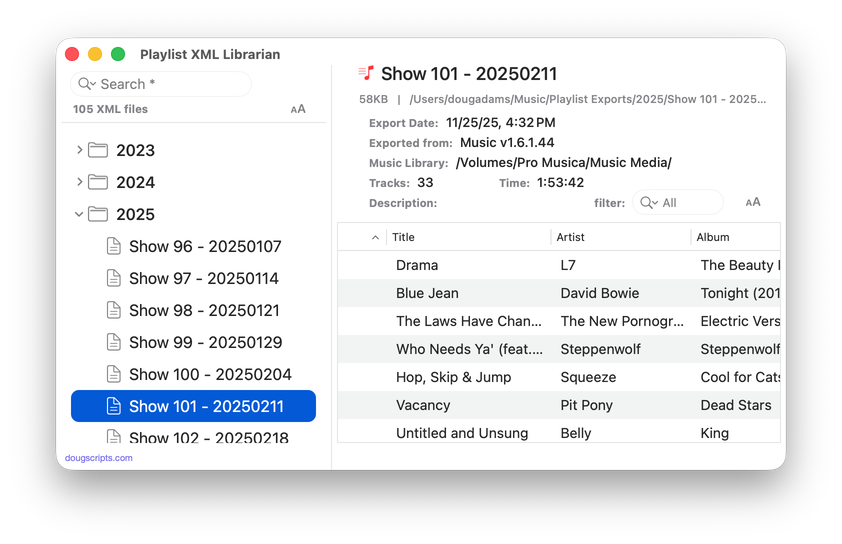
This applet will list the exported Playlist XML files collected in a specified folder with options to view, edit, search and send (import) them to the Music app. Makes it easy to maintain an organized stockpile of exported Playlist XMLs to reduce the number of onboard Music playlists.
Latest version:
- UI adjustments and detailing; minimal Liquid Glass added
- Accepts Open'd and drag-and-dropped Playlist XMLs
- Description field displays popover for longer text
- Table displays Normalization value if present
- Adds "Send to Music app" and "Reveal Default Folder" buttons in main window
- Adds File and Remote Track Type counts to header display
- Handles :00.0 length URL entries properly
- Fixed issue with Filter
Frankly, I would rarely export a playlist as an XML file because traveling to the command to do it—buried in the Music app's File menu—always seemed like a long arduous journey for my mouse. That all changed when I assigned the keyboard shortcut Command-E to the File -> Library -> Export Playlist... menu command. Then I couldn't stop exporting playlists.
The primary advantage is being able to keep the Music app de-littered of old-and-in-the-way playlists. After all, you can only listen to one at a time, so why keep them all hanging around? I keep a bunch of organizational Smart playlists (just local, just Apple Music, just ALAC, and so on) inside of Playlist Folders. But most of the playlists I create usually just ended up sticking around and making it difficult to scroll to my Zappa playlists at the bottom of hundreds of others. Too many onboard playlists!
Also, there are plenty of great Apple Music playlists that you can download and then export which you can then (find again!) reload later. The playlist in the screenshot above is of an Apple Music playlist.
I have created a "Playlist Exports" folder in my home/Music/ folder where I save all my exported playlists and that's my default folder in Playlist XML Librarian. The Librarian recognizes subfolders, so I've arranged the "Playlist Exports" folder into year and month subfolders; when I export a playlist I'll create the new month folder if necessary. Pretty simple. (At one time, I used a Folder Action Script to automatically do the folder-filing. But there were times I didn't want its automatic services and I stopped using it. Not a bad idea, though, if you can cope with it.)
One more advantage is that some of these playlists contain local files, and these XML playlists can be "played" by my stand-alone music players Play Play and Murph.
Also see Playlist XML Viewer which can display and play a single selected local Playlist XML file drag-and-dropped or chosen.
More information for Playlist XML Librarian v1.3 and download link is here.
