
 Apple Music Profile
 YouTube Channel
 RSS Feed
 Play Play
 Murph
Murph Yer Stack
 Block Party Weekend
 30 Most Recent RSS Feed
Monterey
UPDATED: Compare Two Playlists v5.0
For macOS 11 and later only. Quickly compares the contents of any two playlists and displays the tracks that are common to both or the tracks in one playlist not contained by the other. Has tools to copy or move tracks from one playlist to another or delete common tracks from one or the other playlist. Can optionally create a text file report of these comparisons.
Free to try in Demo Mode: While in Demo Mode, several features will be disabled. An in-app purchase of a registration code will unlock the disabled features.
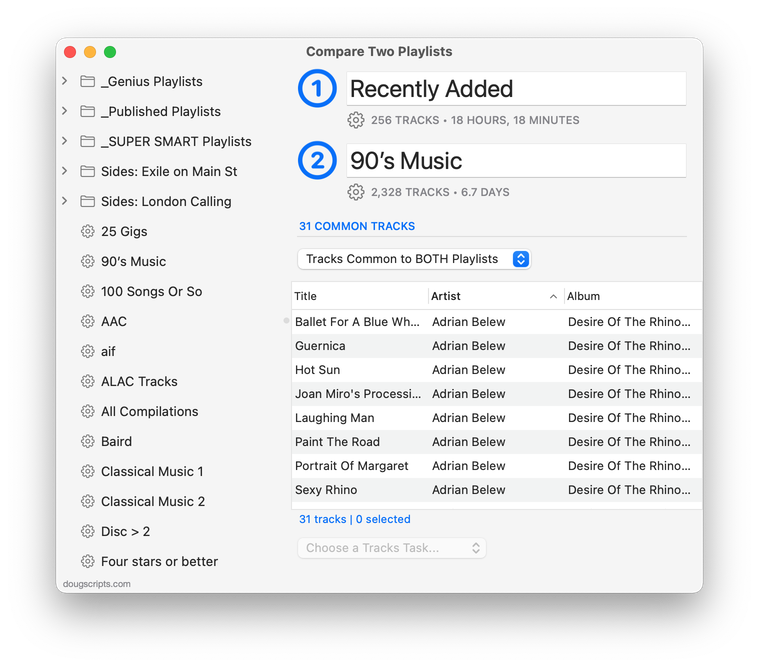
Latest version:
- Initial accommodation for macOS 12 Monterey
- Uses Split View to provide source playlists and work area; playlists can no longer be dragged from the Music app
- Other UI, performance and security fixes and enhancements
More information for Compare Two Playlists v5.0 and download link is here.
UPDATED: Scan For Double Entries v4.0
I first posted Scan For Double Entries in 2014 when a strange iTunes issue was somehow allowing two or more track entries to point to the same media file. The script surveys the library for sets of such tracks and then isolates them in their own playlist for further scrutiny; presumably, all but one of these tracks should be deleted.
Anyway, I hadn't updated the script lately because I figured, "Aw heck. That can't still be happening."
Silly me.
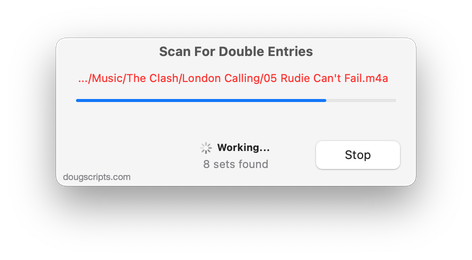
The updated version of Scan For Double Entries found 32 sets of two or more tracks where this was still happening—or, at least, had happened and that I hadn't detected 'til now.
The latest version, v4.0, has initial accommodation for macOS 12 Monterey and some UI and security updates. Specifically, it gives you a better idea of what's happening during the search for the tracks, as in the screenshot above. Earlier versions looked like they weren't doing anything during this particular part of the process.
More information for Scan For Double Entries v4.0 and download link is here.
