
 Apple Music Profile
 YouTube Channel
 RSS Feed
 Play Play
 Murph
Murph Yer Stack
 Block Party Weekend
 30 Most Recent RSS Feed
March 2026
UPDATED: Search-Replace Tag Text v3.5
Search-Replace Tag Text v3.5 performs a search-and-replace on the text in your choice of tag (Song Name, Show, Artist, Album Artist, Album, Composer, Comments, Genre, or Grouping) in the selected tracks or all the tracks in the selected Playlist. Features case sensitivity and whole word match options and dry run preview.
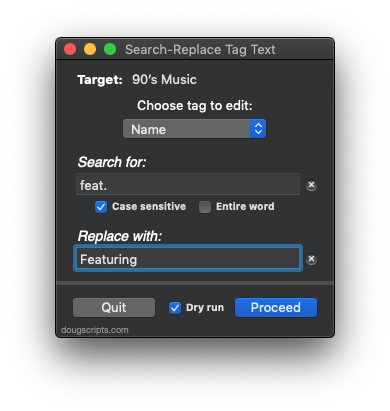
This new version stores the dry run setting between launches, has some additional minor tweaks and is ready for Mavericks.
More information and download is here.
AirPlay Scripting Workaround
As previously noted, you can't do this without getting -1728 errors:
tell application "iTunes"
set apDevices to (get AirPlay devices)
end tell

But you can do this:
tell application "iTunes"
set apDevices to (get a reference to AirPlay devices)
-- see?
log (get name of apDevices)
-- or
repeat with aDevice in apDevices
log (get aDevice's name)
end repeat
-- or
repeat with aDevice in AirPlay devices
log (get aDevice's name)
end repeat
end tell
That's if you need to do that.
UPDATED: Track Down Purchases v2.2
Track Down Purchases v2.2 will examine each track in the entire iTunes library—or a selection of tracks—for items purchased from the iTunes Store (audio, video, and books) and then sort them by either the purchaser's name or account ID into discrete playlists, eg: "Purchased by Tom Ryan" or "Purchased by tomryan@email.com".
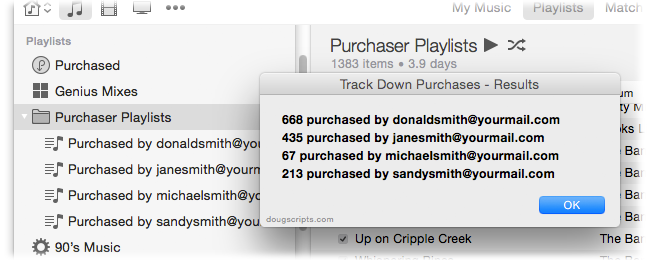
This latest version changes the name of each playlist created (prefixing it with "Purchased by") so that they'll sort together and also fixes an issue with misreading account ID data that produced garbled text in the playlist names.
More info and download here.
iTunes 11.1.1 Available
Apple has released iTunes 11.1.1 with bug fixes for podcast management and iTunes Extras display and a helping of stability fixes. Looks like you can once again delete old podcast episodes.
The AirPlay bug mentioned below has not been fixed.
