
 Apple Music Profile
 YouTube Channel
 RSS Feed
 Play Play
 Murph
Murph Yer Stack
 Block Party Weekend
 30 Most Recent RSS Feed
March 2026
UPDATED: Track Down Purchases v2.3
Track Down Purchases v2.3 will examine each track in the entire iTunes library—or a selection of tracks—for items purchased from the iTunes Store (audio, video, and audiobooks) and then sort them by either the purchaser's name or account ID into discrete playlists, eg: "Purchased by Tom Ryan" or "Purchased by tomryan@email.com".
Purchaser information is gleaned by examining the track's local file (purchase info for iTunes Match tracks in the cloud is inaccessible and cloud tracks will be ignored), which, depending on file location and access speed, may take as long a second per track. Just sayin'.
This lateset version fixes a problem for some OS X 10.9 users whereby the script would hang once engaged.
More information and download is here.
UPDATED: File Renamer v2.4
File Renamer will rename the files of the selected tracks (or the files of the tracks in the selected playlist) with a filename pattern that is formulated using the tracks' tag data. Optionally, export a copy of the files to a chosen location and rename the files in that location.
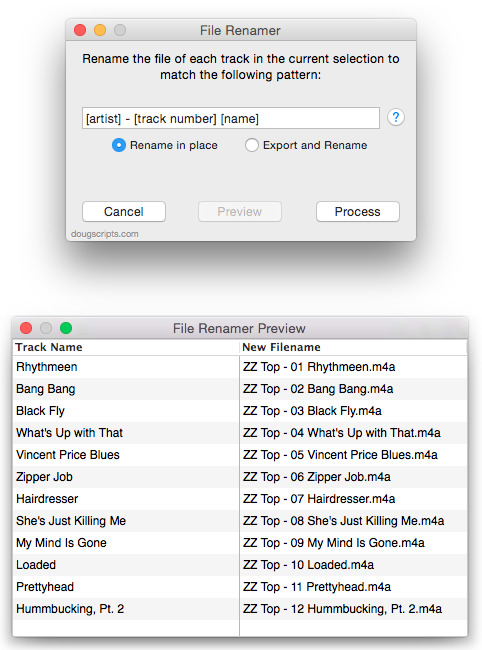
This latest version supports literal bracket characters (ie: [ and ]) and provides a [play order] pattern "field" which will match the index of each selected track in its sorted order.
More information and download is here.
UPDATED: PDF Adder v4.2
PDF Adder is a collection of two scripts (it used to be three) that assist with adding PDF files to iTunes as "digital booklet" PDF tracks. Each provides a method for easily supplying Author (artist), Album, Category (genre), Year, Rating and Description tag data which is then applied to the newly-added PDF track entry:
- Add as PDF to iTunes is a PDF Service workflow that, when installed, will be available in the PDF pop-up menu of the Print Dialog. It allows you to save the current document as a PDF file (from any application that uses the Print Dialog) and add it to iTunes.
- PDF Adder is an applet/droplet that will let you choose or drag-and-drop an existing PDF file and add it to iTunes. It can be installed in iTunes' Scripts folder for easy access from iTunes Script menu.
Each script displays a panel like this so you can provide tag data for the PDF:
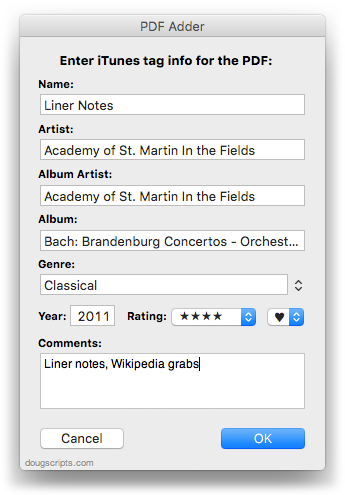
Anything you can print, you can export as a PDF...and any PDF can be added to iTunes.
These latest versions are updated for compatibility with OS X 10.9. I also got rid of PDF Dropper and just made PDF Adder launch via double-click (or Script menu launch) or by drag-and-drop. Finally, Add as PDF to iTunes will use applicable tag data for the PDF metadata tags Title, Author, Keywords (Category/Genre tag) and Subject (Description tag).
I almost included an option to add PDFs to iBooks (see below, "iBooks is Not Scriptable. Much.") but iBooks ignores PDF metadata except for Author and of course prevents "tag" editing in the app itself. You can drag PDFs from iTunes to iBooks and the name and artist/author tags will be copied to Title and Author correctly, but that's insufficient for me. I prefer the bevy of tags available for PDF tracks in iTunes.
Deal-breaker for some: under Mavericks, with iBooks installed, PDFs added to iTunes are put in the Music library. Under earlier OS's, iTunes puts them in Books or Audiobooks.
More information and download here.
Search iTunes Store via Google
Kirk had a tip about using Google to search the iTunes Store in his Macworld column today. Here's a script for that:
try
set searchText to text returned of (display dialog "Search the iTunes Music Store for:" default answer "")
tell application "Finder" to open location "http://www.google.com/search?q=site:itunes.apple.com " & searchText
end try

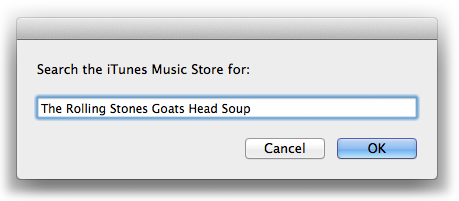
Launch and enter some search text and click the "OK" button. A new window with Google results will be displayed by your default browser.
iBooks is Not Scriptable. Much.
iBooks is built without AppleScript support so I'm still using iTunes to manage my PDFs. But if you need to programmatically add a file—like a PDF—to iBooks you can use this trick, where filePath is an alias:
using terms from application "iTunes"
tell application "iBooks" to open filePath
end using terms from
Unfortunately, you can't edit the tags in iBooks. Nor does iBooks seem to use any existing PDF metadata except "Author". Strangely, in fact, it uses the PDF's file name (without extension) for "Title" instead of checking the PDF's metadata for "Title". And while I'm making wishes, "Keyword" metadata could be parsed for a Category and perhaps a way could be found to use the PDF "Subject" metadata as a description tag somewhere.
iBooks, which seems to me to be a pretty basic database manager, stores much more metadata for other types of books (have a look at ~/Library/Containers/com.apple.BKAgentService/Data/Documents/iBooks/Books and the Books.plist there) so it doesn't seem like it would be much of a bother to accommodate PDFs a little better.
