
 Apple Music Profile
 YouTube Channel
 RSS Feed
 Dupin
Dupin Join Together
 M3Unify
 30 Most Recent RSS Feed
ScriptPal
ScriptPal v1.1 Posted
I posted ScriptPal v1.1 on Monday. This new version can now display the contents of the user "Scripts" folder (~/Library/iTunes/Scripts/) and/or the local "Scripts" folder (/Library/iTunes/Scripts/), can add a script to an existing Workgroup via the contextual menu, and addresses a couple of minor issues.
ScriptPal Gets Macworld Gem Treatment
Macworld's Dan Frakes has a great review of ScriptPal. Thanks!
ScriptPal v1.0.2 Released
This latest update to ScriptPal fixes a problem displaying consecutive sub-folders.
ScriptPal v1.0.1 Released
Just made a couple of quick fixes to ScriptPal, now at version 1.0.1. Fixed a problem listing scripts when the "Scripts" folder has a custom icon and addressed an issue whereby the contents of application bundles with non-standard hierarchies were being displayed.
Thanks for the great feedback on ScriptPal.
ScriptPal v1.0. Released
ScriptPal floats a persistent HUD (heads-up display) palette above iTunes putting just the AppleScripts you need a mouse-click or two away.
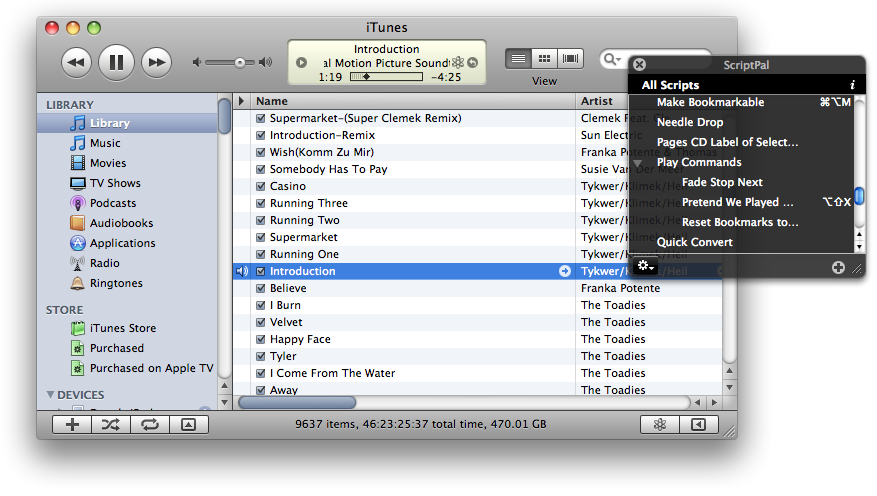
Instead of having to click and scroll through iTunes' Script menu over and over again for just the two or three scripts you need during a big job or for the handful of scripts you use most frequently, let ScriptPal keep your most-needed AppleScripts conveniently ready and able to be launched with a double-click...or edited in Script Editor with an option-click...or arranged into compact and reusable Workgroups...
With ScriptPal you can:
- Have quick and easy access to the iTunes AppleScripts in the iTunes "Scripts" folder, including aliases to AppleScripts elsewhere
- Launch AppleScripts with a double-click
- Display only the scripts you need
- Organize and save collections of scripts into re-loadable Workgroups
- See a script's System Preferences-assigned iTunes shortcut keys
- Open and edit scripts in Script Editor
- Reveal a script's file and "Get Info" window in the Finder
- Create new folders in the "Scripts" folder
- Access a script's "Read Me"
- Search for a script's entry here at dougscripts.com
ScriptPal is easy to configure and use. And it's free!
Coming Soon
Here's a quick video demo of the forthcoming free app, ScriptPal.
