
 Apple Music Profile
 YouTube Channel
 RSS Feed
 Play Play
 Murph
Murph Yer Stack
 Block Party Weekend
 Elevendy
 Dupin v4.0.0
 Join Together
 M3Unify
 30 Most Recent RSS Feed
September 13 2012 - 1:29 pm
UPDATED: Remove n Characters From Front or Back v4.6
Remove n Characters From Front or Back lets you delete a specified number of characters from either the beginning or the ending of the Song Name, Album, Artist, Comments, Composer or Show tag (or their "Sort" siblings) of each selected track. For example, delete the initial digits and the space from "01 First Track", "02 Second Track", and so on.
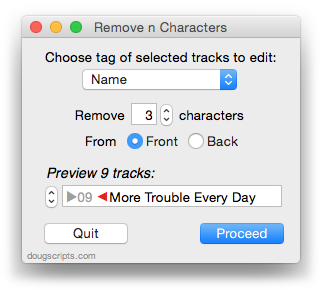
This updated version caps the maximum number of characters to the length of the shortest text in the selected tags, preventing inadvertent deletion of tag text that may be shorter than the user-set number of characters to remove.
