
 Apple Music Profile
 YouTube Channel
 RSS Feed
 Play Play
 Murph
Murph Yer Stack
 Block Party Weekend
 30 Most Recent RSS Feed
AppleScript
UPDATED: Tracks Without Artwork to Playlist v3.3
Tracks Without Artwork to Playlist is up to version 3.3 and fixes the compatibility problem with iTunes 7.7.1.
UPDATED: Make Bookmarkable v2.5
The popular Make Bookmarkable has been updated to v2.5 and is now compatible with iTunes 7.7.1. Make Bookmarkable will change the file type of the selected AAC tracks to "M4B " and file extension to ".m4b", thus making them bookmarkable. Additionally, when used with iTunes 7 or better, deletes and re-adds each track so it will appear in the Audiobooks Library. Ratings, play count, last played date, skip count, and skipped date are preserved.
Updates Coming
I am working on updating several scripts and apps to accommodate the iTunes 7.7.1 issue and I'll be posting them when I can. Notably, Tracks Without Artwork to Playlist and Make Video Tags will be among the first to get fixed.
NEW: Selected Tags to Lyrics
I never bother much with Lyrics, so I didn't realize Lyrics for the current track on the iPhone or iPod Touch could be made visible until Far-Flung Antipodes Correspondent Jon Jong queried about putting various tags into the Lyrics tag so they could be viewed instead.
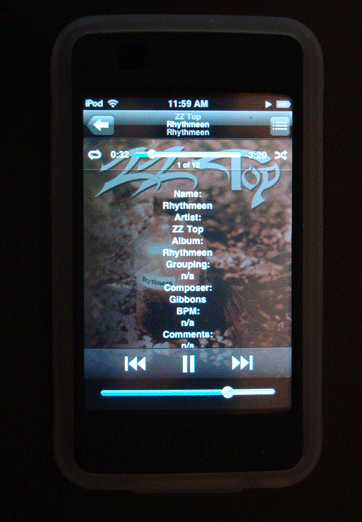
Selected Tags to Lyrics will allow you to copy any combination of the Name, Artist, Album, Grouping, Composer, BPM, Comments and/or Description of the selected tracks to the Lyrics tag of each. Tap-tap, and there you are!
UPDATED: Lossless to AAC Workflow v2.0
I've been wanting to update Lossless to AAC Workflow with some improvements for a while and finally got around to it. As a matter of fact, they were mentioned on a recent Mac Geek Gab Podcast . This is a collection of two scripts that assists with importing/converting Apple Lossless tracks and sending AAC copies to iPod such that you can keep archived Lossless files on your hard drive and manageable AAC files on your iPod. The newest version of the scripts run as universal binary and, in general, has performance fixes and enhancements.
NEW: Export Artwork v1.0
Export Artwork replaces the script "Save Artwork to Folder". This script will save the artwork of the single selected track to a user-chosen folder as a PNG or JPG file, with scaling options. Default location is the folder containing the selected track's file (or your Desktop if an iPod track is selected), however any location can be selected.
UPDATED: Tracks Without Artwork to Playlist v3.1
I only updated this a few days ago, but I managed to get Tracks Without Artwork to Playlist v3.1 to create a playlist much faster.
UPDATED: Set Video Kind of Selected v3.0
If you have visited recently, you may have noticed that I have been updating some of the more popular offerings to universal binary, so that scripts run natively on both PPC and Intel Macs. Set Video Kind of Selected v3.0 gets the UB treatment, as well as some performance fixes. In lieu of iTunes' ability to batch-edit video properties for videos, this script will change the video kind property of the selected tracks to your choice of "Movie", "Music Video" or "TV Show". Additionally, "Show Name", "Season Number", and "Episode Number" can also be set or cleared for each selected track.
UPDATED: Tracks Without Artwork to Playlist v3.0
Had some time to quickly update Tracks Without Artwork to Playlist to v3.0. It now runs as universal binary and has some performance fixes and finessings.
UPDATED: Move Playlists to Folder v2.0
Move Playlists to Folder allows you to select one or more playlists to move into a selected folder. This latest version just has some performance fixes.
