
 Apple Music Profile
 YouTube Channel
 RSS Feed
 Play Play
 Murph
Murph Yer Stack
 Block Party Weekend
 Elevendy
 Dupin v4.0.0
 Join Together
 M3Unify
 30 Most Recent RSS Feed
Managing Track Info
NEW: Multi-Media Items Edit
For reasons not yet clear, as of iTunes 11.1, multi-item editing is no longer possible when a track selection contains mixed media kinds, audio and PDF for example. Kirk explains the matter here.
The script Multi-Media Items Edit provides basic tag editing for a selection of tracks of any media kind.
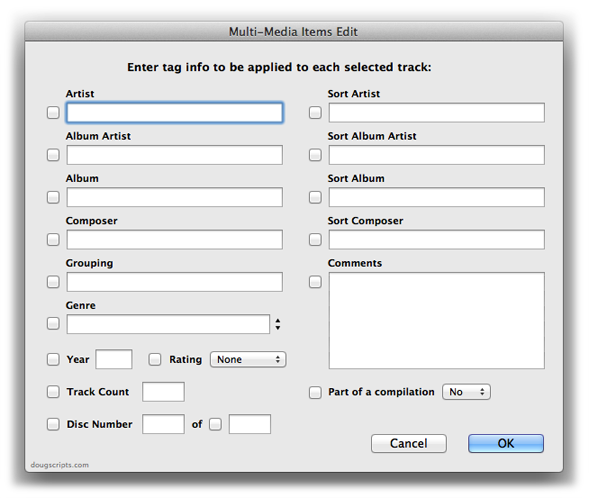
Wondering why your favorite tag or option isn’t included? Just keeping it simple, friend-o.
UPDATED: Search-Replace Tag Text v3.4
Search-Replace Tag Text performs a search-and-replace with the text in your choice of tag (Song Name, Show, Artist, Album Artist, Album, Composer, Comments, Genre, or Grouping) in the selected tracks or all the tracks in the selected Playlist. Features case sensitivity and whole word match options and dry run preview.
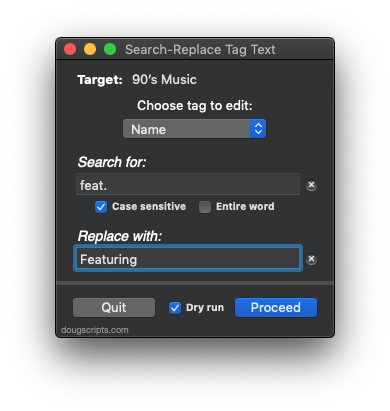
This latest version enables the window to be resized horizontally in order to expand the width of text entry fields.
UPDATED: Remove n Characters From Front or Back v4.6
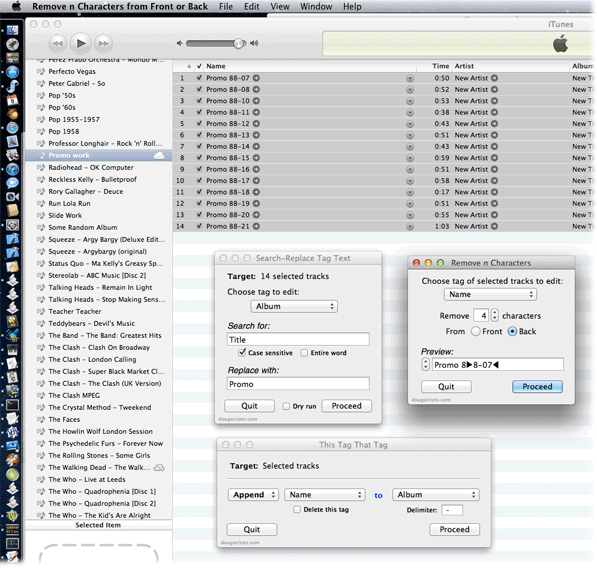
Remove n Characters From Front or Back lets you delete a specified number of characters from either the beginning or the ending of the Song Name, Album, Artist, Comments, Composer or Show tag (or their “Sort” siblings) of each selected track. For example, delete the initial digits and the space from “01 First Track”, “02 Second Track”, and so on.
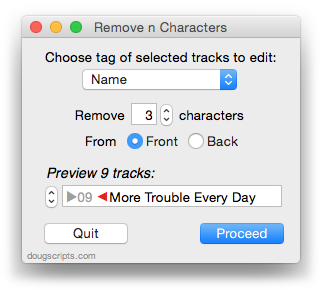
This updated version caps the maximum number of characters to the length of the shortest text in the selected tags, preventing inadvertent deletion of tag text that may be shorter than the user-set number of characters to remove.
UPDATED: Search-Replace Tag Text v3.3
Search-Replace Tag Text v3.3 performs a search-and-replace with the text in your choice of tag (Song Name, Show, Artist, Album Artist, Album, Composer, Comments, Genre, or Grouping) in the selected tracks or all the tracks in the selected Playlist. Features case sensitivity and whole word match options and dry run preview.
The latest version sports conventional search fields and has some minor code tweaks.
UPDATED: This Tag That Tag v3.1
This Tag That Tag will assist with swapping, copying, and appending data between two user-chosen tags in selected tracks or tracks in the selected playlist:
Swap – swap data between tags, ex: ARTIST<->COMPOSER
Copy – copy data from one to another tag, ex: ARTIST->COMPOSER ARTIST
Append – append data from one tag to the end of another, ex: ARTIST->COMPOSER – ARTIST
Prepend – prepend data from one tag to the beginning of another, ex: ARTIST->ARTIST – COMPOSER
The latter three actions also provide an option to delete the info from the first tag after the copy.
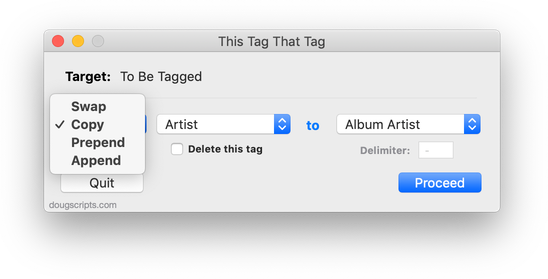
This latest version allows numerical tag data to be copied (for example, the Year tag’s data can be copied to the Comments tag).
UPDATED: Remove n Characters from Front or Back v4.3
Remove n Characters From Front or Back v4.3 will let you delete a specified number of characters from either the beginning or the ending of the Song Name, Album, Artist, Comments, Composer or Show tag (or their “Sort” siblings) of each selected track. For example, delete the initial digits and the space from “01 First Track”, “02 Second Track”, and so on.
This latest version is now stay-open and floats above iTunes, has live track selection detection, re-orients preview stepper direction to abide selected tracks’ sort order, can expand horizontally to enlarge Preview box, increases number limit from 24 to 60, and other minor enhancements.
Here’s a screenshot of Remove n Characters From Front or Back in action during a tag editing session that also includes This Tag That Tag and Search-Replace Tag Text, which are also stay-open floaters:
UPDATED: Search-Replace Tag Text v3.1
Search-Replace Tag Text v3.1 is now posted. This applet allows you to perform search-and-replace text operations on a chosen tag in the selected tracks or tracks in a selected playlist:
This latest version fixes a problem escaping special characters, fixes a problem with operating on the Grouping tag, prevents non-results from displaying in the dry run window, adds close and minimize buttons, and has a few minor code finesses.
UPDATED: New Last Played Date v3.0
Getting date input with plain AppleScript has always been a hassle. But Cocoa-AppleScript has access to Cocoa date pickers. Hoo. Ray. New Last Played Date v3.0 is a Cocoa-AppleScript Applet for iTunes on OS X 10.6 and better that uses a text and calendar date picker to easily enter a new date for either the Last Played or Last Skipped tags of the selected tracks:
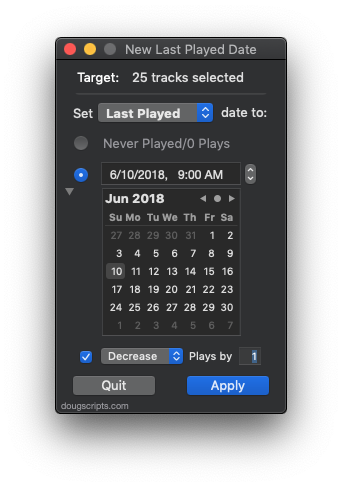
Additionally, the corresponding counts can be increased or decreased. Or the dates and counts can be set to “never”.
UPDATED: This Tag That Tag v3.0
This Tag That Tag v3.0 is now a consolidated applet that previously had been a collection of four separate scripts. It will assist with copying text between tags for each selected track or track in a selected playlist.
It will float open over iTunes while being used and detect whenever the iTunes selection has changed, as displayed by Target:. Also now provides a progress indicator.
NEW: Delete All Lyrics
It’s often interesting to look through the search queries this site gets to see what people are looking for. Over the past few months the phrase “delete all lyrics” has been showing up pretty frequently. Don’t know why it is—seems like it wasn’t so long ago the phrase “find song lyrics” was more prominent. Fads! Who can predict ’em?
I already have a script that will delete the lyrics of a selection of tracks. But this would be rather slow if you used it against every track in the library. So I’ve posted Delete All Lyrics. This is a Cocoa-AppleScript applet (for OS 10.6 and 10.7 only) that will fairly quickly go through all the tracks in the “Music” playlist and delete the lyrics. So whether you’re tired of trying to sing-along or just need to clear out some bytes, it should do the trick.
