 30 Most Recent RSS Feed
 Apple Music Profile
 YouTube Channel
 RSS Feed
 Play Play
 Murph
Murph Yer Stack
 Block Party Weekend
 Elevendy
 Dupin v4.0.0
 Join Together
 M3Unify
Managing Artwork
UPDATED: Save Album Art as folder.jpg v2.0
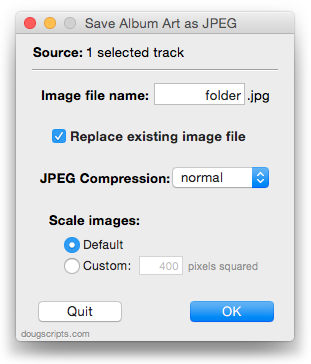
Save Album Art as folder.jpg v2.0 will export the artwork of the selected tracks or tracks in the selected playlist as a JPEG image file named folder.jpg to the folder which contains each selected track’s file–presumably the track’s Album folder. Many third-party music players and systems (Sonos, for example) may look for a “folder.jpg” file here to use as display artwork.
This latest version is written as a Cocoa-AppleScript Applet and can only run on OS X 10.6 and 10.7 systems (the previous universal version is available from the script’s entry page). It consolidates all settings into a single preferences pane.
UPDATED: Save Album Art to Album Folder v4.0
Save Album Art to Album Folder v4.0 is a script that will export the artwork data of the selected tracks or tracks in the selected playlist as an image file to the folder which contains each selected track’s file—presumably the track’s Album folder—or a specific user-selected folder. Additionally, you can customize various settings for the image file:
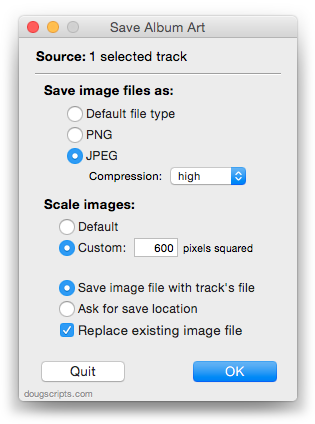
This latest version is a Cocoa-AppleScript Applet, so it can only be run on OS X 10.6 and 10.7.
Artwork-Related Scripting Bug Follow-Up
Not long ago I posted about a possible bug introduced with iTunes 10.2 regarding reading PICT file data for use as track artwork (Possible Artwork-Related Scripting Bug in iTunes 10.2?). Essentially, a tried-and-true AppleScript routine for importing PICT image data fails in iTunes 10.2. After some investigation, it turns out that iTunes 10.2 now uses ImageIO for all image handling instead of QuickTime and the ImageIO framework no longer supports PICT files. No one should really be surprised since the PICT format has largely been deprecated. But even so, until recently, PICT was still supported in iTunes.
So it’s not a bug but a side effect of modernity.
The fix for iTunes 10.2 and above is to simply read in the data from a PNG or JPEG file:
tell application "iTunes" to set data of artwork 1 of theTrack to (read (file targetImageFile) as picture)
Where theTrack is a reference to a file track in iTunes and targetImageFile is the path to a valid PNG or JPEG image file.
A couple of my scripts that need the fix will be posted later today.
NEW: Save Album Art as folder.jpg
Shortly after updating Save Album Art to Album Folder I got a few emails from users who wanted to save iTunes track artwork as a single “folder.jpg” image file in the track’s Album folder. Some third-party music devices and systems, like Sonos, may use a “folder.jpg” file found here as display artwork for the audio files that accompany it in the folder. (Sonos is apparently also capable of using embedded artwork, but I understand there is some restriction here size-wise or something. And, of course, not all audio file formats allow image data to be embedded.)
At first I thought I’d post a quick how-to-mod, but it was eventually easier to just write a new script. Save Album Art as folder.jpg will do what I said above about the “folder.jpg” thing. Like the other script mentioned, it has an additional settings panel that you can access by Option-launching the script:
NEW: Restore Artwork from Album Folder
Restore Artwork from Album Folder will look for an image file in the parent folder of each selected track’s file–presumably its “Album” folder–and apply the data from that image file as artwork for the track. If more than one image file is found in the target folder than the first one found will be used. I didn’t include a preferences pane as I did for Save Album Art to Album Folder, but you can hard-code the kind of image file to look for, JPEG or PNG, in the script.
UPDATED: Save Album Art to Album Folder v3.0
The script Save Album Art to Album Folder will export the display artwork of each selected track as an image file to the folder which contains each selected track’s file—presumably the track’s Album folder—or a single user-selected folder. The script will try to ensure that only one copy of an album’s artwork is exported to the folder if multiple album tracks are selected.
This newest version provides a special Preference pane that enables additional sips image processing options to be set:
This can be accessed by pressing and holding the keyboard’s Option key while launching the script from iTunes’ Scripts menu.
NEW: Search Amazon Book Covers v1.0
Here’s a pretty basic Search-Amazon-For-Art script. It grabs the name, artist, and genre tags from a single selected book-type track in iTunes and lets you choose which of those tags to use as keywords in a search for book cover artwork at Amazon Books. Search Amazon Book Covers currently pings the US Amazon site, but it can easily be mod’d to work with their other sites, or as the basis for a search of some other site.

Updated Spareparts Section
A Correspondent via the AppleScript Users email list detected a problem with a script snippet of mine regarding grabbing the artwork data from an iTunes track with iTunes 9 and Snow Leopard. That very day I also had updated Export Artwork with a fix for a similar issue. At any rate, the snippet resides in the Spare Parts section and, to be more exact, the updated snippet with the fix is here.
UPDATED: Export Artwork v2.0
Export Artwork saves the artwork of the single selected track to a user-chosen folder as a PNG or JPG file, with scaling options. Default location is the folder containing the selected track’s file, however any location can be selected.
This latest version fixes a problem creating the graphics file with iTunes 9 under Snow Leopard, and is generally updated after two years.
UPDATED: Embed Artwork v2.0
I’ve updated Brian Webster’s Embed Artwork as universal binary, but otherwise there are no changes. This script simply re-embeds artwork into the files of the selected tracks. Handy for ensuring that artwork data travels with a file.
