 30 Most Recent RSS Feed

 Apple Music Profile
 YouTube Channel
 RSS Feed
 Play Play
 Murph
 Yer Stack
 Block Party Weekend
 Elevendy
 Dupin v4.0.0
 Join Together
 M3Unify
NEW: Compare Track IDs v1.0
Normally, there’s no reason for Regular People to see a track’s persistent ID. That’s why you don’t see them anywhere in the Music app interface. But every track’s got one, like a hexadecimal belly button. And like a belly button, every one is unique and different. (I think belly buttons are all different. Aren’t they? Anyway, persistent IDs are different for each track and that’s my point.)
Now: The Double Entries Conundrum, in case you don’t know, is a situation in the Music app whereby a duplicate of an existing track entry has been errantly created which results in the file having two track entries. Not much of a good thing.
But you don’t want to confuse Double Entries with two track occurrences (as when a single track is added twice to a playlist). Or with two similar-yet-distinct files having separate entries (as you might have with studio and live/greatest hits versions of a song). If you could only see those persistent IDs! Boy, would that help!
The script Compare Track IDs will display the name, persistent ID, database ID, date added and file path of one or two selected tracks.
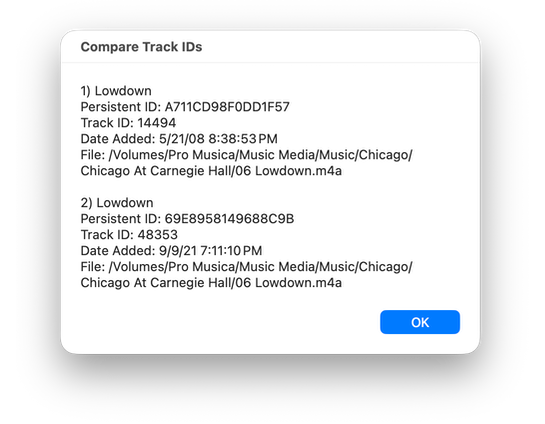
In the screenshot, you can see that, for the most part, the two tracks are different but that their files are the same. There’s no mistaking that they are Double Entries. (I’d love to know what happened on that day in 2021 that caused Music to duplicate some of my Chicago tracks.)
So by comparing the IDs, the date added and the file path, you should be able to figure out what’s what and what ain’t.
Or maybe you just want to look at track persistent IDs. That’s cool, too.
Also see Scan For Double Entries.
Latest version:
- Initial release
More information for Compare Track IDs v1.0 and download link is here.
