 30 Most Recent RSS Feed
 Apple Music Profile
 YouTube Channel
 RSS Feed
 Play Play
 Murph
Murph Yer Stack
 Block Party Weekend
 Elevendy
 Dupin v4.0.0
 Join Together
 M3Unify
iPod
UPDATED: Rip to iPod v2.1
Rip To iPod v2.1 will import each enabled (checkmarked) CD track to iTunes and immediately copy it to iPod, removing the track from the iTunes library and deleting the original file, thus giving the appearance of seamless CD-to-iPod importing. You can also change your encoder on-the-fly and your Preferences-set encoder will be restored after the rip. Requires that iPod be set to “Manually manage music and videos”. iPods set to sync are ignored.
This latest version fixes an issue with intermittent copying.
NEW: Selected Tags to Lyrics
I never bother much with Lyrics, so I didn’t realize Lyrics for the current track on the iPhone or iPod Touch could be made visible until Far-Flung Antipodes Correspondent Jon Jong queried about putting various tags into the Lyrics tag so they could be viewed instead.
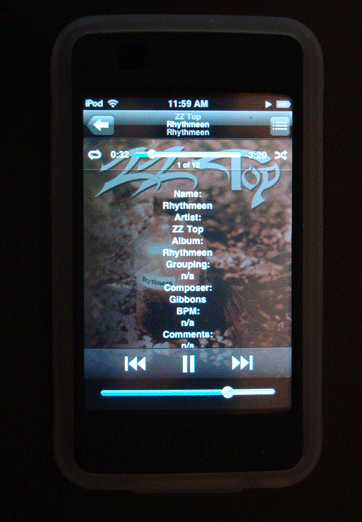
Selected Tags to Lyrics will allow you to copy any combination of the Name, Artist, Album, Grouping, Composer, BPM, Comments and/or Description of the selected tracks to the Lyrics tag of each. Tap-tap, and there you are!
UPDATED: Lossless to AAC Workflow v2.0
I’ve been wanting to update Lossless to AAC Workflow with some improvements for a while and finally got around to it. As a matter of fact, they were mentioned on a recent Mac Geek Gab Podcast . This is a collection of two scripts that assists with importing/converting Apple Lossless tracks and sending AAC copies to iPod such that you can keep archived Lossless files on your hard drive and manageable AAC files on your iPod. The newest version of the scripts run as universal binary and, in general, has performance fixes and enhancements.
UPDATED: New iPod Playlist From Selection v3.0
New iPod Playlist From Selection will copy the selected iTunes track, or the tracks of a selected playlist, to a new iPod playlist. Works only with iPods set to “Manually manage songs and videos”, that is, not to sync.
UPDATED: Lossless to AAC Workflow v1.5
Because of the capacity and free space bugs I’ve mentioned recently, I had to update Lossless to AAC Workflow, which uses those properties to determine the free space on the iPod–well, not in this version. This is a collection of scripts that assists with importing/managing Apple Lossless audio files and sending converted AAC copies to iPod.
NEW: Update Expired Podcasts
This Mac OS X Hints post proposes a solution to a problem I was having: iTunes will stop updating a podcast subscription if one of its episodes has not been played within five days (so that’s what happened). The poster provided an AppleScript solution, which, although admirably on the right track, was somewhat convoluted. Why not just plain update the podcasts! Update Expired Podcasts will batch-update every podcast subscription in your Podcasts playlist by simply “telling” iTunes to updatePodcast for each podcast subscription. The trick is getting a discrete list of podcast subscription names for the updatePodcast command; put ’em in a repeat loop and yer done.
