 30 Most Recent RSS Feed
 Apple Music Profile
 YouTube Channel
 RSS Feed
 Play Play
 Murph
Murph Yer Stack
 Block Party Weekend
 Elevendy
 Dupin v4.0.0
 Join Together
 M3Unify
Managing Playlists
NEW: Dumb Down Genius Mix Playlist v1.0
Dumb Down Genius Mix Playlist will copy the tracks of a playing Genius Mix playlist to a new “dumb” (regular) playlist, which, for example, can be copied/sync’d to older iPods that do not accommodate Genius Mixes. You can subsequently copy the contents of additional Genius Mix playlists to the new playlist, refill it, or create more. (Each Genius Mix playlist only references about 70 tracks maximum, which is why you may have several, say, “Rock Mix” playlists.)
Thanks to Correspondent Pedro Espinosa for coming up with the basic work for this clever script.
Updated a Handful
Nothing to do with Snow Leopard–what a relief, eh? I’ve updated seven scripts today:
- Assimilate View Options
- Batch-Delete Playlists
- Block Party!
- Compare Two Playlists
- Export Smart Playlist Criteria
- Move Playlists to Folder
- Selected Playlists To iPod
These seem to be the most popular scripts that are affected by the “none/all” issue introduced in iTunes 8.2. There may be a few others, but I haven’t gotten email feedback on those nor have I run across a problem with any other scripts I use regularly. But if you ever get a error like this:
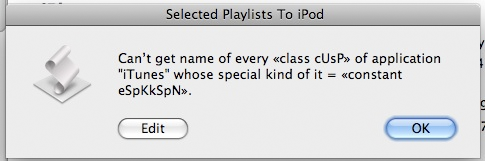
…then let me know.
Daypart v1.0.2 Released
Daypart v1.0.2 is now available.
Updated in v1.0.2:
- Fixed issue with Calendar View re-display
- Fixed issue saving schedule/locating .db file
- Fixed issue with setting fade delay
Daypart is a simple yet full-featured application that allows you to schedule iTunes playlists to play, giving you an easy way to program varied musical content throughout the week in your home or workplace.
This update is free for registered users.
Daypart v1.0.1 Released
Daypart v1.0.1 has been released. With Daypart you can:
- Schedule playlists flexibly, for just a few minutes or several hours
- Schedule intricate configurations of playlists on a weekly basis
- Segue between playlists without cutting off songs
- Automatically shuffle and/or repeat playlists
- Store and re-use frequently used scheduling criteria
- See how playlists are scheduled over a period of days
- Automatically load and engage a schedule at startup
Plus, Daypart features:
- Uncluttered, easy-to-use interface
- Scheduling tips
- Scheduling conflict-awareness
- Customizable windows positioning
- Ample keyboard shortcuts
- Detailed Help book
Updated in v1.0.1:
- Fixed issues related to date/time formatting
- Fixed “sortedDataRows” error
- Addressed error issues when adding Event to Schedule
- Addressed slight delay at startup issue
This update is free for registered users.
iTunes DJ is Still Party Shuffle
Although you will see it listed as “iTunes DJ” in iTunes 8.1, it’s the same thing as “Party Shuffle” (AppleScript-wise it has the same playlist special kind) with a few new behaviors.
Daypart Released
Daypart is a simple yet full-featured application that allows you to schedule iTunes playlists when to play, giving you an easy way to program varied musical content throughout the week in your home or workplace.
Program your iTunes music when you want, the way you want.
Smart Playlists, Playlist Folders, and Genius Playlists provide some degree of musical variety in iTunes, but you still have to manually select, start, and stop each playlist one at a time whenever you want to switch from one to another. Daypart does all that for you and lets you program every day of the week with different playlists at different times. You can have Daypart play your Party Shuffle playlist in the morning, Most Recently Added around lunch, dance music in the afternoon, Classical for dinner, and audiobooks in the evening. And on the following day schedule something completely different. Plus, you can create more than one schedule to accommodate your many listening habits.
With Daypart you can:
- Schedule playlists flexibly, for just a few minutes or several hours
- Schedule intricate configurations of playlists on a weekly basis
- Segue between playlists without cutting off songs
- Automatically shuffle and/or repeat playlists
- Store and re-use frequently used scheduling criteria
- See how playlists are scheduled over a period of days
- Automatically load and engage a schedule at startup
Plus, Daypart features:
- Uncluttered, easy-to-use interface
- Scheduling tips
- Scheduling conflict-awareness
- Customizable windows positioning
- Ample keyboard shortcuts
- Detailed Help book
More information, link to video demonstration, and download is here.
UPDATE: New iPod Playlist From Selection v3.1
New iPod Playlist From Selection copies selected iTunes tracks, or the tracks of a selected iTunes playlist, to a new user-named iPod playlist. Works only with iPods set to “Manually manage music and videos”, and very handily when assigned an iTunes Scripts Menu Shortcut. I use Control-Command-N.
This latest version fixes an issue with intermittent copying
UPDATED: Tracks Without Artwork to Playlist v3.1
I only updated this a few days ago, but I managed to get Tracks Without Artwork to Playlist v3.1 to create a playlist much faster.
UPDATED: Move Playlists to Folder v2.0
Move Playlists to Folder allows you to select one or more playlists to move into a selected folder. This latest version just has some performance fixes.
UPDATED: Export Smart Playlist Criteria v2.0
Export Smart Playlist Criteria will create an XML file containing just the criteria of the selected Smart Playlist(s). This file can then be imported into any iTunes using the “Import…” menu command. Since the XML file contains only the rules for a Smart Playlist and not its track data, you can handily back up your Smart Playlist criteria or share with other users…just zip and email.
