 30 Most Recent RSS Feed
 Apple Music Profile
 YouTube Channel
 RSS Feed
 Play Play
 Murph
Murph Yer Stack
 Block Party Weekend
 Elevendy
 Dupin v4.0.0
 Join Together
 M3Unify
NEW: Make New Playlist v1.0
A neat option for the Music app would be the ability to choose a default playlist view. Not exactly a new item on the Wish List. I’ve evolved a toleration of the default “as Playlist” view since I see it on the iPad so much. But I generally switch to the “as Songs” view while I’m building the playlist or working on the tracks in it and then switch back to “as Playlist” afterwards. Kinda like when you’re done working on your car, you close the hood. CHONK.
I’ve mentioned many times how I’ve assigned keyboard shortcuts to the “as Playlist” and “as Songs” menu items in the Music app’s View menu. That helps.
Lately I’ve been using a script that uses System Events accessibility scripting to hit “as Songs” and display the Column Browser after it creates a new playlist containing a batch of selected tracks. It can change the new playlist to any view. I’ve just set it to “as Songs” at my house.
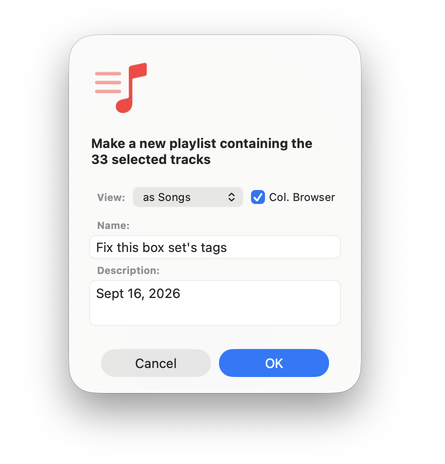
I’m not a big fan of System Events scripting because it can be Kinda Klunky, requires serious permissions, and can need unpredictable future fixes if the app it targets updates its UI. But sometimes it’s the only way to bring truck home.
If you’re going to download and use Make New Playlist, you should know that on first launch it will ask you to give it accessibility permission in System Settings > Privacy & Security > Device Control and Data Access (formerly “Accessibility”). This is so the script can use System Events scripting to access the Music app’s View menu in order to pretend-click on its menu options. And to be able to pretend-click Command-B to show the Column Browser. I’ve put the step-by-step directions in the Read Me PDF. It’s pleading with you to read it.
I’ve given it the Shift-Command-N keyboard shortcut and it appears to over-ride same for the Music app’s “New Playlist with Selection” command. So you can imagine.
Latest version:
- Initial release
More information for Make New Playlist v1.0 and download link is here.
