 30 Most Recent RSS Feed
 Apple Music Profile
 YouTube Channel
 RSS Feed
 Play Play
 Murph
Murph Yer Stack
 Block Party Weekend
 Elevendy
 Dupin v4.0.0
 Join Together
 M3Unify
Managing Playlists
UPDATED: Move Playlists to Folder v3.2
For macOS 10.15 and later only. This script will move the playlists you select to a new or existing Playlist Folder.
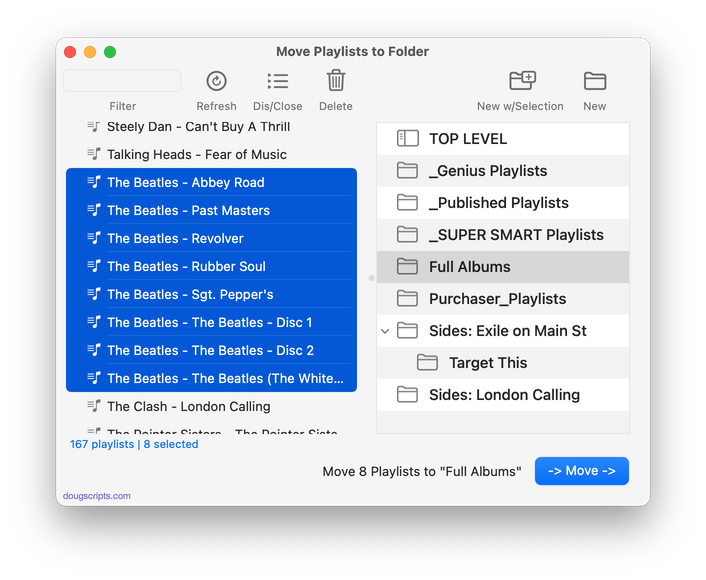
Latest version:
- Accommodations for macOS 11 Big Sur
- Performance, UI and security enhancements
More information for Move Playlists to Folder v3.2 and download link is here.
UPDATED: Refresh Smart Playlists v3.3
For macOS 10.15 and later only. This script will “refresh” the selected user-created Smart Playlists by removing the tracks they contain (if possible*) which obliges them to dynamically repopulate, ostensibly with different tracks.
*Note that tracks cannot be removed from a Smart Playlist which already contains every track of the library meeting its criteria–it would just repopulate with the same tracks. Smart Playlists with the “Limit to” and “Live updating” criteria in use are more likely to be “refreshable”.
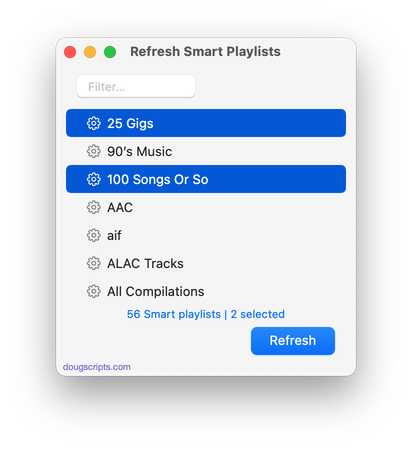
Latest version:
- Additional accommodations for macOS 11 Big Sur
More information for Refresh Smart Playlists v3.3 and download link is here.
UPDATED: Merge-Delete Playlists v6.1
For macOS 10.15 and later only. This script will allow you to merge the track contents of two or more playlists to a new or existing playlist or delete any number of playlists at once, including Smart, Genius, and Playlist Folder playlists. The merge feature will prevent the same tracks that may appear in different source playlists from being duplicated and has an option to delete original playlists. The delete feature only deletes playlists; tracks, of course, remain in the library.
This app is free to try full-featured in Demo Mode. In Demo Mode it will only process 5 playlists per launch. If you like it you can purchase a code for $1.99 which will unlock the Demo Mode restriction. Launch the app and click “Register…” in its File menu to make an in-app purchase.
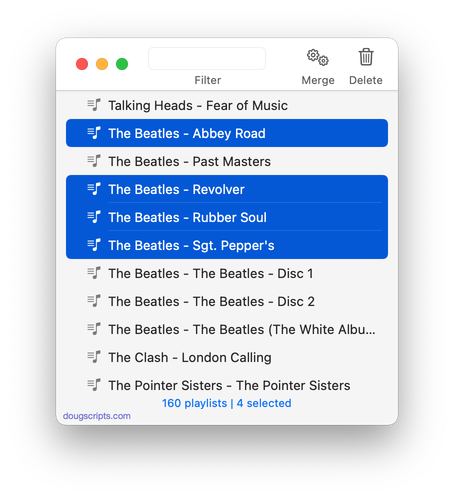
Latest version:
- Additional accommodations for macOS 11 Big Sur
More information for Merge-Delete Playlists v6.1 and download link is here.
UPDATED: Delete Empty Playlists v4.4
For macOS 10.15 and later only. This script will list the empty user-created playlists in the Music app and can delete all or just a selection of them.
NOTE: A bug in the current version of Music prevents the complete removal of playlists from the Sidebar UI (when they are deleted via an AppleScript like this one) until the Music app has been quit and re-started.
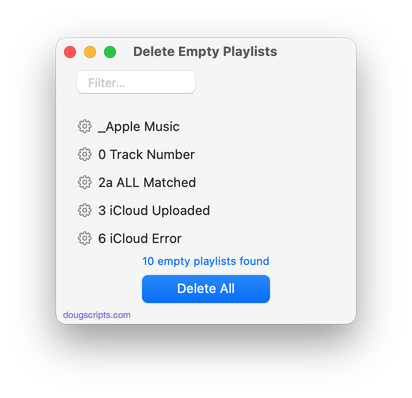
Latest version:
- Additional accommodations for macOS 11 Big Sur
More information for Delete Empty Playlists v4.4 and download link is here.
UPDATED: Block Party! v4.2
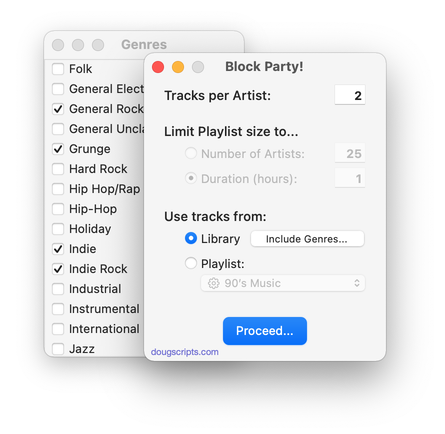
For macOS 10.15 and later only. Create a “Block Party!” playlist containing random Artists and a specific number of their randomly selected songs arranged in a row (“two-fers”, “three-fers”, and so on). You can restrict the size of the “Block Party!” playlist by Number of Artists or Duration in hours. Additionally, you can choose to use a particular Playlist as the source of tracks and include/exclude specific Genres.
Latest version:
- Additional accommodations for macOS 11 Big Sur
More information for Block Party! v4.2 and download link is here.
UPDATED: Delete Empty Playlists v4.3
For macOS 10.15 and later only. This script will list the empty user-created playlists in the Music app and can delete all or just a selection of them.
NOTE: A bug in the current version of Music prevents the complete removal of playlists from the Sidebar UI (when they are deleted via an AppleScript like this one) until the Music app has been quit and re-started.
Latest version:
- Accommodations for macOS 11 Big Sur
- Performance, UI and security enhancements
More information for Delete Empty Playlists v4.3 and download link is here.
NEW: Merge-Delete Playlists v6.0
For macOS 10.15 and later only. This script will allow you to merge the track contents of two or more playlists to a new or existing playlist or delete any number of playlists at once, including Smart, Genius, and Playlist Folder playlists. The merge feature will prevent the same tracks that may appear in different source playlists from being duplicated and has an option to delete original playlists. The delete feature only deletes playlists; tracks, of course, remain in the library.
This app is free to try full-featured in Demo Mode. In Demo Mode it will only process 5 playlists per launch. If you like it you can purchase a code for $1.99 which will unlock the Demo Mode restriction. Launch the app and click “Register…” in its File menu to make an in-app purchase through PayPal.
Latest version:
- Accommodations for macOS 10.15 and later
- Performance, UI and security enhancements
More information for Merge-Delete Playlists v6.0 and download link is here.
UPDATED: Block Party! v4.1
For macOS 10.15 and later only. Create a “Block Party!” playlist containing random Artists and a specific number of their randomly selected songs arranged in a row (“two-fers”, “three-fers”, and so on). You can restrict the size of the “Block Party!” playlist by Number of Artists or Duration in hours. Additionally, you can choose to use a particular Playlist as the source of tracks and include/exclude specific Genres.
Latest version:
- Calculation and speed improvements
- Accommodations for macOS 11 Big Sur
- Performance, UI and security enhancements
More information for Block Party! v4.1 and download link is here.
UPDATED: Refresh Smart Playlists v3.2
For macOS 10.15 and later only. This script will “refresh” the selected user-created Smart Playlists by removing the tracks they contain (if possible*) which obliges them to dynamically repopulate, ostensibly with different tracks.
*Note that tracks cannot be removed from a Smart Playlist which already contains every track of the library meeting its criteria–it would just repopulate with the same tracks. Smart Playlists with the “Limit to” and “Live updating” criteria in use are more likely to be “refreshable”.
Latest version:
- Accommodations for macOS 11 Big Sur
- Performance, UI and security enhancements
More information for Refresh Smart Playlists v3.2 and download link is here.
UPDATED: Compare Two Playlists v4.5
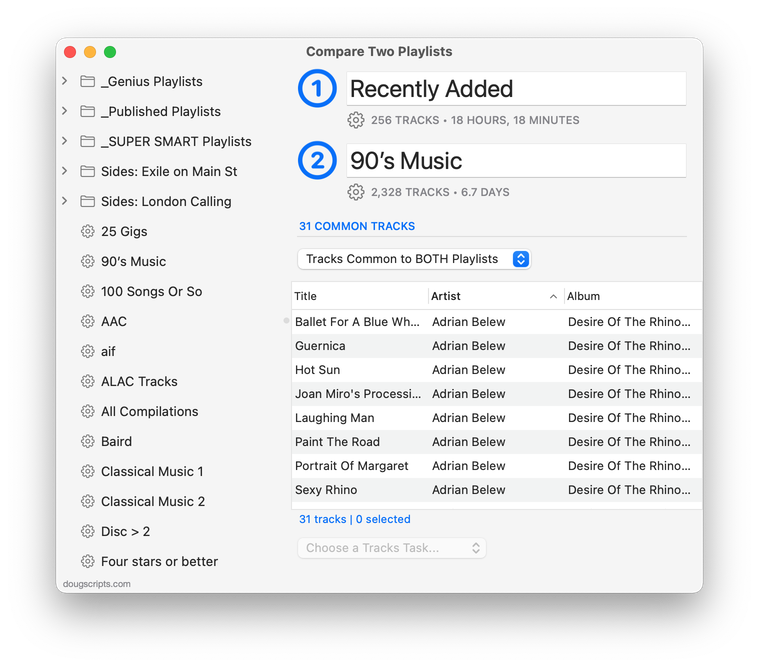
For macOS 10.15 Catalina and later only. Quickly compares the contents of any two playlists and displays the tracks that are common to both or the tracks in one playlist not contained by the other. Has tools to copy or move tracks from one playlist to another or delete common tracks from one or the other playlist. Can optionally create a text file report of these comparisons.
Free to try in Demo Mode: While in Demo Mode, several features will be disabled. An in-app purchase of a registration code will unlock the disabled features.
To purchase a registration code, download and launch the app. Click “Register…” in its File menu and follow the prompts to purchase a code for $1.99. When your payment is processed, you will receive a registration code that will unlock the Demo Mode restrictions.
Latest version:
- Maintenance update
More information for Compare Two Playlists v4.5 and download link is here.
