 30 Most Recent RSS Feed
 Apple Music Profile
 YouTube Channel
 RSS Feed
 Play Play
 Murph
Murph Yer Stack
 Block Party Weekend
 Elevendy
 Dupin v4.0.0
 Join Together
 M3Unify
Managing Tracks
NEW: Dual-Pass Search
Dual-Pass Search conducts a two-pass search for tracks in the currently selected playlist. On the first pass, the search query behaves like iTunes’ own searchbox. Then the track results from the first pass are processed with a second search query.
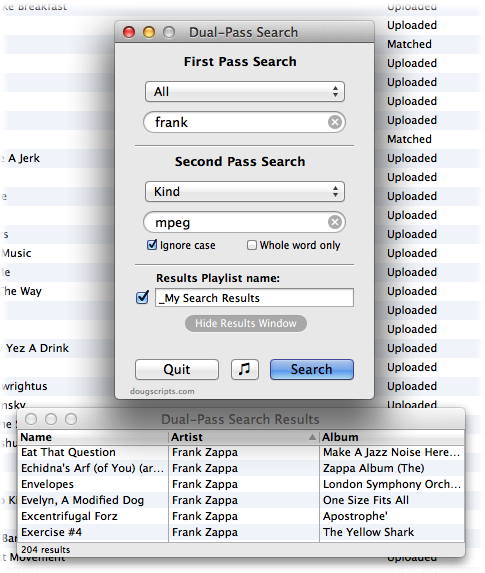
The track results can be displayed in a Results Window and optionally sent to Results Playlist in iTunes.
UPDATED: Track Down Purchases v2.0
If you have been making purchases from the iTunes Store using several names or account names then maybe you’ll have noticed that there’s no easy way to sort purchased tracks by the name or account name used to make the purchase. Oh, wait a minute. Yes there is.
Track Down Purchases v2.0 will examine each track in your entire iTunes library—or a selection of tracks—for items purchased from the iTunes Store (audio, video, and books) and then sort them by either the purchaser’s name (the “Purchased by” entry in a track’s Get Info Summary tab) or account (“Account Name”) into discrete playlists.
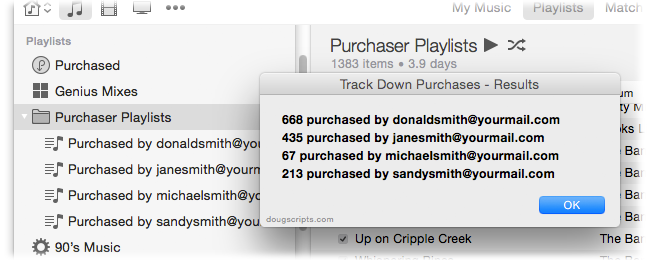
This latest version is written as a Cocoa-AppleScript applet for OS 10.6 or 10.7 only, adds the ability to sort by account name, and provides a progress indicator. (My thanks to Correspondent Andrew Wynn Rouse for inventing the account name search portion.)
UPDATED: Remove n Characters from Front or Back v4.0
Remove n Characters From Front or Back v4.0 helps you delete a specified number of characters from either the beginning or the ending of the Song Name, Album, Artist, Comments, Composer or Show tag (or their “Sort” siblings) of each selected track. For example, delete the initial digits and the space from “01 First Track”, “02 Second Track”, and so on.
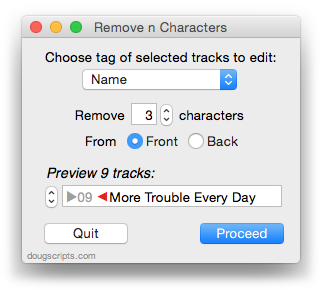
This latest version is written as a Cocoa-AppleScript Applet and can only run in OS X 10.6 or 10.7. As you can see from the pic above, it consolidates all settings into a single window and provides an example that is updated as the settings are changed. Text between the arrows would be removed.
Get a Track Reference from a File Path
Correspondent Wayne B. recently wondered if there is a way to get a reference to a track in iTunes based on its file path. Well, unfortunately, you can’t do something like this:
tell application "iTunes"
	set trackRef  to (get some file track of library playlist 1 whose location is "some/file/path.ext")
end tell
That will generate an error. But you can trick iTunes into giving you the track reference by using the add command–if you are certain the file is already in iTunes’ database. When you add the file iTunes will check its database for the the corresponding library track for you and if it exists will give up the reference–and it won’t re-add it:
set theFile to choose file
-- or however you get the file path

tell application "iTunes"
	try
		set trackRef to (add theFile as alias)
		tell trackRef
			log (get name)
			# and so on...
		end tell
	end try
end tell
But remember that if the file isn’t already in iTunes’ database then iTunes will add the file as a matter of course, which may not be what you want. So this trick may work best only when you know a file is currently in your library.
You will not want to use the open command instead of add, because open will compel iTunes to play the file in addition to any add-housekeeping.
Library Benefits
A Correspondent observes that PDFs and digital booklets are no longer lodged in the “Music” library but in the “Books” library. Thus he laments that he is unable to access these books alongside the music tracks while browsing the “Music” library. While book-type tracks and music tracks can reside in the same playlist, yes, they do belong to different libraries. But creating a separate playlist for every album with a PDF or digital booklet doesn’t seem very efficient.
I used Change Hidden iTunes Preferences to toggle the visibility of the “Library” library playlist. In the pic below it is listed atop the other library playlists. In the old days, this was the main library playlist and listed everything in the library. Well, it still does. When the “Library” is available, you can use the Column Browser to access an entire Album, which will include any associated booklet (providing the Artist/Album tags correspond correctly):
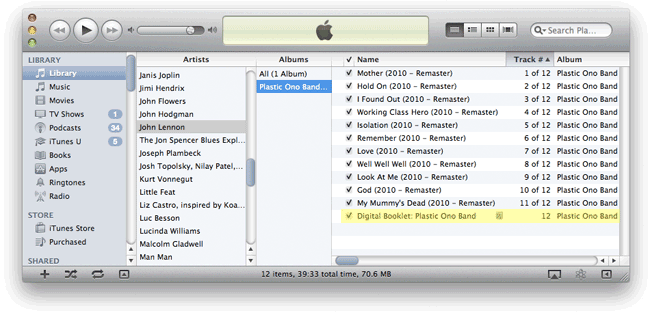
(The yellow highlight over the booklet is an artistic representation.)
NEW: Report Real Play Time
Correspondent Jamie Shaw sent me a version of a script that calculates the play time of selected tracks or tracks in a playlist when the user-set Start and Stop times are also accounted for. In such cases, the total play time (for a playlist) would be shorter than what is displayed along the bottom of the playlist. I threw in a routine that lets you enter your Crossfade time (not really accessible programatically) and this is also part of the calculation. Report Real Play Time works especially nice when assigned a keyboard shortcut.
NEW: Mark All Episodes As Played
A Correspondent bemoaned the loss of the “Mark as…” contextual menu item when control-clicking a Podcast library subscription title while in List View. I wouldn’t have noticed that in a million years. Still, it’s an expulsion only slightly more arcane than doing away with my beloved Mute button, so I was sympathetic, and produced Mark All Episodes As Played. While the Podcast library is in List View, select any one (or more) episode(s) of a podcast or its subscription title and run this script to mark every episode of the podcast as Played (or Watched). Works great when assigned a shortcut.
Updated a Handful
Nothing to do with Snow Leopard–what a relief, eh? I’ve updated seven scripts today:
- Assimilate View Options
- Batch-Delete Playlists
- Block Party!
- Compare Two Playlists
- Export Smart Playlist Criteria
- Move Playlists to Folder
- Selected Playlists To iPod
These seem to be the most popular scripts that are affected by the “none/all” issue introduced in iTunes 8.2. There may be a few others, but I haven’t gotten email feedback on those nor have I run across a problem with any other scripts I use regularly. But if you ever get a error like this:
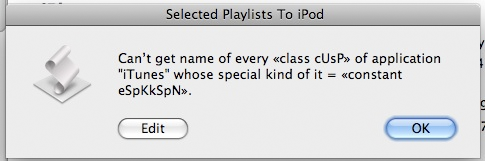
…then let me know.
Re-Posting Stream Startup Script
A couple few days ago I posted a script here that would ping the Radio Paradise stream until its server accepted the connection, suppressing the error dialog that would appear when a connection was denied. Well, that was the wrong version of the script. Here is the correct version, and the one I fire up every morning. You must select a radio stream track first, then run the script:
tell application "iTunes"
	if selection is {} then return
	set strm to (item 1 of selection)
	if (get class of strm) is not URL track then return
	repeat
		try
			play strm
			exit repeat
		on error m number n
			delay 15
		end try
	end repeat
end tell

The earlier script used the open location command, errors from which could not be defeated with the try block.
UPDATED: No Lyrics to Playlist v2.0
No Lyrics to Playlist has been updated to version 2.0. It will search a selected playlist for all tracks in the selected playlist that do not contain lyrics and copy them to a playlist it will create called “No Lyrics”. Includes a second script to clear the “No Lyrics” playlist of tracks with lyrics.
This set of scripts was written by Herwin Lans and originally posted about four years ago. Because of changes in iTunes, it required updating and, particularly, the “Clear No Lyrics Playlist” script needed an over-haul.
